Quad Core detected as single core

juanjotoronja

New member
Local time
9:39 AM
Messages
21
Hello yesterday i've made a system restore and some apps like Coretemp, CPU-Z and HWMonitor gives me as result Core #0 but in task manager on performance tab it display the four cores working. I read in some other threads about the advanced option in msconfig i've already checked\unchecked the number of processors but nothing happened. Please give me some hope before i need to reinstall windows again, there is so much to config and install :mad: CHRISTMAS IS COMING!!! :cry:
 

My Computer

Computer type
PC/Desktop
Computer Manufacturer/Model Number
By Myself
OS
Windows 7 Ultimate x64
CPU
Intel Core 2 Quad Q9400 @ 2.66 GHz
Motherboard
Asus P5Q
Memory
OCZ DDR2 4 GBytes
Graphics Card(s)
NVIDIA GeForce GTX 460
Sound Card
HT OMEGA CLARO Plus+
Monitor(s) Displays
Samsung SyncMaster TA550
Screen Resolution
1920 x 1080
Hard Drives
Western Digital 3x1 TB
PSU
Cooler Master Silent Pro M - 700W
Case
Aerocool Strike X
Cooling
3 fans
Keyboard
SteelSeries Merc Stealth
Mouse
SteelSeries Kinzu v2
Internet Speed
Fibertel cable modem 6Mbps
Antivirus
Comodo Internet Security Premium 7
Browser
Mozilla Firefox 34
Other Info
... and some dust.
Try to uninstall then reinstall those programs and see what happens
 

My Computer

Computer type
PC/Desktop
Computer Manufacturer/Model Number
Home Made
OS
Windows 7 Ultimate x64
CPU
Q6600 3.1ghz
Motherboard
Gigabyte GA-P35-DS3L
Memory
Kingston DDR2 6400 8GB
Graphics Card(s)
Gigabyte Radeon HD 6850 1GB 256-Bit
Sound Card
On board
Monitor(s) Displays
Acer X243H
Screen Resolution
1920x1080
Hard Drives
Intel 330 120GB SSD
WD 2TB 7200
PSU
Thermaltake Toughpower 750W Semi Modular
Case
Modified Alienware
Keyboard
A4Tech
Mouse
Gigabyte ECO600
Antivirus
Comodo
Browser
Cyberfox
none of them are installed, those are portable. They never gived me problems but yesterday after i made a system restore and installed new version of comodo this problem comes in.
 

My Computer

Computer type
PC/Desktop
Computer Manufacturer/Model Number
By Myself
OS
Windows 7 Ultimate x64
CPU
Intel Core 2 Quad Q9400 @ 2.66 GHz
Motherboard
Asus P5Q
Memory
OCZ DDR2 4 GBytes
Graphics Card(s)
NVIDIA GeForce GTX 460
Sound Card
HT OMEGA CLARO Plus+
Monitor(s) Displays
Samsung SyncMaster TA550
Screen Resolution
1920 x 1080
Hard Drives
Western Digital 3x1 TB
PSU
Cooler Master Silent Pro M - 700W
Case
Aerocool Strike X
Cooling
3 fans
Keyboard
SteelSeries Merc Stealth
Mouse
SteelSeries Kinzu v2
Internet Speed
Fibertel cable modem 6Mbps
Antivirus
Comodo Internet Security Premium 7
Browser
Mozilla Firefox 34
Other Info
... and some dust.
Some programs read cores #1, 2, 3, 4,
and some programs read cores #0, 1, 2, 3.

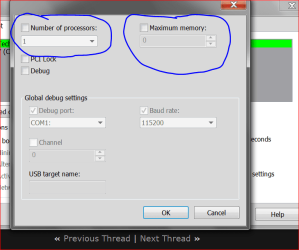
This is what you should be seeing in System Configure/Boot/Advanced Options.

Capture.PNGTODAY ONLY.PNG
 

My Computer

Computer type
PC/Desktop
Computer Manufacturer/Model Number
Home made Desktop
OS
Windows 10 Pro. 64/ version 1709 Windows 7 Pro/64
CPU
Intel i7-6800K @ 4.3
Motherboard
ASUS X-99 Deluxe II
Memory
Corsair Platinum 16 gig @2400
Graphics Card(s)
EVGA GTX 1070 OC
Monitor(s) Displays
Asus 27" LED LCD/VE278Q
Screen Resolution
1920-1080 or 1280-720 HDMI
Hard Drives
INTEL SSD 730-240 Gb Sata 3.0/
PSU
EVGA Platium 1200W
Case
Phanteks Luxe Tempered Glass 8 fans/ one radiator
Cooling
XSPC/ Water Cooled CPU
Keyboard
Das 4 Professional
Mouse
Logitech M705/MX Anywhere 2-S
Internet Speed
100 mbits
Antivirus
Microsoft Security Essentials/ Malwarebytes Premium 3.0/ SAS
Browser
I.E. 11 default/Firefox/ ISP Time Warner Cable/Spectrum
Other Info
LG BluRay Burner/
Sound system-KLipsch-THX/
Icy Dock ssd Hot Swap bays.
yes none of them are checked, i also deleted the processors from device manager so windows will reinstall them (read this in another forum). Maybe windows registry is corrupted, some database that makes others programs read my hardware info? Sorry my english its as bad as my knowledge about system config. :o
 

My Computer

Computer type
PC/Desktop
Computer Manufacturer/Model Number
By Myself
OS
Windows 7 Ultimate x64
CPU
Intel Core 2 Quad Q9400 @ 2.66 GHz
Motherboard
Asus P5Q
Memory
OCZ DDR2 4 GBytes
Graphics Card(s)
NVIDIA GeForce GTX 460
Sound Card
HT OMEGA CLARO Plus+
Monitor(s) Displays
Samsung SyncMaster TA550
Screen Resolution
1920 x 1080
Hard Drives
Western Digital 3x1 TB
PSU
Cooler Master Silent Pro M - 700W
Case
Aerocool Strike X
Cooling
3 fans
Keyboard
SteelSeries Merc Stealth
Mouse
SteelSeries Kinzu v2
Internet Speed
Fibertel cable modem 6Mbps
Antivirus
Comodo Internet Security Premium 7
Browser
Mozilla Firefox 34
Other Info
... and some dust.

My Computer

Computer type
PC/Desktop
Computer Manufacturer/Model Number
Home made Desktop
OS
Windows 10 Pro. 64/ version 1709 Windows 7 Pro/64
CPU
Intel i7-6800K @ 4.3
Motherboard
ASUS X-99 Deluxe II
Memory
Corsair Platinum 16 gig @2400
Graphics Card(s)
EVGA GTX 1070 OC
Monitor(s) Displays
Asus 27" LED LCD/VE278Q
Screen Resolution
1920-1080 or 1280-720 HDMI
Hard Drives
INTEL SSD 730-240 Gb Sata 3.0/
PSU
EVGA Platium 1200W
Case
Phanteks Luxe Tempered Glass 8 fans/ one radiator
Cooling
XSPC/ Water Cooled CPU
Keyboard
Das 4 Professional
Mouse
Logitech M705/MX Anywhere 2-S
Internet Speed
100 mbits
Antivirus
Microsoft Security Essentials/ Malwarebytes Premium 3.0/ SAS
Browser
I.E. 11 default/Firefox/ ISP Time Warner Cable/Spectrum
Other Info
LG BluRay Burner/
Sound system-KLipsch-THX/
Icy Dock ssd Hot Swap bays.
Yeah i already got that program but i need one like coretemp monitoring on the systray and the problem is that Coretemp, CPU-Z and HWMonitor gives me wrong information about the cores. So maybe if i try another monitoring program the results are gonna be the same.
 

My Computer

Computer type
PC/Desktop
Computer Manufacturer/Model Number
By Myself
OS
Windows 7 Ultimate x64
CPU
Intel Core 2 Quad Q9400 @ 2.66 GHz
Motherboard
Asus P5Q
Memory
OCZ DDR2 4 GBytes
Graphics Card(s)
NVIDIA GeForce GTX 460
Sound Card
HT OMEGA CLARO Plus+
Monitor(s) Displays
Samsung SyncMaster TA550
Screen Resolution
1920 x 1080
Hard Drives
Western Digital 3x1 TB
PSU
Cooler Master Silent Pro M - 700W
Case
Aerocool Strike X
Cooling
3 fans
Keyboard
SteelSeries Merc Stealth
Mouse
SteelSeries Kinzu v2
Internet Speed
Fibertel cable modem 6Mbps
Antivirus
Comodo Internet Security Premium 7
Browser
Mozilla Firefox 34
Other Info
... and some dust.
Does Speccy see four cores?
 

My Computer

Computer type
PC/Desktop
Computer Manufacturer/Model Number
Mellon Labs (custom build)
OS
Win 7 Pro x64/Win 10 Pro x64 dual boot
CPU
AMD FX 8350 Vishera @ 4200
Motherboard
ASUS M5A97 R2.0
Memory
16 GB Mushkin Blackline DDR3-2400 @ 1866 (9-10-10-10-31)
Graphics Card(s)
XFX Radeon R9 280 Double D Black Edition
Sound Card
Realtek HD Audio on MB. Sounds great.
Monitor(s) Displays
Acer 24", Acer 22"
Screen Resolution
3840 x 1080
Hard Drives
1 x Mushkin Chronos 120 GB SSD (Win 10)
1 x Samsung 850 EVO 250 GB SSD (Win 7)
1 x WD 1TB SATA Blue
1 x WD 1TB SATA Green
PSU
Corsair TX-750
Case
CoolerMaster HAF 912+
Cooling
Coolermaster Seidon 240M Liquid AIO. 6 case fans
Keyboard
Logitech G710+
Mouse
Logitech G500s
Internet Speed
Much better since I got fiber, but still way overpriced.
Antivirus
MSE, Malware Bytes for scanning
Browser
Firefox
Other Info
Corsair VOID USB headphones.

A Mellon Labs X-1 - LCD Smartie driven system status display.

Brought to you by the letter E
No it doesn't, this is what i got from speccy

Code:
CPU
        Intel Core 2
            Cores    1
            Threads    4
            Name    Intel Core 2
            Package    Socket 775 LGA
            Technology    45nm
            Specification    Intel Core2 Quad CPU Q9400 @ 2.66GHz
            Family    6
            Extended Family    6
            Model    7
            Extended Model    17
            Stepping    A
            Revision    R0
            Instructions    MMX, SSE, SSE2, SSE3, SSSE3, SSE4.1, Intel 64, NX, VMX
            Virtualization    Supported, Disabled
            Hyperthreading    Supported, Enabled
            Fan Speed    1394 RPM
            Bus Speed    333.9 MHz
            Rated Bus Speed    1335.7 MHz
            Stock Core Speed    2666 MHz
            Stock Bus Speed    333 MHz
            Average Temperature    38 °C
                Caches
                    L1 Data Cache Size    4 x 32 KBytes
                    L1 Instructions Cache Size    4 x 32 KBytes
                    L2 Unified Cache Size    3072 KBytes
                Cores
                        Core Speed    Multiplier    Bus Speed    Rated Bus Speed    Temperature    Threads
                    Core 0    2671.5 MHz    x 8.0    333.9 MHz    1335.7 MHz    38 °C    APIC ID: 0, 1, 2, 3
 

My Computer

Computer type
PC/Desktop
Computer Manufacturer/Model Number
By Myself
OS
Windows 7 Ultimate x64
CPU
Intel Core 2 Quad Q9400 @ 2.66 GHz
Motherboard
Asus P5Q
Memory
OCZ DDR2 4 GBytes
Graphics Card(s)
NVIDIA GeForce GTX 460
Sound Card
HT OMEGA CLARO Plus+
Monitor(s) Displays
Samsung SyncMaster TA550
Screen Resolution
1920 x 1080
Hard Drives
Western Digital 3x1 TB
PSU
Cooler Master Silent Pro M - 700W
Case
Aerocool Strike X
Cooling
3 fans
Keyboard
SteelSeries Merc Stealth
Mouse
SteelSeries Kinzu v2
Internet Speed
Fibertel cable modem 6Mbps
Antivirus
Comodo Internet Security Premium 7
Browser
Mozilla Firefox 34
Other Info
... and some dust.
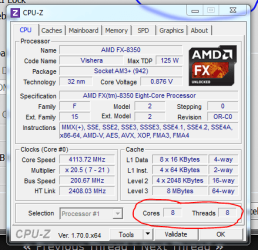
Odd. And you've tried CPUZ? And it doesn't show 4 cores where mine shows 8? Notice that I only have the option for processor #1.

CPUZ.PNG
 

My Computer

Computer type
PC/Desktop
Computer Manufacturer/Model Number
Mellon Labs (custom build)
OS
Win 7 Pro x64/Win 10 Pro x64 dual boot
CPU
AMD FX 8350 Vishera @ 4200
Motherboard
ASUS M5A97 R2.0
Memory
16 GB Mushkin Blackline DDR3-2400 @ 1866 (9-10-10-10-31)
Graphics Card(s)
XFX Radeon R9 280 Double D Black Edition
Sound Card
Realtek HD Audio on MB. Sounds great.
Monitor(s) Displays
Acer 24", Acer 22"
Screen Resolution
3840 x 1080
Hard Drives
1 x Mushkin Chronos 120 GB SSD (Win 10)
1 x Samsung 850 EVO 250 GB SSD (Win 7)
1 x WD 1TB SATA Blue
1 x WD 1TB SATA Green
PSU
Corsair TX-750
Case
CoolerMaster HAF 912+
Cooling
Coolermaster Seidon 240M Liquid AIO. 6 case fans
Keyboard
Logitech G710+
Mouse
Logitech G500s
Internet Speed
Much better since I got fiber, but still way overpriced.
Antivirus
MSE, Malware Bytes for scanning
Browser
Firefox
Other Info
Corsair VOID USB headphones.

A Mellon Labs X-1 - LCD Smartie driven system status display.

Brought to you by the letter E
Yes, i never had this problem those programs always said 4 cores 4 threads. I think this problem begins after i made a system restore i don't know if my registry is screwed up or something like that, i always used ccleaner to clean disc and obsolete registry entrys but in a moderate way. If anyone knows where is stored those informations that these programs handle i can check if they are correct, meanwhile still a mistery :geek:
 

My Computer

Computer type
PC/Desktop
Computer Manufacturer/Model Number
By Myself
OS
Windows 7 Ultimate x64
CPU
Intel Core 2 Quad Q9400 @ 2.66 GHz
Motherboard
Asus P5Q
Memory
OCZ DDR2 4 GBytes
Graphics Card(s)
NVIDIA GeForce GTX 460
Sound Card
HT OMEGA CLARO Plus+
Monitor(s) Displays
Samsung SyncMaster TA550
Screen Resolution
1920 x 1080
Hard Drives
Western Digital 3x1 TB
PSU
Cooler Master Silent Pro M - 700W
Case
Aerocool Strike X
Cooling
3 fans
Keyboard
SteelSeries Merc Stealth
Mouse
SteelSeries Kinzu v2
Internet Speed
Fibertel cable modem 6Mbps
Antivirus
Comodo Internet Security Premium 7
Browser
Mozilla Firefox 34
Other Info
... and some dust.
Try this:
open an elevated command prompt ( click start, type cmd in the search box, right click on the cmd entry and select run as administrator) in the black box that opens, copy/paste sfc /scannow. If you decide to type it, notice the space between the sfc and the /. It is a system file checker which will scan your system files and attempt to correct any missing or corrupt files. What we want are the results to say windows found no integrity violations. If it says files were found but could not be repaired, close the box, reboot and run it again, after opening the administrative command prompt. You may have to reboot and run it three times for it to repair all system files. If it can't repair them after 3 reboots, let us know.
 

My Computers

System One System Two

  • Computer type
    PC/Desktop
    Computer Manufacturer/Model Number
    ALWAYS UNDER CONSTRUCTION
    OS
    Windows 11 Pro
    CPU
    Ryzen 9 5900X
    Motherboard
    Asus X570 Crosshair Viii Hero
    Memory
    32GB G Skill DDR4-3600
    Graphics Card(s)
    EVGA RTX 3080 FTW 3 Ultra
    Sound Card
    On Board/Sennheiser PC37X Headset
    Monitor(s) Displays
    3 X Asus 27"
    Screen Resolution
    2560x1440
    Hard Drives
    2 X 1 TB NVME drives
    PSU
    EVGA 850
    Case
    Phanteks Eclipse P400A
    Cooling
    EVGA 280 AIO
    Keyboard
    Logitech G510s/ Logitech G13
    Mouse
    Logitech G502
    Internet Speed
    24/1
    Antivirus
    ESET/MBAM Pro/SAS Pro
    Browser
    Chrome/ Firefox/ Edge
  • Computer type
    Laptop
    System Manufacturer/Model Number
    Dell 16 Plus
    OS
    Windows 11 Pro
    CPU
    Intel Ultra 9 288V
    Memory
    32 GB LPDDR5X 8533
    Monitor(s) Displays
    16" Mini-LED HDR600 Touch 90 Hz
    Screen Resolution
    2560X1600
    Hard Drives
    1 TB NVME
I've runned system file checker command 3 times, the three times gives me a message about some error/corrupt files system after the scan finished i rebooted and made another scan with the same results. But the programs mentioned before still displaying 1 core instead of 4, this must be some registry value or somewhere this programs gather information. My english is bad, sorry for that... :o
 

My Computer

Computer type
PC/Desktop
Computer Manufacturer/Model Number
By Myself
OS
Windows 7 Ultimate x64
CPU
Intel Core 2 Quad Q9400 @ 2.66 GHz
Motherboard
Asus P5Q
Memory
OCZ DDR2 4 GBytes
Graphics Card(s)
NVIDIA GeForce GTX 460
Sound Card
HT OMEGA CLARO Plus+
Monitor(s) Displays
Samsung SyncMaster TA550
Screen Resolution
1920 x 1080
Hard Drives
Western Digital 3x1 TB
PSU
Cooler Master Silent Pro M - 700W
Case
Aerocool Strike X
Cooling
3 fans
Keyboard
SteelSeries Merc Stealth
Mouse
SteelSeries Kinzu v2
Internet Speed
Fibertel cable modem 6Mbps
Antivirus
Comodo Internet Security Premium 7
Browser
Mozilla Firefox 34
Other Info
... and some dust.
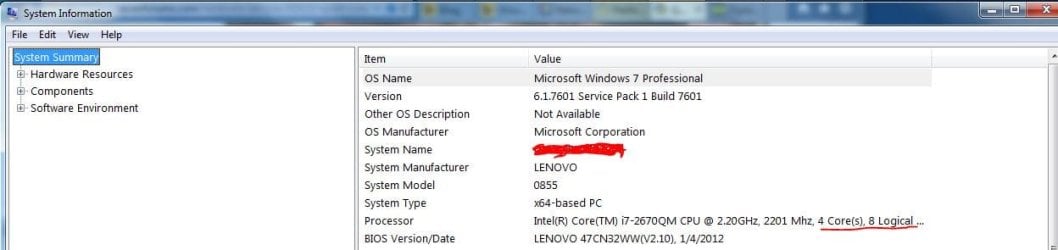
What does Window's System Information display:

e.g:

Capture.JPG
 

My Computer

Computer type
Laptop
Computer Manufacturer/Model Number
Dell Optiplex SX270, Lenovo Z470
OS
Windows 7 Professional x64 SP1
CPU
Intel® Pentium® 4 @ 2.26 GHz, Intel Core i7-2670QM @ 2.20 GH
Motherboard
Dell, Lenovo
Memory
512MB Dual channel DDR SDRAM @ 400MHz 2.5-3-3-7, 8 GB DDR3
Graphics Card(s)
Intel 82865G, Nvidia GeForce 520M Graphics
Sound Card
SoundMax Integrated Audio, Integrated HD Audio
Monitor(s) Displays
LG W1952
Screen Resolution
1440x900, 1366 x 768
Hard Drives
40 GB 2.5" IDE 4200 RPM HDD, 500 GB 5400 RPM Sata 1.5 + 32 GB SSD
PSU
Dell 145 Watt, Lenovo 120 Watt Power Adapter
Case
Optiplex SX270 Small Form Factor, Laptop
Cooling
Dell Proprietary Air Cooling, Stock laptop cooling
Keyboard
Dell SK-8125 USB Keyboard
Mouse
Dell PS/2 2 button ball mouse with wheel scroll
Internet Speed
300 Mbit down / 20 Mbps up Time Warner Cable
Antivirus
MSE, Malwarebytes Scanner
Browser
Internet (Aizawa) Explorer 11
Other Info
Running Windows Server 2012 Datacenter on a virtual machine to run Metro Apps.
I've disabled Administrative Tools i never used it, there is another way i can get this info? Task manager is showing activity of the 4 cores.
 

My Computer

Computer type
PC/Desktop
Computer Manufacturer/Model Number
By Myself
OS
Windows 7 Ultimate x64
CPU
Intel Core 2 Quad Q9400 @ 2.66 GHz
Motherboard
Asus P5Q
Memory
OCZ DDR2 4 GBytes
Graphics Card(s)
NVIDIA GeForce GTX 460
Sound Card
HT OMEGA CLARO Plus+
Monitor(s) Displays
Samsung SyncMaster TA550
Screen Resolution
1920 x 1080
Hard Drives
Western Digital 3x1 TB
PSU
Cooler Master Silent Pro M - 700W
Case
Aerocool Strike X
Cooling
3 fans
Keyboard
SteelSeries Merc Stealth
Mouse
SteelSeries Kinzu v2
Internet Speed
Fibertel cable modem 6Mbps
Antivirus
Comodo Internet Security Premium 7
Browser
Mozilla Firefox 34
Other Info
... and some dust.
If Task Manager is showing 4 cores are working then Windows 7 sees 4 cores working.
What ever a 3rd party programs show really doesn't matter all that much as long as Windows 7 is happy.
You have a 6 year old cpu and their is a chance newer 3rd party programs are not reading correctly.
 

My Computer

Computer type
PC/Desktop
Computer Manufacturer/Model Number
Home made Desktop
OS
Windows 10 Pro. 64/ version 1709 Windows 7 Pro/64
CPU
Intel i7-6800K @ 4.3
Motherboard
ASUS X-99 Deluxe II
Memory
Corsair Platinum 16 gig @2400
Graphics Card(s)
EVGA GTX 1070 OC
Monitor(s) Displays
Asus 27" LED LCD/VE278Q
Screen Resolution
1920-1080 or 1280-720 HDMI
Hard Drives
INTEL SSD 730-240 Gb Sata 3.0/
PSU
EVGA Platium 1200W
Case
Phanteks Luxe Tempered Glass 8 fans/ one radiator
Cooling
XSPC/ Water Cooled CPU
Keyboard
Das 4 Professional
Mouse
Logitech M705/MX Anywhere 2-S
Internet Speed
100 mbits
Antivirus
Microsoft Security Essentials/ Malwarebytes Premium 3.0/ SAS
Browser
I.E. 11 default/Firefox/ ISP Time Warner Cable/Spectrum
Other Info
LG BluRay Burner/
Sound system-KLipsch-THX/
Icy Dock ssd Hot Swap bays.
Yes indeed im happy that windows still recognize all cores but those programs worked fine last week and i didn't made a windows update, the only critical change i made was a system restore. So what i'm trying to figure is what caused these programs fail to recognize my 4 cores, there are millions of threads about this particular problem but till now none of those solution worked for me :(
 

My Computer

Computer type
PC/Desktop
Computer Manufacturer/Model Number
By Myself
OS
Windows 7 Ultimate x64
CPU
Intel Core 2 Quad Q9400 @ 2.66 GHz
Motherboard
Asus P5Q
Memory
OCZ DDR2 4 GBytes
Graphics Card(s)
NVIDIA GeForce GTX 460
Sound Card
HT OMEGA CLARO Plus+
Monitor(s) Displays
Samsung SyncMaster TA550
Screen Resolution
1920 x 1080
Hard Drives
Western Digital 3x1 TB
PSU
Cooler Master Silent Pro M - 700W
Case
Aerocool Strike X
Cooling
3 fans
Keyboard
SteelSeries Merc Stealth
Mouse
SteelSeries Kinzu v2
Internet Speed
Fibertel cable modem 6Mbps
Antivirus
Comodo Internet Security Premium 7
Browser
Mozilla Firefox 34
Other Info
... and some dust.
Back
Top