Quake 2 on Win 7

satchmo

New member
Power User
Local time
3:16 PM
Messages
173
Location
Long Beach, CA
Anyone has any luck running the old-school Quake 2 with OpenGL on Win 7?

It ran just fine under Vista, but it crashes with Win 7.
 

My Computer

Computer Manufacturer/Model Number
Custom
OS
Windows 7 Home Premium 64
CPU
Core i7 870 2.93 GHz
Motherboard
Gigabyte P55A-UD3
Memory
16 GB G-Skills DDR3 1333
Graphics Card(s)
ASUS GTX 680 DirectCu-II Top
Sound Card
Realtek 5.1 audio
Monitor(s) Displays
Samsung 23" widescreen
Screen Resolution
2048x1152
Hard Drives
OCZ Vertex III 128 GB (primary)
OCZ Vertex II 128 GB (data)
PSU
Corsair 650W
Case
CoolerMaster HAF 920
Cooling
Arctic Cooling Freezer 7 Pro
Keyboard
DAS Model S Ultimate keyboard
Mouse
Logitech G5 gaming mouse
Internet Speed
Cable
Browser
Chrome
Other Info
Built in December 2010
I have gotten it to run, but I dont use OpenGL I just use the software mode.
 

My Computer

Computer Manufacturer/Model Number
Custom Build
OS
Windows 7 Ultimate x64 SP1
CPU
AMD Phenom II 1090 3.2 six core
Motherboard
MSI 890FXA-GD65
Memory
16 gig DDR3
Graphics Card(s)
MSI R6950 2gig
Sound Card
on board
Monitor(s) Displays
Acer 23inch led
Screen Resolution
1900x1080 widescreen
Hard Drives
Seagate 1tb SATA6
2x 1tb HITACHI Deskstar
PSU
CORSAIR Enthusiast Series TX750 V2 750W
Case
CoolMaster HAF 922
Cooling
Box AMD Heatsink/Fan
Internet Speed
Cable 12Mbps/3Mbps
When I tried to run it in software rendering, it always crashes.
 

My Computer

Computer Manufacturer/Model Number
Custom
OS
Windows 7 Home Premium 64
CPU
Core i7 870 2.93 GHz
Motherboard
Gigabyte P55A-UD3
Memory
16 GB G-Skills DDR3 1333
Graphics Card(s)
ASUS GTX 680 DirectCu-II Top
Sound Card
Realtek 5.1 audio
Monitor(s) Displays
Samsung 23" widescreen
Screen Resolution
2048x1152
Hard Drives
OCZ Vertex III 128 GB (primary)
OCZ Vertex II 128 GB (data)
PSU
Corsair 650W
Case
CoolerMaster HAF 920
Cooling
Arctic Cooling Freezer 7 Pro
Keyboard
DAS Model S Ultimate keyboard
Mouse
Logitech G5 gaming mouse
Internet Speed
Cable
Browser
Chrome
Other Info
Built in December 2010
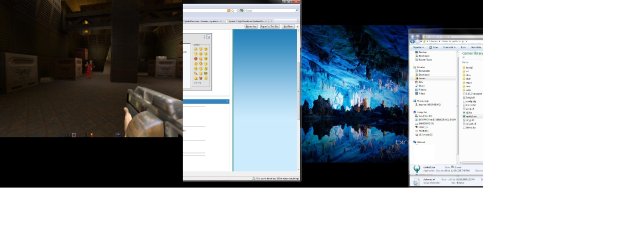
works fine...just loaded my quake 2 dir from 2004 and ran quake2.exe

First screenshot is of q2e.exe quake2evolved... much better version

The 2nd bigger one is of the 1998 3.20 version running full screen on my dual screen setup...thats why it looks funny

I suppose if you never got a newer version and want to run it off the cd you might try a emulator... vmwares player has opengl extensions and new processors should be able to run it full speed, and reports of it working in software mode in virt pc xp mode.

here are some better versions...
Vertigo: Quake II .NET
Quake 2 High Resolution Texture Packs


btw I used to run hotwires ctf back in the day .... :cry: miss the good ole days
 

Attachments

  • Untitled.jpg
    Untitled.jpg
    124.2 KB · Views: 4,212
  • Untitled1.jpg
    Untitled1.jpg
    158.2 KB · Views: 4,384

My Computer

Computer Manufacturer/Model Number
Dell XPS 720 H2C
OS
7 Enterprise
CPU
Intel Core 2 Extreme QX6850 factory overclocked 3.67GHz
Motherboard
Dell Inc., Model 0P611C, NVIDIA nForce 680i SLI
Memory
4GB Dual Channel DDR2 SDRAM (800 MHz, 4 DIMMs)
Graphics Card(s)
dual nVidia GeForce 8800GTX ultra 768MB SLI
Sound Card
Sound Blaster X-Fi XtremeMusic
Monitor(s) Displays
Dual Dell 2208WFP ultra sharp
Screen Resolution
1680x1050 * 2
Hard Drives
to many to count... but raid5 running on 4 western digital RE3 1TB
PSU
1k watt
Case
AWESOME HUGE(search google if you want to see it)
Cooling
H2C hybrid liquid radiator & thermoelectric
Keyboard
Dell Multimedia USB Keyboard
Mouse
Premium Dell USB Optical Corded XPS Scroll Mouse
Internet Speed
none...
Other Info
http://www.dell.com/us/en/dfh/desktops/xpsdt_720h2c/pd.aspx?refid=xpsdt_720h2c&cs=22&s=dfh
Wow, that was very helpful.

Thanks.
 

My Computer

Computer Manufacturer/Model Number
Custom
OS
Windows 7 Home Premium 64
CPU
Core i7 870 2.93 GHz
Motherboard
Gigabyte P55A-UD3
Memory
16 GB G-Skills DDR3 1333
Graphics Card(s)
ASUS GTX 680 DirectCu-II Top
Sound Card
Realtek 5.1 audio
Monitor(s) Displays
Samsung 23" widescreen
Screen Resolution
2048x1152
Hard Drives
OCZ Vertex III 128 GB (primary)
OCZ Vertex II 128 GB (data)
PSU
Corsair 650W
Case
CoolerMaster HAF 920
Cooling
Arctic Cooling Freezer 7 Pro
Keyboard
DAS Model S Ultimate keyboard
Mouse
Logitech G5 gaming mouse
Internet Speed
Cable
Browser
Chrome
Other Info
Built in December 2010
no prob..
 

My Computer

Computer Manufacturer/Model Number
Dell XPS 720 H2C
OS
7 Enterprise
CPU
Intel Core 2 Extreme QX6850 factory overclocked 3.67GHz
Motherboard
Dell Inc., Model 0P611C, NVIDIA nForce 680i SLI
Memory
4GB Dual Channel DDR2 SDRAM (800 MHz, 4 DIMMs)
Graphics Card(s)
dual nVidia GeForce 8800GTX ultra 768MB SLI
Sound Card
Sound Blaster X-Fi XtremeMusic
Monitor(s) Displays
Dual Dell 2208WFP ultra sharp
Screen Resolution
1680x1050 * 2
Hard Drives
to many to count... but raid5 running on 4 western digital RE3 1TB
PSU
1k watt
Case
AWESOME HUGE(search google if you want to see it)
Cooling
H2C hybrid liquid radiator & thermoelectric
Keyboard
Dell Multimedia USB Keyboard
Mouse
Premium Dell USB Optical Corded XPS Scroll Mouse
Internet Speed
none...
Other Info
http://www.dell.com/us/en/dfh/desktops/xpsdt_720h2c/pd.aspx?refid=xpsdt_720h2c&cs=22&s=dfh
I have just installed Win7 64x and thought I might try to install Quake2 win edition. I managed to get it working in Vista but so far no luck in Win7. I have tried the advice on manually installing directx and copying all files from the Dir folder. I also tried manually installing from setup in the install folder. Both got it up and running, but as soon as I shoot, my player locks up and the sound goes and yet the enemy attacking contines to shoot me (all be it in silence) ???

Any help would be much appreciated. I don't really play games, but this has remained my guilty pleasure when time allows.
 

My Computer

OS
Windows 7 x64
Looking at past post, I am not sure what vmwares player is? If I install it, do I have to install a seperate operating system? or can I just open Quake 2 within it?
 

My Computer

OS
Windows 7 x64
I'm using Steam to play quake through. I had to do this for the mission packs to work.

"To get mission packs working. Copy winquake.exe, rename to glquake.exe, replace original glquake.exe."

Don't know if that will help you. Make the changes BUT keep a copy of the original glquake.exe so if it does not do anything you can put it back.

Can't remember where the files are exactly. Somewhere in the quake folder. I had to go looking through till I saw what was what.
 

My Computer

Computer Manufacturer/Model Number
Custom
OS
Windows 7 Pro x64 -- PCLinuxOS KDE4 FullMonty 2011
CPU
i7-875k @ Turbo - 7,6,5,5 - 3.6ghz
Motherboard
Asus P7P55D-E Deluxe
Memory
Corsair CMD8GX3M4A1600C8 8gb
Graphics Card(s)
Asus EAH5850 DirectCU/2DIS/1GD5
Sound Card
On Board
Monitor(s) Displays
Samsung SyncMaster T220 - Panasonic VT30a 50"
Screen Resolution
1680x1050 -
Hard Drives
Corsair Force 3 SSD 120GB x 2 ::
WD VelociRaptor 150GB WD1500HLFS x 2
PSU
Corsair HX-850 Power Supply
Case
Coolmaster HAF 932
Cooling
Corsair H50
Keyboard
Logitech Wireless MK700
Mouse
Logitech Wireless MX620
Internet Speed
Good enough for now
Other Info
Voip. Insanely cheap phone calls.
Thanks HD. I will give steam a try.

I think I got Quake 2 to work in DOS mode on Vista, but can't remember how.
 

My Computer

OS
Windows 7 x64
Sorry. Wasn't suggesting you use steam. Just try changing those files. Probably with steam you'll have to buy it again.
 

My Computer

Computer Manufacturer/Model Number
Custom
OS
Windows 7 Pro x64 -- PCLinuxOS KDE4 FullMonty 2011
CPU
i7-875k @ Turbo - 7,6,5,5 - 3.6ghz
Motherboard
Asus P7P55D-E Deluxe
Memory
Corsair CMD8GX3M4A1600C8 8gb
Graphics Card(s)
Asus EAH5850 DirectCU/2DIS/1GD5
Sound Card
On Board
Monitor(s) Displays
Samsung SyncMaster T220 - Panasonic VT30a 50"
Screen Resolution
1680x1050 -
Hard Drives
Corsair Force 3 SSD 120GB x 2 ::
WD VelociRaptor 150GB WD1500HLFS x 2
PSU
Corsair HX-850 Power Supply
Case
Coolmaster HAF 932
Cooling
Corsair H50
Keyboard
Logitech Wireless MK700
Mouse
Logitech Wireless MX620
Internet Speed
Good enough for now
Other Info
Voip. Insanely cheap phone calls.
Sorry. Wasn't suggesting you use steam. Just try changing those files. Probably with steam you'll have to buy it again.

I have now tried Steam and it seems to work better than before. I will also want the mission packs. So all good :cool:
 

My Computer

OS
Windows 7 x64
Ah OK. At least you got some progress. If you get the mission packs try them first. If they don't co-operate try changing that file.
 

My Computer

Computer Manufacturer/Model Number
Custom
OS
Windows 7 Pro x64 -- PCLinuxOS KDE4 FullMonty 2011
CPU
i7-875k @ Turbo - 7,6,5,5 - 3.6ghz
Motherboard
Asus P7P55D-E Deluxe
Memory
Corsair CMD8GX3M4A1600C8 8gb
Graphics Card(s)
Asus EAH5850 DirectCU/2DIS/1GD5
Sound Card
On Board
Monitor(s) Displays
Samsung SyncMaster T220 - Panasonic VT30a 50"
Screen Resolution
1680x1050 -
Hard Drives
Corsair Force 3 SSD 120GB x 2 ::
WD VelociRaptor 150GB WD1500HLFS x 2
PSU
Corsair HX-850 Power Supply
Case
Coolmaster HAF 932
Cooling
Corsair H50
Keyboard
Logitech Wireless MK700
Mouse
Logitech Wireless MX620
Internet Speed
Good enough for now
Other Info
Voip. Insanely cheap phone calls.
Back
Top