I have just bought a Samsung Galaxy S5 and started off with a 2GB micro SD card in it and have filled it quite a bit more than I thought I would.
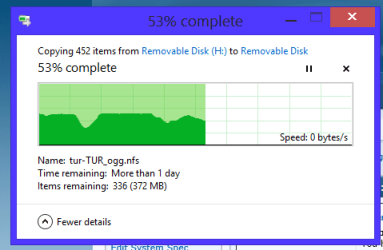
So I have a 8GB one and want to transfer the 2GB to it using copy / paste - am doing this via an USB / SD adaptor and thought it would go across fairly quickly. I copied the 2GB to a desktop folder and put the 8GB card into the adaptor (using safe removal etc) and started to paste the contents of the desktop folder into the 8GB card but it has stopped after a flying strat at 53% (see pic) and it tells me more than one day?? to finish.
Does this sound about right as it doesn't to me. I am on a Toshiba L550 laptop with an Intel i5 430M 8GB RAM running 8.1 in 7 style and the USB ports are all 2.0. Should I just stick to copying one file at a time or what?? Any ides most appreciated.
Attachments
MICRO SD DISK.PNG
6.9 KB
· Views: 14
My Computer
Computer type
PC/Desktop
Computer Manufacturer/Model Number
Own build (new) Desk1 / Asus ROG Win 7 / Desk2 1st build
OS
Desk1 7 Home Prem / Desk2 10 Pro / Main lap Asus ROG 10 Pro 2 laptop Toshiba 7 Pro Asus P2520 7 & 10
One other Desktop (tester) and spare Toshba laptop both with SSD's
Running Kaspersky 2016 ISS on all machines config'd identically
Logitec audio stereo systems on each machine (x3)
Canon MG5250MFC
Router/modem TP-Link running WPA2SK
How old is the card reader that is plugged into the Notebook/Laptop? The older ones worked with SD cards but the newer SDHC cards need a newer reader, looks like the card slot on your Notebook should be new enough. The whole things hinges on the different capacity of the cards, SD cards have a max capacity of 2GB but the SDHC cards start at 4GB. The microSD cards usually come with an adapter to use them in the SDHC slots.
John, I never trust the Time remaining: guesstimates, I've found them to be increasingly wide of the mark. I take it that the transfer is complete now? How long did it take?
My Computer
Computer type
PC/Desktop
Computer Manufacturer/Model Number
Custom Build
OS
W7 Pro x64 SP1 | W10 Pro IP x64 | W8.1 Pro x64 VM | Linux Mint VM
Thanks and sorry for the late reply the card itself about 18 months old and I used one of those USB /SD/micro adaptors. It was showing the files as copying across and still a ridiculous time left. So I wiped the 8GB again reformatted and did the files one by one as there were not that many.
Anyhow it seems to have copied over ok except for some photos that were of nothing much only time will tell the stuff I had on that card included the security stuff and it works ok. So I am just going to let it go with the larger card and see.
But thanks again for your concern.
My Computer
Computer type
PC/Desktop
Computer Manufacturer/Model Number
Own build (new) Desk1 / Asus ROG Win 7 / Desk2 1st build
OS
Desk1 7 Home Prem / Desk2 10 Pro / Main lap Asus ROG 10 Pro 2 laptop Toshiba 7 Pro Asus P2520 7 & 10
One other Desktop (tester) and spare Toshba laptop both with SSD's
Running Kaspersky 2016 ISS on all machines config'd identically
Logitec audio stereo systems on each machine (x3)
Canon MG5250MFC
Router/modem TP-Link running WPA2SK