Solved Question About CPU Fan

bigmck

Very Senior Member
Guru
Gold Member
VIP
Local time
6:55 PM
Messages
4,745
Location
Houston, Texas
I have CPUID installed on my PC to monitor the heat, fan speed, etc. I don't ever get any high temps, but I notice I can clear all the stats before I go to bed and in the morning the minumum CPU temp is maybe 35 C and the CPU fan speed is 0. It appears the fan stops working when the temp gets low. This does not sound right as I would think it should work all the time, maybe just not as fast when there are low temps. Do any of your CPU fans stop working when the temps get low?
 

My Computer

Computer type
PC/Desktop
Computer Manufacturer/Model Number
Custom Build
OS
Windows 7 Home Premium 32-Bit - Build 7600 SP1
CPU
Intel Core i3-2120 3.30Ghz
Motherboard
Asus P8Z68-V LX Intel Z68 Socket H2 ATX
Memory
Kingston 4 GB DDR3 1333 mhz
Graphics Card(s)
AMD Radeon HD6670
Sound Card
Sound Blaster Audigy SE 24-Bit
Monitor(s) Displays
Asus VE228
Screen Resolution
1440 X 900
Hard Drives
OCZ Vertex 3 120 GB Sata 3 SSD ==
Kingston SH103/S3 120 G Hyper X 120 GB SSD ==
Western Digital 500 GB Caviar Green 7200 RPM ==
PSU
Corsair CX600M == 600 Watt
Case
NZXT Apollo - Silver with Clear Side Panel
Cooling
Three 120 mm Fans
Keyboard
Microsoft Natural 4000
Mouse
Microsoft Custom Optical 3000
Internet Speed
AT&T Fiber Optic Wireless Network
Antivirus
Microsoft Security Essentials
Browser
Chrome
Other Info
120 mm Blue LED Fan -- Three Blue LED Lazer Light Sticks
Do any of your CPU fans stop working when the temps get low?

No. I never heard of such a thing.

I have to assume that is simply an error.

Unless of course, your fan really is stopping--which I would take to be a defect to be corrected.

If it did actually stop, I would expect to see a CPU temperature spike of some degree at the same time if it lasted more than a second or two.

Perhaps you can look at a log of some type?

Odd that it happens only when you are asleep. Gremlins.

When you awake and the fan speed reads 0, can you tell by ear if it is actually spinning?

Try another monitor such as HWInfo and see if it confirms the situation.
 

My Computer

Computer type
PC/Desktop
Computer Manufacturer/Model Number
Ignatz Special; 4 speed manual gearbox; factory air conditioning; one of one
OS
Windows 7 Home Premium SP1, 64-bit
CPU
Intel Skylake i5-6600K, not overclocked
Motherboard
AsRock Z170M Extreme 4, micro ATX
Memory
8 GB HyperX DDR4-2666 (2 x 4 GB)
Graphics Card(s)
none; graphics are integrated on CPU
Sound Card
onboard: Realtek ALC1150; external: USB Behringer UF0-202
Monitor(s) Displays
Dell S2340M 23 inch IPS
Screen Resolution
1600 x 900
Hard Drives
System: Crucial MX100 series SSD, 128 GB;
Data: Samsung Spinpoint 103SJ, 1 TB;
Backup: WD Caviar Green WD30EZRX-00D8PB0, 3 TB
PSU
Rosewill SilentNight 500 watt fanless, semi-modular
Case
Antec Solo II
Cooling
Noctua NH-U12S; Noctua F12 intake, Noctua S12A exhaust
Keyboard
Microsoft 200 6JH-00001 USB
Mouse
Dell or Microsoft optical wired; USB
Antivirus
Microsoft Security Essentials and Malwarebytes Premium
Browser
Pale Moon
Other Info
All fans PWM; speeds at idle: CPU circa 500 rpm; intake circa 600 rpm; exhaust circa 600 rpm; CPU temps 27 idle and 47 C load in a warm room (27 C/81 F) when running Intel Extreme Tuning Utility stress test.
Do any of your CPU fans stop working when the temps get low?

No. I never heard of such a thing.

I have to assume that is simply an error.

Unless of course, your fan really is stopping--which I would take to be a defect to be corrected.

If it did actually stop, I would expect to see a CPU temperature spike of some degree at the same time if it lasted more than a second or two.

Perhaps you can look at a log of some type?

Odd that it happens only when you are asleep. Gremlins.

When you awake and the fan speed reads 0, can you tell by ear if it is actually spinning?

Try another monitor such as HWInfo and see if it confirms the situation.

By the time I check it again the temp is OK and there is no problem. The highest the temp ever gets is the mid 60's. The minimum is about 35 when I am not using it and for a brief time when I boot it gets to the 60's but most of the time it is in the 40's low 50's. I just thought it was strange. Like you said, it may be an error because I am not getting any temp problems.
 

My Computer

Computer type
PC/Desktop
Computer Manufacturer/Model Number
Custom Build
OS
Windows 7 Home Premium 32-Bit - Build 7600 SP1
CPU
Intel Core i3-2120 3.30Ghz
Motherboard
Asus P8Z68-V LX Intel Z68 Socket H2 ATX
Memory
Kingston 4 GB DDR3 1333 mhz
Graphics Card(s)
AMD Radeon HD6670
Sound Card
Sound Blaster Audigy SE 24-Bit
Monitor(s) Displays
Asus VE228
Screen Resolution
1440 X 900
Hard Drives
OCZ Vertex 3 120 GB Sata 3 SSD ==
Kingston SH103/S3 120 G Hyper X 120 GB SSD ==
Western Digital 500 GB Caviar Green 7200 RPM ==
PSU
Corsair CX600M == 600 Watt
Case
NZXT Apollo - Silver with Clear Side Panel
Cooling
Three 120 mm Fans
Keyboard
Microsoft Natural 4000
Mouse
Microsoft Custom Optical 3000
Internet Speed
AT&T Fiber Optic Wireless Network
Antivirus
Microsoft Security Essentials
Browser
Chrome
Other Info
120 mm Blue LED Fan -- Three Blue LED Lazer Light Sticks
I was going to say that temps most of the time in the 40s and 50s is probably a little high.

Then I noticed that you have a P4. As I recall, they tend to run hot, so your temps are probably OK.

I'd just keep an eye on it and also use another app to check temps to see if it agrees with the one you have now.
 

My Computer

Computer type
PC/Desktop
Computer Manufacturer/Model Number
Ignatz Special; 4 speed manual gearbox; factory air conditioning; one of one
OS
Windows 7 Home Premium SP1, 64-bit
CPU
Intel Skylake i5-6600K, not overclocked
Motherboard
AsRock Z170M Extreme 4, micro ATX
Memory
8 GB HyperX DDR4-2666 (2 x 4 GB)
Graphics Card(s)
none; graphics are integrated on CPU
Sound Card
onboard: Realtek ALC1150; external: USB Behringer UF0-202
Monitor(s) Displays
Dell S2340M 23 inch IPS
Screen Resolution
1600 x 900
Hard Drives
System: Crucial MX100 series SSD, 128 GB;
Data: Samsung Spinpoint 103SJ, 1 TB;
Backup: WD Caviar Green WD30EZRX-00D8PB0, 3 TB
PSU
Rosewill SilentNight 500 watt fanless, semi-modular
Case
Antec Solo II
Cooling
Noctua NH-U12S; Noctua F12 intake, Noctua S12A exhaust
Keyboard
Microsoft 200 6JH-00001 USB
Mouse
Dell or Microsoft optical wired; USB
Antivirus
Microsoft Security Essentials and Malwarebytes Premium
Browser
Pale Moon
Other Info
All fans PWM; speeds at idle: CPU circa 500 rpm; intake circa 600 rpm; exhaust circa 600 rpm; CPU temps 27 idle and 47 C load in a warm room (27 C/81 F) when running Intel Extreme Tuning Utility stress test.
My experience with anomalies like this (including radical CPU temperatures or various odd fan speed values) is that they are generally hardware sensor issues providing the odd values, rather than true hardware malfunctions (e.g. the fan stopped spinning... although that is also certainly possible). But there's really no way to know without your own physical examination (e.g. open the side of your machine case, and see if that CPU fan is actually still spinning or not).

In fact I suspect if you had a manufacturer's BIOS-level piece of motherboard hardware monitoring software available under Windows as an alternative (e.g. the SuperoDoctor software from SuperMicro, Probe-II software from ASUS, etc.) that you would see exactly the same odd values. In fact, I suspect that if you could instantly be talking to the BIOS itself (e.g. at boot time) you would again see these same odd values reported by the BIOS's own "Hardware Monitor" tab.

But that's still precisely what these hardware monitor software products are for, to visually present something to you onscreen for you to see and notice and look at on a regular basis, and get a feel for what normal behavior and operation of these various items looks like, in order to detect when anything unusual appears. If the software provides for onscreen or audible alerts, so much the better to attract your attention.


Anyway, CPUID provides a limited amount of hardware monitoring. But so should vendor-provided software typically available from your motherboard manufacturer.

Another commonly used (and more elaborate) similar product that provides for some customization but still doesn't allow for a true "miniaturization" to optimize screen real-estate required for its window is Speed Fan. Personally I was dissatisfied with Speed Fan, as I was with various other generally available [and free] similar hardware monitoring products.

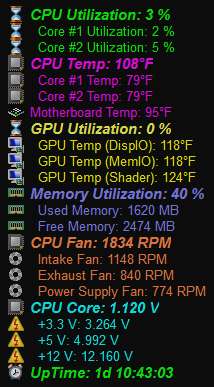
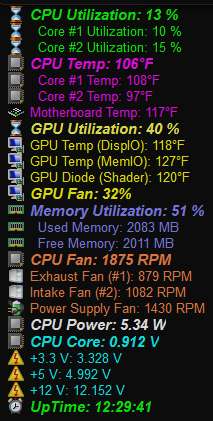
I, myself, have tried many of these 3rd-party products over the years and have long ago decided to use a non-free but superb product named Aida64 (formerly named Everest). My own particular two "on-screen display", i.e. OSD) customizations look as follows (which I have set to refresh every 4 seconds):

aida64osd.jpg
asusaida64.jpg


Note that non-free Aida64 also provides many more items you can display if you want to and if your hardware monitoring/sensors provide measurement, such has hard drive temperatures, power consumption in watts, additional video card temperature or other GPU performance measurements, etc. On my Supermicro machine the ATI HD4850 video card is "fanless", so I have no reason to show the "GPU fan speed" which of course is optionally available for display, if measured. On my ASUS machine the ATI HD5770 does have a fan, and also reports power wattage used by the CPU (currently shown is with an HDTV window playing in WMC).

Also, notice that my own "CPU Temp" value on this Supermicro machine is seemingly way out-of-whack with the core temperatures reported, and with the other internal case temperature sensor on the motherboard itself which is located kind of near the CPU. This is actually due to a BIOS update (provided from Intel to Supermicro) which changed this particular type of measurement from a precise numeric value to a crude "low/medium/high" value which is apparently not "understood" correctly by Aida64. Before making the BIOS update this particular numeric value was in line with the other three temperatures shown, but I've come to accept the odd value I now see and still consider just one of many overall measurements I keep my eye on to observe "situation normal" from "situation abnormal".


I highly recommend Aida64. I do not use either SuperoDoctor on my Supermicro machine, nor do I use Probe-II on my ASUS machine, nor do I use CPUID or Speed Fan. I use Aida64 on both of my machines... because I like it's look and appearance, and because it contains no more and no less than my customization of it provides.

Incidentally, Aida64 also provides onscreen and audible alerts when values go "out of spec" per your settings... if you want to enable them.

 
Last edited:

My Computer

Computer type
PC/Desktop
Computer Manufacturer/Model Number
Home-built, two systems (1) and (2)
OS
Windows 7 Pro x64 (1), Win7 Pro X64 (2)
CPU
i5-3350p 3.1Ghz/6MB-cache (1); E8400 3.0Ghz/6MB-cache (2)
Motherboard
ASUS P8Z77-V Pro (1); ASUS P5Q3 (2)
Memory
8GB PC3-12800 DDR3 (1); 4GB PC3-10600 DDR3 (2)
Graphics Card(s)
ATI HD7750 (1), (see TV cards); ATI R7 250 (2)
Sound Card
Realtek ALC892 HD Audio (1); Realtek ALC1200 HD Audio (2)
Monitor(s) Displays
Eizo HD2441W LCD, Eizo S2433W (1); Eizo 24" S2433W (2)
Screen Resolution
1920x1200, 1920x1200 (1); 1920x1200 (2)
Hard Drives
(1) 1TB SATA-II (7200RPM), 2x2TB SATA-III (7200RPM), 250GB SATA-III (10000RPM) for OS; 2x2TB external USB 3.0

(2) 320GB SATA-II (7200RPM), 750GB SATA-II (7200RPM), 150GB SATA-II (10000RPM) for OS; 2TB external USB 3.0
PSU
Nesteq ECS-6001 600W (1); Nesteq ECS-5001 500W (2)
Case
Acousti-Case 360 (1) and (2)
Cooling
Noctua NH-U12P SE2 for CPU, 2x120mm case fans (1) and (2)
Keyboard
IBM PS/2 (1) and (2)
Mouse
Logitech MX Revolution wireless (1); Microsoft wired (2)
Internet Speed
100mbps down / 10mbps up
Antivirus
Microsoft Security Essentials; Malwarebyte Anti-Malware Pro
Browser
Firefox
Other Info
Ceton InfiniTV 4-tuner cablecard-enabled TV card as well as Hauppauge HVR-2250 OTA/ATSC 2-tuner TV card in (1), running under Win7 WMC
Back
Top