Question about how/where to install programs.

Jabomb9

New member
Local time
2:06 PM
Messages
14
I have an SSD as my OS/essential programs drive and a 1TB drive for storage. Is there anything special that I need to do when I install non-essential programs to it? Should I just make a folder on the storage HDD called "Programs" and install everything to that or am I supposed to use libraries or something?

Also, I have Windows 7, MS Office, MSE, Photoshop CS5, Solidworks, and Pro/E on the SSD. Anything else I should put on it?

Sorry for all the questions, but you guys have helped me out a lot so far!
 

My Computer My Computer

At a glance

Windows 7 Professional 64bitIntel i5-7508GB (2x4GB) G.Skill DDR3 1333XFX Radeon HD 5770
OS
Windows 7 Professional 64bit
CPU
Intel i5-750
Motherboard
MSI P55-GD65
Memory
8GB (2x4GB) G.Skill DDR3 1333
Graphics Card(s)
XFX Radeon HD 5770
Screen Resolution
1680*1050
Hard Drives
OCZ Agility 2 60GB
WD Caviar Black 1TB
PSU
Antec Earthwatts 750w
Case
Antec Nine Hundred
Cooling
3x120mm intake, 1x120mm exhaust, 1x200mm exhaust
Internet Speed
Fiber
Hello Jabomb9.


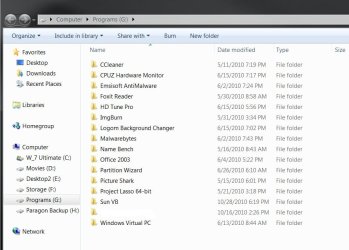
Create a new folder for each program/app you install to the spinner so everything it not just "thrown" together, like this.


click to enlarge
folders.jpg
 

My Computer My Computer

At a glance

W 7 64-bit UltimateIntel Q9550 Yorkfield8GB Dominator 8500C5DATI : XFX 5870
Computer Manufacturer/Model Number
* BFK Customs *
OS
W 7 64-bit Ultimate
CPU
Intel Q9550 Yorkfield
Motherboard
ASUS P5Q Pro
Memory
8GB Dominator 8500C5D
Graphics Card(s)
ATI : XFX 5870
Sound Card
Realtek HD Audio 7-1
Monitor(s) Displays
1x 47" LCD HDMI & 3x 26" LCD HDMI
Screen Resolution
1920x1080P & 1920x1200
Hard Drives
1x 80GB Intel X25-M G2 SSD : 1x 500GB & 1x 640GB WD Caviar Black(s)
PSU
Corsair 620HX
Case
Cooler Master RC-690
Cooling
Tuniq Tower 120, 2x 140mm and 3x 120mm case fans
Keyboard
Microsoft 500
Mouse
Razer Diamondback 3G
Internet Speed
14 Mb/s
Other Info
1x Koutech 3Gb/s SATA HDD Hot Swap Rack
Jabomb,

We are missing one vital piece of info: the size of your SSD.

Just as general info, I have a SSD in my workhorse laptop which I use for just about everything.

The ssd is utilized as follows:
50 GB (17.5 GB free) C for system, programs, boot, page file,
55 GB (19.5 GB free) D for data including all Win 7 Libraries
14.5 GB unallocated.

You could help us out here by completing your system specs and here is how:


HOW TO FILL OUT YOUR SYSTEM SPECS


In the line at the top of www.SevenForums.com you will see UserCP.
That is an abbreviation for User Control Panel.
Click on UserCP.
In the left-hand column, under Your Profile you will see Edit System Spec.
Click on Edit System Spec
You can copy and paste from the output of Speccy, Speccy - System Information - Free Download to fill out much of the info. Be sure to use the Other Info section of your System Specs for such info as your optical drive, your wireless adapter, your speakers, etc.


My Computer My Computer

At a glance

MS Windows 7 Ultimate SP1 64-bitAMD A10-4600M6.00 GB Dual-Channel DDR3 @ 798MHz (11-11-12-28)AMD Radeon HD 7660G
Computer Manufacturer/Model Number
Toshiba Satellite S875D-S7239 laptop
OS
MS Windows 7 Ultimate SP1 64-bit
CPU
AMD A10-4600M
Motherboard
AMD Pumori (Socket FT1)
Memory
6.00 GB Dual-Channel DDR3 @ 798MHz (11-11-12-28)
Graphics Card(s)
AMD Radeon HD 7660G
Sound Card
High Definition Audio Device
Monitor(s) Displays
Generic PnP Monitor (1600x900@60Hz)
Screen Resolution
1600x900@60Hz
Hard Drives
SSD 119GB Corsair CSSD-V128GB2 ATA Device
Keyboard
Standard PS/2 Keyboard
Mouse
HP Wireless Optical Mobile Mouse Model FHA-3410
Internet Speed
What the local pub, local coffee shop offers.
Other Info
Optical Drive:MATSHITA BD-CMB UJ160B ATA Device


Also have an Asus ha1002xp netbook with Win 7 Ultimate installed.
Thanks for replying. It is an OCZ Agility 2 60gb. And I updated my system info per your request. Suggestions would be appreciated!
 

My Computer My Computer

At a glance

Windows 7 Professional 64bitIntel i5-7508GB (2x4GB) G.Skill DDR3 1333XFX Radeon HD 5770
OS
Windows 7 Professional 64bit
CPU
Intel i5-750
Motherboard
MSI P55-GD65
Memory
8GB (2x4GB) G.Skill DDR3 1333
Graphics Card(s)
XFX Radeon HD 5770
Screen Resolution
1680*1050
Hard Drives
OCZ Agility 2 60GB
WD Caviar Black 1TB
PSU
Antec Earthwatts 750w
Case
Antec Nine Hundred
Cooling
3x120mm intake, 1x120mm exhaust, 1x200mm exhaust
Internet Speed
Fiber
Always install all programs to the OS SSD/HD as they write values to registry and become integrated in the OS, so should travel with it if moved or imaged.

User files can be placed on a separate Data partition, ideally on a separate HD which also stores a backup image of the OS/Programs partition. Here is the best method to change location of User folders: http://www.sevenforums.com/tutorials/18629-user-folders-change-default-location.html

This keeps the OS/Programs partition compact for imaging and if OS becomes irreparable or its HD fails you can reimage the OS/Programs partition in 15 minutes with your data waiting and current in it's own protected vault on a separate HD.

You can keep data backed up externally using a Backup program, or excellent Windows Live Mesh sync'ing program which maintains the same folder structure with your other computers over the network - or anywhere using Skydrive as a server.
 
Back
Top