Question about Java and other Add-ons.

Judesman

New member
Member
VIP
Local time
12:08 AM
Messages
217
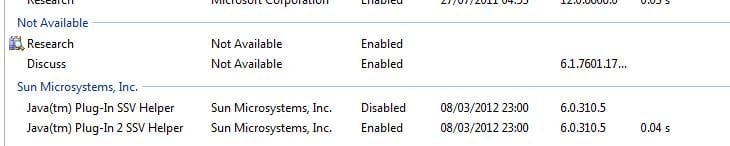
I have just downloaded an update for Java and I see that in Manage Add-ons there are two lines for Java Helper (See screen shot below) One is disabled the other is enabled. So what is the difference between SSV Helper and 2 SSV Helper please. Do I need both? I have had a look in Google but can;t seem to find an answer.

I also notice that above there are two more enabled add-ons; research and discuss. Does anyone know what these are please?
 

Attachments

  • Add-ons.JPG
    Add-ons.JPG
    28 KB · Views: 29

My Computer

Computer type
PC/Desktop
Computer Manufacturer/Model Number
Dell OptiPlex 960
OS
Windows 7 64 bit
Memory
8 GB
Graphics Card(s)
Redeon HD 4670
Monitor(s) Displays
Dell
Antivirus
Norton
Browser
IE 10

My Computer

Computer type
PC/Desktop
Computer Manufacturer/Model Number
OQO 2+
OS
Windows 8 Pro w/MC 32-bit
CPU
Intel Atom 1.86 GHz
Motherboard
OQO 2+
Memory
2 GB
Graphics Card(s)
Intel GMA 500
Sound Card
IDT
Monitor(s) Displays
LCD
Screen Resolution
800 x 480 (portable) 1280 x 1024 (docked)
Hard Drives
64 GB SSD
PSU
9 Ah Battery (portable) or OQO Brick (docked)
Case
Shirt Pocket Sized
Cooling
Tiny Fan
Keyboard
Slide out (portable) DiNovo Edge (docked)
Mouse
Eraser head (portable) Logitech Bluetooth (docked)
Internet Speed
WWAN or 802.11G (portable) T1 (docked)
Browser
IE 10
Other Info
DVD-RW OQO Docking Station
Thank you for that roncerr.

Can anyone help with the Java question please?
 

My Computer

Computer type
PC/Desktop
Computer Manufacturer/Model Number
Dell OptiPlex 960
OS
Windows 7 64 bit
Memory
8 GB
Graphics Card(s)
Redeon HD 4670
Monitor(s) Displays
Dell
Antivirus
Norton
Browser
IE 10
...Can anyone help with the Java question...
You could just uninstall Java and both plugins, then reinstall Java. If you don't know for sure that you need Java, just don't reinstall it. (It's not the same as Javascript, which is part of the browser and is required by most websites. If you leave it uninstalled you won't have to worry about keeping up with its frequent security updates.)
 

My Computer

Computer type
PC/Desktop
Computer Manufacturer/Model Number
OQO 2+
OS
Windows 8 Pro w/MC 32-bit
CPU
Intel Atom 1.86 GHz
Motherboard
OQO 2+
Memory
2 GB
Graphics Card(s)
Intel GMA 500
Sound Card
IDT
Monitor(s) Displays
LCD
Screen Resolution
800 x 480 (portable) 1280 x 1024 (docked)
Hard Drives
64 GB SSD
PSU
9 Ah Battery (portable) or OQO Brick (docked)
Case
Shirt Pocket Sized
Cooling
Tiny Fan
Keyboard
Slide out (portable) DiNovo Edge (docked)
Mouse
Eraser head (portable) Logitech Bluetooth (docked)
Internet Speed
WWAN or 802.11G (portable) T1 (docked)
Browser
IE 10
Other Info
DVD-RW OQO Docking Station
Hello Roncerr, I have been having a trawl around Google and I think I will just leave it all well alone. I just wondered what the differece is between SSV Helper and 2 SSV Helper.

Thanks for your help.
 

My Computer

Computer type
PC/Desktop
Computer Manufacturer/Model Number
Dell OptiPlex 960
OS
Windows 7 64 bit
Memory
8 GB
Graphics Card(s)
Redeon HD 4670
Monitor(s) Displays
Dell
Antivirus
Norton
Browser
IE 10
I have the same thing. I'm guessing that one is 32bit and the other is 64bit. When I downloaded mine it said if I had both 32 and 64 bit browsers. that I need both.

Clint
 

My Computer

Computer type
PC/Desktop
Computer Manufacturer/Model Number
Dell XPS 9100
OS
Windows 10 Pro 64-bit
CPU
Intel I7 920 @ 2.67 GHz
Motherboard
Dell
Memory
24 Gig
Graphics Card(s)
ATI 5670
Sound Card
Internal
Monitor(s) Displays
23" Wide Flat LED HDMI
Screen Resolution
1366 X 768
Hard Drives
Samsung 250 GB SSD
WD 1TB internal
Seagate 1TB internal
WD 2TB external USB 3
PSU
550 W
Case
Mid
Cooling
Fan
Keyboard
US USB
Mouse
USB
Internet Speed
3.84 Mbps down .44 Mbps up
Antivirus
MS Defener
Browser
IE 11
Other Info
1 Liteon DVD wrighter
1 Liteon BD drive
These are both added by Java 7 as well, They are both IE BHO's (Browser Helper Objects). They are needed to view java web content with IE. They are "normal", and required if you are going to use java and IE.

A new light-weight browser helper object, jp2ssv.dll, has been added
which performs the registry key redirection done by the old ssv.dll as
well as the cleanup of old Java Plug-Ins out of the Mozilla plugins
directory. It redirects all of the static and family CLSIDs to the new
Java Plug-In's jp2iexp.dll, and this code has been modified to deal
with arbitrary CLSIDs coming in for instantiation. More work is needed
to provide full SSV support in the new plugin. An associated broker
process, jp2ssvbroker.exe, has been added which elevates to either
medium or high integrity to help with this work, depending on the kind
of work needed. Shared code from the old ssv.dll has been placed in
the ssv_common directory; more refactorings between the old and the
new SSV DLLs will be done in a subsequent putback.

A small custom launcher, jp2launcher.exe, has been added for Windows
Vista which is registered as a broker process by the installer on this
platform. This launcher performs the necessary argument validation to
prevent other IE plugins from escaping the low integrity sandbox, and
then executes javaw.exe.

The installer has been modified to register all of the above new DLLs
and executables in the appropriate ways, and to unregister them during
uninstallation. Currently if the new plugin is the default, then
during installation it will register jp2ssv.dll as a browser helper
object and unregister ssv.dll. Once the Java Control Panel work for
switching between the old and new plugins is done, both of these
browser helper objects will be registered simultaneously, and one or
the other will be disabled depending on the toggle value in the
control panel.

Source

Note this is from September 18th 2007, so these are not at all new.

A Guy
 

My Computer

Computer type
PC/Desktop
OS
Windows 10 Home x64
CPU
INTEL Core i5-750 Quad-Core 3.37GHz
Motherboard
ASUS P7P55D
Memory
HyperX Fury Black Series 8GB (2 x 4GB) 1866Mhz
Graphics Card(s)
EVGA GeForce GTX 750 Superclocked 1GB 128-Bit GDDR5
Monitor(s) Displays
LG 32MA68HY 32" IPS
Screen Resolution
1920 x 1080
Hard Drives
Samsung 840 Evo 120GB, SEAGATE 500GB Barracuda® 7200.12, SATA 3 Gb/s, 7200 RPM, 16MB cache
PSU
ANTEC TruePower New TP-550, 80 PLUS, 550W
Case
ANTEC Three Hundred Illusion
Cooling
COOLER MASTER Hyper 212 Plus, 4 x 120mm 1 x 140mm Noctua's
Internet Speed
85 + Mbps
Antivirus
Avast
Browser
Vivaldi
Thanks A Guy and 5Clint7. I have enabled both and I will leave it that way. I don't look in Manage Add-ons very often and had not noticed these before but I am sure they have been there for years.
 

My Computer

Computer type
PC/Desktop
Computer Manufacturer/Model Number
Dell OptiPlex 960
OS
Windows 7 64 bit
Memory
8 GB
Graphics Card(s)
Redeon HD 4670
Monitor(s) Displays
Dell
Antivirus
Norton
Browser
IE 10
Back
Top