Solved Question about my old dell 'want to update a bit'

GianniDPC

^_^
Guru
Local time
7:52 PM
Messages
529
Location
Belgium (WVL)

My Computer My Computer

At a glance

Windows 7 Home Premium x64Core i7 2600K4GB DDR3 Kingston HyperXGigabyte GTX 670
Computer Manufacturer/Model Number
Homebuilt
OS
Windows 7 Home Premium x64
CPU
Core i7 2600K
Motherboard
Asus P8Z77-V LX
Memory
4GB DDR3 Kingston HyperX
Graphics Card(s)
Gigabyte GTX 670
Sound Card
Realtek HD Audio
Monitor(s) Displays
Delium Monitor
Screen Resolution
1360 x 768
Hard Drives
C: (500GB)
PSU
Corsair 620W
Case
Antec
Cooling
Cooling Master
Keyboard
Logitech
Mouse
Logitech wireless mouse M 505
Internet Speed
60MBPS

My Computer My Computer

At a glance

Win 8 Release candidate 8400[email protected]4 gigsNvidia 9600M
Computer Manufacturer/Model Number
HP Pavillion dv-7 1005 Tx
OS
Win 8 Release candidate 8400
CPU
[email protected]
Memory
4 gigs
Graphics Card(s)
Nvidia 9600M
Sound Card
HD built-in
Monitor(s) Displays
17" Wxga
Screen Resolution
1440x900
Cooling
none
Internet Speed
45Mb down 5Mb up
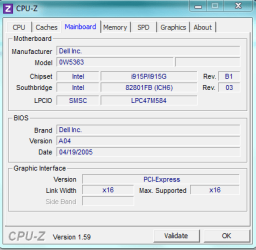
BIOS-version: Dell Inc. (A04, 19/04/2005)
 

My Computer My Computer

At a glance

Windows 7 Home Premium x64Core i7 2600K4GB DDR3 Kingston HyperXGigabyte GTX 670
Computer Manufacturer/Model Number
Homebuilt
OS
Windows 7 Home Premium x64
CPU
Core i7 2600K
Motherboard
Asus P8Z77-V LX
Memory
4GB DDR3 Kingston HyperX
Graphics Card(s)
Gigabyte GTX 670
Sound Card
Realtek HD Audio
Monitor(s) Displays
Delium Monitor
Screen Resolution
1360 x 768
Hard Drives
C: (500GB)
PSU
Corsair 620W
Case
Antec
Cooling
Cooling Master
Keyboard
Logitech
Mouse
Logitech wireless mouse M 505
Internet Speed
60MBPS
Guys !! can you take a look at this ?: http://ftp.us.dell.com/bios/D5000A07.EXE

The Dell site doesn't seems to longer support my dell all drivers are gone from the list (it was there before ..)

Now the above link links to BIOS A07 but I'm not 100% sure that bios update is safe can someone help me :(
 

My Computer My Computer

At a glance

Windows 7 Home Premium x64Core i7 2600K4GB DDR3 Kingston HyperXGigabyte GTX 670
Computer Manufacturer/Model Number
Homebuilt
OS
Windows 7 Home Premium x64
CPU
Core i7 2600K
Motherboard
Asus P8Z77-V LX
Memory
4GB DDR3 Kingston HyperX
Graphics Card(s)
Gigabyte GTX 670
Sound Card
Realtek HD Audio
Monitor(s) Displays
Delium Monitor
Screen Resolution
1360 x 768
Hard Drives
C: (500GB)
PSU
Corsair 620W
Case
Antec
Cooling
Cooling Master
Keyboard
Logitech
Mouse
Logitech wireless mouse M 505
Internet Speed
60MBPS
That's a dodgy looking site. I'd be spooked. BIOS flashing is touchy enough without having to worry about whether your new BIOS is legit.

Leaving aside whether or not an upgrade to A07 will help you out.
 

My Computer My Computer

At a glance

Windows 7 Home Premium SP1, 64-bitIntel Skylake i5-6600K, not overclocked8 GB HyperX DDR4-2666 (2 x 4 GB)none; graphics are integrated on CPU
Computer type
PC/Desktop
Computer Manufacturer/Model Number
Ignatz Special; 4 speed manual gearbox; factory air conditioning; one of one
OS
Windows 7 Home Premium SP1, 64-bit
CPU
Intel Skylake i5-6600K, not overclocked
Motherboard
AsRock Z170M Extreme 4, micro ATX
Memory
8 GB HyperX DDR4-2666 (2 x 4 GB)
Graphics Card(s)
none; graphics are integrated on CPU
Sound Card
onboard: Realtek ALC1150; external: USB Behringer UF0-202
Monitor(s) Displays
Dell S2340M 23 inch IPS
Screen Resolution
1600 x 900
Hard Drives
System: Crucial MX100 series SSD, 128 GB;
Data: Samsung Spinpoint 103SJ, 1 TB;
Backup: WD Caviar Green WD30EZRX-00D8PB0, 3 TB
PSU
Rosewill SilentNight 500 watt fanless, semi-modular
Case
Antec Solo II
Cooling
Noctua NH-U12S; Noctua F12 intake, Noctua S12A exhaust
Keyboard
Microsoft 200 6JH-00001 USB
Mouse
Dell or Microsoft optical wired; USB
Antivirus
Microsoft Security Essentials and Malwarebytes Premium
Browser
Pale Moon
Other Info
All fans PWM; speeds at idle: CPU circa 500 rpm; intake circa 600 rpm; exhaust circa 600 rpm; CPU temps 27 idle and 47 C load in a warm room (27 C/81 F) when running Intel Extreme Tuning Utility stress test.
That's a dodgy looking site. I'd be spooked. BIOS flashing is touchy enough without having to worry about whether your new BIOS is legit.

Leaving aside whether or not an upgrade to A07 will help you out.

Well relook at my post I found it on the Dell FTP://
 

My Computer My Computer

At a glance

Windows 7 Home Premium x64Core i7 2600K4GB DDR3 Kingston HyperXGigabyte GTX 670
Computer Manufacturer/Model Number
Homebuilt
OS
Windows 7 Home Premium x64
CPU
Core i7 2600K
Motherboard
Asus P8Z77-V LX
Memory
4GB DDR3 Kingston HyperX
Graphics Card(s)
Gigabyte GTX 670
Sound Card
Realtek HD Audio
Monitor(s) Displays
Delium Monitor
Screen Resolution
1360 x 768
Hard Drives
C: (500GB)
PSU
Corsair 620W
Case
Antec
Cooling
Cooling Master
Keyboard
Logitech
Mouse
Logitech wireless mouse M 505
Internet Speed
60MBPS
I get the download link. That would tell me it is a legit BIOS, but not whether it is a BIOS for your particular Dell or if it will help you with your upgrade idea. Do you have any reason to believe A07 is necessary?
 

My Computer My Computer

At a glance

Windows 7 Home Premium SP1, 64-bitIntel Skylake i5-6600K, not overclocked8 GB HyperX DDR4-2666 (2 x 4 GB)none; graphics are integrated on CPU
Computer type
PC/Desktop
Computer Manufacturer/Model Number
Ignatz Special; 4 speed manual gearbox; factory air conditioning; one of one
OS
Windows 7 Home Premium SP1, 64-bit
CPU
Intel Skylake i5-6600K, not overclocked
Motherboard
AsRock Z170M Extreme 4, micro ATX
Memory
8 GB HyperX DDR4-2666 (2 x 4 GB)
Graphics Card(s)
none; graphics are integrated on CPU
Sound Card
onboard: Realtek ALC1150; external: USB Behringer UF0-202
Monitor(s) Displays
Dell S2340M 23 inch IPS
Screen Resolution
1600 x 900
Hard Drives
System: Crucial MX100 series SSD, 128 GB;
Data: Samsung Spinpoint 103SJ, 1 TB;
Backup: WD Caviar Green WD30EZRX-00D8PB0, 3 TB
PSU
Rosewill SilentNight 500 watt fanless, semi-modular
Case
Antec Solo II
Cooling
Noctua NH-U12S; Noctua F12 intake, Noctua S12A exhaust
Keyboard
Microsoft 200 6JH-00001 USB
Mouse
Dell or Microsoft optical wired; USB
Antivirus
Microsoft Security Essentials and Malwarebytes Premium
Browser
Pale Moon
Other Info
All fans PWM; speeds at idle: CPU circa 500 rpm; intake circa 600 rpm; exhaust circa 600 rpm; CPU temps 27 idle and 47 C load in a warm room (27 C/81 F) when running Intel Extreme Tuning Utility stress test.
Guys !! can you take a look at this ?: http://ftp.us.dell.com/bios/D5000A07.EXE

The Dell site doesn't seems to longer support my dell all drivers are gone from the list (it was there before ..)

Now the above link links to BIOS A07 but I'm not 100% sure that bios update is safe can someone help me :(

Dells most recent Bios is A10. They are retiring the older legacy machine lines. I have one
 

My Computer My Computer

At a glance

Win 8 Release candidate 8400[email protected]4 gigsNvidia 9600M
Computer Manufacturer/Model Number
HP Pavillion dv-7 1005 Tx
OS
Win 8 Release candidate 8400
CPU
[email protected]
Memory
4 gigs
Graphics Card(s)
Nvidia 9600M
Sound Card
HD built-in
Monitor(s) Displays
17" Wxga
Screen Resolution
1440x900
Cooling
none
Internet Speed
45Mb down 5Mb up
Guys !! can you take a look at this ?: http://ftp.us.dell.com/bios/D5000A07.EXE

The Dell site doesn't seems to longer support my dell all drivers are gone from the list (it was there before ..)

Now the above link links to BIOS A07 but I'm not 100% sure that bios update is safe can someone help me :(

Dells most recent Bios is A10. They are retiring the older legacy machine lines. I have one

??? Is there a newer bios version avaible then ?:

My Dell is a Dimension 5000

Also I'd like to know, Let's say if it fails to update the bios is there any way to unbrick it (I have a floppy drive)
 
Last edited:

My Computer My Computer

At a glance

Windows 7 Home Premium x64Core i7 2600K4GB DDR3 Kingston HyperXGigabyte GTX 670
Computer Manufacturer/Model Number
Homebuilt
OS
Windows 7 Home Premium x64
CPU
Core i7 2600K
Motherboard
Asus P8Z77-V LX
Memory
4GB DDR3 Kingston HyperX
Graphics Card(s)
Gigabyte GTX 670
Sound Card
Realtek HD Audio
Monitor(s) Displays
Delium Monitor
Screen Resolution
1360 x 768
Hard Drives
C: (500GB)
PSU
Corsair 620W
Case
Antec
Cooling
Cooling Master
Keyboard
Logitech
Mouse
Logitech wireless mouse M 505
Internet Speed
60MBPS
Also the reason I want to update the bios Is i saw on the net that A07 add's support for more processors so If I want to upgrade to that 3.8 Ghz cpu i think I'll need to update the bios first then ??!!
 

My Computer My Computer

At a glance

Windows 7 Home Premium x64Core i7 2600K4GB DDR3 Kingston HyperXGigabyte GTX 670
Computer Manufacturer/Model Number
Homebuilt
OS
Windows 7 Home Premium x64
CPU
Core i7 2600K
Motherboard
Asus P8Z77-V LX
Memory
4GB DDR3 Kingston HyperX
Graphics Card(s)
Gigabyte GTX 670
Sound Card
Realtek HD Audio
Monitor(s) Displays
Delium Monitor
Screen Resolution
1360 x 768
Hard Drives
C: (500GB)
PSU
Corsair 620W
Case
Antec
Cooling
Cooling Master
Keyboard
Logitech
Mouse
Logitech wireless mouse M 505
Internet Speed
60MBPS

My Computer My Computer

At a glance

Windows 7 Ultimate 64 bitAMD Phenom II X4 965 Black EditionGSkill 4 X 2 GB PC 8500XFX Radeon HD 6790 D
Computer Manufacturer/Model Number
Custom built
OS
Windows 7 Ultimate 64 bit
CPU
AMD Phenom II X4 965 Black Edition
Motherboard
Gigabyte GA-MA790X-DS4
Memory
GSkill 4 X 2 GB PC 8500
Graphics Card(s)
XFX Radeon HD 6790 D
Sound Card
On board RealTek HD
Monitor(s) Displays
Dual monitors:Samsung SyncMaster S20B300
Screen Resolution
1600 X 900
Hard Drives
Seagate Barracuda 1TB (primary)
Seagate Barracuda 2 X 320 GB
PSU
Ultra X4 750 watt fully modular
Case
Thermaltake Overseer RX 1 full tower
Cooling
Core-Contact 92 mm CPU Cooler
Keyboard
Logitech G510
Mouse
Razor DeathAdder
Internet Speed
50/5 Mbps UL/DL
Other Info
Optical: Super Muliti DVD burner w/lightscribe, Hauppauge WinTV HVR-1800
Also I'd like to know, Let's say if it fails to update the bios is there any way to unbrick it (I have a floppy drive)

Probably not without some expense (new chip). If you were lucky, it might leave your existing BIOS intact, rather than drop dead in mid-stream.

BIOS flashes succeed most of the time if done correctly (99%??), but the consequences if they fail are so high that I would not even think about doing it UNLESS I had a solid reason to believe that a successful flash would solve some problem.
 

My Computer My Computer

At a glance

Windows 7 Home Premium SP1, 64-bitIntel Skylake i5-6600K, not overclocked8 GB HyperX DDR4-2666 (2 x 4 GB)none; graphics are integrated on CPU
Computer type
PC/Desktop
Computer Manufacturer/Model Number
Ignatz Special; 4 speed manual gearbox; factory air conditioning; one of one
OS
Windows 7 Home Premium SP1, 64-bit
CPU
Intel Skylake i5-6600K, not overclocked
Motherboard
AsRock Z170M Extreme 4, micro ATX
Memory
8 GB HyperX DDR4-2666 (2 x 4 GB)
Graphics Card(s)
none; graphics are integrated on CPU
Sound Card
onboard: Realtek ALC1150; external: USB Behringer UF0-202
Monitor(s) Displays
Dell S2340M 23 inch IPS
Screen Resolution
1600 x 900
Hard Drives
System: Crucial MX100 series SSD, 128 GB;
Data: Samsung Spinpoint 103SJ, 1 TB;
Backup: WD Caviar Green WD30EZRX-00D8PB0, 3 TB
PSU
Rosewill SilentNight 500 watt fanless, semi-modular
Case
Antec Solo II
Cooling
Noctua NH-U12S; Noctua F12 intake, Noctua S12A exhaust
Keyboard
Microsoft 200 6JH-00001 USB
Mouse
Dell or Microsoft optical wired; USB
Antivirus
Microsoft Security Essentials and Malwarebytes Premium
Browser
Pale Moon
Other Info
All fans PWM; speeds at idle: CPU circa 500 rpm; intake circa 600 rpm; exhaust circa 600 rpm; CPU temps 27 idle and 47 C load in a warm room (27 C/81 F) when running Intel Extreme Tuning Utility stress test.

My Computer My Computer

At a glance

Windows 7 Home Premium x64Core i7 2600K4GB DDR3 Kingston HyperXGigabyte GTX 670
Computer Manufacturer/Model Number
Homebuilt
OS
Windows 7 Home Premium x64
CPU
Core i7 2600K
Motherboard
Asus P8Z77-V LX
Memory
4GB DDR3 Kingston HyperX
Graphics Card(s)
Gigabyte GTX 670
Sound Card
Realtek HD Audio
Monitor(s) Displays
Delium Monitor
Screen Resolution
1360 x 768
Hard Drives
C: (500GB)
PSU
Corsair 620W
Case
Antec
Cooling
Cooling Master
Keyboard
Logitech
Mouse
Logitech wireless mouse M 505
Internet Speed
60MBPS
Also I'd like to know, Let's say if it fails to update the bios is there any way to unbrick it (I have a floppy drive)

Probably not without some expense (new chip). If you were lucky, it might leave your existing BIOS intact, rather than drop dead in mid-stream.

BIOS flashes succeed most of the time if done correctly (99%??), but the consequences if they fail are so high that I would not even think about doing it UNLESS I had a solid reason to believe that a successful flash would solve some problem.

Well found this for making a Bootable DOS usb: Bios-boot-usb-stick - Howto: BIOS-Update per bootable USB-Stick - www.biosflash.com

That seems to be the safest way
 

My Computer My Computer

At a glance

Windows 7 Home Premium x64Core i7 2600K4GB DDR3 Kingston HyperXGigabyte GTX 670
Computer Manufacturer/Model Number
Homebuilt
OS
Windows 7 Home Premium x64
CPU
Core i7 2600K
Motherboard
Asus P8Z77-V LX
Memory
4GB DDR3 Kingston HyperX
Graphics Card(s)
Gigabyte GTX 670
Sound Card
Realtek HD Audio
Monitor(s) Displays
Delium Monitor
Screen Resolution
1360 x 768
Hard Drives
C: (500GB)
PSU
Corsair 620W
Case
Antec
Cooling
Cooling Master
Keyboard
Logitech
Mouse
Logitech wireless mouse M 505
Internet Speed
60MBPS
Drivers and Downloads | Dell [United States]
Hi GianniDPC
This link is to your drivers for the Dell 5000 and the A07 Bios update is there also,
I looked up the manual and the link is here ;
Documentation
By reading the manual it says your D5000 will use a CPU with upto 1mb level 2 cache
where as the 670 you linked to has 2 mb,s of level 2 cache and the 915 chipset
may not support that much cache i would think twice about buying the 670 chip for your
D5000 it may not work for you .
I have the Dell Dimension 8400 and the intel 925ex chipset that will run the 670\671 CPU
@ 3.8 ghz with the A09 Bios and that Bios was written to use the intel 670\671 CPU
If it were me i would not buy the 670 CPU for your D5000 it may not work !!
Of coures that is me !
You could post to the Dell hardware forum and ask there it would not hurt to ask them .
Good Luck
JerryW.
 

My Computer My Computer

At a glance

Win 7 Ultimate sp-1 64 Bit+Vista Ultimate sp-...Intel Core 2 [email protected] GHZ socket 775 LGA8 gb stepping 7-7-7-20ATI HD-4850 Dell
Computer type
PC/Desktop
Computer Manufacturer/Model Number
Dell XPS 430-Dell XPS 8700
OS
Win 7 Ultimate sp-1 64 Bit+Vista Ultimate sp-2 64 Bit
CPU
Intel Core 2 [email protected] GHZ socket 775 LGA
Motherboard
Dell Inc. 0G254H (CPU)
Memory
8 gb stepping 7-7-7-20
Graphics Card(s)
ATI HD-4850 Dell
Sound Card
IDT High Definition Audio CODEC
Monitor(s) Displays
DELL S2209W
Screen Resolution
(1920x1080@60Hz)
Hard Drives
2 Crucial M4SSD 64gb Win7 Ultimate 64 bit SSD {Raid-0}
2 750 GB Seagate sata {Raid-0}Vista Ultimate 64 Bit
1 1000 GB Seagate {SATA}-Backup
PSU
430 W
Case
Dell XPS 430
Cooling
CPU Fan-Hard drive Fan-GPU Fan on card-PSU Fan
Keyboard
Dell
Mouse
MS 2000
First Dell is so propritary in their older computers, especially the P4 if the bios is not for your tag # it will not work. That cpu your looking at is used for one, to cheap for another, i'd say if it sounds to good to be true it probably is, just a friendly warning.
 

My Computer My Computer

At a glance

Windows 7 Home Premium 64 bitIntel Core 2 quad Extreme Q9770 @ 3.2 GHz4x2 GB Muskin 1600 MHz ramNVidia GTX 250
Computer Manufacturer/Model Number
Dell XPS 730
OS
Windows 7 Home Premium 64 bit
CPU
Intel Core 2 quad Extreme Q9770 @ 3.2 GHz
Memory
4x2 GB Muskin 1600 MHz ram
Graphics Card(s)
NVidia GTX 250
Sound Card
Soundblaster X-Fi Fatality Champion
Monitor(s) Displays
2 Dell 2007WFP Ultrascans
Screen Resolution
3360 x 1050
Hard Drives
WD Black 1TB sata, 2-WD Black 500 sata, 2-Seagate 500 Go external
PSU
1000 Watt
Cooling
air
Keyboard
MS Natrual Keyboard Pro
Mouse
Logitech Wireless Trackball
Internet Speed
DSL Elite
First Dell is so propritary in their older computers, especially the P4 if the bios is not for your tag # it will not work. That cpu your looking at is used for one, to cheap for another, i'd say if it sounds to good to be true it probably is, just a friendly warning.

Well, But I Still want to update my bios in case to be up to date as the BIOS update fixes some other things also. My questions is if I type my service tag it will find no drivers anymore for my dell but If I search for my dell manually I'll find the system with the A07 bios. Does the service tag matter or not ?? I also don't think that dell makes a BIOS for all service tags right ? I think they make just one for all dell 5000's ?
 

My Computer My Computer

At a glance

Windows 7 Home Premium x64Core i7 2600K4GB DDR3 Kingston HyperXGigabyte GTX 670
Computer Manufacturer/Model Number
Homebuilt
OS
Windows 7 Home Premium x64
CPU
Core i7 2600K
Motherboard
Asus P8Z77-V LX
Memory
4GB DDR3 Kingston HyperX
Graphics Card(s)
Gigabyte GTX 670
Sound Card
Realtek HD Audio
Monitor(s) Displays
Delium Monitor
Screen Resolution
1360 x 768
Hard Drives
C: (500GB)
PSU
Corsair 620W
Case
Antec
Cooling
Cooling Master
Keyboard
Logitech
Mouse
Logitech wireless mouse M 505
Internet Speed
60MBPS

Attachments

  • Knipsel.PNG
    Knipsel.PNG
    11.3 KB · Views: 3

My Computer My Computer

At a glance

Windows 7 Home Premium x64Core i7 2600K4GB DDR3 Kingston HyperXGigabyte GTX 670
Computer Manufacturer/Model Number
Homebuilt
OS
Windows 7 Home Premium x64
CPU
Core i7 2600K
Motherboard
Asus P8Z77-V LX
Memory
4GB DDR3 Kingston HyperX
Graphics Card(s)
Gigabyte GTX 670
Sound Card
Realtek HD Audio
Monitor(s) Displays
Delium Monitor
Screen Resolution
1360 x 768
Hard Drives
C: (500GB)
PSU
Corsair 620W
Case
Antec
Cooling
Cooling Master
Keyboard
Logitech
Mouse
Logitech wireless mouse M 505
Internet Speed
60MBPS
If your service tag # doesn't show any results for a new bios then their are none for your computer. If you use one for a different model you will probably hose your comp for good. If you want to take that chance be forwarned.
 

My Computer My Computer

At a glance

Windows 7 Home Premium 64 bitIntel Core 2 quad Extreme Q9770 @ 3.2 GHz4x2 GB Muskin 1600 MHz ramNVidia GTX 250
Computer Manufacturer/Model Number
Dell XPS 730
OS
Windows 7 Home Premium 64 bit
CPU
Intel Core 2 quad Extreme Q9770 @ 3.2 GHz
Memory
4x2 GB Muskin 1600 MHz ram
Graphics Card(s)
NVidia GTX 250
Sound Card
Soundblaster X-Fi Fatality Champion
Monitor(s) Displays
2 Dell 2007WFP Ultrascans
Screen Resolution
3360 x 1050
Hard Drives
WD Black 1TB sata, 2-WD Black 500 sata, 2-Seagate 500 Go external
PSU
1000 Watt
Cooling
air
Keyboard
MS Natrual Keyboard Pro
Mouse
Logitech Wireless Trackball
Internet Speed
DSL Elite
Hi GianniDPC
This is the link Drivers and Downloads | Dell [United States]
to the newest A07 Bios For the Dell Dimension 5000 your service tag has nothing to do with the Bios,
The D5000A07.exe is for all of the Dell Dimension 5000 motherboards , Dell does not make a Bios for each service tag !
This is the fixes & Enhancements
The following changes have been made to BIOS rev A06 to create A07:
1. Add support for newer processors
2. Add help text during password change
3. Improve boot sequence for CD ROMs
4. Removed dialog pop-ups from flash program when -NoPause is used
5. Improve S3 resume timing
Good Luck
EDIT
For more info
This link is to Intel for the CPU,s that the Intel 915 can work with .
http://ark.intel.com/products/chipsets/5341 it does Look like the 670 chip will work for your D5000 !
After reading about this i have changed my mind i would get the Intel 670 and try it its
up to you !
JerryW
EDIT.
Well it looks like my link did not work right but read this,

Intel® 915G Express COMPATIBLE PRODUCTS

Chipset Combinations
Intel® 915G Express Chipset with 82801FB I/O Controller Hub 6 (ICH6)
Intel® 915G Express Chipset with 82801FR I/O Controller Hub 6 (ICH6Compatible Processors
Expand AllIntel® Celeron® D Processor 351 (256K Cache, 3.20 GHz, 533 MHz FSB)•
Intel® Celeron® D Processor 355 (256K Cache, 3.33 GHz, 533 MHz FSB)•
Intel® Pentium® 4 Processor 517 supporting HT Technology (1M Cache, 2.93 GHz, 533 MHz FSB)•
Intel® Pentium® 4 Processor 520 supporting HT Technology (1M Cache, 2.80 GHz, 800 MHz FSB)•
Intel® Pentium® 4 Processor 520/520J supporting HT Technology (1M Cache, 2.80 GHz, 800 MHz FSB)•
Intel® Pentium® 4 Processor 520J supporting HT Technology (1M Cache, 2.80 GHz, 800 MHz FSB)•
Intel® Pentium® 4 Processor 521 supporting HT Technology (1M Cache, 2.80 GHz, 800 MHz FSB)•
Intel® Pentium® 4 Processor 524 supporting HT Technology (1M Cache, 3.06 GHz, 533 MHz FSB)•
Intel® Pentium® 4 Processor 530/530J supporting HT Technology (1M Cache, 3.00 GHz, 800 MHz FSB)•
Intel® Pentium® 4 Processor 530J supporting HT Technology (1M Cache, 3.00 GHz, 800 MHz FSB)•
Intel® Pentium® 4 Processor 531 supporting HT Technology (1M Cache, 3.00 GHz, 800 MHz FSB)•
Intel® Pentium® 4 Processor 540/540J supporting HT Technology (1M Cache, 3.20 GHz, 800 MHz FSB)•
Intel® Pentium® 4 Processor 540J supporting HT Technology (1M Cache, 3.20 GHz, 800 MHz FSB)
Intel® Pentium® 4 Processor 541 supporting HT Technology (1M Cache, 3.20 GHz, 800 MHz FSB)•
Intel® Pentium® 4 Processor 550/550J supporting HT Technology (1M Cache, 3.40 GHz, 800 MHz FSB)•
Intel® Pentium® 4 Processor 550J supporting HT Technology (1M Cache, 3.40 GHz, 800 MHz FSB)•
Intel® Pentium® 4 Processor 551 supporting HT Technology (1M Cache, 3.40 GHz, 800 MHz FSB)•
Intel® Pentium® 4 Processor 630 supporting HT Technology (2M Cache, 3.00 GHz, 800 MHz FSB)•
Intel® Pentium® 4 Processor 640 supporting HT Technology (2M Cache, 3.20 GHz, 800 MHz FSB)•
Intel® Pentium® 4 Processor 650 supporting HT Technology (2M Cache, 3.40 GHz, 800 MHz FSB)•
Intel® Pentium® 4 Processor 631 supporting HT Technology (2M Cache, 3.00 GHz, 800 MHz FSB)•
Intel® Pentium® 4 Processor 641 supporting HT Technology (2M Cache, 3.20 GHz, 800 MHz FSB)•
Intel® Pentium® 4 Processor 651 supporting HT Technology (2M Cache, 3.40 GHz, 800 MHz FSB)•
Intel® Pentium® 4 Processor 661 supporting HT Technology (2M Cache, 3.60 GHz, 800 MHz FSB)•
Intel® Pentium® 4 Processor 520/521 supporting HT Technology (1M Cache, 2.80 GHz, 800 MHz FSB)•
Intel® Pentium® 4 Processor 520/521 supporting HT Technology (1M Cache, 2.80E GHz, 800 MHz FSB)•
Intel® Pentium® 4 Processor 550 supporting HT Technology (1M Cache, 3.40 GHz, 800 MHz FSB)•
Intel® Pentium® 4 Processor 560/560J supporting HT Technology (1M Cache, 3.60 GHz, 800 MHz FSB)•
Intel® Pentium® 4 Processor 560J supporting HT Technology (1M Cache, 3.60 GHz, 800 MHz FSB)•
Intel® Pentium® 4 Processor 561 supporting HT Technology (1M Cache, 3.60 GHz, 800 MHz FSB)•
Intel® Pentium® 4 Processor 570J supporting HT Technology (1M Cache, 3.80 GHz, 800 MHz FSB)•
Intel® Pentium® 4 Processor 571 supporting HT Technology (1M Cache, 3.80 GHz, 800 MHz FSB)•
Intel® Pentium® 4 Processor 660 supporting HT Technology (2M Cache, 3.60 GHz, 800 MHz FSB)•
Intel® Pentium® 4 Processor 662 supporting HT Technology (2M Cache, 3.60 GHz, 800 MHz FSB)•
Intel® Pentium® 4 Processor 670 supporting HT Technology (2M Cache, 3.80 GHz, 800 MHz FSB)•
Intel® Pentium® 4 Processor 672 supporting HT Technology (2M Cache, 3.80 GHz, 800 MHz FSB)•

 
Last edited:

My Computer My Computer

At a glance

Win 7 Ultimate sp-1 64 Bit+Vista Ultimate sp-...Intel Core 2 [email protected] GHZ socket 775 LGA8 gb stepping 7-7-7-20ATI HD-4850 Dell
Computer type
PC/Desktop
Computer Manufacturer/Model Number
Dell XPS 430-Dell XPS 8700
OS
Win 7 Ultimate sp-1 64 Bit+Vista Ultimate sp-2 64 Bit
CPU
Intel Core 2 [email protected] GHZ socket 775 LGA
Motherboard
Dell Inc. 0G254H (CPU)
Memory
8 gb stepping 7-7-7-20
Graphics Card(s)
ATI HD-4850 Dell
Sound Card
IDT High Definition Audio CODEC
Monitor(s) Displays
DELL S2209W
Screen Resolution
(1920x1080@60Hz)
Hard Drives
2 Crucial M4SSD 64gb Win7 Ultimate 64 bit SSD {Raid-0}
2 750 GB Seagate sata {Raid-0}Vista Ultimate 64 Bit
1 1000 GB Seagate {SATA}-Backup
PSU
430 W
Case
Dell XPS 430
Cooling
CPU Fan-Hard drive Fan-GPU Fan on card-PSU Fan
Keyboard
Dell
Mouse
MS 2000
Back
Top