Solved Question about overclocking my E5400.

StalkeR

New member
Guru
Gold Member
VIP
Local time
9:11 AM
Messages
7,160
Location
Macedonia
Hello people.I was thinking to oc my cpu.

I was reading through the Web and found that this cpu runs stable at 3.2Ghz.
Now,my answer is will I be able to oc it to 3.0 ghz ?
I have stock cooling,and one additional 80m cooler behind the psu. Tomorrow I'll see if I can mount the 120mm fan also.

I have asked JK and he gives me good answer,to try lets say at 3ghz and to run Prime95 tests for about 30-45 min. If it pass that test to increase a bit,and if fall to get back.
He also mentioned that if it falled I can bump cpu voltage for a hair. How fair can I go with that voltage ?

Here is print from CPU-Z.
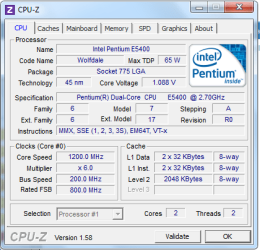
cpu.PNG

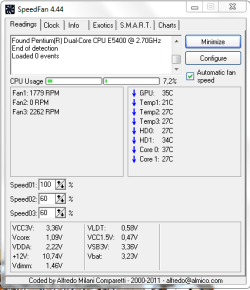
Also my temps ATM.

Capture.PNG
 

My Computer My Computer

At a glance

Windows 10 Pro x64Intel Core i5 4440 @Stock4 x 4GB HyperX Fury DDR3Gigabyte GTX 1050Ti O4G
Computer type
PC/Desktop
Computer Manufacturer/Model Number
Custom Build
OS
Windows 10 Pro x64
CPU
Intel Core i5 4440 @Stock
Motherboard
Gigabyte Z97 D3H
Memory
4 x 4GB HyperX Fury DDR3
Graphics Card(s)
Gigabyte GTX 1050Ti O4G
Sound Card
Integrated
Monitor(s) Displays
Dell P2417H
Screen Resolution
1920 x 1080
Hard Drives
Samsung EVO 850 120GB / Toshiba DT01ACA050 1TB 7200prm 32MB
PSU
Riotoro Onyx 750W
Case
NZXT H500 Black-Red
Cooling
Stock CPU + NZXT 120mm + 2x120mm red fans
Keyboard
Modecom Volcano Lanparty
Mouse
Asus ROG Gladius / DeepCool E-Pad Plus
Internet Speed
DOCSIS 50/3 Mbit
Browser
Google Chrome
Other Info
Asus K55VJ(i5 3210M, GT635M / 2GB, 8GB DDR3, 500GB HDD)
I think 3.0GHz is realistic, though I'm not really familiar with this particular CPU.

I have an E6600 rated at 2.4GHz and it runs perfectly stable at 2.7GHz. I even had it at 2.8GHz for a while but then decided to back it down just a little bit (actually, I had FSB problems at higher clock rates).
 

My Computer My Computer

At a glance

Windows 7 Professional SP1 32-bitIntel Core 2 Duo E6600 2.4GHz4GB DDR2-667 (4x1GB in dual-channel config)nVidia GeForce 9800 GT
Computer type
PC/Desktop
Computer Manufacturer/Model Number
Custom-built
OS
Windows 7 Professional SP1 32-bit
CPU
Intel Core 2 Duo E6600 2.4GHz
Motherboard
Asus PL5D2
Memory
4GB DDR2-667 (4x1GB in dual-channel config)
Graphics Card(s)
nVidia GeForce 9800 GT
Sound Card
Creative X-Fi XtremeMusic
Monitor(s) Displays
Acer P236H
Screen Resolution
1920x1200 (DVI)
Hard Drives
OCZ SSD Vertex Plus 60GB SATA (Firmware 3.55), 64MB cache
Hitachi HD321KJ SATA, 320GB, 7200rpm, 16MB cache
PSU
Antec TruePower 2.0
Case
Cooler Master Centurion
Cooling
Too many fans
Keyboard
Standard
Mouse
Microsoft wireless optical mouse
Internet Speed
AT&T U-verse (18mbit/sec)
Antivirus
Microsoft Security Essentials
Browser
Firefox
Other Info
Other devices:
Compaq CQ-60 laptop
Google Nexus 7 (2012) tablet
Nvidia SHIELD tablet (US/LTE)
Hardkernel ODROID-XU single-board computer (Samsung Exynos 5420)
Thanks for answering Corazon. :)

Anyway 1 day untill cpu is oc'd at 3GHz,and run perfectly. ATM I'm with the stock cooler just,and the temps are good with normal work. CPU Temp is 22-26 C. Core Voltage is going up to 1.278 V max. Are this volts good ?
Also I noticed that my RAM freq. is higher now after oc'ing the cpu. From 800 to 889Mhz.

Tommorow I'll move this parts into my other case which is bigger that this and should have better air flow. Also I'll mount one 80,and one 120mm fans there. So the temps should be lower that this.
 

My Computer My Computer

At a glance

Windows 10 Pro x64Intel Core i5 4440 @Stock4 x 4GB HyperX Fury DDR3Gigabyte GTX 1050Ti O4G
Computer type
PC/Desktop
Computer Manufacturer/Model Number
Custom Build
OS
Windows 10 Pro x64
CPU
Intel Core i5 4440 @Stock
Motherboard
Gigabyte Z97 D3H
Memory
4 x 4GB HyperX Fury DDR3
Graphics Card(s)
Gigabyte GTX 1050Ti O4G
Sound Card
Integrated
Monitor(s) Displays
Dell P2417H
Screen Resolution
1920 x 1080
Hard Drives
Samsung EVO 850 120GB / Toshiba DT01ACA050 1TB 7200prm 32MB
PSU
Riotoro Onyx 750W
Case
NZXT H500 Black-Red
Cooling
Stock CPU + NZXT 120mm + 2x120mm red fans
Keyboard
Modecom Volcano Lanparty
Mouse
Asus ROG Gladius / DeepCool E-Pad Plus
Internet Speed
DOCSIS 50/3 Mbit
Browser
Google Chrome
Other Info
Asus K55VJ(i5 3210M, GT635M / 2GB, 8GB DDR3, 500GB HDD)
Sounds good so far, but I hope your RAM is still stable at almost 890MHz too...I'd probably run memtest86+ just to be sure. If it does throw an error, try loosening the RAM timings in your BIOS a little - or maybe you can change the FSB:RAM ratio and run the memory at a lower speed.
But nice going so far :)
 

My Computer My Computer

At a glance

Windows 7 Professional SP1 32-bitIntel Core 2 Duo E6600 2.4GHz4GB DDR2-667 (4x1GB in dual-channel config)nVidia GeForce 9800 GT
Computer type
PC/Desktop
Computer Manufacturer/Model Number
Custom-built
OS
Windows 7 Professional SP1 32-bit
CPU
Intel Core 2 Duo E6600 2.4GHz
Motherboard
Asus PL5D2
Memory
4GB DDR2-667 (4x1GB in dual-channel config)
Graphics Card(s)
nVidia GeForce 9800 GT
Sound Card
Creative X-Fi XtremeMusic
Monitor(s) Displays
Acer P236H
Screen Resolution
1920x1200 (DVI)
Hard Drives
OCZ SSD Vertex Plus 60GB SATA (Firmware 3.55), 64MB cache
Hitachi HD321KJ SATA, 320GB, 7200rpm, 16MB cache
PSU
Antec TruePower 2.0
Case
Cooler Master Centurion
Cooling
Too many fans
Keyboard
Standard
Mouse
Microsoft wireless optical mouse
Internet Speed
AT&T U-verse (18mbit/sec)
Antivirus
Microsoft Security Essentials
Browser
Firefox
Other Info
Other devices:
Compaq CQ-60 laptop
Google Nexus 7 (2012) tablet
Nvidia SHIELD tablet (US/LTE)
Hardkernel ODROID-XU single-board computer (Samsung Exynos 5420)
Thanks for the answer . This week I'll put my other fans in other case(today I was not able) and will give a try. Also I'll post again. :)
 

My Computer My Computer

At a glance

Windows 10 Pro x64Intel Core i5 4440 @Stock4 x 4GB HyperX Fury DDR3Gigabyte GTX 1050Ti O4G
Computer type
PC/Desktop
Computer Manufacturer/Model Number
Custom Build
OS
Windows 10 Pro x64
CPU
Intel Core i5 4440 @Stock
Motherboard
Gigabyte Z97 D3H
Memory
4 x 4GB HyperX Fury DDR3
Graphics Card(s)
Gigabyte GTX 1050Ti O4G
Sound Card
Integrated
Monitor(s) Displays
Dell P2417H
Screen Resolution
1920 x 1080
Hard Drives
Samsung EVO 850 120GB / Toshiba DT01ACA050 1TB 7200prm 32MB
PSU
Riotoro Onyx 750W
Case
NZXT H500 Black-Red
Cooling
Stock CPU + NZXT 120mm + 2x120mm red fans
Keyboard
Modecom Volcano Lanparty
Mouse
Asus ROG Gladius / DeepCool E-Pad Plus
Internet Speed
DOCSIS 50/3 Mbit
Browser
Google Chrome
Other Info
Asus K55VJ(i5 3210M, GT635M / 2GB, 8GB DDR3, 500GB HDD)
22-26c seems a little bit low to me, that's lower than the ambient temperature in your case.

Sent from my BlackBerry 9900 using Tapatalk
 

My Computer My Computer

At a glance

Windows 7 Ultimate x64, & Mac OS X 10.9.2Intel Core i5 2500kCorsair Vengence 8gb 1866mhzNvidia GTX 770 OC
Computer type
PC/Desktop
Computer Manufacturer/Model Number
Built by badgers!!!
OS
Windows 7 Ultimate x64, & Mac OS X 10.9.2
CPU
Intel Core i5 2500k
Motherboard
Asus P8z68 LE
Memory
Corsair Vengence 8gb 1866mhz
Graphics Card(s)
Nvidia GTX 770 OC
Monitor(s) Displays
2x ASUS LED 22" IPS
Screen Resolution
3840x1080
Hard Drives
240GB Crucial M500 SSD
120gb Corsair Force 3 SSD
1TB Western Digital
PSU
Corsair HX650w Modular
Case
Corsair Air 540
Cooling
Corsair H60 Push/Pull
Keyboard
Corsair K70/ Logitech G27 wheel
Mouse
Saitek R.A.T 9
Internet Speed
Too slow!
Other Info
AMD fusion E350N Home server-Windows Home Server 2011 (also made by badgers!)
2011 Macbook 2.4ghz Core2Duo, 4gb ddr3, 120gb Ocz Vertex SSD
Yep you can easily do 3 GHz. I'm not sure what the rating for that chip is, but I imagine you can have it at 1.35 volts or more safely. The temperatures are what is most important. Something to consider: Your temperature doing "normal work" is low, because it isn't doing cpu intensive tasks. With stock cooling (regardless of how many extra fans you put in there), when running Prime95, that temperature is going to go up probably the high 80s. If you regularly use your cpu at full load like that, you will need better cooling. But if you just use the computer casually, there is no issue with the cooling - just keep an eye on it.

Regarding the ram, as the FSB is increased, so is the ram frequency. That is probably going to limit your over clock more than anything. You can lower the ratio between the FSB and the ram if you run into problems.
 

My Computer My Computer

At a glance

Windows 7 Home Premium 64 bitAMD A8 55002 x 2GB Gskill 1600MHz
Computer type
PC/Desktop
OS
Windows 7 Home Premium 64 bit
CPU
AMD A8 5500
Motherboard
MSI FM2-A75IA-E53
Memory
2 x 2GB Gskill 1600MHz
Hard Drives
OCz Agility 4 64GB
Case
Antec ISK 110
Hello frogger4,thanks for answering !
Yesterday I was running AIDA 64 system stability test for 30min. Here are the temps...

stabilitytest1.png

According to Intel's CPU guide it says that the Voltage rage is : VID Voltage Range0.8500V–1.3625V

I'm using my pc just for surfing on the internet,and my brother is playing some games(PES '12,WRC..) and temps are pretty good then. As I said in my case costumizing thread I'll cut a hole in left side panel and put there a grill,and it will be able to get more air out.

For the RAM. Yes,it's limiting my overclocking. How can I get lower the ratio ? My ram is now working great,there are no any problems,but I'm just asking to know for the next time. :)
 

My Computer My Computer

At a glance

Windows 10 Pro x64Intel Core i5 4440 @Stock4 x 4GB HyperX Fury DDR3Gigabyte GTX 1050Ti O4G
Computer type
PC/Desktop
Computer Manufacturer/Model Number
Custom Build
OS
Windows 10 Pro x64
CPU
Intel Core i5 4440 @Stock
Motherboard
Gigabyte Z97 D3H
Memory
4 x 4GB HyperX Fury DDR3
Graphics Card(s)
Gigabyte GTX 1050Ti O4G
Sound Card
Integrated
Monitor(s) Displays
Dell P2417H
Screen Resolution
1920 x 1080
Hard Drives
Samsung EVO 850 120GB / Toshiba DT01ACA050 1TB 7200prm 32MB
PSU
Riotoro Onyx 750W
Case
NZXT H500 Black-Red
Cooling
Stock CPU + NZXT 120mm + 2x120mm red fans
Keyboard
Modecom Volcano Lanparty
Mouse
Asus ROG Gladius / DeepCool E-Pad Plus
Internet Speed
DOCSIS 50/3 Mbit
Browser
Google Chrome
Other Info
Asus K55VJ(i5 3210M, GT635M / 2GB, 8GB DDR3, 500GB HDD)
Hello frogger4,thanks for answering !
Yesterday I was running AIDA 64 system stability test for 30min. Here are the temps...

...

According to Intel's CPU guide it says that the Voltage rage is : VID Voltage Range0.8500V–1.3625V

I'm using my pc just for surfing on the internet,and my brother is playing some games(PES '12,WRC..) and temps are pretty good then. As I said in my case costumizing thread I'll cut a hole in left side panel and put there a grill,and it will be able to get more air out.

For the RAM. Yes,it's limiting my overclocking. How can I get lower the ratio ? My ram is now working great,there are no any problems,but I'm just asking to know for the next time. :)

If anything those temperatures shown in the AIDA64 test are low - that's good! You should considering downloading the program CoreTemp for monitoring temperatures if you want to overclock more.
And really, based on what you will be doing, temperatures don't look like they will be an issue at all. :)

Cool, glad you found the spec from Intel. Basically, as long as temps are good, you can safely take the volts up to 1.3625 like it says, although only raise volts if the system fails a stress test. Given what you are using the computer for, the best stress test is arguably just playing the games that will be played on it. If the game crashes, then it is unstable and you'll have to adjust voltages. I'm suggesting that less than 100% stability is ok, since it doesn't sound like you are doing anything "mission critical," and it allows you to keep the voltage a little bit lower.

Since you are at 1.278 V right now, you can do a lot more overclocking! (If you want, I mean).

On to RAM - I don't know for sure what options you have in your BIOS, but I'll do my best. The easiest thing to do is choose the next lower option for "RAM Frequency" or something like that. That option is probably in the same section where you adjusted the cpu clock. It probably says DDR2 - 889MHz right now, and you can just go to the next lower one which is probably 741 MHz. If you keep clocking the FSB up (and so the ram goes up as well), you'll get to a point where the system won't boot, so just back off a notch on the ram when you get to that point. You can learn a lot more over at this section at overclock.net.

Hope that helps!

Edit: Another thing worth mentioning - If you are going to overclock further, be sure to set the vcore to a specific number (like 1.278), rather than it be on auto. Also, consider disabling Intel SpeedStep while you are working on getting the clock speed up. What it does is it automatically slows the processor down to save electricity (good) but can be misleading when you are working on overclocking (bad).
 

My Computer My Computer

At a glance

Windows 7 Home Premium 64 bitAMD A8 55002 x 2GB Gskill 1600MHz
Computer type
PC/Desktop
OS
Windows 7 Home Premium 64 bit
CPU
AMD A8 5500
Motherboard
MSI FM2-A75IA-E53
Memory
2 x 2GB Gskill 1600MHz
Hard Drives
OCz Agility 4 64GB
Case
Antec ISK 110
Thanks again for you're great post.

For the temps, yes I was using Core Temp atm also, temps were the same as they there. So it mean that they are true. :)

For more overclocking I'll see, after I cut that hole and after my example at Tuesday.

Thanks again for the answer, I'll post results if I made some changes. :)

StalkeR
 

My Computer My Computer

At a glance

Windows 10 Pro x64Intel Core i5 4440 @Stock4 x 4GB HyperX Fury DDR3Gigabyte GTX 1050Ti O4G
Computer type
PC/Desktop
Computer Manufacturer/Model Number
Custom Build
OS
Windows 10 Pro x64
CPU
Intel Core i5 4440 @Stock
Motherboard
Gigabyte Z97 D3H
Memory
4 x 4GB HyperX Fury DDR3
Graphics Card(s)
Gigabyte GTX 1050Ti O4G
Sound Card
Integrated
Monitor(s) Displays
Dell P2417H
Screen Resolution
1920 x 1080
Hard Drives
Samsung EVO 850 120GB / Toshiba DT01ACA050 1TB 7200prm 32MB
PSU
Riotoro Onyx 750W
Case
NZXT H500 Black-Red
Cooling
Stock CPU + NZXT 120mm + 2x120mm red fans
Keyboard
Modecom Volcano Lanparty
Mouse
Asus ROG Gladius / DeepCool E-Pad Plus
Internet Speed
DOCSIS 50/3 Mbit
Browser
Google Chrome
Other Info
Asus K55VJ(i5 3210M, GT635M / 2GB, 8GB DDR3, 500GB HDD)
  • Like
Reactions: JMH
You really dont want to exceed the 1.36v. Once you get beyond that point, not only will there be more heat but your also getting into the danger area, especially for 24/7 use.
It also gets to the point that diminished returns grow much more rapidly.

What I would do, is stay around 1.28v or maybe 1.3v. This is a good area for these CPUs IMHO for a 24/7 OC, without being to hard on them.
Just set the RAM to run as slow as it will allow you to.

Then slowly start bumping up the FSB 5mhz at a time until you Blue Screen, or Windows will no longer boot. Sometimes you can get into Windows and then crash right after the desktop comes up.
Once any of these things happen, you know thats the CPU wall at that voltage.

So if you do not want to increase voltage anymore, drop the FSB speed about 10mhz from the time it blue screened and start testing.
If it fails a stress test, drop the FSB a bit and try again.
Once the CPU seems stable enough, set your RAM.

Id just set the RAM to run as close to spec as possible, or little over.

Just keep a close eye on your temps.


In this voltage range, I think 3.0 is easily achieved.
Although I do not know much about that CPU in particular, most Intel CPUs can do a 20-25% OC fairly well.
So I would guess 3.2Ghz would easily achieved, with proper cooling.

But keep in mind, how well that CPU can OC will depend on the chip itself, cooling, RAM, and how well your motherboard itself can deal with OCing.
You just need to find a place where its all happy together. It may take some time.

Short runs of Prime for an hour or 2 are OK for a quick test,as a very unstable OC will have issues in that time.
But that doesn't mean the OC stable, just that your getting close.

Once you think youve got everything sorted, youll want a Prime run of 10hrs at least to be sure all is OK. If it can do that error free, you can be fairly ceratin you have a stable OC.
 

My Computer My Computer

At a glance

Windows 7 Home Premium 64bitIntel Core i7 2700k8GB Mushkin Redline Ridgebacks @1866EVGA GTX570 SC
Computer Manufacturer/Model Number
Custom (Self Build)
OS
Windows 7 Home Premium 64bit
CPU
Intel Core i7 2700k
Motherboard
eVGA P67 SLI
Memory
8GB Mushkin Redline Ridgebacks @1866
Graphics Card(s)
EVGA GTX570 SC
Sound Card
XiFi Titanium HD
Monitor(s) Displays
LG W2453V
Screen Resolution
1920x1080
Hard Drives
Intel 320 80GB -- Intel X25-V 40GB --WD Black 1TB x2 -- WD Blue 640GB
PSU
Seasonic x750
Case
Corsair 600T SE White
Cooling
eVGA Superclocked CPU Cooler
Keyboard
Saitek Cyborg
Antivirus
Kaspersky
Browser
IE
Other Info
LG BD/DVD
I'll post my oc here... System is stable now,temps are also good. :)

182659d1320686232-post-your-overclock-untitled.png
 

My Computer My Computer

At a glance

Windows 10 Pro x64Intel Core i5 4440 @Stock4 x 4GB HyperX Fury DDR3Gigabyte GTX 1050Ti O4G
Computer type
PC/Desktop
Computer Manufacturer/Model Number
Custom Build
OS
Windows 10 Pro x64
CPU
Intel Core i5 4440 @Stock
Motherboard
Gigabyte Z97 D3H
Memory
4 x 4GB HyperX Fury DDR3
Graphics Card(s)
Gigabyte GTX 1050Ti O4G
Sound Card
Integrated
Monitor(s) Displays
Dell P2417H
Screen Resolution
1920 x 1080
Hard Drives
Samsung EVO 850 120GB / Toshiba DT01ACA050 1TB 7200prm 32MB
PSU
Riotoro Onyx 750W
Case
NZXT H500 Black-Red
Cooling
Stock CPU + NZXT 120mm + 2x120mm red fans
Keyboard
Modecom Volcano Lanparty
Mouse
Asus ROG Gladius / DeepCool E-Pad Plus
Internet Speed
DOCSIS 50/3 Mbit
Browser
Google Chrome
Other Info
Asus K55VJ(i5 3210M, GT635M / 2GB, 8GB DDR3, 500GB HDD)
Very nice :)
CPU Vcore looks to be at a good place to.
 

My Computer My Computer

At a glance

Windows 7 Home Premium 64bitIntel Core i7 2700k8GB Mushkin Redline Ridgebacks @1866EVGA GTX570 SC
Computer Manufacturer/Model Number
Custom (Self Build)
OS
Windows 7 Home Premium 64bit
CPU
Intel Core i7 2700k
Motherboard
eVGA P67 SLI
Memory
8GB Mushkin Redline Ridgebacks @1866
Graphics Card(s)
EVGA GTX570 SC
Sound Card
XiFi Titanium HD
Monitor(s) Displays
LG W2453V
Screen Resolution
1920x1080
Hard Drives
Intel 320 80GB -- Intel X25-V 40GB --WD Black 1TB x2 -- WD Blue 640GB
PSU
Seasonic x750
Case
Corsair 600T SE White
Cooling
eVGA Superclocked CPU Cooler
Keyboard
Saitek Cyborg
Antivirus
Kaspersky
Browser
IE
Other Info
LG BD/DVD
Thanks Wishmaster. And yes, vcore is good also. :)
 

My Computer My Computer

At a glance

Windows 10 Pro x64Intel Core i5 4440 @Stock4 x 4GB HyperX Fury DDR3Gigabyte GTX 1050Ti O4G
Computer type
PC/Desktop
Computer Manufacturer/Model Number
Custom Build
OS
Windows 10 Pro x64
CPU
Intel Core i5 4440 @Stock
Motherboard
Gigabyte Z97 D3H
Memory
4 x 4GB HyperX Fury DDR3
Graphics Card(s)
Gigabyte GTX 1050Ti O4G
Sound Card
Integrated
Monitor(s) Displays
Dell P2417H
Screen Resolution
1920 x 1080
Hard Drives
Samsung EVO 850 120GB / Toshiba DT01ACA050 1TB 7200prm 32MB
PSU
Riotoro Onyx 750W
Case
NZXT H500 Black-Red
Cooling
Stock CPU + NZXT 120mm + 2x120mm red fans
Keyboard
Modecom Volcano Lanparty
Mouse
Asus ROG Gladius / DeepCool E-Pad Plus
Internet Speed
DOCSIS 50/3 Mbit
Browser
Google Chrome
Other Info
Asus K55VJ(i5 3210M, GT635M / 2GB, 8GB DDR3, 500GB HDD)
Thanks to all who have answered here, that helped me a lot. So I marked this thread as solved. At the end here are my latest results, oc'd at 3.3GHz.

octest.png


Again, big thanks !
StalkeR
 

My Computer My Computer

At a glance

Windows 10 Pro x64Intel Core i5 4440 @Stock4 x 4GB HyperX Fury DDR3Gigabyte GTX 1050Ti O4G
Computer type
PC/Desktop
Computer Manufacturer/Model Number
Custom Build
OS
Windows 10 Pro x64
CPU
Intel Core i5 4440 @Stock
Motherboard
Gigabyte Z97 D3H
Memory
4 x 4GB HyperX Fury DDR3
Graphics Card(s)
Gigabyte GTX 1050Ti O4G
Sound Card
Integrated
Monitor(s) Displays
Dell P2417H
Screen Resolution
1920 x 1080
Hard Drives
Samsung EVO 850 120GB / Toshiba DT01ACA050 1TB 7200prm 32MB
PSU
Riotoro Onyx 750W
Case
NZXT H500 Black-Red
Cooling
Stock CPU + NZXT 120mm + 2x120mm red fans
Keyboard
Modecom Volcano Lanparty
Mouse
Asus ROG Gladius / DeepCool E-Pad Plus
Internet Speed
DOCSIS 50/3 Mbit
Browser
Google Chrome
Other Info
Asus K55VJ(i5 3210M, GT635M / 2GB, 8GB DDR3, 500GB HDD)
Looks very good. :)
 

My Computer My Computer

At a glance

Windows 7 Home Premium 64bitIntel Core i7 2700k8GB Mushkin Redline Ridgebacks @1866EVGA GTX570 SC
Computer Manufacturer/Model Number
Custom (Self Build)
OS
Windows 7 Home Premium 64bit
CPU
Intel Core i7 2700k
Motherboard
eVGA P67 SLI
Memory
8GB Mushkin Redline Ridgebacks @1866
Graphics Card(s)
EVGA GTX570 SC
Sound Card
XiFi Titanium HD
Monitor(s) Displays
LG W2453V
Screen Resolution
1920x1080
Hard Drives
Intel 320 80GB -- Intel X25-V 40GB --WD Black 1TB x2 -- WD Blue 640GB
PSU
Seasonic x750
Case
Corsair 600T SE White
Cooling
eVGA Superclocked CPU Cooler
Keyboard
Saitek Cyborg
Antivirus
Kaspersky
Browser
IE
Other Info
LG BD/DVD
Awesome! Congratulations on an overclock well done - that's a nice jump there. :cool:

Just to be sure, you did make sure to adjust the FSB:RAM ratio? You probably did - with that kind of FSB, if you hadn't your RAM would already have packed in I think. ;)
 

My Computer My Computer

At a glance

Windows 7 Professional SP1 32-bitIntel Core 2 Duo E6600 2.4GHz4GB DDR2-667 (4x1GB in dual-channel config)nVidia GeForce 9800 GT
Computer type
PC/Desktop
Computer Manufacturer/Model Number
Custom-built
OS
Windows 7 Professional SP1 32-bit
CPU
Intel Core 2 Duo E6600 2.4GHz
Motherboard
Asus PL5D2
Memory
4GB DDR2-667 (4x1GB in dual-channel config)
Graphics Card(s)
nVidia GeForce 9800 GT
Sound Card
Creative X-Fi XtremeMusic
Monitor(s) Displays
Acer P236H
Screen Resolution
1920x1200 (DVI)
Hard Drives
OCZ SSD Vertex Plus 60GB SATA (Firmware 3.55), 64MB cache
Hitachi HD321KJ SATA, 320GB, 7200rpm, 16MB cache
PSU
Antec TruePower 2.0
Case
Cooler Master Centurion
Cooling
Too many fans
Keyboard
Standard
Mouse
Microsoft wireless optical mouse
Internet Speed
AT&T U-verse (18mbit/sec)
Antivirus
Microsoft Security Essentials
Browser
Firefox
Other Info
Other devices:
Compaq CQ-60 laptop
Google Nexus 7 (2012) tablet
Nvidia SHIELD tablet (US/LTE)
Hardkernel ODROID-XU single-board computer (Samsung Exynos 5420)
Looks very good. :)
Thanks Wishmaster ! :)

Awesome! Congratulations on an overclock well done - that's a nice jump there. :cool:

Just to be sure, you did make sure to adjust the FSB:RAM ratio? You probably did - with that kind of FSB, if you hadn't your RAM would already have packed in I think. ;)
Thanks Corazon.

Yes, I adjust the FSB:RAM ratio... :)
 

My Computer My Computer

At a glance

Windows 10 Pro x64Intel Core i5 4440 @Stock4 x 4GB HyperX Fury DDR3Gigabyte GTX 1050Ti O4G
Computer type
PC/Desktop
Computer Manufacturer/Model Number
Custom Build
OS
Windows 10 Pro x64
CPU
Intel Core i5 4440 @Stock
Motherboard
Gigabyte Z97 D3H
Memory
4 x 4GB HyperX Fury DDR3
Graphics Card(s)
Gigabyte GTX 1050Ti O4G
Sound Card
Integrated
Monitor(s) Displays
Dell P2417H
Screen Resolution
1920 x 1080
Hard Drives
Samsung EVO 850 120GB / Toshiba DT01ACA050 1TB 7200prm 32MB
PSU
Riotoro Onyx 750W
Case
NZXT H500 Black-Red
Cooling
Stock CPU + NZXT 120mm + 2x120mm red fans
Keyboard
Modecom Volcano Lanparty
Mouse
Asus ROG Gladius / DeepCool E-Pad Plus
Internet Speed
DOCSIS 50/3 Mbit
Browser
Google Chrome
Other Info
Asus K55VJ(i5 3210M, GT635M / 2GB, 8GB DDR3, 500GB HDD)
Back
Top