question about overclocking

socrgy9

New member
Power User
Local time
9:37 AM
Messages
306
i have a question about overclocking. i'm just starting to look into it and am a bit confused.

when overclocking, do you overclock the cpu, the motherboard, or the graphics cards? i've found how to overclock the graphics cards with ATI Catalyst Control Center, and i know my motherboard has an overclocking dial for easy overclocking, but im not really sure what to do, what to use, or how to do any of it.

im just a noobie looking for some basic overclocking info.

thx

all system specs up to date
 

My Computer

Computer type
PC/Desktop
Computer Manufacturer/Model Number
Custom Build and MSI GE60 0ND laptop
OS
windows 7 64bit on both
CPU
AMD FX-8350 @4.6GHz/Intel Core i7-3610QM @2.3GHz
Motherboard
ASUS M5A99X EVO R2.0/MS-16GA
Memory
16GB G.Skill 1866MHz/8GB dual channel 1600MHz
Graphics Card(s)
two Sapphire HD7970 OC 3Gb in crossfire/GTX660M 2Gb
Sound Card
Realtek HD Audio/Realtek HD Audio with THX TruStudio Pro
Monitor(s) Displays
Hanns-G 27" 1080p /Generic PnP Monitor
Screen Resolution
both 1920x1080p 60Hz
Hard Drives
250GB Samsung 840 EVO SSD,
1TB WD Blue
3x2TB WD Greens
/Samsung 840 EVO mSATA
PSU
Corsair HX750/laptop psu
Case
NZXT Source 530
Cooling
CoolerMaster Hyper 212 Evo
Keyboard
Logitech G710+/laptop keyboard by steelseries
Mouse
Logitec G500s/Logitec G500
Internet Speed
50Mbps down/1-3 Mbps up
Other Info
Scythe Kaze Master Pro 5.25 fan controller; APC Back-UPS XS 1500

My Computer

Computer Manufacturer/Model Number
Dell and Custom
OS
Systems 1 and 2: Windows 7 Enterprise x64, Win 8 Developer
CPU
System 1: i7 [email protected], System 2: AMD FX-4100 Zambezi 3.6G
Motherboard
System 1:Dell 06NWYK System 2: ASUS M5A97 AM3+
Memory
System 1: 8GB System 2: 8GB
Graphics Card(s)
System 1: ATI FirePro V4800 System 2: Radeon HD 6850
Sound Card
System 1: onboard System 2: onboard
Monitor(s) Displays
System1: Viewsonic HDMI 24"
Screen Resolution
System 1: 1920x1080 System 2: 1920x1080
Hard Drives
System 1: Mirrored .5B drives System 2: Seagate Barracuda ST1000DM003 1TB 7200 RPM 64MB Cache SATA 6.0Gb/s
Case
System 1: Dell System 2: Cooler Master
Internet Speed
10 MBPS

My Computer

Computer type
PC/Desktop
Computer Manufacturer/Model Number
Systems by SmartEyeball
OS
8 Pro x64
CPU
i7 3770K 4.6GHz
Motherboard
ASUS P8Z77 WS
Memory
16GB G.Skill Trident X 2666mhz
Graphics Card(s)
x2 EVGA 780 Ti Superclocked SLI
Sound Card
SB X-FI Surround 5.1 PRO USB / ATH-AD900 Headphones
Monitor(s) Displays
x3 Dell U2410 / 58" Samsung
Screen Resolution
5760*1200/ 1920*1200
Hard Drives
2x Intel 520 240GB (RAID 0) * 2x WD Caviar Blacks 2TB (RAID 0) * 2TB WD Caviar Black * Sony Optirac DVD
PSU
Silverstone Strider Evolution 1200W
Case
Thermaltake Level 10 GT Snow Edition
Cooling
Noctua NH-D14
Keyboard
Topre Realforce // Ducky Shine MX Black // Filco Ninja TKL
Mouse
Thermaltake Theron (Highly Recommended) + Razer Imperator
Antivirus
MSE
Browser
IE, FF, WaterFox
Other Info
GT Extreme V2 Sim Racing Cockpit + 40" LCD and K/B Mouse stand ▼
Fanatec CSR Elite Wheel + Clubsport V1 Pedals + CSR shifter/7G-H ▼Saitek X52 Pro ▼ TrackIR 5 Pro
Buttkicker v2 Seat Rumbler with Dedicated 5.1 and Sub Woofer attached to frame ▼
=
Bloody Big Grin
http://www.sevenforums.com/overcloc...2-am3-phenom-phenomii-overclocking-guide.html

Easy and 'convenient' software based over clocking software is 'okay-ish' for minor Overclocks, but Overclocking through the BIOS is always the best method.


+1

I would even say if you wish to learn to OC, take the time to research and do it properly.

The main reason i do not like the software based 'Auto OC" is that they tend to Overvolt, which really isn't good

Make sure you have something better than stock cooling in place as well.
 

My Computer

Computer Manufacturer/Model Number
Custom (Self Build)
OS
Windows 7 Home Premium 64bit
CPU
Intel Core i7 2700k
Motherboard
eVGA P67 SLI
Memory
8GB Mushkin Redline Ridgebacks @1866
Graphics Card(s)
EVGA GTX570 SC
Sound Card
XiFi Titanium HD
Monitor(s) Displays
LG W2453V
Screen Resolution
1920x1080
Hard Drives
Intel 320 80GB -- Intel X25-V 40GB --WD Black 1TB x2 -- WD Blue 640GB
PSU
Seasonic x750
Case
Corsair 600T SE White
Cooling
eVGA Superclocked CPU Cooler
Keyboard
Saitek Cyborg
Antivirus
Kaspersky
Browser
IE
Other Info
LG BD/DVD
yea ive got a Corsair H50 cooler and phenom II x4 965 black edition, the main thing i guess i was wondering is if anyone knows about the Overclocking dial button on my motherboard (msi 790fx-gd70). would that dial be a good place to start or not?

plus i've found in my Catalyst Control Center where to OC my gfx cards, but i'm assuming that is going to be software based. does anyone know about overclocking ati gfx cards?
 

My Computer

Computer type
PC/Desktop
Computer Manufacturer/Model Number
Custom Build and MSI GE60 0ND laptop
OS
windows 7 64bit on both
CPU
AMD FX-8350 @4.6GHz/Intel Core i7-3610QM @2.3GHz
Motherboard
ASUS M5A99X EVO R2.0/MS-16GA
Memory
16GB G.Skill 1866MHz/8GB dual channel 1600MHz
Graphics Card(s)
two Sapphire HD7970 OC 3Gb in crossfire/GTX660M 2Gb
Sound Card
Realtek HD Audio/Realtek HD Audio with THX TruStudio Pro
Monitor(s) Displays
Hanns-G 27" 1080p /Generic PnP Monitor
Screen Resolution
both 1920x1080p 60Hz
Hard Drives
250GB Samsung 840 EVO SSD,
1TB WD Blue
3x2TB WD Greens
/Samsung 840 EVO mSATA
PSU
Corsair HX750/laptop psu
Case
NZXT Source 530
Cooling
CoolerMaster Hyper 212 Evo
Keyboard
Logitech G710+/laptop keyboard by steelseries
Mouse
Logitec G500s/Logitec G500
Internet Speed
50Mbps down/1-3 Mbps up
Other Info
Scythe Kaze Master Pro 5.25 fan controller; APC Back-UPS XS 1500
You can try the Auto OC feature, its really your call.
But I would advise learning to do it properly through the bios for the reasons I mentioned above.


If you do decide to learn to do it manually, as well as doing plenty of research of the OCing subject itself, find as much info as you can about your hardware before you start.

For example:

1) Make sure you know how to reset your bios in case it refuses to post or does not automatically reset in this case. (If your board has such a feature)

2) Learn your CPU and Motherboard limits (Temprature & Voltage Ranges)
You'll need to know the default settings for Voltages as well as safe and Danger Zones for Voltage and Temps.

3) The specs. RAM timings Voltages etc.

4) keep in mind when OCing, the RAM is the easiest thing to fry. try to keep it at or below its rated specs.


--In fact, knowing these things would be quite beneficial, even if you start of with the "Auto OC' tools.
Because you can use the Auto OC feature as a base of where to start. Then lower Voltages etc. from there.


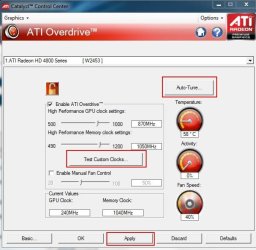
As far as your GPU goes, personally I find the ATI CCC Overdrive just fine.

What you can try if your unsure where to start is the "Auto Tune" Funtion, as seen in the snip below.
This will give a rough idea of where to start.
Once it gives the results, I would back off the Core and MEM just a bit.

Remember to "Test Custom Clocks" as well, if you make your own, and watch the Temps.


I make a Profile called GPU OC, that includes just the Overdrive section.
And another for default speeds in the same manner.

This way, when I go to play a graphic intesive games and want that little extra, I just enable my "GPU OC" profile and go at it.
When done, and just web brosing for example, I restore the default speeds.

If I remember correctly, the 4850 isn't a great Overclocker.
So don't expect a huge boost. In fact, most cards that do OC well won't give a major improvment, but it does help a little.


Hope this helps.
 

Attachments

  • Capture.JPG
    Capture.JPG
    43.8 KB · Views: 5

My Computer

Computer Manufacturer/Model Number
Custom (Self Build)
OS
Windows 7 Home Premium 64bit
CPU
Intel Core i7 2700k
Motherboard
eVGA P67 SLI
Memory
8GB Mushkin Redline Ridgebacks @1866
Graphics Card(s)
EVGA GTX570 SC
Sound Card
XiFi Titanium HD
Monitor(s) Displays
LG W2453V
Screen Resolution
1920x1080
Hard Drives
Intel 320 80GB -- Intel X25-V 40GB --WD Black 1TB x2 -- WD Blue 640GB
PSU
Seasonic x750
Case
Corsair 600T SE White
Cooling
eVGA Superclocked CPU Cooler
Keyboard
Saitek Cyborg
Antivirus
Kaspersky
Browser
IE
Other Info
LG BD/DVD
Overdrive is a good method to go but I find that actually using Rivatuner is a better way to go in my opinion as they have the recommended amount to overclock your GPU. As for your CPU goes you have a Black Edition and those are really good when it comes to bein overclocked you might even be able to unlock some cores on it as well.
 

My Computer

Computer Manufacturer/Model Number
Custom PC
OS
Windows 7 Ultimate x64
CPU
AMD Athlon II x2 Regor 245 2.9 GHz @ 3.7 GHz
Motherboard
Asus M4A785-M
Memory
G.Skill 4 Gigs 1066
Graphics Card(s)
ATI Radeon HD 4200
Sound Card
VIA VT1708S
Hard Drives
WD 80 Gig IDE
Seagate 160 Gig SATA
PSU
Rosewill 500 Watt
Case
Rosewill CRUISER Black Gaming ATX Mid Tower Computer Case
Back
Top