I got a new computer. So I am going to dump the old computer. I would like to erase everything in both C- and D-drives with "Active@ KillDisk" program. Before doing that, I have following queswtions:
a) Once a hard drive is erased with Active @killdisk, can the erased disk be re-vived by re-formatting?
b) Can the Ative@kill program also erase everything on C-drive (because Active@kill program must be installed on C-drive before use?
Microsoft Security Essentials and Malwarebytes Premium
Browser
Pale Moon
Other Info
All fans PWM; speeds at idle: CPU circa 500 rpm; intake circa 600 rpm; exhaust circa 600 rpm; CPU temps 27 idle and 47 C load in a warm room (27 C/81 F) when running Intel Extreme Tuning Utility stress test.
No - it cannot be "revived" once it has been wiped.
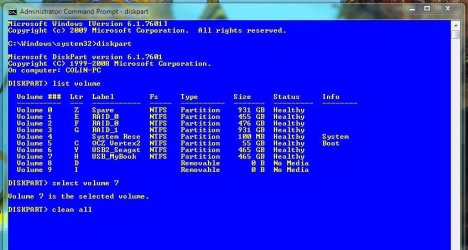
I agree with ignatz : Use the CLEAN ALL command via DISKPART from a Windows Installation disk this way:
1. Insert and boot from the Windows installation disk
2. At the screen that prompts for Language and Keyboard setup hold SHIFT and then hit F10
3. You will now have a CMD window open with the prompt X:\Sources
4. Type diskpart and hit enter
5. Type list volume and hit enter
6. Once you know which volume you want to clean, type select volume <number of volume>
7. Now type clean all and hit enter
This will wipe the selected volume by writing zero's across the entire disk, making any data on it unrecoverable. Depending on the size of the disk this can take several hours.
1*Samsung 840 EVO 120GB SSD;
1*OCZ Vertex 2 60GB SSD;
2*Samsung F3 SpinPoint 1TB in RAID0;
1*Samsung F1 SpinPoint 1TB;
2*Western Digital 1TB External USB 3.0
1*Western Digital 500GB External USB 3.0
1*Seagate 500GB External USB 2.0
PSU
Thermaltake ToughPower QFan 750W
Case
Thermaltake Element S VK60001W2Z
Cooling
Corsair H60 Water Cooling, 2*230mm and 2*80mm case fans
Thanks for the useful information. BTW, I chose a wrong word in the post: revive.
I did not mean to restore the original data from the cleaned drive. What I meant is that once the drive is cleaned, can it be reformatted in NTSF and then re-used as a "new drive"? That was my question.
1*Samsung 840 EVO 120GB SSD;
1*OCZ Vertex 2 60GB SSD;
2*Samsung F3 SpinPoint 1TB in RAID0;
1*Samsung F1 SpinPoint 1TB;
2*Western Digital 1TB External USB 3.0
1*Western Digital 500GB External USB 3.0
1*Seagate 500GB External USB 2.0
PSU
Thermaltake ToughPower QFan 750W
Case
Thermaltake Element S VK60001W2Z
Cooling
Corsair H60 Water Cooling, 2*230mm and 2*80mm case fans