
Solved Question about this partition

CriticalError

New member
Member
VIP
Local time
12:52 AM
Messages
118
HI all, few months ago I moved to Windows 7, from Vista home premium, Vista was pre-installed with this PC this PC was built by HP and, they also made a recovery partition for me. (for the vista OS)

Now the only thing is could I even use Vista again? or do I need the full OS?, does the recovery partition have on required files or the full OS?

If It's useless now I can deleted and keep that 10GB!

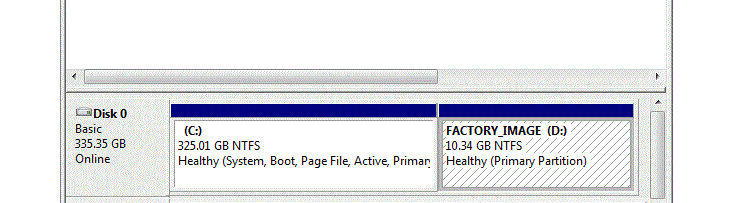
Here is an image
Capture.GIF


its the drive to the right which says FACTORY IMAGE (D)

Hope you understand..
 
Last edited by a moderator:

My Computer

OS
Windows 7 Ultimate 32
CPU
AMD Athlon 64 X2 4400+ Brisbane 65nm Technology
Motherboard
ASUSTek Computer INC. NARRA3 (Socket AM2 )
Memory
Size 3072 MBytes
Graphics Card(s)
ATI Radeon HD 3450
Sound Card
Realtek High Definition Audio
Monitor(s) Displays
Name Generic PnP Monitor on ATI Radeon HD 3450 Current Resol
Screen Resolution
1440x900
Hard Drives
Manufacturer Seagate
Form Factor 3.5"
Interface ATA
Capacity 352GB
Real size 360,080,695,296 bytes
RAID Type None
S.M.A.R.T
S.M.A.R.T not supported
Partition 0
Partition ID Disk #0, Partition #0
Disk Letter C:
File System NTFS
As the factory image is still intact you could restore your computer to HP's factory settings, but that would of course wipe your Windows 7 partition in the process.

If you've no need of Vista any more use Disk Management to delete the D partition, and then extend C to take up the slack.

Next, you'd need to remove Vista from the boot screen, and one of Brink's tutorials will show you the way.

http://www.sevenforums.com/tutorials/2288-operating-system-start-delete-os-list-boot.html
 

My Computer

Computer Manufacturer/Model Number
HP Pavilion Elite 495UK
OS
Windows 7 Ultimate SP1 64-Bit
CPU
Intel Core i7 870 @ 2.93GHz
Motherboard
MSI 2A9C (CPU1)
Memory
8Gb Dual-Channel DDR3 @ 664MHz
Graphics Card(s)
nVidia GeForce GTX 460 1024MB dedicated RAM
Sound Card
Realtek HD Audio
Monitor(s) Displays
HP2310i
Screen Resolution
1920 x 1080
Hard Drives
1x1954GB Hitachi HDS22020ALA 330 (RAID), 1x1954GB Hitachi External for backup and storage
PSU
460W
Case
HP Elite
Cooling
Air cooled
Keyboard
Logitech K750 solar-powered keyboard
Mouse
Logitech Wireless M180 mouse
Internet Speed
2Mb
Other Info
Pure Avanti Flow Internet Radio with iPod Dock, 64Gb iPod, HP USB Speakers, Sony MDR-V500 Headphones, Sony Vaio F-Series Laptop
Hello CriticalError,

Since you only have Windows 7 installed now instead of your factory default Vista, then yes you could delete the "FACTORY IMAGE (D)" partition if you like. After you do so, you would need to extend the C: partition into the unallocated space left from deleting the partition to have the space added back to the C: partion.

I would recommend that you create a set of factory recovery discs before deleting the "FACTORY IMAGE (D)" partition. This way if you should ever want to, you would be able to do a factory restore with these discs reinstall Vista back like how the computer was out of the box. Once you delete it, there will be no other way to restore your original Vista without these created factory recovery discs.
Hope this helps,
Shawn
 

My Computer

Computer type
PC/Desktop
Computer Manufacturer/Model Number
Self built custom
OS
64-bit Windows 11 Pro for Workstations
CPU
Intel i7-8700K OC'd to 5 GHz
Motherboard
ASUS ROG Maximus XI Formula Z390
Memory
64 GB (4x16GB) G.SKILL TridentZ RGB DDR4 3600 MHz
Graphics Card(s)
ASUS ROG-STRIX-GTX1080TI-O11G-GAMING
Sound Card
Integrated
Monitor(s) Displays
2 x Samsung Odyssey G7 27"
Screen Resolution
2560x1440
Hard Drives
1TB Samsung 990 PRO M.2,
4TB Samsung 990 PRO PRO M.2,
TerraMaster F8 SSD Plus NAS
PSU
Seasonic Prime Titanium 850W
Case
Thermaltake Core P3
Cooling
Corsair Hydro H115i
Keyboard
Logitech wireless K800
Mouse
Logitech MX Master 4
Internet Speed
2 Gb/s Download and 100 Mb/s Upload
Antivirus
Malwarebyte Anti-Malware Premium
Browser
Google Chrome
Other Info
Logitech Z625 speaker system,
Logitech BRIO 4K Pro webcam,
HP Color LaserJet Pro MFP M477fdn,
APC SMART-UPS RT 1000 XL - SURT1000XLI,
Galaxy S23 Plus phone
As the factory image is still intact you could restore your computer to HP's factory settings, but that would of course wipe your Windows 7 partition in the process.

If you've no need of Vista any more use Disk Management to delete the D partition, and then extend C to take up the slack.

Next, you'd need to remove Vista from the boot screen, and one of Brink's tutorials will show you the way.

http://www.sevenforums.com/tutorials/2288-operating-system-start-delete-os-list-boot.html


its not on dual boot windows 7 loads....vista boot has gone..
 

My Computer

OS
Windows 7 Ultimate 32
CPU
AMD Athlon 64 X2 4400+ Brisbane 65nm Technology
Motherboard
ASUSTek Computer INC. NARRA3 (Socket AM2 )
Memory
Size 3072 MBytes
Graphics Card(s)
ATI Radeon HD 3450
Sound Card
Realtek High Definition Audio
Monitor(s) Displays
Name Generic PnP Monitor on ATI Radeon HD 3450 Current Resol
Screen Resolution
1440x900
Hard Drives
Manufacturer Seagate
Form Factor 3.5"
Interface ATA
Capacity 352GB
Real size 360,080,695,296 bytes
RAID Type None
S.M.A.R.T
S.M.A.R.T not supported
Partition 0
Partition ID Disk #0, Partition #0
Disk Letter C:
File System NTFS
OK anyway when I start this PC I cannot boot in to system recovery when I press F11 that's probably because I removed the Vista....and I can' make back up cause I only got DVD/RW which cannot be used according to HP website, and also, it would take around 10discs which is a waste and bad for the environment lol, and also, I had Vista Home premium which was slow and had less features and was ugly and cr@p, so I doubt I would ever need it back, I will wipe that drive out....(got space for Zorin!!!)

Thanks for your help guys..
 

My Computer

OS
Windows 7 Ultimate 32
CPU
AMD Athlon 64 X2 4400+ Brisbane 65nm Technology
Motherboard
ASUSTek Computer INC. NARRA3 (Socket AM2 )
Memory
Size 3072 MBytes
Graphics Card(s)
ATI Radeon HD 3450
Sound Card
Realtek High Definition Audio
Monitor(s) Displays
Name Generic PnP Monitor on ATI Radeon HD 3450 Current Resol
Screen Resolution
1440x900
Hard Drives
Manufacturer Seagate
Form Factor 3.5"
Interface ATA
Capacity 352GB
Real size 360,080,695,296 bytes
RAID Type None
S.M.A.R.T
S.M.A.R.T not supported
Partition 0
Partition ID Disk #0, Partition #0
Disk Letter C:
File System NTFS
You're most welcome. I'm glad that we could help. :)
 

My Computer

Computer type
PC/Desktop
Computer Manufacturer/Model Number
Self built custom
OS
64-bit Windows 11 Pro for Workstations
CPU
Intel i7-8700K OC'd to 5 GHz
Motherboard
ASUS ROG Maximus XI Formula Z390
Memory
64 GB (4x16GB) G.SKILL TridentZ RGB DDR4 3600 MHz
Graphics Card(s)
ASUS ROG-STRIX-GTX1080TI-O11G-GAMING
Sound Card
Integrated
Monitor(s) Displays
2 x Samsung Odyssey G7 27"
Screen Resolution
2560x1440
Hard Drives
1TB Samsung 990 PRO M.2,
4TB Samsung 990 PRO PRO M.2,
TerraMaster F8 SSD Plus NAS
PSU
Seasonic Prime Titanium 850W
Case
Thermaltake Core P3
Cooling
Corsair Hydro H115i
Keyboard
Logitech wireless K800
Mouse
Logitech MX Master 4
Internet Speed
2 Gb/s Download and 100 Mb/s Upload
Antivirus
Malwarebyte Anti-Malware Premium
Browser
Google Chrome
Other Info
Logitech Z625 speaker system,
Logitech BRIO 4K Pro webcam,
HP Color LaserJet Pro MFP M477fdn,
APC SMART-UPS RT 1000 XL - SURT1000XLI,
Galaxy S23 Plus phone
Not a problem. Thanks for the feedback too.

I hope Windows 7 gives you a better computing experience than Vista appears to have done.
 

My Computer

Computer Manufacturer/Model Number
HP Pavilion Elite 495UK
OS
Windows 7 Ultimate SP1 64-Bit
CPU
Intel Core i7 870 @ 2.93GHz
Motherboard
MSI 2A9C (CPU1)
Memory
8Gb Dual-Channel DDR3 @ 664MHz
Graphics Card(s)
nVidia GeForce GTX 460 1024MB dedicated RAM
Sound Card
Realtek HD Audio
Monitor(s) Displays
HP2310i
Screen Resolution
1920 x 1080
Hard Drives
1x1954GB Hitachi HDS22020ALA 330 (RAID), 1x1954GB Hitachi External for backup and storage
PSU
460W
Case
HP Elite
Cooling
Air cooled
Keyboard
Logitech K750 solar-powered keyboard
Mouse
Logitech Wireless M180 mouse
Internet Speed
2Mb
Other Info
Pure Avanti Flow Internet Radio with iPod Dock, 64Gb iPod, HP USB Speakers, Sony MDR-V500 Headphones, Sony Vaio F-Series Laptop
Not a problem. Thanks for the feedback too.

I hope Windows 7 gives you a better computing experience than Vista appears to have done.

no, only difference I see is the booting time lol, other than that its the same, it takes around 20-30minutes to deleted 3GB! while Linux can do it in, 10seconds, oh well...but hey I got it free in a competition so can't refuse the gift lol::))
 

My Computer

OS
Windows 7 Ultimate 32
CPU
AMD Athlon 64 X2 4400+ Brisbane 65nm Technology
Motherboard
ASUSTek Computer INC. NARRA3 (Socket AM2 )
Memory
Size 3072 MBytes
Graphics Card(s)
ATI Radeon HD 3450
Sound Card
Realtek High Definition Audio
Monitor(s) Displays
Name Generic PnP Monitor on ATI Radeon HD 3450 Current Resol
Screen Resolution
1440x900
Hard Drives
Manufacturer Seagate
Form Factor 3.5"
Interface ATA
Capacity 352GB
Real size 360,080,695,296 bytes
RAID Type None
S.M.A.R.T
S.M.A.R.T not supported
Partition 0
Partition ID Disk #0, Partition #0
Disk Letter C:
File System NTFS
Back
Top