Question about UPS

Reverence

New member
Member
VIP
Local time
11:07 PM
Messages
110
Hello

Wanted to know if UPS considered as battery?

Cause from some reason from today I have the battery icon and it says that the battery fully charged.

Also when I left the pc on it went to sleep and then resume windows and told me bla bla.... because battery level is 100%.

Is that normal?
 

My Computer

Computer Manufacturer/Model Number
Custom Build
OS
Windows 7 Ultimate x64 SP1 RC
CPU
Core i7 950, 3.06GHz, s1366, 8MB Tray
Motherboard
GIGABYTE X58A-UD5 s1366 Core i7, Intel X58, DDR3 2200+, 4xPC
Memory
Corsair 3x2GB Corsair Dominator-GT Triple Channel CL7
Graphics Card(s)
GIGABYTE GTX580 1536MB GDDR5 DX11 2xDVI Mini HDMI PCI-E
Sound Card
Onboard
Monitor(s) Displays
Samsung XL2370 23'' LED 2ms DVI HDMI WideScreen Black
Screen Resolution
1920x1080
Hard Drives
HD 1 (OS): Mushkin Callisto Series 60GB SSD Sata II MLC 2.5'' Retail
HD 2 (DATA): WD Caviar Black 1TB 7200RPM, 64MB, SATA III WD1002FAEX
PSU
Corsair HX 850W Active PFC 12cm Fan Modular
Case
Antec P183 Mid Tower Black
Cooling
Scythe Mugen II Rev.b 5 Heat Pipes CPU Cooler s1156/s1366
Internet Speed
VDSL 30Mbit
Hello Reverence,

Yes, a UPS would give you a Power (battery) icon in the notification area when you have it's data cable connected to the computer. :)
 

My Computer

Computer type
PC/Desktop
Computer Manufacturer/Model Number
Self built custom
OS
64-bit Windows 11 Pro for Workstations
CPU
Intel i7-8700K OC'd to 5 GHz
Motherboard
ASUS ROG Maximus XI Formula Z390
Memory
64 GB (4x16GB) G.SKILL TridentZ RGB DDR4 3600 MHz
Graphics Card(s)
ASUS ROG-STRIX-GTX1080TI-O11G-GAMING
Sound Card
Integrated
Monitor(s) Displays
2 x Samsung Odyssey G7 27"
Screen Resolution
2560x1440
Hard Drives
1TB Samsung 990 PRO M.2,
4TB Samsung 990 PRO PRO M.2,
TerraMaster F8 SSD Plus NAS
PSU
Seasonic Prime Titanium 850W
Case
Thermaltake Core P3
Cooling
Corsair Hydro H115i
Keyboard
Logitech wireless K800
Mouse
Logitech MX Master 4
Internet Speed
2 Gb/s Download and 100 Mb/s Upload
Antivirus
Malwarebyte Anti-Malware Premium
Browser
Google Chrome
Other Info
Logitech Z625 speaker system,
Logitech BRIO 4K Pro webcam,
HP Color LaserJet Pro MFP M477fdn,
APC SMART-UPS RT 1000 XL - SURT1000XLI,
Galaxy S23 Plus phone
Thanks for quick answer Brink.

But is that possible my comp just went into hibernation cause battery was full?

And windows says to not harm the battery comp just went hibernation.
 

My Computer

Computer Manufacturer/Model Number
Custom Build
OS
Windows 7 Ultimate x64 SP1 RC
CPU
Core i7 950, 3.06GHz, s1366, 8MB Tray
Motherboard
GIGABYTE X58A-UD5 s1366 Core i7, Intel X58, DDR3 2200+, 4xPC
Memory
Corsair 3x2GB Corsair Dominator-GT Triple Channel CL7
Graphics Card(s)
GIGABYTE GTX580 1536MB GDDR5 DX11 2xDVI Mini HDMI PCI-E
Sound Card
Onboard
Monitor(s) Displays
Samsung XL2370 23'' LED 2ms DVI HDMI WideScreen Black
Screen Resolution
1920x1080
Hard Drives
HD 1 (OS): Mushkin Callisto Series 60GB SSD Sata II MLC 2.5'' Retail
HD 2 (DATA): WD Caviar Black 1TB 7200RPM, 64MB, SATA III WD1002FAEX
PSU
Corsair HX 850W Active PFC 12cm Fan Modular
Case
Antec P183 Mid Tower Black
Cooling
Scythe Mugen II Rev.b 5 Heat Pipes CPU Cooler s1156/s1366
Internet Speed
VDSL 30Mbit

My Computer

Computer type
PC/Desktop
Computer Manufacturer/Model Number
Self built custom
OS
64-bit Windows 11 Pro for Workstations
CPU
Intel i7-8700K OC'd to 5 GHz
Motherboard
ASUS ROG Maximus XI Formula Z390
Memory
64 GB (4x16GB) G.SKILL TridentZ RGB DDR4 3600 MHz
Graphics Card(s)
ASUS ROG-STRIX-GTX1080TI-O11G-GAMING
Sound Card
Integrated
Monitor(s) Displays
2 x Samsung Odyssey G7 27"
Screen Resolution
2560x1440
Hard Drives
1TB Samsung 990 PRO M.2,
4TB Samsung 990 PRO PRO M.2,
TerraMaster F8 SSD Plus NAS
PSU
Seasonic Prime Titanium 850W
Case
Thermaltake Core P3
Cooling
Corsair Hydro H115i
Keyboard
Logitech wireless K800
Mouse
Logitech MX Master 4
Internet Speed
2 Gb/s Download and 100 Mb/s Upload
Antivirus
Malwarebyte Anti-Malware Premium
Browser
Google Chrome
Other Info
Logitech Z625 speaker system,
Logitech BRIO 4K Pro webcam,
HP Color LaserJet Pro MFP M477fdn,
APC SMART-UPS RT 1000 XL - SURT1000XLI,
Galaxy S23 Plus phone
Yes I know that m8 thats not the issue ;)

I am afraid something is wrong.

Well lets wait if that happens again.
 

My Computer

Computer Manufacturer/Model Number
Custom Build
OS
Windows 7 Ultimate x64 SP1 RC
CPU
Core i7 950, 3.06GHz, s1366, 8MB Tray
Motherboard
GIGABYTE X58A-UD5 s1366 Core i7, Intel X58, DDR3 2200+, 4xPC
Memory
Corsair 3x2GB Corsair Dominator-GT Triple Channel CL7
Graphics Card(s)
GIGABYTE GTX580 1536MB GDDR5 DX11 2xDVI Mini HDMI PCI-E
Sound Card
Onboard
Monitor(s) Displays
Samsung XL2370 23'' LED 2ms DVI HDMI WideScreen Black
Screen Resolution
1920x1080
Hard Drives
HD 1 (OS): Mushkin Callisto Series 60GB SSD Sata II MLC 2.5'' Retail
HD 2 (DATA): WD Caviar Black 1TB 7200RPM, 64MB, SATA III WD1002FAEX
PSU
Corsair HX 850W Active PFC 12cm Fan Modular
Case
Antec P183 Mid Tower Black
Cooling
Scythe Mugen II Rev.b 5 Heat Pipes CPU Cooler s1156/s1366
Internet Speed
VDSL 30Mbit
If the battery level gets low to a certain point, there is a setting in "Advanced Power Settings" that will either put the computer to sleep, hibernate, or shutdown depending on what you have set. You might check to see if that may be it. Not sure why it would say "because of 100%" though.
 

My Computer

Computer type
PC/Desktop
Computer Manufacturer/Model Number
Self built custom
OS
64-bit Windows 11 Pro for Workstations
CPU
Intel i7-8700K OC'd to 5 GHz
Motherboard
ASUS ROG Maximus XI Formula Z390
Memory
64 GB (4x16GB) G.SKILL TridentZ RGB DDR4 3600 MHz
Graphics Card(s)
ASUS ROG-STRIX-GTX1080TI-O11G-GAMING
Sound Card
Integrated
Monitor(s) Displays
2 x Samsung Odyssey G7 27"
Screen Resolution
2560x1440
Hard Drives
1TB Samsung 990 PRO M.2,
4TB Samsung 990 PRO PRO M.2,
TerraMaster F8 SSD Plus NAS
PSU
Seasonic Prime Titanium 850W
Case
Thermaltake Core P3
Cooling
Corsair Hydro H115i
Keyboard
Logitech wireless K800
Mouse
Logitech MX Master 4
Internet Speed
2 Gb/s Download and 100 Mb/s Upload
Antivirus
Malwarebyte Anti-Malware Premium
Browser
Google Chrome
Other Info
Logitech Z625 speaker system,
Logitech BRIO 4K Pro webcam,
HP Color LaserJet Pro MFP M477fdn,
APC SMART-UPS RT 1000 XL - SURT1000XLI,
Galaxy S23 Plus phone
Yes but when I resumed the windows it said that the battery reached 100% and to not make damage to the battery windows went to hibernation shame I didn't read all the message and resumed windows too fast.

Well lets just wait if it will happen again.
 

My Computer

Computer Manufacturer/Model Number
Custom Build
OS
Windows 7 Ultimate x64 SP1 RC
CPU
Core i7 950, 3.06GHz, s1366, 8MB Tray
Motherboard
GIGABYTE X58A-UD5 s1366 Core i7, Intel X58, DDR3 2200+, 4xPC
Memory
Corsair 3x2GB Corsair Dominator-GT Triple Channel CL7
Graphics Card(s)
GIGABYTE GTX580 1536MB GDDR5 DX11 2xDVI Mini HDMI PCI-E
Sound Card
Onboard
Monitor(s) Displays
Samsung XL2370 23'' LED 2ms DVI HDMI WideScreen Black
Screen Resolution
1920x1080
Hard Drives
HD 1 (OS): Mushkin Callisto Series 60GB SSD Sata II MLC 2.5'' Retail
HD 2 (DATA): WD Caviar Black 1TB 7200RPM, 64MB, SATA III WD1002FAEX
PSU
Corsair HX 850W Active PFC 12cm Fan Modular
Case
Antec P183 Mid Tower Black
Cooling
Scythe Mugen II Rev.b 5 Heat Pipes CPU Cooler s1156/s1366
Internet Speed
VDSL 30Mbit
Hello Reverence,

Yes, a UPS would give you a Power (battery) icon in the notification area when you have it's data cable connected to the computer. :)

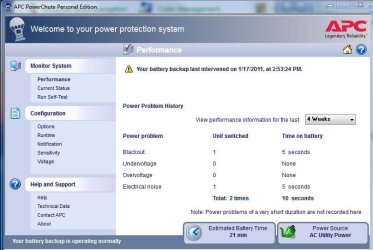
I think this depends on the brand of UPS. I have a "smart" APC UPS Power conditioner/backup unit which is connected to my computer (so the computer can test the battery) but it dosent in any way have anything to do with the Windows Battery Icon. The APC has a control panel which you can bring up with the APC icon in the system tray. Looks like this -

Capture.JPG
 

My Computer

Computer Manufacturer/Model Number
Alienware Aurora
OS
Win 7 Ultimate x64
CPU
Core I7 980X O.C. to 4.0 Ghz
Motherboard
Custom Intel mATX (Bios ver A10)
Memory
12GB 1600 mhz triple channel DDR3 - Kingston
Graphics Card(s)
ATI Radeon HD 5970 2GB Video Card
Sound Card
Creative Labs Titanium sound blaster
Monitor(s) Displays
30" Dell LCD
Screen Resolution
2560 x 1600
Hard Drives
240 GB OCZ Vertex 2 SSD
256 GB Samsung V2 SSD
2TB WD Black Caviar 7200 rpm SATA3
600GB WD Velociraptor 10,000 rpm SATA3
3TB WD MyBook Essential USB 3.0 7200 rpm External
PSU
850 Watt
Case
Alienware Aurora
Cooling
Water
Keyboard
Logitech G15 (original version)
Mouse
Logitech MX1000 Laser - Wireless
Internet Speed
Cable 22 Mb/sec download
Other Info
USB 3.0,
Blue Ray DVD Read/Writer
Bose Companion 3 Speakers
WRT54G Wireless Router
Hello HappyMan,

That's what I have as well with my APC unit.

It depends on if you installed the software that came with the UPS (ex: APC brand) or not. If you didn't or uninstall it, then you would have the normal "Power" icon in the system tray area instead of the icon for the UPS's software. Of course the data cable has to be connected as well between the UPS and computer.
 

My Computer

Computer type
PC/Desktop
Computer Manufacturer/Model Number
Self built custom
OS
64-bit Windows 11 Pro for Workstations
CPU
Intel i7-8700K OC'd to 5 GHz
Motherboard
ASUS ROG Maximus XI Formula Z390
Memory
64 GB (4x16GB) G.SKILL TridentZ RGB DDR4 3600 MHz
Graphics Card(s)
ASUS ROG-STRIX-GTX1080TI-O11G-GAMING
Sound Card
Integrated
Monitor(s) Displays
2 x Samsung Odyssey G7 27"
Screen Resolution
2560x1440
Hard Drives
1TB Samsung 990 PRO M.2,
4TB Samsung 990 PRO PRO M.2,
TerraMaster F8 SSD Plus NAS
PSU
Seasonic Prime Titanium 850W
Case
Thermaltake Core P3
Cooling
Corsair Hydro H115i
Keyboard
Logitech wireless K800
Mouse
Logitech MX Master 4
Internet Speed
2 Gb/s Download and 100 Mb/s Upload
Antivirus
Malwarebyte Anti-Malware Premium
Browser
Google Chrome
Other Info
Logitech Z625 speaker system,
Logitech BRIO 4K Pro webcam,
HP Color LaserJet Pro MFP M477fdn,
APC SMART-UPS RT 1000 XL - SURT1000XLI,
Galaxy S23 Plus phone

My Computer

Computer Manufacturer/Model Number
Custom Build
OS
Windows 7 Ultimate x64 SP1 RC
CPU
Core i7 950, 3.06GHz, s1366, 8MB Tray
Motherboard
GIGABYTE X58A-UD5 s1366 Core i7, Intel X58, DDR3 2200+, 4xPC
Memory
Corsair 3x2GB Corsair Dominator-GT Triple Channel CL7
Graphics Card(s)
GIGABYTE GTX580 1536MB GDDR5 DX11 2xDVI Mini HDMI PCI-E
Sound Card
Onboard
Monitor(s) Displays
Samsung XL2370 23'' LED 2ms DVI HDMI WideScreen Black
Screen Resolution
1920x1080
Hard Drives
HD 1 (OS): Mushkin Callisto Series 60GB SSD Sata II MLC 2.5'' Retail
HD 2 (DATA): WD Caviar Black 1TB 7200RPM, 64MB, SATA III WD1002FAEX
PSU
Corsair HX 850W Active PFC 12cm Fan Modular
Case
Antec P183 Mid Tower Black
Cooling
Scythe Mugen II Rev.b 5 Heat Pipes CPU Cooler s1156/s1366
Internet Speed
VDSL 30Mbit
Good morning Reverence,

If it happens again, post back a screenshot of it to see if we may be able to spot something that may help.
 

My Computer

Computer type
PC/Desktop
Computer Manufacturer/Model Number
Self built custom
OS
64-bit Windows 11 Pro for Workstations
CPU
Intel i7-8700K OC'd to 5 GHz
Motherboard
ASUS ROG Maximus XI Formula Z390
Memory
64 GB (4x16GB) G.SKILL TridentZ RGB DDR4 3600 MHz
Graphics Card(s)
ASUS ROG-STRIX-GTX1080TI-O11G-GAMING
Sound Card
Integrated
Monitor(s) Displays
2 x Samsung Odyssey G7 27"
Screen Resolution
2560x1440
Hard Drives
1TB Samsung 990 PRO M.2,
4TB Samsung 990 PRO PRO M.2,
TerraMaster F8 SSD Plus NAS
PSU
Seasonic Prime Titanium 850W
Case
Thermaltake Core P3
Cooling
Corsair Hydro H115i
Keyboard
Logitech wireless K800
Mouse
Logitech MX Master 4
Internet Speed
2 Gb/s Download and 100 Mb/s Upload
Antivirus
Malwarebyte Anti-Malware Premium
Browser
Google Chrome
Other Info
Logitech Z625 speaker system,
Logitech BRIO 4K Pro webcam,
HP Color LaserJet Pro MFP M477fdn,
APC SMART-UPS RT 1000 XL - SURT1000XLI,
Galaxy S23 Plus phone
Back
Top