Solved question about "visibility" of 2 PCs in the same LAN

blos46

New member
Local time
2:28 PM
Messages
5
Hello,I'm new to this Forum, and hope to be aided to solve a problem I'm unable to solve by myself.
My aim is to be able to access drives of Desktop from Laptop, and viceversa.
Here is the situation:


  1. I have a Desktop and a Laptop connected to the same LAN
  2. Ping from Laptop to Desktop works
  3. Ping from Desktop to Laptop doesn't work
  4. On Desktop "Network" shows that Desktop is online, while Laptop isn't
  5. On Laptop, "Network" doesn't show Laptop online, while Desktop is online, but isn't accessible
  6. Desktop cannot see drives shared by Laptop
  7. Laptop cannot see drives shared by Desktop

Maybe issues 4 and 5 are due to issue 3, and issues 6 and 7 re due to issues 4 an 5.
So my first question is:


  • Why ping from Desktop to Laptop doesn't work? What have I to check/change so that ping works both ways

Thanks in advance for each suggestion I'll receive!
 

My Computers My Computers

  • At a glance

    Windows 7 home premium 64 bit
    OS
    Windows 7 home premium 64 bit
  • At a glance

    Windows 11
    Computer type
    Laptop
    System Manufacturer/Model Number
    Asus Vivobook
    OS
    Windows 11
Welcome to the forum. Its lickley a setting issue. compare the setting for network between laptop and desktop most likely network discovery isnt on or its set to public
 

My Computer My Computer

At a glance

win 8 32 bit
Computer type
PC/Desktop
OS
win 8 32 bit
Thanks Samuria.
Your suggestion is invaluable. I found that Desktop's network was private while Laptop's one was public.
So I was able to solve issues 3 and 4.
Now there is a last (I hope) issue: When on Desktop's Network I try to open the remote Laptop, a message is issued saying that authorizations are insufficient. What has to be done to provide lacking authorization?
 

My Computers My Computers

  • At a glance

    Windows 7 home premium 64 bit
    OS
    Windows 7 home premium 64 bit
  • At a glance

    Windows 11
    Computer type
    Laptop
    System Manufacturer/Model Number
    Asus Vivobook
    OS
    Windows 11
By default when you try and connect windows passes your current login and password it depends how you have setup shares if theyare set to everyone it should let you in but then the NTFS permissions must be set correct. Some folders and files will be owned by system which you can get to NTFS Permissions - NTFS.com
 

My Computer My Computer

At a glance

win 8 32 bit
Computer type
PC/Desktop
OS
win 8 32 bit
On Desktop I added, as Windows credentials, those of Laptop; now I can access Laptop's drive C from Desktop without problems.
Then I tried the same procedure on Laptop, adding as Windows credentials those of Desktop, but again I cannot access Desktop's drive C from Laptop. Again not enough permissions.
Laptop has the right credentials for Desktop; Desktop shares Drive C , and sharing permissions for Drive C on Desktop are for "Everyone". Drive C is NTFS, and its permissions are for Everyone.
What am I doing wrong or am I missing?
 

My Computers My Computers

  • At a glance

    Windows 7 home premium 64 bit
    OS
    Windows 7 home premium 64 bit
  • At a glance

    Windows 11
    Computer type
    Laptop
    System Manufacturer/Model Number
    Asus Vivobook
    OS
    Windows 11
You shouldn't share the whole C: drive. Try sharing a specific folder that you have created. You can share other folders you do not own if your user is type Admin.

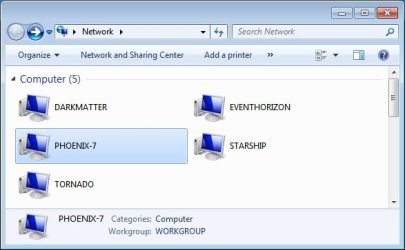
I have a number of computers that I share files over my home network. Here is a screenshot taken on the computer called Phoenix7. It shows five of the computers I currently have powered on.

Desktops:
  • Darkmatter (Windows 10 Pro)
  • Phoenix-7 (Windows 7 Pro)
Laptops:
  • Tornado (Windows 7 Home)
  • EventHorizon (Windows 10 Pro)
  • Starship (Windows 11 Home)
 

Attachments

  • network_on_phoenix7.jpg
    network_on_phoenix7.jpg
    25.5 KB · Views: 8

My Computers My Computers

  • At a glance

    Windows 7 Home Premium 64-bitsAMD FX-8350GSKILL Ripjaw-X PC3 12800 8GB (2x4GB)ASUS ROG STRIX GTX 1060 6GB
    Computer type
    PC/Desktop
    Computer Manufacturer/Model Number
    Custom build
    OS
    Windows 7 Home Premium 64-bits
    CPU
    AMD FX-8350
    Motherboard
    Gigabyte GA-990FXA-UD3 (AM3+)
    Memory
    GSKILL Ripjaw-X PC3 12800 8GB (2x4GB)
    Graphics Card(s)
    ASUS ROG STRIX GTX 1060 6GB
    Sound Card
    Integrated
    Monitor(s) Displays
    Asus VE228H (21.5-in)
    Screen Resolution
    1920x1080 60Hz
    Hard Drives
    SAMSUNG 870 EVO 2.5 Inch SATA SSD (1TB)
    SAMSUNG 870 EVO 2.5 Inch SATA SSD (1TB)
    SAMSUNG 870 EVO 2.5 Inch SATA SSD (1TB)
    PSU
    Corsair RM750x (750 watts)
    Case
    Corsair Carbide Series 200R
    Cooling
    Corsair Hydro Series H60 (CWCH60)
    Keyboard
    Logitech Elite
    Mouse
    Logitech M510 Wireless Mouse
    Internet Speed
    Comcast Gigabit Extra (1200Mbps down / 35Mbps up)
    Antivirus
    Malwarebytes
    Browser
    Firefox, Edge, Chrome
    Other Info
    ASUS DRW-24B1ST DVD-RW (24X) optical drive
    Seagate Expansion Desk (5TB) external SATA/USB HDD
    Comcast XB8 Internet Gateway
  • At a glance

    Windows 7 Pro (64-bit)AMD Phenom II 960T X4Corsair XMS2 DDR2-800 8GB (4x2GB)ASUS ENGTX560 DCII OC/2DI/1GD5 1GB
    Computer type
    PC/Desktop
    System Manufacturer/Model Number
    Custom
    OS
    Windows 7 Pro (64-bit)
    CPU
    AMD Phenom II 960T X4
    Motherboard
    ASUS M4N82 Deluxe
    Memory
    Corsair XMS2 DDR2-800 8GB (4x2GB)
    Graphics Card(s)
    ASUS ENGTX560 DCII OC/2DI/1GD5 1GB
    Monitor(s) Displays
    Samsung 930B 19-inch LCD
    Screen Resolution
    1280x1024
    Hard Drives
    Samsung SSD 870 EVO 1000 GB (Windows 10)
    Seagate ST1000DM003 1000 GB (Windows 7)
    PSU
    Antec TruePower (new) TP-650
    Case
    Antec Three Hundred
    Cooling
    AMD stock cooler from FX8350
    Mouse
    Logitech M100
    Internet Speed
    Xfinity Gigabit Extra 1200/35 Mbps
My situation is apparently similar to the one shown by MisterEd's screenshot, but if I on Laptop double-click Desktop's icon, I don't see a list of Desktop's shared folders, as happens when opening Laptop's icon from Desktop's "Network", but only the message about not enough permissions. This happens also if Desktop shares a single folder instead of a drive.
 

My Computers My Computers

  • At a glance

    Windows 7 home premium 64 bit
    OS
    Windows 7 home premium 64 bit
  • At a glance

    Windows 11
    Computer type
    Laptop
    System Manufacturer/Model Number
    Asus Vivobook
    OS
    Windows 11
I don't use Windows networking so I'll be of very little help there, but I can tell you that if you can't even ping the laptop it's possible a firewall is to blame.

The other thing here is perhaps when you setup the laptop's network for the first time you did not opt to set as Home Network and all that rot. This might be remedied by removing a registry key forcing the NIC (Network Interface Card) to reestablish the network connection giving you the option on how you wanna be discoverable on your LAN.

A better solution: TrueNAS - Welcome to the Open Storage Era

Ideas:

Amazon Link

Amazon Link

Better than Synergy IMO. Input Director - Software KVM to Control Multiple Computers

Use this locally ONLY. Unless you use ZeroTier... TightVNC: VNC-Compatible Free Remote Control / Remote Desktop Software
 

My Computer My Computer

At a glance

Windows 7 Ultimate x64
Computer type
PC/Desktop
OS
Windows 7 Ultimate x64
Thanks to everyone for the invaluable support.Through your suggestions and a lot of trial and error, the system now works as I expected.Issues 3, 4, 5 and 6 have been solved setting LAN on both computers to "Private".Issue 7 was harder to solve, and, to be sincere, I am not able to say exactly which settings led to the desired result. Last obstacle was that I could access Desktop via its LAN IP and not via its NAME (i.e. via \\ipaddress and not via \\desktopname).This morning also this obstacle has disappeared: clicking the Desktop's icon in "Network" now gives me access to every shared folder and disk in Desktop.Again thanks!
 

My Computers My Computers

  • At a glance

    Windows 7 home premium 64 bit
    OS
    Windows 7 home premium 64 bit
  • At a glance

    Windows 11
    Computer type
    Laptop
    System Manufacturer/Model Number
    Asus Vivobook
    OS
    Windows 11
The problem is by default all drives are shared as a admin account and hidden with a $ ie c$ if you then share it anotrher way you wil have problems to access it you need to pass admin name and password on the pc your connecting to best whay is to map via cmd which you can save as a cmd file

net use s: \\tower\movies /user:HTG password

Change s to the drive letter you want to use
change \\tower to your pcs name and drive letter ie \\laptop\c$
change htg to admin on the pc and password for the pcs password

when it works save the file as a cmd file ie lapy.cmd then to connect you just run lapy
 

My Computer My Computer

At a glance

win 8 32 bit
Computer type
PC/Desktop
OS
win 8 32 bit
Back
Top