question about win 7 magnifier

Just married

New member
Member
VIP
Local time
5:53 PM
Messages
96
Good Evening Seven Forums, this is about SFC.EXE

The Dummy is back again. I posted a question about the problem I am haveing with the built in magnifier in Win 7 Pro.

I did get a reply but was no help. I decided to check with Microsoft ASK A QUESTION. I did get a reply, however I could not complete the possible solution since my copy of win 7 Pro does not allow me to execute the possible solution. I replied to Microsoft ask a question no answer. Hopefully someone at seven forums can tell why the proceedure does not work:
This is what I was tald to do, go to accessories then click ELEVATED COMMAND PROMPT the only I could not find that kind of prompt but did find COMMAND PROMPT, so I clicked that, however I was supposed to se RUN AS ADMINISTRATOR, whick I did not find, I did find this c:/user/my name followed by a blinking cursor waiting for entries. I was to enter ALLOW after possible being asked for my password, that did not work so I entered ALLOW, the only thing I got was you are not allowed to enter in so many words. I then made sure I am listed as the administrator on my computer and I was. The oblect of all this is to run SFC.EXE a program allready installed to check the operating system files, if corrumpted then insert my install CD or DVD when I installed win 7 Pro to replace any corrupted files.

If anyone has used the program SFC.EXE please let me know what the proceedure is.
hope you don't find too many missplelled words.
 

My Computer

Computer Manufacturer/Model Number
assemble my own
OS
Windows 7 Pro 64 bit
CPU
AMD
Motherboard
ASUS
Memory
6GB
Graphics Card(s)
ON BOARD
Sound Card
ON BOARD
Monitor(s) Displays
HP FALT SCREEN 21"
Hard Drives
ONE 1.5TB, ONE .5TB
PSU
500w
Case
NEW TO FIT
Cooling
WGAT CANE WUTG CASE
To "run as administrator", you need to right click on the Command Prompt, instead of a normal left click. And then at the top of the menu that opens, choose run as administrator.
 

My Computer

Computer Manufacturer/Model Number
Customized build from CyberPower
OS
Windows 7 Home Premium 64bit SP 1
CPU
Intel i5 2500k
Motherboard
Asus P8P67 Deluxe
Memory
8 gigabytes Corsair PC3-12800 DDR3
Graphics Card(s)
EVGA GeForce GTX 460 superclocked
Sound Card
Integrated
Monitor(s) Displays
ViewSonic 23" LCD
Screen Resolution
1980 x 1080
Hard Drives
120 Gb Samsung 840 Pro SSD
120 Gb Kingston Hyper X SSD
1 Tb WD Caviar Black HDD
PSU
Coolermaster 1000 watt modular
Case
Coolermaster HAF X full tower
Cooling
Coolermaster Hyper 212 plus
Keyboard
Logitech USB
Mouse
Microsoft 3 button
Internet Speed
download 1.5 Mb/sec upload 300Kb/sec
To open an elevated command prompt click start button
type cmd, you will see program at top of start menu window
right click on program then select run as administrator, you now have an open command prompt at administrator level
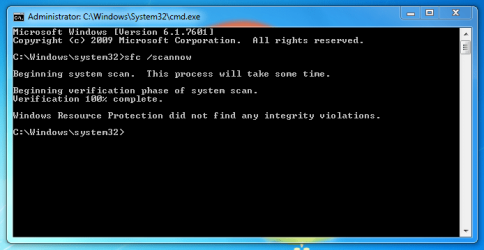
now type sfc /scannow and hit enter
you will now see the program running, if all is good the progress will go to 100% and you will see something like this
Capture.PNG
If any problems are found then let us know and we can tell you where to find log files and what you can do about it

Hope this helps
 

My Computer

Computer type
PC/Desktop
Computer Manufacturer/Model Number
Pauly Special
OS
Win7 Ultimate X64
CPU
Intel i5 3570K
Motherboard
Gigabyte Z77X-DS3H
Memory
8GB DDR3 1600
Graphics Card(s)
Onboard
Sound Card
Onboard
Screen Resolution
1280x1024
Hard Drives
Samsung 840 Evo SSD (OS)
1TB Spinner (Data)
PSU
800W Arctic
Case
Cooler Master
Cooling
3x120mm Fans
Keyboard
MS Wireless
Mouse
MS Wireless
Internet Speed
20M
Results in rybbubg SFC,EXE

Good Morning Seven Forums,

I very much appreciate your topic on how to create an elevated command prompt for windows 7.

I did as you outlined and it worked perfectly. I have tried from others winout succes, from Microsoft it;s self their procedure did not work but yours did, hats of the Seven Forums.
I just rand SFC.EXE several lines appeared with the lines with how did it come out data with lines longer than the cmd type window white letters on black background. I could not make the window any wider so could not read the entire line. I did use windows snipit to copy all the lines and put them in Paint shop pro and printed them.

The lines started like this: /scannow, /verfyonly, /scanfile, /veriffile, /offb ooidir, /offwubdur

I am not sure since I could not read all of the senteces to their end not sure if anything was done. It would be nice to know what I could expect when I did get to run SFC.EXE. Has anyone done that?
 

My Computer

Computer Manufacturer/Model Number
assemble my own
OS
Windows 7 Pro 64 bit
CPU
AMD
Motherboard
ASUS
Memory
6GB
Graphics Card(s)
ON BOARD
Sound Card
ON BOARD
Monitor(s) Displays
HP FALT SCREEN 21"
Hard Drives
ONE 1.5TB, ONE .5TB
PSU
500w
Case
NEW TO FIT
Cooling
WGAT CANE WUTG CASE
It sounds like you actually typed sfc.exe in to command prompt
you need to type exactly how i stated above
sfc /scannow
look at my screen shot above this was taken after scan completed
if entered correctly you will see the same screen with the progress indicator starting at 1% rising to 100% then an output on results
above is what you are hoping for "no integrity violations found"
if anything else comes out post the message and we can help
 

My Computer

Computer type
PC/Desktop
Computer Manufacturer/Model Number
Pauly Special
OS
Win7 Ultimate X64
CPU
Intel i5 3570K
Motherboard
Gigabyte Z77X-DS3H
Memory
8GB DDR3 1600
Graphics Card(s)
Onboard
Sound Card
Onboard
Screen Resolution
1280x1024
Hard Drives
Samsung 840 Evo SSD (OS)
1TB Spinner (Data)
PSU
800W Arctic
Case
Cooler Master
Cooling
3x120mm Fans
Keyboard
MS Wireless
Mouse
MS Wireless
Internet Speed
20M
Their is a space between the c and /.
sfc (space)/scannow.
 

My Computer

Computer type
PC/Desktop
Computer Manufacturer/Model Number
Home made Desktop
OS
Windows 10 Pro. 64/ version 1709 Windows 7 Pro/64
CPU
Intel i7-6800K @ 4.3
Motherboard
ASUS X-99 Deluxe II
Memory
Corsair Platinum 16 gig @2400
Graphics Card(s)
EVGA GTX 1070 OC
Monitor(s) Displays
Asus 27" LED LCD/VE278Q
Screen Resolution
1920-1080 or 1280-720 HDMI
Hard Drives
INTEL SSD 730-240 Gb Sata 3.0/
PSU
EVGA Platium 1200W
Case
Phanteks Luxe Tempered Glass 8 fans/ one radiator
Cooling
XSPC/ Water Cooled CPU
Keyboard
Das 4 Professional
Mouse
Logitech M705/MX Anywhere 2-S
Internet Speed
100 mbits
Antivirus
Microsoft Security Essentials/ Malwarebytes Premium 3.0/ SAS
Browser
I.E. 11 default/Firefox/ ISP Time Warner Cable/Spectrum
Other Info
LG BluRay Burner/
Sound system-KLipsch-THX/
Icy Dock ssd Hot Swap bays.
elevated prompt to run sfc.exe

Seven Forums,

Thanks a bunch, I ran the scan in the Elevated Command Prompt, worked just fine. I tried it first with no space between the c and / worked apprently ok then I ran it a second time with the space. The scan looked about the same either way. One comment on your reply you put a link to see a snippet of wat I would see, it did not work it gave me link to some other unrlated place. I also found out the elevated command prompt is good for only one time, to run a second time I had to create the command a second time to work. There was a problem and told me to look at the log file, I tride to but when clicking the CBS log file access was denied. I am listed as administrator in users and just about every place I look, not sure what is going on there. This log file is supposed to tell me what to do to correct the bad file it found. From the way you described the scan I would see a visual graph that runs across a window, however it was atext view with the percent in numbers till it reached 100% it did show the scan process. Please let me know about accessing the CBS log file. I REALY APPRECIATE YOUR HELP IN THIS PROCESS.
 

My Computer

Computer Manufacturer/Model Number
assemble my own
OS
Windows 7 Pro 64 bit
CPU
AMD
Motherboard
ASUS
Memory
6GB
Graphics Card(s)
ON BOARD
Sound Card
ON BOARD
Monitor(s) Displays
HP FALT SCREEN 21"
Hard Drives
ONE 1.5TB, ONE .5TB
PSU
500w
Case
NEW TO FIT
Cooling
WGAT CANE WUTG CASE
You may need to copy the CBS.log file to the desktop and confirm UAC to do so then you should be able to upload it
Sorry I gave you the wrong impression but it is a number view on progress not a slider bar
 

My Computer

Computer type
PC/Desktop
Computer Manufacturer/Model Number
Pauly Special
OS
Win7 Ultimate X64
CPU
Intel i5 3570K
Motherboard
Gigabyte Z77X-DS3H
Memory
8GB DDR3 1600
Graphics Card(s)
Onboard
Sound Card
Onboard
Screen Resolution
1280x1024
Hard Drives
Samsung 840 Evo SSD (OS)
1TB Spinner (Data)
PSU
800W Arctic
Case
Cooler Master
Cooling
3x120mm Fans
Keyboard
MS Wireless
Mouse
MS Wireless
Internet Speed
20M
Folders some with files some without

I give up, this is the second time I tried to use the spell checker, it shut me off again. So bear with me and ignore the miss spelled words.

I was able to place the CBS.LOG on the desk top and read it. Looks like comoputer code, not sure I am going to get anything from the log. The original sfc /scannow said that the scan found several corrupted files, some were corrected some were not, it said I should be able to complet what was not corrected by viewing th log file, this does not appear something I can do, does anyone have a suggestion??
 

My Computer

Computer Manufacturer/Model Number
assemble my own
OS
Windows 7 Pro 64 bit
CPU
AMD
Motherboard
ASUS
Memory
6GB
Graphics Card(s)
ON BOARD
Sound Card
ON BOARD
Monitor(s) Displays
HP FALT SCREEN 21"
Hard Drives
ONE 1.5TB, ONE .5TB
PSU
500w
Case
NEW TO FIT
Cooling
WGAT CANE WUTG CASE
Try running another scan so we only get results about unfixable errors and not the fixed ones then upload the new log in your next post
Again you may need to copy to desktop before you can upload, attach it to your post by clicking the paperclip symbol, browse to file click upload, close window then click paperclip symbol again to insert uploaded file

edit
you may need to zip file first
 

My Computer

Computer type
PC/Desktop
Computer Manufacturer/Model Number
Pauly Special
OS
Win7 Ultimate X64
CPU
Intel i5 3570K
Motherboard
Gigabyte Z77X-DS3H
Memory
8GB DDR3 1600
Graphics Card(s)
Onboard
Sound Card
Onboard
Screen Resolution
1280x1024
Hard Drives
Samsung 840 Evo SSD (OS)
1TB Spinner (Data)
PSU
800W Arctic
Case
Cooler Master
Cooling
3x120mm Fans
Keyboard
MS Wireless
Mouse
MS Wireless
Internet Speed
20M
Folders some with files some without

Seven Forums,

OK, going to try this again, I located the file CBS.zip on my computer, clicked it, the screen went back to the attachment page where it was listed then clicked upload again, went to this message, did not see anthing to indicate that it was attached. I did notice when I clicked the CBS.ZIP FILE it read out on the right side as CBS.LOG. Am going to try again.
 

My Computer

Computer Manufacturer/Model Number
assemble my own
OS
Windows 7 Pro 64 bit
CPU
AMD
Motherboard
ASUS
Memory
6GB
Graphics Card(s)
ON BOARD
Sound Card
ON BOARD
Monitor(s) Displays
HP FALT SCREEN 21"
Hard Drives
ONE 1.5TB, ONE .5TB
PSU
500w
Case
NEW TO FIT
Cooling
WGAT CANE WUTG CASE
Sfc log problem

Seven Forums,

I have tried to uplooad the CBS.LOG in zipped form two times have not heard from anyone whether the log got updated, it looked like the log went womewhere but where i do not know. I do know when I selected it the right side show the contens as DVS.LOG not CBS.ZIP. Please let mek know if it was received the log in any form. Then explain again the proceedure. The proceedure looks pretty simple, but must be someth9ng wrong.
 

My Computer

Computer Manufacturer/Model Number
assemble my own
OS
Windows 7 Pro 64 bit
CPU
AMD
Motherboard
ASUS
Memory
6GB
Graphics Card(s)
ON BOARD
Sound Card
ON BOARD
Monitor(s) Displays
HP FALT SCREEN 21"
Hard Drives
ONE 1.5TB, ONE .5TB
PSU
500w
Case
NEW TO FIT
Cooling
WGAT CANE WUTG CASE
Ok you need to click paper clip once navigate to file then click upload, as you have done, this uploads the file ready to post but does not insert it into your post, after you return to your post click paper clip symbol again and you will see any files you attached previously you can then click the desired file and it will insert the file into your post, if it has inserted successfully you will see a couple words of text with brackets before and after
 

My Computer

Computer type
PC/Desktop
Computer Manufacturer/Model Number
Pauly Special
OS
Win7 Ultimate X64
CPU
Intel i5 3570K
Motherboard
Gigabyte Z77X-DS3H
Memory
8GB DDR3 1600
Graphics Card(s)
Onboard
Sound Card
Onboard
Screen Resolution
1280x1024
Hard Drives
Samsung 840 Evo SSD (OS)
1TB Spinner (Data)
PSU
800W Arctic
Case
Cooler Master
Cooling
3x120mm Fans
Keyboard
MS Wireless
Mouse
MS Wireless
Internet Speed
20M
CBS.ZIP upload

Seven Forums,

I will try this again. I followed your proceedure as follows. Clicked the paper clip, located the CBS.ZIP ON my computer, listed on the left side of windows Explorer where it was save to, when I clicked it to get it into the right side so it could be clicked as CBS.LOG, cOULD not get it in the que as a zip file, then I had to click open which then opened in the clip window on Seven Forums, with a message to wait after a bit of time the wait stopped, I closed the paper clip window, clicked the paper clip again nothing, and nothing showed up in this message where I am typing now. It seams as though I should be able to get the zip file in the upload instead of the opened zip file. I will work on that now.
 

My Computer

Computer Manufacturer/Model Number
assemble my own
OS
Windows 7 Pro 64 bit
CPU
AMD
Motherboard
ASUS
Memory
6GB
Graphics Card(s)
ON BOARD
Sound Card
ON BOARD
Monitor(s) Displays
HP FALT SCREEN 21"
Hard Drives
ONE 1.5TB, ONE .5TB
PSU
500w
Case
NEW TO FIT
Cooling
WGAT CANE WUTG CASE
CBS.ZIP UPLOAD, goint to try again

I was replying then suddenly the page closed I clicke again and got this new place to report.

I tried you proceedure again to upload the CBS.LOG FILE, THE PROCESS went thgough the same way, however like the three or four times before nothing was listed other than a list of types of files the program probably was expecting bout nothing like I uploaded, I again saw the PLEASE WAINT, then it went away, nothing after that, clickint the paper clip again showed the same page with a list of files expected but nothing. Sorry this is not going to work. I feel that somethin was uploade but have no idea where it went.
 

My Computer

Computer Manufacturer/Model Number
assemble my own
OS
Windows 7 Pro 64 bit
CPU
AMD
Motherboard
ASUS
Memory
6GB
Graphics Card(s)
ON BOARD
Sound Card
ON BOARD
Monitor(s) Displays
HP FALT SCREEN 21"
Hard Drives
ONE 1.5TB, ONE .5TB
PSU
500w
Case
NEW TO FIT
Cooling
WGAT CANE WUTG CASE
Back
Top