question about Windows 7 (deciding on version to get)

timeless

New member
Member
VIP
Local time
2:06 PM
Messages
637
basically l have a simple question about which version to go for.. however l was a little confused about the comparison page on the MS site.

regardless, tho it might be a silly question l feel its worth asking just to be entirely sure as l dont want to get Pro and find out it only works in Ultimate.
currently l am running WinXP Pro and have unicode settings set to Japanese, lm wondering if the same ability exists within Windows7 pro as thats the version l intend to go for within my current price range, basically lm assuming what was meant by the language features on the MS comparison page was that you could change the whole systems language to that of the region you wished to have it set as, for example if l was Japanese l could view all menus etc in Japanese.. lm assuming with Pro that the unicode settings are present as l only wish to run programs using Japanese fonts rather than change the whole systems language, and tho l feel this might be a silly question l wish to verify that l can change the system to run non-unicode programs along side my usual programs that are in english like l can with XP, given that information l shall be able to decide which version l shall go for and if l have to save up a lil more if its something thats an extra feature on the Ultimate version as l wouldnt put it past MS to expect someone to get a higher version for such an extra feature.
 

My Computer

Computer type
PC/Desktop
Computer Manufacturer/Model Number
Custom build
OS
Windows 7 Professional (64bit)
CPU
Intel i5 4440 3.10ghz
Motherboard
Gigabyte GA-H97M-D3H
Memory
Corsair 32GB (4x8GB) DDR3 1600MHz Vengeance Memory Kit 1.5V
Graphics Card(s)
Intel Graphics 4600 (on board)
Sound Card
External Creative Soundblaster
Monitor(s) Displays
32" TV
Screen Resolution
1360*768
Hard Drives
Kingston SSDNow UV400 240GB 2.5inch SATAIII SSD
1 1TB WD WD10EADS
3 1TB WD WD10EZEX
PSU
Coolermaster GM-Series 550W Semi Modular
Case
Aerocool X-Predator X1 Devil Red
Cooling
5x 120mil (Arctic F12)
Keyboard
Microsoft Curve 2000 v1
Mouse
Trust MaxTrack Mini Mouse - 6 button(s) - wired - USB
Internet Speed
34Meg
Antivirus
Bitdefender 2017
Browser
Firefox

My Computer

Computer Manufacturer/Model Number
Home built
OS
Windows 7 Ultimate 32 bit
CPU
Intel(R) Pentium(R) 4 CPU 3.00GHz
Motherboard
ASUS P4P800-VM Motherboard Chipset: Intel 865G + ICH5
Memory
2.50 GB RAM
Graphics Card(s)
NVIDIA GeForce 7600 GS
Sound Card
SoundMax Integrated Digital Audio (Chip)
Monitor(s) Displays
ViewSonic VX 1962 wm
Screen Resolution
1680 X 1050
Hard Drives
Seagate Barracuda 7200.10 80 GB
ST380215A ATA Device 18.6 GB
Western Digital "My Book" external hard drive 750 GB
Cooling
Fan based
Keyboard
Microsoft Comfort Curve Keyboard 2000 v10 USB
Mouse
Logitec optic USB
Internet Speed
3.01 Mb/s download 0.64 Mb/s upload

My Computer

Computer Manufacturer/Model Number
Homebrew
OS
XP Pro SP3 X86 / Win7 Pro X86
CPU
Amd 64 x2 4200 (2.4ghz)
Motherboard
Asus M2N-MX SE Plus
Memory
Kingston DDR2 800 2gb
Graphics Card(s)
Nvidia GF-8400
Sound Card
Realtek on Motherboard
Monitor(s) Displays
Acer x-193bw
Screen Resolution
1440 x 900
Hard Drives
Western Digital 500g
PSU
350watt In-Win
Case
In-Win
Cooling
Air
Keyboard
yes
Mouse
yes
Internet Speed
5mpbs
Other Info
Also ASRock ION 330 as HTPC (on XP).
Acer Aspire as GP netbook (on XP).
what lm trying to distinguish is being able to use non-unicode programs on pro, lm assuming MUI means Multi User Interface and under the same assumption l assume this means l can "change the interface" to whatever language l wish however l want to view the user interface as english, l only really want to know if l can install fonts to run non-unicode programs (basically Japanese) so l can both view said language on web pages and run some of the programs l have that require non-unicode support, so basically lm assuming MUI means it changes the language l can see for context menus and folders etc where l just require the ability to see the language l wish to install when running programs that contain Japanese characters and programming.

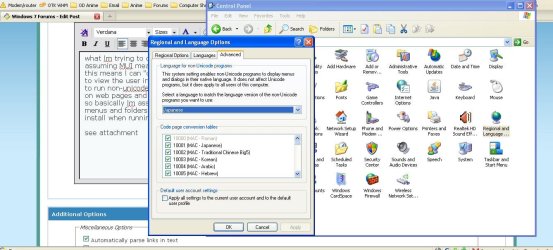
please see the attachment to this post, all menus are in english, the non-unicode setting is set to Japanese but my keyboard and region settings are set to english UK this is the option l wish to verify exists, tho l have a vague idea its off the administrative tab on regional settings on windows 7 but havent been able to verify that tab exists with the unicode setting on lower than ultimate as l dont know anyone running less than ultimate.
 

Attachments

  • Image1.jpg
    Image1.jpg
    119.7 KB · Views: 39
Last edited:

My Computer

Computer type
PC/Desktop
Computer Manufacturer/Model Number
Custom build
OS
Windows 7 Professional (64bit)
CPU
Intel i5 4440 3.10ghz
Motherboard
Gigabyte GA-H97M-D3H
Memory
Corsair 32GB (4x8GB) DDR3 1600MHz Vengeance Memory Kit 1.5V
Graphics Card(s)
Intel Graphics 4600 (on board)
Sound Card
External Creative Soundblaster
Monitor(s) Displays
32" TV
Screen Resolution
1360*768
Hard Drives
Kingston SSDNow UV400 240GB 2.5inch SATAIII SSD
1 1TB WD WD10EADS
3 1TB WD WD10EZEX
PSU
Coolermaster GM-Series 550W Semi Modular
Case
Aerocool X-Predator X1 Devil Red
Cooling
5x 120mil (Arctic F12)
Keyboard
Microsoft Curve 2000 v1
Mouse
Trust MaxTrack Mini Mouse - 6 button(s) - wired - USB
Internet Speed
34Meg
Antivirus
Bitdefender 2017
Browser
Firefox

My Computer

Computer Manufacturer/Model Number
Home built
OS
Windows 7 Ultimate 32 bit
CPU
Intel(R) Pentium(R) 4 CPU 3.00GHz
Motherboard
ASUS P4P800-VM Motherboard Chipset: Intel 865G + ICH5
Memory
2.50 GB RAM
Graphics Card(s)
NVIDIA GeForce 7600 GS
Sound Card
SoundMax Integrated Digital Audio (Chip)
Monitor(s) Displays
ViewSonic VX 1962 wm
Screen Resolution
1680 X 1050
Hard Drives
Seagate Barracuda 7200.10 80 GB
ST380215A ATA Device 18.6 GB
Western Digital "My Book" external hard drive 750 GB
Cooling
Fan based
Keyboard
Microsoft Comfort Curve Keyboard 2000 v10 USB
Mouse
Logitec optic USB
Internet Speed
3.01 Mb/s download 0.64 Mb/s upload
Timeless, I'm sorry that I cannot answer your question as I have no experience with anything other than Ultimate. I hope someone more knowledgeable than I will come along.
 

My Computer

Computer Manufacturer/Model Number
Home built
OS
Windows 7 Ultimate 32 bit
CPU
Intel(R) Pentium(R) 4 CPU 3.00GHz
Motherboard
ASUS P4P800-VM Motherboard Chipset: Intel 865G + ICH5
Memory
2.50 GB RAM
Graphics Card(s)
NVIDIA GeForce 7600 GS
Sound Card
SoundMax Integrated Digital Audio (Chip)
Monitor(s) Displays
ViewSonic VX 1962 wm
Screen Resolution
1680 X 1050
Hard Drives
Seagate Barracuda 7200.10 80 GB
ST380215A ATA Device 18.6 GB
Western Digital "My Book" external hard drive 750 GB
Cooling
Fan based
Keyboard
Microsoft Comfort Curve Keyboard 2000 v10 USB
Mouse
Logitec optic USB
Internet Speed
3.01 Mb/s download 0.64 Mb/s upload
hope someone can answer :p as this would mean l could buy it sooner, however l dont want to buy something if l cant run certain things l want to run on it... as long as it works like XP but better (from what l have seen and heard) then lm happy.
 

My Computer

Computer type
PC/Desktop
Computer Manufacturer/Model Number
Custom build
OS
Windows 7 Professional (64bit)
CPU
Intel i5 4440 3.10ghz
Motherboard
Gigabyte GA-H97M-D3H
Memory
Corsair 32GB (4x8GB) DDR3 1600MHz Vengeance Memory Kit 1.5V
Graphics Card(s)
Intel Graphics 4600 (on board)
Sound Card
External Creative Soundblaster
Monitor(s) Displays
32" TV
Screen Resolution
1360*768
Hard Drives
Kingston SSDNow UV400 240GB 2.5inch SATAIII SSD
1 1TB WD WD10EADS
3 1TB WD WD10EZEX
PSU
Coolermaster GM-Series 550W Semi Modular
Case
Aerocool X-Predator X1 Devil Red
Cooling
5x 120mil (Arctic F12)
Keyboard
Microsoft Curve 2000 v1
Mouse
Trust MaxTrack Mini Mouse - 6 button(s) - wired - USB
Internet Speed
34Meg
Antivirus
Bitdefender 2017
Browser
Firefox
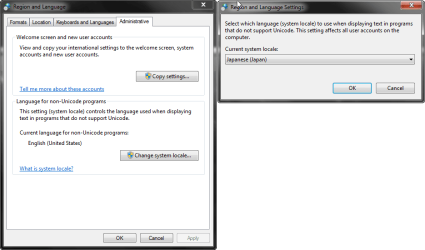
Does this help? I have Win7 pro and it looks like I can do what you are asking for. In the Region and Language dialogue box, if I select the Administrative tab, I get the screen on the left. After clicking the 'Change system locale...' button, I get the window on the right, which has a drop down menu and allows to choose Japan.
 

Attachments

  • unicode_1.png
    unicode_1.png
    22.8 KB · Views: 681

My Computer

Computer Manufacturer/Model Number
Dell M6300
OS
Windows 7 Professional
CPU
Intel Duo 2.4
Motherboard
Dell
Memory
4 Gb
Graphics Card(s)
Nvidia Quadro FX1600M
Monitor(s) Displays
integrated 17 inch
Screen Resolution
1920x1200
Hard Drives
Seagate 320Gb
Mouse
Logitec VX nano
Internet Speed
DSL
With Pro you get XP Mode for free which is a Virtual copy of Windows XP and I would assume if what you want to do doesn't work in Windows 7, it will work in XP mode.
Check out this link for more info on XP Mode. Windows Virtual PC: Get Started
 

My Computer

Computer Manufacturer/Model Number
Asus K60IJ
OS
Windows 7 Ultimate x64
CPU
Intel Pentium Dual Core T4200
Motherboard
HP Laptop
Memory
4gb PC-6400
Graphics Card(s)
Integrated Intel GMA 4500
Sound Card
onboard(laptop)
Monitor(s) Displays
16"
Screen Resolution
1300 X 766 with true 720p HD support
Hard Drives
320GB 5400RPM
Mouse
Microsoft 3000 laptop mouse
Internet Speed
15mbit+ down and 768kbit up
Other Info
1TB external Western Digital Essentials HDD
what lm trying to distinguish is being able to use non-unicode programs on pro,

I think you're confusing the meaning of "non-unicode" ...

Unicode is a contraction for Universal Code. In Unicode every character is 2 bytes long, giving you the ability to see extended character sets up to 65535 characters, in non-Arabic fonts such as Cerillic or Japanese.

A Non-Unicode program would use ANSI or ASCII codes (which are the same thing for all intents and purposes) but are limited to 128 displayable characters, generally North American English.

And yes all versions of windows since Win98 can do either.

please see the attachment to this post, all menus are in english, the non-unicode setting is set to Japanese but my keyboard and region settings are set to english UK this is the option l wish to verify exists,

Yes, both are customizable.

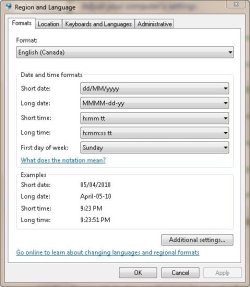
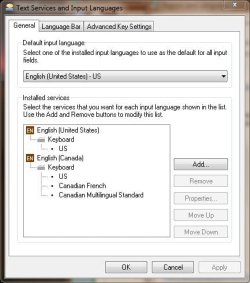
tho l have a vague idea its off the administrative tab on regional settings on windows 7 but havent been able to verify that tab exists with the unicode setting on lower than ultimate as l dont know anyone running less than ultimate.

Capture.JPG
Capture2.JPG
 

My Computer

Computer Manufacturer/Model Number
Homebrew
OS
XP Pro SP3 X86 / Win7 Pro X86
CPU
Amd 64 x2 4200 (2.4ghz)
Motherboard
Asus M2N-MX SE Plus
Memory
Kingston DDR2 800 2gb
Graphics Card(s)
Nvidia GF-8400
Sound Card
Realtek on Motherboard
Monitor(s) Displays
Acer x-193bw
Screen Resolution
1440 x 900
Hard Drives
Western Digital 500g
PSU
350watt In-Win
Case
In-Win
Cooling
Air
Keyboard
yes
Mouse
yes
Internet Speed
5mpbs
Other Info
Also ASRock ION 330 as HTPC (on XP).
Acer Aspire as GP netbook (on XP).
many thanks for your replies, especially mvnsnd who has verified what l wished to know, looks like l will be buying Windows 7 Professional on saturday.

@CommonTater
thanks for the info, even if my information was a little off, appreciate the lil technical tidbits l pick up, in my quest of geekyness :p
 

My Computer

Computer type
PC/Desktop
Computer Manufacturer/Model Number
Custom build
OS
Windows 7 Professional (64bit)
CPU
Intel i5 4440 3.10ghz
Motherboard
Gigabyte GA-H97M-D3H
Memory
Corsair 32GB (4x8GB) DDR3 1600MHz Vengeance Memory Kit 1.5V
Graphics Card(s)
Intel Graphics 4600 (on board)
Sound Card
External Creative Soundblaster
Monitor(s) Displays
32" TV
Screen Resolution
1360*768
Hard Drives
Kingston SSDNow UV400 240GB 2.5inch SATAIII SSD
1 1TB WD WD10EADS
3 1TB WD WD10EZEX
PSU
Coolermaster GM-Series 550W Semi Modular
Case
Aerocool X-Predator X1 Devil Red
Cooling
5x 120mil (Arctic F12)
Keyboard
Microsoft Curve 2000 v1
Mouse
Trust MaxTrack Mini Mouse - 6 button(s) - wired - USB
Internet Speed
34Meg
Antivirus
Bitdefender 2017
Browser
Firefox
I am glad you got your question answered. Don't be a stranger to the forum. There a lots of fine, knowledgeable folks here. And welcome to the world of Windows 7.
 

My Computer

Computer Manufacturer/Model Number
Home built
OS
Windows 7 Ultimate 32 bit
CPU
Intel(R) Pentium(R) 4 CPU 3.00GHz
Motherboard
ASUS P4P800-VM Motherboard Chipset: Intel 865G + ICH5
Memory
2.50 GB RAM
Graphics Card(s)
NVIDIA GeForce 7600 GS
Sound Card
SoundMax Integrated Digital Audio (Chip)
Monitor(s) Displays
ViewSonic VX 1962 wm
Screen Resolution
1680 X 1050
Hard Drives
Seagate Barracuda 7200.10 80 GB
ST380215A ATA Device 18.6 GB
Western Digital "My Book" external hard drive 750 GB
Cooling
Fan based
Keyboard
Microsoft Comfort Curve Keyboard 2000 v10 USB
Mouse
Logitec optic USB
Internet Speed
3.01 Mb/s download 0.64 Mb/s upload
it will become a more formal welcome on monday :) as l should be ordering for next day delivery on saturday :p then again it might not be installed til tuesday lol.

still lm pretty sure l will be visiting again for gadget info, l'll be looking around for some tools for cpu temp measurement etc and useful stuffs to make life easier, while l do love XP its time for something a little different and more interesting to work with.
 

My Computer

Computer type
PC/Desktop
Computer Manufacturer/Model Number
Custom build
OS
Windows 7 Professional (64bit)
CPU
Intel i5 4440 3.10ghz
Motherboard
Gigabyte GA-H97M-D3H
Memory
Corsair 32GB (4x8GB) DDR3 1600MHz Vengeance Memory Kit 1.5V
Graphics Card(s)
Intel Graphics 4600 (on board)
Sound Card
External Creative Soundblaster
Monitor(s) Displays
32" TV
Screen Resolution
1360*768
Hard Drives
Kingston SSDNow UV400 240GB 2.5inch SATAIII SSD
1 1TB WD WD10EADS
3 1TB WD WD10EZEX
PSU
Coolermaster GM-Series 550W Semi Modular
Case
Aerocool X-Predator X1 Devil Red
Cooling
5x 120mil (Arctic F12)
Keyboard
Microsoft Curve 2000 v1
Mouse
Trust MaxTrack Mini Mouse - 6 button(s) - wired - USB
Internet Speed
34Meg
Antivirus
Bitdefender 2017
Browser
Firefox
I think, once you get the feel of it, you will really like 7. It is quite different from XP. I came from XP to 7 and this forum helped me with the learning curve. Look through our tutorial section; there is a vast amount of help there.
 

My Computer

Computer Manufacturer/Model Number
Home built
OS
Windows 7 Ultimate 32 bit
CPU
Intel(R) Pentium(R) 4 CPU 3.00GHz
Motherboard
ASUS P4P800-VM Motherboard Chipset: Intel 865G + ICH5
Memory
2.50 GB RAM
Graphics Card(s)
NVIDIA GeForce 7600 GS
Sound Card
SoundMax Integrated Digital Audio (Chip)
Monitor(s) Displays
ViewSonic VX 1962 wm
Screen Resolution
1680 X 1050
Hard Drives
Seagate Barracuda 7200.10 80 GB
ST380215A ATA Device 18.6 GB
Western Digital "My Book" external hard drive 750 GB
Cooling
Fan based
Keyboard
Microsoft Comfort Curve Keyboard 2000 v10 USB
Mouse
Logitec optic USB
Internet Speed
3.01 Mb/s download 0.64 Mb/s upload
will definitely back if l get stuck, tho l believe my system is in need more and more for a format.. its being running weird for a few days, today being the worst.. its been installed for nearly 8 months and since it was installed when it was at the shop (had to have it repaired once, could have done it myself but l wanted warrenty) and they installed crap on it l didnt need which l think is part of the problem now.
 

My Computer

Computer type
PC/Desktop
Computer Manufacturer/Model Number
Custom build
OS
Windows 7 Professional (64bit)
CPU
Intel i5 4440 3.10ghz
Motherboard
Gigabyte GA-H97M-D3H
Memory
Corsair 32GB (4x8GB) DDR3 1600MHz Vengeance Memory Kit 1.5V
Graphics Card(s)
Intel Graphics 4600 (on board)
Sound Card
External Creative Soundblaster
Monitor(s) Displays
32" TV
Screen Resolution
1360*768
Hard Drives
Kingston SSDNow UV400 240GB 2.5inch SATAIII SSD
1 1TB WD WD10EADS
3 1TB WD WD10EZEX
PSU
Coolermaster GM-Series 550W Semi Modular
Case
Aerocool X-Predator X1 Devil Red
Cooling
5x 120mil (Arctic F12)
Keyboard
Microsoft Curve 2000 v1
Mouse
Trust MaxTrack Mini Mouse - 6 button(s) - wired - USB
Internet Speed
34Meg
Antivirus
Bitdefender 2017
Browser
Firefox
Back
Top