Solved question - batch file only works with "unofficial" directory name

rcrgs

New member
Local time
9:39 AM
Messages
5
Location
Syracuse, NY
question - batch file only works with "unofficial" directory name

Hello...
I'm using a command line batch file to backup files from my W7 Pro x64 machine to an external USB HD. Basically, "xcopy c:\......\my documents\*.*" "external HD". I couldn't get this to work until I truncated the source directory to "documents" instead of "my documents" [the name that the W7 installer specified]. While the batch file now runs and does what it's suppose to do, I'm mystified as to why the source directory needs to have a truncated name in the batch file rather that the one it has "officially." Any insight into this is appreciated.
...robert
 

My Computer My Computer

At a glance

Win7 professional 64bitIntel i5-660016 GbZotac Gforce 1850 super
Computer type
PC/Desktop
Computer Manufacturer/Model Number
DIY
OS
Win7 professional 64bit
CPU
Intel i5-6600
Motherboard
MSI Z170 A M7
Memory
16 Gb
Graphics Card(s)
Zotac Gforce 1850 super
Sound Card
motherboard sound
Monitor(s) Displays
HP 24in
Screen Resolution
1920 x 1080
Hard Drives
WD 250 Gig
Samsung 250 Gig SSD
PSU
700w
Case
Antec Sonata
Cooling
Intel generic
Keyboard
Vortex 8200
Mouse
Logitech M525
Internet Speed
DSL 3.5 MBytes down
Antivirus
Windows 7 firewall
Browser
Mozilla Firefox
Other Info
This is a DIY machine I built several years ago. Runs fine in all respects. OS loaded clean at that time. Since then, OS reloaded several times, not recently.
Hello Robert,

"My Documents" is just a symbolic link to "Documents" for backwards compatibility for older programs that still reference "My Documents". "Documents" is the true folders name. It's the same with all of the "My...." user folders.

Hope this helps, :)
Shawn
 

My Computer My Computer

At a glance

64-bit Windows 11 Pro for WorkstationsIntel i7-8700K OC'd to 5 GHz64 GB (4x16GB) G.SKILL TridentZ RGB DDR4 3600...ASUS ROG-STRIX-GTX1080TI-O11G-GAMING
Computer type
PC/Desktop
Computer Manufacturer/Model Number
Self built custom
OS
64-bit Windows 11 Pro for Workstations
CPU
Intel i7-8700K OC'd to 5 GHz
Motherboard
ASUS ROG Maximus XI Formula Z390
Memory
64 GB (4x16GB) G.SKILL TridentZ RGB DDR4 3600 MHz
Graphics Card(s)
ASUS ROG-STRIX-GTX1080TI-O11G-GAMING
Sound Card
Integrated
Monitor(s) Displays
2 x Samsung Odyssey G7 27"
Screen Resolution
2560x1440
Hard Drives
1TB Samsung 990 PRO M.2,
4TB Samsung 990 PRO PRO M.2,
TerraMaster F8 SSD Plus NAS
PSU
Seasonic Prime Titanium 850W
Case
Thermaltake Core P3
Cooling
Corsair Hydro H115i
Keyboard
Logitech wireless K800
Mouse
Logitech MX Master 4
Internet Speed
2 Gb/s Download and 100 Mb/s Upload
Antivirus
Malwarebyte Anti-Malware Premium
Browser
Google Chrome
Other Info
Logitech Z625 speaker system,
Logitech BRIO 4K Pro webcam,
HP Color LaserJet Pro MFP M477fdn,
APC SMART-UPS RT 1000 XL - SURT1000XLI,
Galaxy S23 Plus phone
In addition to what Brink told you above, in case you need to use batch files or command line also in the future: you seem to have a syntax error in your XCOPY command syntax.

If no folders and files on path have spaces, you do not need quotation marks ("). However, if a folder or file has space(s) on its name, the whole path must be between quotation marks. Important is that quotation marks when used come at the beginning and the end of the path, not at the beginning of the command line.

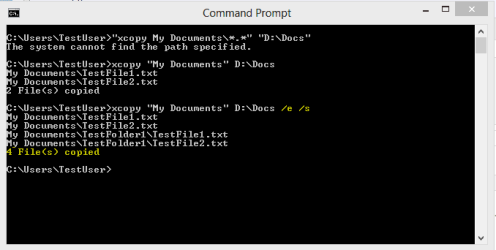
Your quotation marks, at least on your post above, are wrong. Let's say you really had a folder called My Documents on C:\Users\Your_Username\My Documents, and you would like to copy it to D: drive on folder called Docs. According to your post you would give that command as:
Code:
[B][COLOR="Red"]"[/COLOR][/B]xcopy c:\users\your_username\my documents\*.*[B][COLOR="Red"]" "[/COLOR][/B]D:\Docs[COLOR="Red"]"[/COLOR]
This would produce an error message as seen here:

Path_Quotes_1.png

But with correct usage of quotation marks the files would be copied. Here's the correct syntax, please notice the begin quotation mark just before the source path, not at the beginning of the command line, and the end quotation mark just after the source path. Destination path in this example of mine does not need quotation marks because it does not contain spaces:
Code:
xcopy [B][COLOR="Red"]"[/COLOR][/B]c:\users\your_username\my documents[B][COLOR="Red"]"[/COLOR][/B] D:\Docs
Also notice that wildcards *.* are useless with XCOPY command. XCOPY always copies all files of the folder.

With this small change the content of the folder My Documents would be copied:

Path_Quotes_2.png

If you also want to copy subfolders and files on them you need to add handle /s, and if you want even to copy empty subfolders you need to add handle /e to the command line:

Path_Quotes_3.png

Sorry the rant, an old school geek just loves to speak about command line language ;).

Kari
 

My Computer My Computer

At a glance

Windows 10 Pro x64 EN-GB1.6 GHz Intel Core i7-720QM Processor6 GBATI Mobility Radeon HD 5850 Graphics
Computer type
Laptop
Computer Manufacturer/Model Number
HP ENVY 17-1150eg
OS
Windows 10 Pro x64 EN-GB
CPU
1.6 GHz Intel Core i7-720QM Processor
Memory
6 GB
Graphics Card(s)
ATI Mobility Radeon HD 5850 Graphics
Sound Card
Beats sound system with integrated subwoofer
Monitor(s) Displays
17" laptop display, 22" LED and 32" Full HD TV through HDMI
Screen Resolution
1600*900 (1), 1920*1080 (2&3)
Hard Drives
Internal: 2 x 500 GB SATA Hard Disk Drive 7200 rpm
External: 2TB for backups, 3TB USB3 network drive for media
Cooling
As Envy runs a bit warm, I have it on a Cooler Master pad
Keyboard
Logitech diNovo Media Desktop Laser (bluetooth)
Mouse
Logitech Performance Mouse MX
Internet Speed
50/10 Mbps VDSL
Antivirus
Windows Defender 4.3.9431.0
Browser
Maxthon 3.5.2., IE11

My Computer My Computer

At a glance

64-bit Windows 11 Pro for WorkstationsIntel i7-8700K OC'd to 5 GHz64 GB (4x16GB) G.SKILL TridentZ RGB DDR4 3600...ASUS ROG-STRIX-GTX1080TI-O11G-GAMING
Computer type
PC/Desktop
Computer Manufacturer/Model Number
Self built custom
OS
64-bit Windows 11 Pro for Workstations
CPU
Intel i7-8700K OC'd to 5 GHz
Motherboard
ASUS ROG Maximus XI Formula Z390
Memory
64 GB (4x16GB) G.SKILL TridentZ RGB DDR4 3600 MHz
Graphics Card(s)
ASUS ROG-STRIX-GTX1080TI-O11G-GAMING
Sound Card
Integrated
Monitor(s) Displays
2 x Samsung Odyssey G7 27"
Screen Resolution
2560x1440
Hard Drives
1TB Samsung 990 PRO M.2,
4TB Samsung 990 PRO PRO M.2,
TerraMaster F8 SSD Plus NAS
PSU
Seasonic Prime Titanium 850W
Case
Thermaltake Core P3
Cooling
Corsair Hydro H115i
Keyboard
Logitech wireless K800
Mouse
Logitech MX Master 4
Internet Speed
2 Gb/s Download and 100 Mb/s Upload
Antivirus
Malwarebyte Anti-Malware Premium
Browser
Google Chrome
Other Info
Logitech Z625 speaker system,
Logitech BRIO 4K Pro webcam,
HP Color LaserJet Pro MFP M477fdn,
APC SMART-UPS RT 1000 XL - SURT1000XLI,
Galaxy S23 Plus phone
Brink and Kari...
Thanks for your comments and help. Most useful. Asking folks about command prompt issues is always a good way of telling when they got into the game. I'm glad that MS keeps them available. One can do a lot of things from "C:\" in a simpler manner than by using higher level programs. Happy New Year.
...robert
 

My Computer My Computer

At a glance

Win7 professional 64bitIntel i5-660016 GbZotac Gforce 1850 super
Computer type
PC/Desktop
Computer Manufacturer/Model Number
DIY
OS
Win7 professional 64bit
CPU
Intel i5-6600
Motherboard
MSI Z170 A M7
Memory
16 Gb
Graphics Card(s)
Zotac Gforce 1850 super
Sound Card
motherboard sound
Monitor(s) Displays
HP 24in
Screen Resolution
1920 x 1080
Hard Drives
WD 250 Gig
Samsung 250 Gig SSD
PSU
700w
Case
Antec Sonata
Cooling
Intel generic
Keyboard
Vortex 8200
Mouse
Logitech M525
Internet Speed
DSL 3.5 MBytes down
Antivirus
Windows 7 firewall
Browser
Mozilla Firefox
Other Info
This is a DIY machine I built several years ago. Runs fine in all respects. OS loaded clean at that time. Since then, OS reloaded several times, not recently.
You are welcome, Robert.
 

My Computer My Computer

At a glance

Windows 10 Pro x64 EN-GB1.6 GHz Intel Core i7-720QM Processor6 GBATI Mobility Radeon HD 5850 Graphics
Computer type
Laptop
Computer Manufacturer/Model Number
HP ENVY 17-1150eg
OS
Windows 10 Pro x64 EN-GB
CPU
1.6 GHz Intel Core i7-720QM Processor
Memory
6 GB
Graphics Card(s)
ATI Mobility Radeon HD 5850 Graphics
Sound Card
Beats sound system with integrated subwoofer
Monitor(s) Displays
17" laptop display, 22" LED and 32" Full HD TV through HDMI
Screen Resolution
1600*900 (1), 1920*1080 (2&3)
Hard Drives
Internal: 2 x 500 GB SATA Hard Disk Drive 7200 rpm
External: 2TB for backups, 3TB USB3 network drive for media
Cooling
As Envy runs a bit warm, I have it on a Cooler Master pad
Keyboard
Logitech diNovo Media Desktop Laser (bluetooth)
Mouse
Logitech Performance Mouse MX
Internet Speed
50/10 Mbps VDSL
Antivirus
Windows Defender 4.3.9431.0
Browser
Maxthon 3.5.2., IE11
Back
Top