Well it has a download button on that page you provided.
After you set up the download there is a Icon somewhere to start playing the game.
Right click it and see if it lists Run in compatibility mode or Troubleshoot compatibility mode. Click it if option is there.
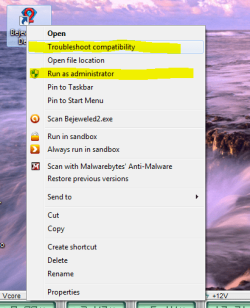
Here is a Snip below of my Bejeweled2.
I had to set it to Compatibility mode since it is for XP.
I right clicked the Bejeweled icon. Then clicked the Trouble shoot compatibility. Then follow prompts.
It may show Run in compatibility mode which you would click instead.
Also as you can see you can select Run as Administrator if needed from here also if you find you need to do so.
Mike
Attachments
Bejeweled2.PNG
45.3 KB
· Views: 0
My Computer
At a glance
Windows7 Pro 64bit SP-1; Windows XP Pro 32bitIntel Core i7-870 Lynnfield 2.93GHz LGA 1156 ...8GB@1400MHz Crucial Ballistix DDR3-1600 4x2GBASUS ENGTX460 DirectCU/2DI/1GD5 1GB 256-bit G...
Samsung 830 120GB SSD
Intel 320 120GB SSD
Western Digital Caviar Black WD7501AALS 750GB 7200 RPM SATA 3.0Gb/s
Western Digital Caviar Black WD6401AALS 640GB 7200 RPM SATA 3.0Gb/s
PSU
COOLER MASTER Silent Pro RS850-AMBAJ3-US 850W Modular
Samsung 830 120GB SSD
Intel 320 120GB SSD
Western Digital Caviar Black WD7501AALS 750GB 7200 RPM SATA 3.0Gb/s
Western Digital Caviar Black WD6401AALS 640GB 7200 RPM SATA 3.0Gb/s
PSU
COOLER MASTER Silent Pro RS850-AMBAJ3-US 850W Modular


 ...hope it works no issues this time xD