Question for Acronis Users

jack1953

New member
Member
VIP
Local time
4:12 PM
Messages
126
Digging deeper into the program, I see you can configure backups to be differential or incremental. After reading the documentation on the differences, I want to make sure I am understanding those differences correctly.

My goal is to, after the initial backup, which has been done, I want to backup only when changes are made to the files/disk backup.

From what I understand, under my scenario, the best option for me would be the differential backup?

Under the differential option, it also gives an option to do a full backup after a certain number of differential backups.

I was wondering if that might also be a wise option to check, and was wondering if anyone else is using it, and what number of differential backups you have chosen before you do the full backup?

Thanks again folks for all your knowledge and help!

God bless,
Jack
 

My Computer My Computer

At a glance

Windows 7
OS
Windows 7
Get a 'bare metal' restore point, then build complete further backup files as and when changes are made.

Incremental backup jobs can be overwritten as disk space becomes tighter, and when that happens it's the oldest (and therefore the most important one) that goes first!

Personally I make a bootable DVD with the Acronis Rescue ISO that also contains my 'bare metal' backup :)
 

My Computer My Computer

At a glance

W7 x64Intel Q9300 2.5Ghz Quad LGA775 (Would like Q9...4Gb OCZ Gold 1,333MhzPalit HD4850 O/C Sonic 512Mb DDR3, Dual DViD's
Computer Manufacturer/Model Number
Custom built machine
OS
W7 x64
CPU
Intel Q9300 2.5Ghz Quad LGA775 (Would like Q9650)
Motherboard
Gigabyte GA-EP45T-UD3R (F6 Bios)
Memory
4Gb OCZ Gold 1,333Mhz
Graphics Card(s)
Palit HD4850 O/C Sonic 512Mb DDR3, Dual DViD's
Sound Card
Azalia to twin Samson 50w Studio Monitors
Monitor(s) Displays
Twin Dell (E-IPS) U2311H 23.6" Screens
Screen Resolution
1920 x 1080 @ 60Hz
Hard Drives
Crucial M4 SSD, archives on twin Western Digital Caviar Black WD2002FAEX, 2TB, 7200rpm HDD's, Samsung Ritemaster CD/DVD Burner...
PSU
OCZ 600w
Case
Lian-Li PC8 acoustifoamed' aluminium tower
Cooling
Scythe 140mm Zipang
Keyboard
Cherry PS/2 custom model
Mouse
Lenovo USB laser "Thinkpad" Mouse
Internet Speed
ADSL2+ @14Mbps downstream & Cat6 Gigabit Ethernet
Antivirus
NOD32
Browser
Opera
Other Info
Silicon Dust HD Homerun Dual FTA (Ethernet) TV Tuners, Dray Tek Vigor 2850Vn router and 8x HP Gigabit Switch. Lian-Li CR26 Card Reader, Canon MF4430 iSensys laser printer/scanner.
Hi Jack,
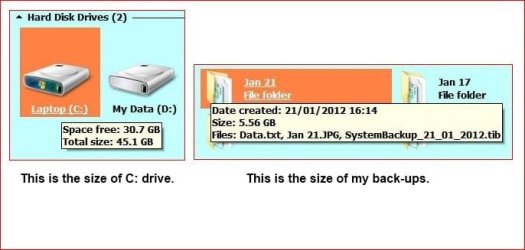
I use Acronis 2010 and only make 'One Click' back-ups. They are saved in separate folders on an external hdd named as the date they were made. I keep 3 back-ups as a safety measure, in case one fails. Creation time, 7 minutes, restore is slightly faster. As you see in my image, C: is small with plenty free space, that's because all I need access to is kept on D:
I find doing other types of back-ups confusing, restoring if needed is even more so if it's required. i.e. what one to choose for restoring.
 

Attachments

  • RR.JPG
    RR.JPG
    28.6 KB · Views: 13

My Computer My Computer

At a glance

Win7 H.Prem. 32bit+SP1
Computer Manufacturer/Model Number
Look in my Signature.
OS
Win7 H.Prem. 32bit+SP1
A differential backup always starts with a full backup. Each subsequent backup will be a backup of every file that has changed since the last full backup ran.

Example. You run the first full backup on Sunday. On Monday, you create C:\file1.txt and C:\file2.txt. When you run the backup on Monday night, it will backup all files that have changed since your last full backup on Sunday. So, the differential backup on Monday will consist of file1.txt and file2.txt. Now, lets say on Tuesday you create C:\file3.txt and C:\file4.txt. When your backup runs on Tuesday night, it will backup everything that has changed since the last full backup. So, it would include file1.txt, file2.txt, file3.txt and file4.txt. So, on Saturday , if you needed to restore absolutely everything...it would more or less restore the full backup from Sunday, and then the differential backup from Friday night (as that would contain all changes since the last full backup occurred.).

An incremental backup is different in that it only backups up the files that have changed since the last backup (notice, not full backup). So, based on the above example, on Sunday night you would get your first full backup. The backup on Monday night would include file1.txt and file2.txt. The backup on Tuesday night would only get file3.txt and file4.txt. Thus, in the event you had to fully restore everything on Saturday, it would first restore the full backup from Sunday, and then the incremental from Monday, then the incremental from Tuesday, and then the incremental from Wednesday, and the incremental from Thursday and finally the incremental from Friday night.

A differential backup is nice in that it provides the fastest restore time, but also takes the longest to backup...as all changes since the last full backup are backed up each time the backup is run. This type of backup will consume the most disk space as the subsequent differential backups on Monday, Tuesday, Wednesday are going to get bigger and bigger and bigger...since they contain the cumulative changes since the last full backup. So, the backup on Tuesday contains the changes from Monday and Tuesday. And the backup on Wednesday will contain the changes from Monday, and Tuesday and Wednesday. So, with a differential backup, you often backup the same data over and over and over again.

An incremental backup is nice in that it provides the shortest backup time since it only gets changes since the last incremental backup, but it does lengthen the restore time as it has to restore the full as well as all subsequent incrementals along the way. This backup is going to consume the least amount of disk space as it's only the changes from each day getting backed up once.


For me personally, I only do full image backups with Acronis. My actual data files are only stored in a few folders and they aren't on my C drive. I regularly attach some USB 2 drives and run robocopy to mirror my actual data on the hard drive with the external drive. I try to always keep 1 external offsite at any time just in case I am robbed or the house burns down.

With Acronis, about once a month or so, I run an image based backup of my C drive to an external eSATA drive. This gives me a snapshot style backup of my OS and my installed applications. I just go ahead and do a full backup each time, as my C drive in an SSD and it takes less than 5 minutes to image it. < This image is just my OS and apps....so in the event that I had to restore the whole box, I would have to restore the image to get the OS and apps back, and restore from my USB drive to get my data files back.
 

My Computer My Computer

At a glance

Windows 7 Ultimate x64Intel Q9550 2.83Ghz OC'd to 3.40Ghz8GB G.Skill PI DDR2-800, 4-4-4-12 timingsEVGA 1280MB Nvidia GeForce GTX570
Computer Manufacturer/Model Number
Self-Built in July 2009
OS
Windows 7 Ultimate x64
CPU
Intel Q9550 2.83Ghz OC'd to 3.40Ghz
Motherboard
Gigabyte GA-EP45-UD3R rev. 1.1, F12 BIOS
Memory
8GB G.Skill PI DDR2-800, 4-4-4-12 timings
Graphics Card(s)
EVGA 1280MB Nvidia GeForce GTX570
Sound Card
Realtek ALC899A 8 channel onboard audio
Monitor(s) Displays
23" Acer x233H
Screen Resolution
1920x1080
Hard Drives
Intel X25-M 80GB Gen 2 SSD
Western Digital 1TB Caviar Black, 32MB cache. WD1001FALS
PSU
Corsair 620HX modular
Case
Antec P182
Cooling
stock
Keyboard
ABS M1 Mechanical
Mouse
Logitech G9 Laser Mouse
Internet Speed
15/2 cable modem
Other Info
Windows and Linux enthusiast. Logitech G35 Headset.
A differential backup always starts with a full backup. Each subsequent backup will be a backup of every file that has changed since the last full backup ran.

Example. You run the first full backup on Sunday. On Monday, you create C:\file1.txt and C:\file2.txt. When you run the backup on Monday night, it will backup all files that have changed since your last full backup on Sunday. So, the differential backup on Monday will consist of file1.txt and file2.txt. Now, lets say on Tuesday you create C:\file3.txt and C:\file4.txt. When your backup runs on Tuesday night, it will backup everything that has changed since the last full backup. So, it would include file1.txt, file2.txt, file3.txt and file4.txt. So, on Saturday , if you needed to restore absolutely everything...it would more or less restore the full backup from Sunday, and then the differential backup from Friday night (as that would contain all changes since the last full backup occurred.).

An incremental backup is different in that it only backups up the files that have changed since the last backup (notice, not full backup). So, based on the above example, on Sunday night you would get your first full backup. The backup on Monday night would include file1.txt and file2.txt. The backup on Tuesday night would only get file3.txt and file4.txt. Thus, in the event you had to fully restore everything on Saturday, it would first restore the full backup from Sunday, and then the incremental from Monday, then the incremental from Tuesday, and then the incremental from Wednesday, and the incremental from Thursday and finally the incremental from Friday night.

A differential backup is nice in that it provides the fastest restore time, but also takes the longest to backup...as all changes since the last full backup are backed up each time the backup is run. This type of backup will consume the most disk space as the subsequent differential backups on Monday, Tuesday, Wednesday are going to get bigger and bigger and bigger...since they contain the cumulative changes since the last full backup. So, the backup on Tuesday contains the changes from Monday and Tuesday. And the backup on Wednesday will contain the changes from Monday, and Tuesday and Wednesday. So, with a differential backup, you often backup the same data over and over and over again.

An incremental backup is nice in that it provides the shortest backup time since it only gets changes since the last incremental backup, but it does lengthen the restore time as it has to restore the full as well as all subsequent incrementals along the way. This backup is going to consume the least amount of disk space as it's only the changes from each day getting backed up once.


For me personally, I only do full image backups with Acronis. My actual data files are only stored in a few folders and they aren't on my C drive. I regularly attach some USB 2 drives and run robocopy to mirror my actual data on the hard drive with the external drive. I try to always keep 1 external offsite at any time just in case I am robbed or the house burns down.

With Acronis, about once a month or so, I run an image based backup of my C drive to an external eSATA drive. This gives me a snapshot style backup of my OS and my installed applications. I just go ahead and do a full backup each time, as my C drive in an SSD and it takes less than 5 minutes to image it. < This image is just my OS and apps....so in the event that I had to restore the whole box, I would have to restore the image to get the OS and apps back, and restore from my USB drive to get my data files back.

Let me first say that you rock pparks! Now THAT is a detailed explanation that I could comprehend! I do have a few questions.

1. It sounds to me that the differential would be better for me, because I have plenty of external drive space and it would be more beneficial to me to have the quicker restore time, with my business, in exchange for the longer backup time. Agree?

This is what I have my settings at in Acronis:

Schemes: Custom
Method: Differential

I have the following boxes checked:

Create a full version after every 7 differential versions

Store no more than 7 recent version changes

2. With those settings, am I to assume that after initial full backup, it will back up 7 differential versions, then another full backup, and on the next differential backup, it will delete the previous 7 version changes?

3. So the most I will ever have on the external is a full backup, and 7 differential versions?

I did the full backup which used 11.2G. The first differential version used only .77G.

Let me know how all this adds up and if I need to tweak anything, in your respected opinion.

Thanks again,
Jack
 

My Computer My Computer

At a glance

Windows 7
OS
Windows 7
It is stated in Acronis backup page that a differential back up is always smaller in size than an incremental back up.

That said, I have found that there is not much difference in size between full, differential and incremental backups. The reason being that Acronis does a sector by sector backup and if the files have moved and changed sectors they get backed up again. Things are really bad if the drive has been defragmented between backups. It is for this reason that I make a full image every time. And standalone images are easier to handle because you can delete one without affecting your imaging strategy.

I have only once done a differential backup of a small size. This was after I installed Windows 7, took an image then immediately installed MS Office 2010 and then again immediately take a differential image.
 

My Computer My Computer

At a glance

Windows 7 Pro with SP1 32bit2 gigs of RAMIntel(R) 82845G/GL/GE/PE/GV Graphics Controller
Computer Manufacturer/Model Number
Custom Built
OS
Windows 7 Pro with SP1 32bit
Motherboard
Intel D845GVS1 X86-based PC
Memory
2 gigs of RAM
Graphics Card(s)
Intel(R) 82845G/GL/GE/PE/GV Graphics Controller
Sound Card
Realtek AC'97 Audio
Monitor(s) Displays
Samsung SyncMaster 931BF Black 19" LCD Monitor
Screen Resolution
1280X960
Hard Drives
1. SAMSUNG SP0822N ATA Device ~ 80 GigaBytes

2. Seagate FreeAgent Go USB Device ~ 500 GigaBytes
Keyboard
COMPAQ Standard PS/2 Keyboard
Mouse
iBall Laser Precise Speedster
Internet Speed
4 mb/sec
1. It sounds to me that the differential would be better for me, because I have plenty of external drive space and it would be more beneficial to me to have the quicker restore time, with my business, in exchange for the longer backup time. Agree?
Usually in business case scenarios, the faster restore times are preferred.

Create a full version after every 7 differential versions

Store no more than 7 recent version changes

2. With those settings, am I to assume that after initial full backup, it will back up 7 differential versions, then another full backup, and on the next differential backup, it will delete the previous 7 version changes?
I don't use Differentials or Incrementals with Acronis, however if the program works like almost any other backup application, things won't work like you are describing.

Using my example, if you were to do your first full backup on Sunday, and then differentials on Monday, Tuesday, Wed, Thurs, Fri and Sat...that would mean that on Sunday morning you would have 7 restore points.

On Sunday night, your system would then create a new full backup. So, technically you would be left with 1 full backup from previous Sunday, incrementals all week, and 1 new full backup from this Sunday. Now, this would give you more than 7 restore points....but "if" the system were to delete the first full backup from the 1st sunday...it would render all of the differentials form the 1st week as unusable since they need that first full backup. So, "if" the 1st sunday were deleted, and all subsequent differentials were useless, come Sunday night if you had to restore, you would only have 1 restore point (from that current day).

So, come the 2nd Monday you have
--Full backup from Sunday
--Diff from Monday
--Diff from Tues
--Diff from Wed
--Diff from Thurs
--Diff from Fri
--Diff from Sat
--Full from Sun *
--Diff from monday

So, technically you have 9 files. But the system will most likely not be able to delete anything until you have 7 additional backups after the Full backup on the 2nd Sunday. (which I noted with an * above). Otherwise you wouldn't have 7 restore points to pick from.

Hopefully that makes sense...it can be a little confusing at first. I've tried to explain it best that I could.


3. So the most I will ever have on the external is a full backup, and 7 differential versions?
No, see above.

The most I would expect if you kept 7 restore points would be.

--Full backup from Sunday
--Diff from Monday
--Diff from Tues
--Diff from Wed
--Diff from Thurs
--Diff from Fri
--Diff from Sat
--Full from Sun *
--Diff from monday
--Diff from Tues
--Diff from Wed
--Diff from Thurs
--Diff from Fri
--Diff from Sat (first deletion would occur here).

Because you now have 7 since the 2nd full backup. That first week can go. So, I would say the most you would have would be 2 fulls and 11 differentials.
 

My Computer My Computer

At a glance

Windows 7 Ultimate x64Intel Q9550 2.83Ghz OC'd to 3.40Ghz8GB G.Skill PI DDR2-800, 4-4-4-12 timingsEVGA 1280MB Nvidia GeForce GTX570
Computer Manufacturer/Model Number
Self-Built in July 2009
OS
Windows 7 Ultimate x64
CPU
Intel Q9550 2.83Ghz OC'd to 3.40Ghz
Motherboard
Gigabyte GA-EP45-UD3R rev. 1.1, F12 BIOS
Memory
8GB G.Skill PI DDR2-800, 4-4-4-12 timings
Graphics Card(s)
EVGA 1280MB Nvidia GeForce GTX570
Sound Card
Realtek ALC899A 8 channel onboard audio
Monitor(s) Displays
23" Acer x233H
Screen Resolution
1920x1080
Hard Drives
Intel X25-M 80GB Gen 2 SSD
Western Digital 1TB Caviar Black, 32MB cache. WD1001FALS
PSU
Corsair 620HX modular
Case
Antec P182
Cooling
stock
Keyboard
ABS M1 Mechanical
Mouse
Logitech G9 Laser Mouse
Internet Speed
15/2 cable modem
Other Info
Windows and Linux enthusiast. Logitech G35 Headset.
It is stated in Acronis backup page that a differential back up is always smaller in size than an incremental back up.

That said, I have found that there is not much difference in size between full, differential and incremental backups. The reason being that Acronis does a sector by sector backup and if the files have moved and changed sectors they get backed up again. Things are really bad if the drive has been defragmented between backups. It is for this reason that I make a full image every time. And standalone images are easier to handle because you can delete one without affecting your imaging strategy.

I have only once done a differential backup of a small size. This was after I installed Windows 7, took an image then immediately installed MS Office 2010 and then again immediately take a differential image.


I'm not sure that applies if you aren't doing an "image" based backup. If you are using Acronis to backup files and folders...then the sector by sector won't come into play at all.
 

My Computer My Computer

At a glance

Windows 7 Ultimate x64Intel Q9550 2.83Ghz OC'd to 3.40Ghz8GB G.Skill PI DDR2-800, 4-4-4-12 timingsEVGA 1280MB Nvidia GeForce GTX570
Computer Manufacturer/Model Number
Self-Built in July 2009
OS
Windows 7 Ultimate x64
CPU
Intel Q9550 2.83Ghz OC'd to 3.40Ghz
Motherboard
Gigabyte GA-EP45-UD3R rev. 1.1, F12 BIOS
Memory
8GB G.Skill PI DDR2-800, 4-4-4-12 timings
Graphics Card(s)
EVGA 1280MB Nvidia GeForce GTX570
Sound Card
Realtek ALC899A 8 channel onboard audio
Monitor(s) Displays
23" Acer x233H
Screen Resolution
1920x1080
Hard Drives
Intel X25-M 80GB Gen 2 SSD
Western Digital 1TB Caviar Black, 32MB cache. WD1001FALS
PSU
Corsair 620HX modular
Case
Antec P182
Cooling
stock
Keyboard
ABS M1 Mechanical
Mouse
Logitech G9 Laser Mouse
Internet Speed
15/2 cable modem
Other Info
Windows and Linux enthusiast. Logitech G35 Headset.
I like the differential option myself, and have mine set to do them daily.

But, I would also recommend having a second schedule that does just full backups periodically, depending on how often things change.


For example,.
Keep a Full backup that remains untouched of the system after a clean install with Windows activated, but nothing else.
A second Image after your get you main software installed and activated, & everything setup to your liking.
Never know when these will come in handy.


From there, youll want to make a full backup image to save after any major changes.

I use the differntial backups to recover files folders etc should I need to, and the full images to recover the entire disc.

However, you can recover the entire disc from a differential I just prefer to try and avoid doing that. But they are there should I need them, and they make recovering single files/folders easy as well.
 

My Computer My Computer

At a glance

Windows 7 Home Premium 64bitIntel Core i7 2700k8GB Mushkin Redline Ridgebacks @1866EVGA GTX570 SC
Computer Manufacturer/Model Number
Custom (Self Build)
OS
Windows 7 Home Premium 64bit
CPU
Intel Core i7 2700k
Motherboard
eVGA P67 SLI
Memory
8GB Mushkin Redline Ridgebacks @1866
Graphics Card(s)
EVGA GTX570 SC
Sound Card
XiFi Titanium HD
Monitor(s) Displays
LG W2453V
Screen Resolution
1920x1080
Hard Drives
Intel 320 80GB -- Intel X25-V 40GB --WD Black 1TB x2 -- WD Blue 640GB
PSU
Seasonic x750
Case
Corsair 600T SE White
Cooling
eVGA Superclocked CPU Cooler
Keyboard
Saitek Cyborg
Antivirus
Kaspersky
Browser
IE
Other Info
LG BD/DVD
I only do full hard drive backups with Acronis. I also keep, at a minimum, the previous backup on the hard drive I use for backups when I do a backup. This eliminates "Murphy's Law" of something happening during a backup and no longer having a backup because the drive used for backups was erased first.

Where I used to work (I was a LAN/WAN Network Manager) we initially did a full backup of our file servers on Monday and then incremental backups on Tuesday through Friday. However, we found that if we needed to restore a server from the backups it took longer to restore with all the incremental backups. We also had a couple of isolated problems with the incrementals and lost some data. Thus the decision was made to do full backups every night. That eliminated any potential for data loss from the incrementals and rebuilding a file server from a full backup took less time.
 

My Computer My Computer

At a glance

Windows 10 64 bitIntel i7 6700K16GB Corsair DominatorIntel CPU Graphics
Computer type
PC/Desktop
Computer Manufacturer/Model Number
My Own Build
OS
Windows 10 64 bit
CPU
Intel i7 6700K
Motherboard
ASUS ROG Maximus VIII Hero
Memory
16GB Corsair Dominator
Graphics Card(s)
Intel CPU Graphics
Sound Card
RealTek
Monitor(s) Displays
27" Dell S2719dgf
Screen Resolution
2560X1440
Hard Drives
1 TB Samsung 850 EVO SSD for Win 10 Pro
500GB Samsung 850 EVO SSD for Win 10 Insider
2 TB drive for backup
PSU
EVGA Supernova 750G2
Case
BeQuiet Silent Base 600
Cooling
Deepcool Captain 120EX
Keyboard
Microsoft Wireless 2000
Mouse
Microsoft wireless
Internet Speed
100 MB/sec (Cable)
Antivirus
Microsoft Defender and Malwarebytes
Browser
Edge/Firefox
Other Info
Cakewalk (Sonar) by BandLab and Studio One 4.1 Pro recording studio software. MOTU 896Mk3 Hybrid recording interface, Frontier Tranzport wireless control unit, Behringer X-Touch Control Surface.
Five USB connected optical drives for CD Audio production using Nero BurningROM
  • Like
Reactions: JMH
I only do full hard drive backups with Acronis. I also keep, at a minimum, the previous backup on the hard drive I use for backups when I do a backup. This eliminates "Murphy's Law" of something happening during a backup and no longer having a backup because the drive used for backups was erased first.

Where I used to work (I was a LAN/WAN Network Manager) we initially did a full backup of our file servers on Monday and then incremental backups on Tuesday through Friday. However, we found that if we needed to restore a server from the backups it took longer to restore with all the incremental backups. We also had a couple of isolated problems with the incrementals and lost some data. Thus the decision was made to do full backups every night. That eliminated any potential for data loss from the incrementals and rebuilding a file server from a full backup took less time.

It is my understanding fireberd, that the differential system takes longer to backup, but restores much quicker, and the incremental is vice versa.
 

My Computer My Computer

At a glance

Windows 7
OS
Windows 7
I think I understand your examples and logic, but let me use a simple example wise, and see where my error in thinking is:

I have Acronis scheduled to do a full backup after every 3 version changes.
I also have it programmed to store no more than 3 version changes.
I also have it programmed never to delete the first version change of any full backup.

If my senior citizen mind is understanding correctly, wouldn't it be the following scenario:

Full backup #1
Version change 1a
Version change 1b
Version change 1c
Full backup #2
Version change 2a
(After Version change 2a, since it's programmed to keep no more than 3 version changes, and also programmed not to remove the first version change after each full backup, wouldn't it delete Version change 1b, keeping 1a, 1c, and 2a?)

On the next version change 2b, it would remove 1c, and leave 1a, 2a, and 2b.

On the next version change 2c, it would remove 2b, and leave 1a, 2a, and 2c. etc.

So you would always have a full backup and the first version change?

Believe it or not, I'm not confused, and I guess the best way to see, is to set it up like I have described above, and see what happens!

BOTTOM LINE: My goal is to use as little space as possible, and yet have it programmed to where I can restore it as 'up to date' as I can, regardless of when I would need to do so.

Thanks again to everyone!

Jack

1. It sounds to me that the differential would be better for me, because I have plenty of external drive space and it would be more beneficial to me to have the quicker restore time, with my business, in exchange for the longer backup time. Agree?
Usually in business case scenarios, the faster restore times are preferred.

Create a full version after every 7 differential versions

Store no more than 7 recent version changes

2. With those settings, am I to assume that after initial full backup, it will back up 7 differential versions, then another full backup, and on the next differential backup, it will delete the previous 7 version changes?
I don't use Differentials or Incrementals with Acronis, however if the program works like almost any other backup application, things won't work like you are describing.

Using my example, if you were to do your first full backup on Sunday, and then differentials on Monday, Tuesday, Wed, Thurs, Fri and Sat...that would mean that on Sunday morning you would have 7 restore points.

On Sunday night, your system would then create a new full backup. So, technically you would be left with 1 full backup from previous Sunday, incrementals all week, and 1 new full backup from this Sunday. Now, this would give you more than 7 restore points....but "if" the system were to delete the first full backup from the 1st sunday...it would render all of the differentials form the 1st week as unusable since they need that first full backup. So, "if" the 1st sunday were deleted, and all subsequent differentials were useless, come Sunday night if you had to restore, you would only have 1 restore point (from that current day).

So, come the 2nd Monday you have
--Full backup from Sunday
--Diff from Monday
--Diff from Tues
--Diff from Wed
--Diff from Thurs
--Diff from Fri
--Diff from Sat
--Full from Sun *
--Diff from monday

So, technically you have 9 files. But the system will most likely not be able to delete anything until you have 7 additional backups after the Full backup on the 2nd Sunday. (which I noted with an * above). Otherwise you wouldn't have 7 restore points to pick from.

Hopefully that makes sense...it can be a little confusing at first. I've tried to explain it best that I could.


3. So the most I will ever have on the external is a full backup, and 7 differential versions?
No, see above.

The most I would expect if you kept 7 restore points would be.

--Full backup from Sunday
--Diff from Monday
--Diff from Tues
--Diff from Wed
--Diff from Thurs
--Diff from Fri
--Diff from Sat
--Full from Sun *
--Diff from monday
--Diff from Tues
--Diff from Wed
--Diff from Thurs
--Diff from Fri
--Diff from Sat (first deletion would occur here).

Because you now have 7 since the 2nd full backup. That first week can go. So, I would say the most you would have would be 2 fulls and 11 differentials.
 

My Computer My Computer

At a glance

Windows 7
OS
Windows 7
I suspect you need to test Acronis to find out exactly what it does on your system with your chosen settings, rather than speculate or rely on opinion.

Not many things worse with a PC than discovering, after you have a disaster, that your carefully thought out backup plan didn't actually do what you thought it was doing. Or did what you thought, but won't restore for whatever reason.

And I'd hate to see you blindly rely on "automatic" anything. Scheduling can fail.

When in doubt, I'd lean toward full backups rather than differentials or incrementals, regardless of speed or restoration times.

And maybe consider more than one application--i.e. Acronis and another product, perhaps alternating, but independent of each other.
 

My Computer My Computer

At a glance

Windows 7 Home Premium SP1, 64-bitIntel Skylake i5-6600K, not overclocked8 GB HyperX DDR4-2666 (2 x 4 GB)none; graphics are integrated on CPU
Computer type
PC/Desktop
Computer Manufacturer/Model Number
Ignatz Special; 4 speed manual gearbox; factory air conditioning; one of one
OS
Windows 7 Home Premium SP1, 64-bit
CPU
Intel Skylake i5-6600K, not overclocked
Motherboard
AsRock Z170M Extreme 4, micro ATX
Memory
8 GB HyperX DDR4-2666 (2 x 4 GB)
Graphics Card(s)
none; graphics are integrated on CPU
Sound Card
onboard: Realtek ALC1150; external: USB Behringer UF0-202
Monitor(s) Displays
Dell S2340M 23 inch IPS
Screen Resolution
1600 x 900
Hard Drives
System: Crucial MX100 series SSD, 128 GB;
Data: Samsung Spinpoint 103SJ, 1 TB;
Backup: WD Caviar Green WD30EZRX-00D8PB0, 3 TB
PSU
Rosewill SilentNight 500 watt fanless, semi-modular
Case
Antec Solo II
Cooling
Noctua NH-U12S; Noctua F12 intake, Noctua S12A exhaust
Keyboard
Microsoft 200 6JH-00001 USB
Mouse
Dell or Microsoft optical wired; USB
Antivirus
Microsoft Security Essentials and Malwarebytes Premium
Browser
Pale Moon
Other Info
All fans PWM; speeds at idle: CPU circa 500 rpm; intake circa 600 rpm; exhaust circa 600 rpm; CPU temps 27 idle and 47 C load in a warm room (27 C/81 F) when running Intel Extreme Tuning Utility stress test.
Jack,

What version of Acronis are you using? I think the options per version are different. I'm on Home 2010, and my option is
Full, Incremental (recommended) and Differential.
Check box to "Create a new full backup after ## of "incremental or differential" backups
check box to "delete previous backup archive.

When I run this, it gives me

--Full
--Differential
--Differential
--Differential

The next run becomes a full, and it wipes out everything previously, giving me only 1 backup restore point.


The key is how the dialog is worded. I assumed it said something like, # of restore points to keep. BUt instead, it simply says run a new full after 3 differentials and then delete previous backups (check is a check box with no option). This is quite different from most enterprise backup applications that I have used at work.

I don't see the option you reference that says;
"I also have it programmed never to delete the first version change of any full backup."
 

My Computer My Computer

At a glance

Windows 7 Ultimate x64Intel Q9550 2.83Ghz OC'd to 3.40Ghz8GB G.Skill PI DDR2-800, 4-4-4-12 timingsEVGA 1280MB Nvidia GeForce GTX570
Computer Manufacturer/Model Number
Self-Built in July 2009
OS
Windows 7 Ultimate x64
CPU
Intel Q9550 2.83Ghz OC'd to 3.40Ghz
Motherboard
Gigabyte GA-EP45-UD3R rev. 1.1, F12 BIOS
Memory
8GB G.Skill PI DDR2-800, 4-4-4-12 timings
Graphics Card(s)
EVGA 1280MB Nvidia GeForce GTX570
Sound Card
Realtek ALC899A 8 channel onboard audio
Monitor(s) Displays
23" Acer x233H
Screen Resolution
1920x1080
Hard Drives
Intel X25-M 80GB Gen 2 SSD
Western Digital 1TB Caviar Black, 32MB cache. WD1001FALS
PSU
Corsair 620HX modular
Case
Antec P182
Cooling
stock
Keyboard
ABS M1 Mechanical
Mouse
Logitech G9 Laser Mouse
Internet Speed
15/2 cable modem
Other Info
Windows and Linux enthusiast. Logitech G35 Headset.
Im back on 2010 as well, as 2012 has some issues.

But, 2012 has a lot more clean up options beyond just consolodate.

Never delete 1st Full backUp is one, as well as delete any back up older than XXX days etc.

I think in 2010 we can only consolodate, not actualy delete older backups.
(other than the delete previous option)
 

My Computer My Computer

At a glance

Windows 7 Home Premium 64bitIntel Core i7 2700k8GB Mushkin Redline Ridgebacks @1866EVGA GTX570 SC
Computer Manufacturer/Model Number
Custom (Self Build)
OS
Windows 7 Home Premium 64bit
CPU
Intel Core i7 2700k
Motherboard
eVGA P67 SLI
Memory
8GB Mushkin Redline Ridgebacks @1866
Graphics Card(s)
EVGA GTX570 SC
Sound Card
XiFi Titanium HD
Monitor(s) Displays
LG W2453V
Screen Resolution
1920x1080
Hard Drives
Intel 320 80GB -- Intel X25-V 40GB --WD Black 1TB x2 -- WD Blue 640GB
PSU
Seasonic x750
Case
Corsair 600T SE White
Cooling
eVGA Superclocked CPU Cooler
Keyboard
Saitek Cyborg
Antivirus
Kaspersky
Browser
IE
Other Info
LG BD/DVD
^ I never upgraded my Acronis 2010 as it hasn't caused me any problems and from a feature perspective, I'm happy with the options that I have in the 2010 software. I mainly just do full image backups and I do use the Try and Decide, but I "always" discard changes...I never commit them. If I really want to do what I tested, I just do it again.
 

My Computer My Computer

At a glance

Windows 7 Ultimate x64Intel Q9550 2.83Ghz OC'd to 3.40Ghz8GB G.Skill PI DDR2-800, 4-4-4-12 timingsEVGA 1280MB Nvidia GeForce GTX570
Computer Manufacturer/Model Number
Self-Built in July 2009
OS
Windows 7 Ultimate x64
CPU
Intel Q9550 2.83Ghz OC'd to 3.40Ghz
Motherboard
Gigabyte GA-EP45-UD3R rev. 1.1, F12 BIOS
Memory
8GB G.Skill PI DDR2-800, 4-4-4-12 timings
Graphics Card(s)
EVGA 1280MB Nvidia GeForce GTX570
Sound Card
Realtek ALC899A 8 channel onboard audio
Monitor(s) Displays
23" Acer x233H
Screen Resolution
1920x1080
Hard Drives
Intel X25-M 80GB Gen 2 SSD
Western Digital 1TB Caviar Black, 32MB cache. WD1001FALS
PSU
Corsair 620HX modular
Case
Antec P182
Cooling
stock
Keyboard
ABS M1 Mechanical
Mouse
Logitech G9 Laser Mouse
Internet Speed
15/2 cable modem
Other Info
Windows and Linux enthusiast. Logitech G35 Headset.
Jack,

What version of Acronis are you using? I think the options per version are different. I'm on Home 2010, and my option is
Full, Incremental (recommended) and Differential.
Check box to "Create a new full backup after ## of "incremental or differential" backups
check box to "delete previous backup archive.

When I run this, it gives me

--Full
--Differential
--Differential
--Differential

The next run becomes a full, and it wipes out everything previously, giving me only 1 backup restore point.


The key is how the dialog is worded. I assumed it said something like, # of restore points to keep. BUt instead, it simply says run a new full after 3 differentials and then delete previous backups (check is a check box with no option). This is quite different from most enterprise backup applications that I have used at work.

I don't see the option you reference that says;
"I also have it programmed never to delete the first version change of any full backup."

I have 2012 parks. Here are the options:

(Box to check) Create only differential versions after initial full version

Create a full version after every ____ differential versions

Old version cleanup rules:
Delete version chains older than ____ days
Store no more than ___ recent version chains
Keep size of the backup no more than ____ G

(Box to check) Do not delete the first version of the backup
 

My Computer My Computer

At a glance

Windows 7
OS
Windows 7
Just setup a job and backup a small folder. And then you test and see exactly how it works. I don't have the 2012 product, rather the 2010 product...so I cannot say for sure what the 2012 product will do.
 

My Computer My Computer

At a glance

Windows 7 Ultimate x64Intel Q9550 2.83Ghz OC'd to 3.40Ghz8GB G.Skill PI DDR2-800, 4-4-4-12 timingsEVGA 1280MB Nvidia GeForce GTX570
Computer Manufacturer/Model Number
Self-Built in July 2009
OS
Windows 7 Ultimate x64
CPU
Intel Q9550 2.83Ghz OC'd to 3.40Ghz
Motherboard
Gigabyte GA-EP45-UD3R rev. 1.1, F12 BIOS
Memory
8GB G.Skill PI DDR2-800, 4-4-4-12 timings
Graphics Card(s)
EVGA 1280MB Nvidia GeForce GTX570
Sound Card
Realtek ALC899A 8 channel onboard audio
Monitor(s) Displays
23" Acer x233H
Screen Resolution
1920x1080
Hard Drives
Intel X25-M 80GB Gen 2 SSD
Western Digital 1TB Caviar Black, 32MB cache. WD1001FALS
PSU
Corsair 620HX modular
Case
Antec P182
Cooling
stock
Keyboard
ABS M1 Mechanical
Mouse
Logitech G9 Laser Mouse
Internet Speed
15/2 cable modem
Other Info
Windows and Linux enthusiast. Logitech G35 Headset.
From the 2012 Help File (My screen name could be Jack1937 :))

Custom schemes

With Acronis True Image Home 2012 you also can create your own backup schemes. Schemes can be based on the pre-defined backup schemes. You can make changes in a selected pre-defined scheme to suit your needs and then save the changed scheme as a new one.
You cannot overwrite existing pre-defined backup schemes.
In addition, you can create custom schemes from scratch based on full, differential or incremental backup versions.
So first of all select one of the backup methods in the appropriate box.
  • <LI class=listbullet>Full Select this method if you want to create only full backup versions.
    <LI class=listbullet>Differential Select this method if you want to create backup chains containing only full and differential backup versions.
    You can configure the scheme by using one of the following options:
    • <LI class=listbullet2>Create only differential versions after the initial full version - select this item to create only one backup version chain. Automatic cleanup is not available for this option.
    • Create a full version after every [n] differential versions - select this item to create several backup version chains. This is a more reliable but more space-consuming backup scheme.
    <LI class=listbullet>Incremental Select this method if you want to create backup chains containing only full and incremental backup versions.
    You can configure the scheme by using one of the following options:
    • Create only incremental versions after the initial full version - select this item to create only one backup version chain. Automatic cleanup is not available for this option.
    • Create a full version after every [n] incremental versions - select this item to create several backup version chains. This is a more reliable but more space-consuming backup scheme.
Automatic cleanup rules
To delete obsolete backup versions automatically, you can set one of the following cleanup rules:
  • <LI class=listbullet>Delete versions older than [defined period] (available for full method only) - Select this option to limit the age of backup versions. All versions that are older than the specified period will be automatically deleted. <LI class=listbullet>Delete version chains older than [defined period] (available for incremental and differential methods only) - Select this option to limit the age of backup version chains. The oldest version chain will be deleted only if, after deletion, the age of the oldest version exceeds the specified period. <LI class=listbullet>Store no more than [n] recent versions (available for full method only) - Select this option to limit the maximum number of backup versions. When the number of versions exceeds the specified value, the oldest backup version will be automatically deleted. <LI class=listbullet>Store no more than [n] recent version chains (available for incremental and differential methods only) - Select this option to limit the maximum number of backup version chains. When the number of version chains exceeds the specified value, the oldest backup version chain will be automatically deleted.
  • Keep size of the backup no more than [defined size] - Select this option to limit maximum size of the backup. After creating a new backup version, the program checks whether the total backup size exceeds the specified value. If it's true, the oldest backup version will be deleted.
The first backup version option
Often the first version of any backup is one of the most valuable versions. This is true because it stores the initial data state (for example, your system partition with recently installed Windows) or some other stable data state (for example, data after a successful virus check).
Do not delete the first version of the backup - Select this check box to keep the initial data state. The program will create two initial full backup versions. The first version will be excluded from the automatic cleanup, and will be stored until you delete it manually.
If you select incremental or differential method, the first backup chain will start from the second full backup version. And only the third version of the backup will be incremental or differential one.
Note that when the check box is selected, the Store no more than [n] recent versions check box will change to Store no more than 1+[n] recent versions
 

My Computer My Computer

At a glance

Windows 10 64 bitIntel i7 6700K16GB Corsair DominatorIntel CPU Graphics
Computer type
PC/Desktop
Computer Manufacturer/Model Number
My Own Build
OS
Windows 10 64 bit
CPU
Intel i7 6700K
Motherboard
ASUS ROG Maximus VIII Hero
Memory
16GB Corsair Dominator
Graphics Card(s)
Intel CPU Graphics
Sound Card
RealTek
Monitor(s) Displays
27" Dell S2719dgf
Screen Resolution
2560X1440
Hard Drives
1 TB Samsung 850 EVO SSD for Win 10 Pro
500GB Samsung 850 EVO SSD for Win 10 Insider
2 TB drive for backup
PSU
EVGA Supernova 750G2
Case
BeQuiet Silent Base 600
Cooling
Deepcool Captain 120EX
Keyboard
Microsoft Wireless 2000
Mouse
Microsoft wireless
Internet Speed
100 MB/sec (Cable)
Antivirus
Microsoft Defender and Malwarebytes
Browser
Edge/Firefox
Other Info
Cakewalk (Sonar) by BandLab and Studio One 4.1 Pro recording studio software. MOTU 896Mk3 Hybrid recording interface, Frontier Tranzport wireless control unit, Behringer X-Touch Control Surface.
Five USB connected optical drives for CD Audio production using Nero BurningROM
I had only once installed Acronis TrueImage and Acronis Disk Director on my computer. Then after making the boot disks I have deleted both of them. I think the custom schemes described above are unavailable on the boot disk.
 

My Computer My Computer

At a glance

Windows 7 Pro with SP1 32bit2 gigs of RAMIntel(R) 82845G/GL/GE/PE/GV Graphics Controller
Computer Manufacturer/Model Number
Custom Built
OS
Windows 7 Pro with SP1 32bit
Motherboard
Intel D845GVS1 X86-based PC
Memory
2 gigs of RAM
Graphics Card(s)
Intel(R) 82845G/GL/GE/PE/GV Graphics Controller
Sound Card
Realtek AC'97 Audio
Monitor(s) Displays
Samsung SyncMaster 931BF Black 19" LCD Monitor
Screen Resolution
1280X960
Hard Drives
1. SAMSUNG SP0822N ATA Device ~ 80 GigaBytes

2. Seagate FreeAgent Go USB Device ~ 500 GigaBytes
Keyboard
COMPAQ Standard PS/2 Keyboard
Mouse
iBall Laser Precise Speedster
Internet Speed
4 mb/sec
Back
Top