Has anybody noticed that the machines that used to run well with 1gb wont even update anymore? It keeps spitting out a error code when checking for updates and when you look it up they say its related to running out of ram when doing anything windows update related. Even with 2gb of ram it will pop up saying its out of ram when downloading and error out again.
Fresh load with just basic starter and drivers.
I know the limit is to prevent starter being used on higher end machines but come on? If you release updates that end up using more ram why dont you up the limit?
Hi,
Most people with limited models soon forget and overload them with third party stuff that soak up what little resources they have,
So with that in mind I wouldn't pool everyone as in having issues just those that think they have more than they actually do
My Computer
At a glance
Win-7-Pro64bit 7-H-Prem-64biti7-5930K 2nd i9-9940x both water blocked VRM'...Trident-z 3200C14 2nd Trident-z 3600C16EVGA 1080ti ftw3 2nd Titan Xp both water blocked
Computer type
PC/Desktop
Computer Manufacturer/Model Number
Custom assembled by me :}
OS
Win-7-Pro64bit 7-H-Prem-64bit
CPU
i7-5930K 2nd i9-9940x both water blocked VRM's too
2nd ASUS X299 Apex/Intel i9-9940x with Custom water loop/7H-Prem-x64/Corsair 450D case/Ram Trident-z 3600C16 4x8gb / Samsung970Evo plus 500gb SSD/Dual ssd EZ swap evo/PSU EVGA SuperNova 1200w-P2 80+Platinum/GPU Titan Xp /8-ML-140 on push-pull on 2-280GTX rads
Hi,
Yea well the first thing people would do is hack to change desktop background and screen savers so that alone will soak it up with 1-2 gig's of ram for win-7 starter or basic
Then you get to all of the other goodies they try to do to make things look better
So it's all self inflicted and not much anyone can do for that
Then they use Chrome which that alone will bring a low system spec's machine to it's knees
My Computer
At a glance
Win-7-Pro64bit 7-H-Prem-64biti7-5930K 2nd i9-9940x both water blocked VRM'...Trident-z 3200C14 2nd Trident-z 3600C16EVGA 1080ti ftw3 2nd Titan Xp both water blocked
Computer type
PC/Desktop
Computer Manufacturer/Model Number
Custom assembled by me :}
OS
Win-7-Pro64bit 7-H-Prem-64bit
CPU
i7-5930K 2nd i9-9940x both water blocked VRM's too
2nd ASUS X299 Apex/Intel i9-9940x with Custom water loop/7H-Prem-x64/Corsair 450D case/Ram Trident-z 3600C16 4x8gb / Samsung970Evo plus 500gb SSD/Dual ssd EZ swap evo/PSU EVGA SuperNova 1200w-P2 80+Platinum/GPU Titan Xp /8-ML-140 on push-pull on 2-280GTX rads
Use Clean boot, http://www.sevenforums.com/tutorials/179159-troubleshoot-application-conflicts-performing-clean-startup.html
Click Start and type in the search box,
msconfig
Click on the suggestion on top or hit the Enter key,
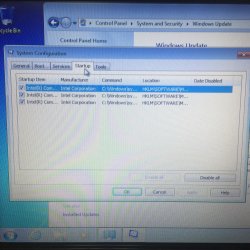
Go to the Startup section and take some screen shots for a complete list,
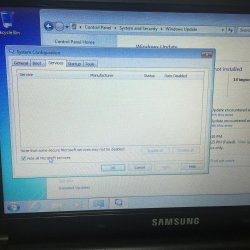
Go to the Services section and on the bottom left Check the box to Hide All Microsoft services,
Repeat the screen shots,
See the links above my signature on how to take and upload screen shots here,
Cheers.
My Computer
At a glance
Win-7-Pro64bit 7-H-Prem-64biti7-5930K 2nd i9-9940x both water blocked VRM'...Trident-z 3200C14 2nd Trident-z 3600C16EVGA 1080ti ftw3 2nd Titan Xp both water blocked
Computer type
PC/Desktop
Computer Manufacturer/Model Number
Custom assembled by me :}
OS
Win-7-Pro64bit 7-H-Prem-64bit
CPU
i7-5930K 2nd i9-9940x both water blocked VRM's too
2nd ASUS X299 Apex/Intel i9-9940x with Custom water loop/7H-Prem-x64/Corsair 450D case/Ram Trident-z 3600C16 4x8gb / Samsung970Evo plus 500gb SSD/Dual ssd EZ swap evo/PSU EVGA SuperNova 1200w-P2 80+Platinum/GPU Titan Xp /8-ML-140 on push-pull on 2-280GTX rads
It is a empty load that has no programs installed like I said before. Just the basic windows. Once it gets that first update to the windows update runtimes (Dont know what its called but it installs before any updates) It cant check and the error means it runs out of memory before it finishes checking.
I don't know what empty load means post the startup screen shots so we might have a better idea what is loading with windows.
My Computer
At a glance
Win-7-Pro64bit 7-H-Prem-64biti7-5930K 2nd i9-9940x both water blocked VRM'...Trident-z 3200C14 2nd Trident-z 3600C16EVGA 1080ti ftw3 2nd Titan Xp both water blocked
Computer type
PC/Desktop
Computer Manufacturer/Model Number
Custom assembled by me :}
OS
Win-7-Pro64bit 7-H-Prem-64bit
CPU
i7-5930K 2nd i9-9940x both water blocked VRM's too
2nd ASUS X299 Apex/Intel i9-9940x with Custom water loop/7H-Prem-x64/Corsair 450D case/Ram Trident-z 3600C16 4x8gb / Samsung970Evo plus 500gb SSD/Dual ssd EZ swap evo/PSU EVGA SuperNova 1200w-P2 80+Platinum/GPU Titan Xp /8-ML-140 on push-pull on 2-280GTX rads
The only thing installed is windows and drivers. No programs have been installed at this point yet with the 1gb of ram after windows installs its updated windows update files when you goto check for updates it errors out and runs out of ram. Error also says it ran out of ram.
And no, there isnt any extra acer crap running with the drivers. Just the Intel GFX app which runs on almost everything out there.
Win-7-Pro64bit 7-H-Prem-64biti7-5930K 2nd i9-9940x both water blocked VRM'...Trident-z 3200C14 2nd Trident-z 3600C16EVGA 1080ti ftw3 2nd Titan Xp both water blocked
Computer type
PC/Desktop
Computer Manufacturer/Model Number
Custom assembled by me :}
OS
Win-7-Pro64bit 7-H-Prem-64bit
CPU
i7-5930K 2nd i9-9940x both water blocked VRM's too
2nd ASUS X299 Apex/Intel i9-9940x with Custom water loop/7H-Prem-x64/Corsair 450D case/Ram Trident-z 3600C16 4x8gb / Samsung970Evo plus 500gb SSD/Dual ssd EZ swap evo/PSU EVGA SuperNova 1200w-P2 80+Platinum/GPU Titan Xp /8-ML-140 on push-pull on 2-280GTX rads
At this point I put in a 2gb stick to get the updates going on it. Ill get you the windows update error code tho. Give me a few as its doing a shutdown update session right now.
Unless you turned off virtual memory a Windows machine shouldn't run out of RAM. That's the whole point of virtual memory, uses disk space as RAM when the OS runs out of physical RAM. It might slow to a crawl but shouldn't error out with not enough memory.
My Computer
At a glance
W10 Pro desktop, W11 laptop, W11 Pro tablet (...3.7Ghz 8700K i7, i7-11800H, i7-1065G716G desktop, 16G laptop, 4G tabletAMD Radeon RX580, RTX 3060, Intel Iris Plus
Computer type
PC/Desktop
Computer Manufacturer/Model Number
Home Built desktop, Dell G15 5511 Gaming laptop,MS Surface Pro 7 tablet
OS
W10 Pro desktop, W11 laptop, W11 Pro tablet (all 64-bit)
CPU
3.7Ghz 8700K i7, i7-11800H, i7-1065G7
Motherboard
ASUS TUF Z370-Pro Gaming in desktop
Memory
16G desktop, 16G laptop, 4G tablet
Graphics Card(s)
AMD Radeon RX580, RTX 3060, Intel Iris Plus
Sound Card
High Definition Audio (Built-in to mobo)
Monitor(s) Displays
Samsung U32J59 32" (2x), 15.6", 12"
Screen Resolution
3840x2160, 3840x2160, 1920x1080, 2160x1440
Hard Drives
500G SSD for OS; 2T, 10T & 15T HDDs for Data on Desktop, 1TB SSD laptop, 128G SSD tablet.
PSU
Corsair CX 750M
Case
Antec 100
Cooling
CM 212+
Keyboard
IBM Model M - used continuously since 1986
Mouse
Microsoft Pro IntelliMouse
Internet Speed
400M down 8M up
Antivirus
Windows Defender
Browser
FireFox
Other Info
Built my first computer (8Mhz 8088cpu, 640K RAM, 20MB HDD, 2 360K floppy drives) in 1985 and have been building them for myself, relatives and friends ever since.
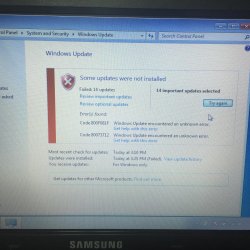
Here is another starter laptop. Its a samsung. Base load of windows 7 starter sp1 32bit would not even try updates with the original 1gb of ram. After putting a different 2gb stick than the other laptop this one is fighting to do updates same as the other.
Attached is some photos for you guys showing that nothing is running that its an empty load of windows. I have no clue whats wrong with starter now. Non sp1 disk I have works perfect. But the sp1 disk has issues for starter. If I install home premium with the disk it doesnt give these issues.
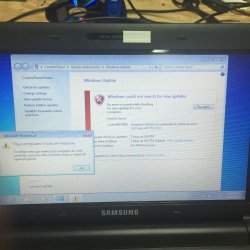
Let me know if you guys want anymore info. I will also pull out the 2gb stick shortly and post a picture of the error that comes up when checking for update if it only has 1gb of ram.
If I fight with the computer it will do 5-10 updates at a time. Those 14 are just part of whats left. Even after checking for updates again it still shows around 50ish updates waiting. If I install at shutdown it fails and reverts.
Note that this 2gb ram stick Im trying in this machine is different from the one that was in the acer the original post was about.
Have you tried reboots watching for Windows Updates queued on Start Menu Shutdown button with a ! mark? Some Updates want a full Shutdown to install, many that fail will eventually catch up with enough reboots.
Try typing Troubleshoot in the Start Search Box, run the Windows Update troubleshooter. Google the specific error codes for Updates which persistently fail to find how others have resolved them. Once you post the Updates log Noel will likely have other steps for your to take.
Those Intel programs do not need to start up with Windows.
Shutdowns also fail the same. Tried the Microsoft fixit for windows updates and it still did the same. Also the Intel gfx apps don't use much for resources. Last machine I had issues with didn't even have them running but the same result. I did install from a non sp1 disk on another 1gb machine and it appears to be something with the sp1 loads of starter. Updating a non service pack to sp1 and updates work perfect after.
There is a known bug with 32bit Windows - which MS are addressing - where the RAM required for a full check can grow to exceed the available address space.. I was under the impression that this was only relevant in Domain situations with WSUS in operation, but it may also be applicable here.
An update is expected within a month or so to address this problem - but no definite details have yet emerged that I am aware of.
My Computer
At a glance
Win 7 x64 Home Premium (and x86 VirtualBox VM...i3 370M/i7 6500U8GB - finally :)/8GBit's an i3, dude!/dual Intel&nVidia
Computer type
Laptop
Computer Manufacturer/Model Number
Asus K52F or Lenovo B51-80
OS
Win 7 x64 Home Premium (and x86 VirtualBox VM)/Win10
CPU
i3 370M/i7 6500U
Motherboard
Asus/Lenovo
Memory
8GB - finally :)/8GB
Graphics Card(s)
it's an i3, dude!/dual Intel&nVidia
Sound Card
onboard
Monitor(s) Displays
15.6" built-in
Screen Resolution
1366x768/1920x1080
Hard Drives
750GB Seagate internal
Sundry external drives attached to other computers on the local network
1TB SSD on the Lenovo
PSU
n/a
Internet Speed
as much as I can get - usually on a dongle/phone, so <1MB/s
When installing updates on any machine no matter version after the first 100 or so updates ram fills up and drags the pc down. They need to fix this too. Maybe a final sp2 one day. Consolidate to lower server load.
But anyways. Found the issue. Virtual memory is disabled by default in 7 starter sp1. Non service pack came enabled. Why they did this I have no clue. Maybe to get people to upgrade to home premium?