

rev1775
New member
- Local time
- 5:00 AM
- Messages
- 79
Okay, this might get a little long winded but I have a hypothetical set of questions to ask.
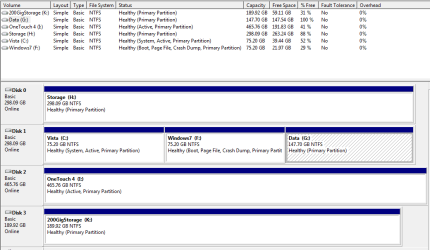
Background on specs..See image...
Disk 0 Simply storage.
Disk 1 Vista (C: Windows7 (F: Data/Storage (G:
Disk 2 (H: Usb Storage Drive.
Disk 3 (K: Usb Backups from Windows7/Vista image created from within windows7.
I just created a backup image of disk 1 which backs up the whole drive vista/windows7 and the storage partition, within the last hour.
Here comes the hypothetical part.
I would like to try installing MAC OS X on a partition I will create on disk 0 (say 25gig) leaving the rest of the drive as it is currently.
If I can manage to get the MAC OS installed onto the partition and it even works, that would be fine (worked in VMware).
The issue will be that I will mess the bootloader up as far as my windows drive goes which I will need to fix.
My question is this, since I just made a system image back up of the drive that holds all the windows partitions and the install of the MAC OS is not on the same drive can I simply boot the recovery disk and restore the images for my windows drive thinking it should also restore the bootloader for windows as it is currently?
Also, there is no problem restoring the image if stored on a usb hard drive right?
At that point I would expect to have the dual boot options I have presently, knowing I can't boot back into the MAC side yet.
However, If I download EasyBCD (or something better if someone has a suggestion) Open it, click “Add/Remove entries” navigate to “Mac”. Select Type in the dropdown to “Generic x86 Pc” and give some name in the text box below. This name should then appear in my boot screen when I reboot correct?
I know it might seem like the long way around but I would rather not do the command line boot loader editing...
Background on specs..See image...
Disk 0 Simply storage.
Disk 1 Vista (C: Windows7 (F: Data/Storage (G:
Disk 2 (H: Usb Storage Drive.
Disk 3 (K: Usb Backups from Windows7/Vista image created from within windows7.
I just created a backup image of disk 1 which backs up the whole drive vista/windows7 and the storage partition, within the last hour.
Here comes the hypothetical part.
I would like to try installing MAC OS X on a partition I will create on disk 0 (say 25gig) leaving the rest of the drive as it is currently.
If I can manage to get the MAC OS installed onto the partition and it even works, that would be fine (worked in VMware).
The issue will be that I will mess the bootloader up as far as my windows drive goes which I will need to fix.
My question is this, since I just made a system image back up of the drive that holds all the windows partitions and the install of the MAC OS is not on the same drive can I simply boot the recovery disk and restore the images for my windows drive thinking it should also restore the bootloader for windows as it is currently?
Also, there is no problem restoring the image if stored on a usb hard drive right?
At that point I would expect to have the dual boot options I have presently, knowing I can't boot back into the MAC side yet.
However, If I download EasyBCD (or something better if someone has a suggestion) Open it, click “Add/Remove entries” navigate to “Mac”. Select Type in the dropdown to “Generic x86 Pc” and give some name in the text box below. This name should then appear in my boot screen when I reboot correct?
I know it might seem like the long way around but I would rather not do the command line boot loader editing...
Attachments
My Computer
- Computer Manufacturer/Model Number
- Home Built
- OS
- 7-Pro-64
- CPU
- Intel Dual Core E5400 2.7
- Motherboard
- Asus P5Q Pro Turbo
- Memory
- 2gig DDR2 800
- Graphics Card(s)
- XFX Radeon HD 4770 512MB
- Sound Card
- Onboard
- Monitor(s) Displays
- 19" Wide screen
- Screen Resolution
- 1440x900
- Hard Drives
- Seagate 320 Sata2 (2)
Seagate 750 Sata2 (1)
- PSU
- Corsair HX520W
