
Of the start menu:
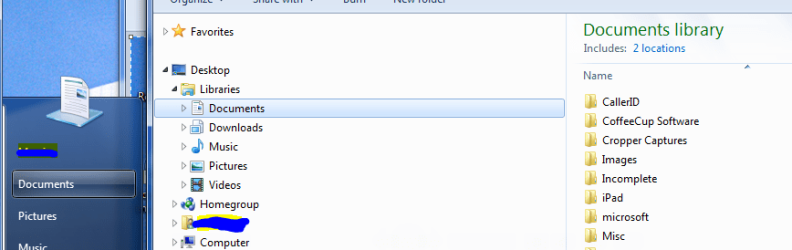
- the Document link takes me right to the Document Library (see Screenshot1 below)
- the Pictures link takes me right to the Picture Library (perfect)
- the Music link takes me right to the Music Library (perfect)
- but the Downloads link
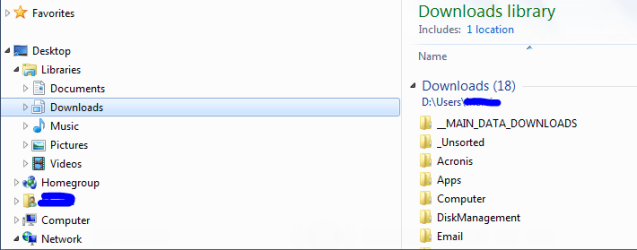
- does NOT take me Downloads Library - which exists (see Screenshot2), but rather,
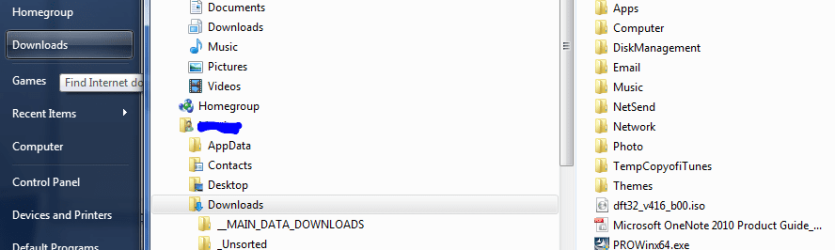
- it takes me to a Downloads Folder (see Screenshot3 )
Attachments
My Computer
- Computer type
- PC/Desktop
- Computer Manufacturer/Model Number
- DELL XPS 8500 // DELL XPS Studio 9100 // DELL Dim 9200
- OS
- DELL Win 7 Home Premium 64 Bit
- CPU
- Intel Core i7-930 (8MB L2, 2.8GHz) // ntel Core 2 Quad Q6600
- Motherboard
- ?? // Dell A02 BIOS // ??
- Memory
- 16GB // 18GB DDR3 SDRAM 1333Mhhz 6 DIMMS (3x2, 3x4) //4 GB
- Graphics Card(s)
- AMD HD7570 // AMD Radeon HD6750 // ATI Radeon HD5670 1 GB GD
- Sound Card
- ?? // THX TruStudio PC //?
- Monitor(s) Displays
- Dual Dell 2405 WFP-HC24 //SAmsung 27" // Triple 19" LCD
- Screen Resolution
- 1900 x 1200
- Hard Drives
- Main :WD Caviar Black 1 TB SATA WD1002FAEX
Backup :WD Caviar Black 1 TB SATA WD1002FAEX
- PSU
- ?? // Ultra 900W // ??

