Question on my new build

Odd Job

New member
Member
Local time
4:01 AM
Messages
93
The BIOS version on my new build motherboard is rev 1.01. The latest version is 1904. This latest version supports all of the newer processors.

Question: will there be any performance (or other) benefit in installing the latest bios version. I am a little apprehensive about flashing the bios although Asus do provide a utility for doing this from windows (EZFlash). Does anyone have experience of this utility and is it easy and reliable.

Also if I flash the bios will it revert back to default settings.

Thanks in advance.
 

My Computer My Computer

Computer type
PC/Desktop
Computer Manufacturer/Model Number
Self build
OS
Windows 7 professional X 64
CPU
Phenom 11 X 6 1090t 3.2 GHz
Motherboard
Asus Crosshair III Formula 790FX
Memory
8 gb Corsair 1600MHz C9 DDR3
Graphics Card(s)
2 X Saphire HD5770 Vapour X in crossfire
Sound Card
SupremeFX X-Fi
Monitor(s) Displays
Samsung 24" full HD
Screen Resolution
1920 X 1080
Hard Drives
1 X 1Tb Sata HHD
PSU
Corsair TX 650 watt
Case
Antec 902 ultimate gamer case
Cooling
Zalman CNPS 9900
MSI has a EZ flash like feature and I've flashed my board twice with perfect results. The manual way makes me nervous so I prefer it. Just read up on it first and give it a go. Yes it will go to the default bios setting from what I remember with the MSi program.
 

My Computer My Computer

Computer type
PC/Desktop
Computer Manufacturer/Model Number
A blend of brains, brawn and dumb luck.
OS
Windows 7 Ultimate 64
CPU
i7 3770k OC'd 4.6 @ 1.17v, also FX 8120 & i5 miniITX
Motherboard
MSI P67A-GD80 b3
Memory
32 gb G.Skill Sniper DDR3 10-12-12-31 @ 2133
Graphics Card(s)
XFX Radeon 7870 2GB DDR5
Sound Card
Sound Blaster Z Series Card
Monitor(s) Displays
(2) LG LED 23" 1920 x 1080 2ms Monitors via mini d-port
Screen Resolution
1680 X 1050 p
Hard Drives
Samsung 256 gb 830 SSD sata III
(1) 1 tb WD Black
(2) 1 tb Hitachi deskmates/sata II
(2) 1 tb WD green/sata II
(2) 3 tb Seagate Barracuda
(1) 120 gb OCZ Vertex SS
(1) Drobo 5N w/5 Seagate 3tb
PSU
EVGA modular 1000G2 80% gold rating & APC 1200 RS
Case
CoolerMaster Storm Styker
Cooling
7 case fans 140mm & 120mm, NZXT Kraken X60
Keyboard
(2) Logitech Illuminated Keyboards (1) usb (1) wireless
Mouse
Logitech G700 & T-BC21 - nano nx for the laptop
Internet Speed
Basic 120mbps down
Antivirus
Trend Micro Titanium Max Security & Malwarebytes Premium
Browser
Chrome and IE 10
Other Info
5 Noctua case fans + 3 Noctua in p/p on NZXT cooler
Integrated hot swap drive bays for 2.5" Drives
(2) Lite-on dvd/cd/Blu Ray optical 22X
Integrated fan controller and led on/off
HP Officejet Pro 8630 all-n-one
Hot-swappable 3.5" hard drive bay
Netgear Nighthawk router
Asus USB 3 & sata 6 PCIe card
Vantec IDE to sata adptr./Ultra sata adptr
Lenovo L420 i5 lappy with m sata
Drobo 5N advanced NAS
Make sure you select in Bios to "Save" the old Bios. If the new one fails to work right you just revert back to old one.

Mike
 

My Computer My Computer

Computer Manufacturer/Model Number
Hopalong/ Godzilla
OS
Windows7 Pro 64bit SP-1; Windows XP Pro 32bit
CPU
Intel Core i7-870 Lynnfield 2.93GHz LGA 1156 95W Quad-Core
Motherboard
ASUS P7P55D-E PRO
Memory
8GB@1400MHz Crucial Ballistix DDR3-1600 4x2GB
Graphics Card(s)
ASUS ENGTX460 DirectCU/2DI/1GD5 1GB 256-bit GDDR5
Sound Card
VIA Onboard
Monitor(s) Displays
Asus VS248H-P 24"; Samsung SyncMaster 941BW 19"ws
Screen Resolution
1920x1080; 1440x900
Hard Drives
Samsung 830 120GB SSD
Intel 320 120GB SSD
Western Digital Caviar Black WD7501AALS 750GB 7200 RPM SATA 3.0Gb/s
Western Digital Caviar Black WD6401AALS 640GB 7200 RPM SATA 3.0Gb/s
PSU
COOLER MASTER Silent Pro RS850-AMBAJ3-US 850W Modular
Case
COOLER MASTER HAF 932 RC-932-KKN5-GP Black
Cooling
Scythe "Mugen-2 Rev.B" (2 ScytheKaze-Jyuni PWM fans)
Keyboard
Logitech K-320
Mouse
Kensington
Antivirus
Avast Inernet Suite
Browser
IE 9 ; Chrome
I'm a little concerned that the numbering scheme is different between the two BIOS versions. Maybe I'm just reading wrong.

Anyway, just be sure your get the right BIOS for your board and go for it. You probably won't see a performance improvement directly, but may see something indirectly.

As far as settings go, it varies. Sometimes a flash will reset to defaults and sometimes it won't . Or, you may see some but not all settings returned to default. If you have any custom settings, make a note of them so you can restore them after the flash if needed.
 

My Computer My Computer

Computer Manufacturer/Model Number
Dell Optiplex
OS
Windows 7 Professional 64 bit
Memory
4096
Read the release notes. If there isn't anything broke on your computer that the release notes say will be fixed, I vote for just leaving well enough alone and not screwing with the BIOS.
 

My Computer My Computer

Computer Manufacturer/Model Number
Self-Built in July 2009
OS
Windows 7 Ultimate x64
CPU
Intel Q9550 2.83Ghz OC'd to 3.40Ghz
Motherboard
Gigabyte GA-EP45-UD3R rev. 1.1, F12 BIOS
Memory
8GB G.Skill PI DDR2-800, 4-4-4-12 timings
Graphics Card(s)
EVGA 1280MB Nvidia GeForce GTX570
Sound Card
Realtek ALC899A 8 channel onboard audio
Monitor(s) Displays
23" Acer x233H
Screen Resolution
1920x1080
Hard Drives
Intel X25-M 80GB Gen 2 SSD
Western Digital 1TB Caviar Black, 32MB cache. WD1001FALS
PSU
Corsair 620HX modular
Case
Antec P182
Cooling
stock
Keyboard
ABS M1 Mechanical
Mouse
Logitech G9 Laser Mouse
Internet Speed
15/2 cable modem
Other Info
Windows and Linux enthusiast. Logitech G35 Headset.
Asus EZ Flash 2 utility is safe and easy to use. I've flashed this motherboard 3 times.

BUT
You've got to follow proper procedure (see below, from Asus herself).

I use a digital camera to take photos of all my BIOS pages and their current (my preferred) settings. I print them out. Now anytime I want to check or reset my BIOS settings it is quick and easy.

**************
EZ Flash 2 – the best, the safest and the most convenient way to update BIOS.

Revised February 4, 2010.

Updating BIOS is serious business!
Every precaution should therefore be taken to prevent that anything goes wrong. Above all: DO NOT USE ASUS UPDATE!!! AFUDOS is the only good alternative to EZ Flash 2.

EZ Flash 2 is a built-in function of BIOS. It is the safest way to update BIOS, because one is not dependent on the operating system, any application, internet connection, firewall settings, antivirus or anything else that can put the vital BIOS update at risk.

On a new build, BIOS can be updated to the latest version before installation of the OS, which may possibly make the installation go smoother and safer.


Note: All what's said below about loading BIOS defaults also applies to the other BIOS update methods (ASUS Update and AFUDOS)!

The PC must never be overclocked during the BIOS update! Always load and save BIOS defaults before and after a BIOS update (press <F5>). By loading and saving BIOS defaults before the update, CPU frequency, memory frequency and voltages are set to default (Auto).
Memory timings are set to SPD values which ensure that a PC with high performance memory that need a higher voltage than 1.8V for DDR2 or 1.5V for DDR3 is able to boot on the standard Memory Voltage. Save the default settings (press <F10>) before starting the update
.

When these instructions are carefully followed, there will be no need for a CLRTC.

Preparation:


  • Document all your preferred BIOS settings (i.e. the settings you have changed from the default setting).
  • Download the BIOS file, which normally is compressed (zipped).
  • Unzip the BIOS file to a FAT/FAT32 formatted USB Flash Disk with only one partition (or to a Floppy Disk or a CD-ROM). If the unzipped BIOS file is named like e.g. 'P5B-ASUS-Deluxe-1101.ROM', you can rename it to 'P5BD1101.ROM'. Otherwise a truncated name will appear as 'P5B-AS~1.ROM' due to a limitation to max 8 characters in the filename (8.3).

Update:

  • Reboot.
  • Press (tap) <DEL> during POST (Power-On Self Test) to enter BIOS Setup.
  • Load BIOS Defaults (press <F5>).
  • Insert the USB Flash Disk containing the BIOS file P5BDxxxx.ROM. (Note that the USB Flash Disk has to be inserted before boot to enter BIOS, otherwise it won't be detected).
  • Save and Exit <F10>. (BIOS will now restart).
  • During BIOS restart, press <DEL> to enter BIOS Setup again.
  • Under Tools menu, select ASUS EZ Flash 2. It may take 20 seconds for the drives to show up. Select a drive in the left pane <Tab>. Use <Up> and <Down> arrows and <Enter> to select a drive. If you don't see the BIOS file in the right pane, check the other drives. Note that the drive letters may not be the same here as in Windows.
  • Select the BIOS file (e.g. P5BD1101.ROM) and press <Enter> to start flashing. Supervise the update, which includes the following stages: Erasing - Flashing (writing) - Verification. BIOS will automatically restart when the update is ready.
  • Disconnect the USB Flash Disk before/during the restart.
  • Perform a C.P.R. (CPU Parameter Recall) which resets the chipset. Power down, remove power cord from the PSU for 2 minutes and then power up.
  • Enter BIOS and load BIOS Defaults <F5> again.
  • Reenter your preferred BIOS settings - if you are using AHCI or RAID mode, don't forget to set 'Configure SATA as' to [AHCI / RAID]. Also remember the settings for the JMicron Controller, Audio and Memory Voltage. Check also that the Boot Device Priority is ok.
  • Save and Exit <F10> (automatic restart).
  • Press <DEL> to enter BIOS Setup and make a final check that all BIOS settings are ok. Save any changes.

In case of a new build:


When BIOS is updated to the latest version, and prior to the installation of the operating system, run Memtest86+ (v4.10 or later) for a few hours to check that the memory test doesn't report any errors.
There are precompiled, bootable downloads for Floppy Disk and CD-ROM (ISO).

 

My Computer My Computer

Computer type
PC/Desktop
Computer Manufacturer/Model Number
Home Built - Jan 2013
OS
Windows 7 64 Bit Home Premium SP1
CPU
i7-3820
Motherboard
Asus P9X79-PRO - Bios 4608
Memory
GSkill F3-14900CL9Q - 16GB
Graphics Card(s)
EVGA GeForce GTX660 - Driver 352.86
Sound Card
On board Realtek ALC898
Monitor(s) Displays
Acer S271HL
Screen Resolution
1920 x 1080
Hard Drives
#1- Samsung 840 Pro Series
#2- Western Digital WD1002FAEX Sata3 Black
#3- Western Digital WD1002FAEX Sata3 Black
PSU
Corsair CMPSU-850TX-V2 - 850 watt (by Seasonic)
Case
Corsair Obsidian 550D
Cooling
Standard 3 120mm case fans, Cooler Master Hyper 212 EVO
Keyboard
MS KC-0405
Mouse
Intellimouse 5-button
Internet Speed
56 Mbits/Sec (on a good day)
Antivirus
Avast & Malwarebytes
Browser
Firefox
Other Info
Asus DVD - DRW-24B1ST 24X
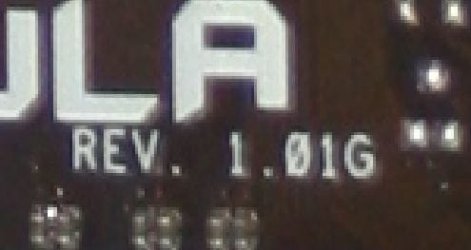
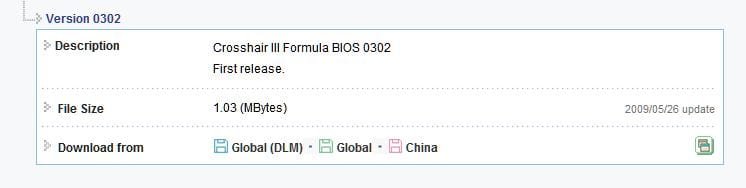
I'm a little concerned that the numbering scheme is different between the two BIOS versions. Maybe I'm just reading wrong.

The file for the BIOS update is "Crosshair-III-Formula-ASUS-1904.ROM"

The original version according to my motherboard is Rev 1.01G. (see pic)

However, according to Asus site the original version is 0302. (see pic 2)

I'm confused now :confused::confused:
 

Attachments

  • BIOS.JPG
    BIOS.JPG
    21.4 KB · Views: 6
  • BIOS original.JPG
    BIOS original.JPG
    19.3 KB · Views: 11

My Computer My Computer

Computer type
PC/Desktop
Computer Manufacturer/Model Number
Self build
OS
Windows 7 professional X 64
CPU
Phenom 11 X 6 1090t 3.2 GHz
Motherboard
Asus Crosshair III Formula 790FX
Memory
8 gb Corsair 1600MHz C9 DDR3
Graphics Card(s)
2 X Saphire HD5770 Vapour X in crossfire
Sound Card
SupremeFX X-Fi
Monitor(s) Displays
Samsung 24" full HD
Screen Resolution
1920 X 1080
Hard Drives
1 X 1Tb Sata HHD
PSU
Corsair TX 650 watt
Case
Antec 902 ultimate gamer case
Cooling
Zalman CNPS 9900
I'm on a slow connection....anyways, every new bios is released along with a changelog. A changelog lists the bugs the bios fixes or new features it adds. So, FIRST, locate the changelog for bios 1904, if you cant, hold your horses till one becomes available or call Acer and ask them.

Once you lay your hands on the changelog, READ it. If theres something new it offers and you think it'll benefit you, take the usual precautions, then flash your bios. EZFlash is pretty OK.

If you cant figure out the changelog, paste it here so all of us can advise you.

And why are you confused about the revision numbers? You dont need to be Einstein to go to the asus site and check the latest bios for your mobo.
 

My Computer My Computer

Computer Manufacturer/Model Number
Too many to describe...
OS
Windows 7 x64 pro/ Windows 7 x86 Pro/ XP SP3 x86
I updated my bios through the BIOS utility on my ASUS board, no problems what so ever...

http://usa.asus.com/product.aspx?P_ID=2Y4dQFaJ6gPN18cQ

it looks like that is the newest bios revision for your board.. that version you are seeing may be for some other controller on the mobo.. i know when my mobo posts the sata3 marvell controller lists its own bios revision which is different (obviously) than my mobo bios version... check the bios version IN the bios
 

My Computer My Computer

Computer type
PC/Desktop
Computer Manufacturer/Model Number
My First Build
OS
Windows 7 64-bit Home
CPU
Intel Core i7-870 Lynnfield 2.93 Ghz
Motherboard
Asus P7P55D-E Pro
Memory
8GB 4x2 A-Data 1333 Mhz
Graphics Card(s)
HIS Radeon HD 5850 1GB
Sound Card
Onboard
Monitor(s) Displays
Dell S2440L 24"
Screen Resolution
1080p
Hard Drives
120 GB Intel X25-M SATA Solid State Drive ///
1 TB Western Digital Caviar Black SATA 6gb/s 7200rpm Drive
PSU
Corsair 650TX 650 Watt
Case
Antec Three Hundred
Cooling
Stock Intel /// 4 Antec Case Fans /// NZXT Sentry-2
Keyboard
Logitech LX 710
Mouse
Logitech LX 710
Other Info
LG Blu-Ray Drive
That 1.01 is just the PCB revision, NOT the BIOS version.

I have the same board, it's been working great for me since I installed it in Feb. this year. No BIOS flashes, my only problems came from having OCZ Platinum memory with my AMD BE processor, once swapped to OCZ BE memory all was well.

I second the vote, if the machine works fine and the BIOS update changelogs don't report fixes for issues you're having, leave well enough alone.
 

My Computer My Computer

Computer Manufacturer/Model Number
Home built
OS
Windows 7 Home Premium x64
CPU
Phenom II X4 955 BE
Motherboard
Asus Sabertooth 990FX
Memory
8 GB OCZ BE 1667
Graphics Card(s)
EVGA GeForce GTX470 SC
Monitor(s) Displays
BenQ 19"
Screen Resolution
1280x1024
Hard Drives
256 GB OCZ Vertex 3 SSD
2x WD 1 TB
1x WD 2 TB
PSU
Thermaltake 850W
Case
Coolermaster Cosmos 1000
Cooling
Air
Keyboard
Logitech
Mouse
Cyborg R.A.T 7
Internet Speed
Standard RR
To find your current BIOS version:
Enter the BIOS
On the MAIN Tab > Go to "System Information"
Bios Information is at the top of the screen, Version: xxxx
 

My Computer My Computer

Computer type
PC/Desktop
Computer Manufacturer/Model Number
Home Built - Jan 2013
OS
Windows 7 64 Bit Home Premium SP1
CPU
i7-3820
Motherboard
Asus P9X79-PRO - Bios 4608
Memory
GSkill F3-14900CL9Q - 16GB
Graphics Card(s)
EVGA GeForce GTX660 - Driver 352.86
Sound Card
On board Realtek ALC898
Monitor(s) Displays
Acer S271HL
Screen Resolution
1920 x 1080
Hard Drives
#1- Samsung 840 Pro Series
#2- Western Digital WD1002FAEX Sata3 Black
#3- Western Digital WD1002FAEX Sata3 Black
PSU
Corsair CMPSU-850TX-V2 - 850 watt (by Seasonic)
Case
Corsair Obsidian 550D
Cooling
Standard 3 120mm case fans, Cooler Master Hyper 212 EVO
Keyboard
MS KC-0405
Mouse
Intellimouse 5-button
Internet Speed
56 Mbits/Sec (on a good day)
Antivirus
Avast & Malwarebytes
Browser
Firefox
Other Info
Asus DVD - DRW-24B1ST 24X
I flashed the bios. It was easy peasy, and now I cant understand why I was so worried about it. Perhaps because I'd never done it before. I used a USB stick with the new bios on and eazyflash. Took about 30 seconds and I had a new bios with a few extra setup options.

One strange thing though, when I restarted windows I had to reactivate it. Is this normal with a change of bios ?
 

My Computer My Computer

Computer type
PC/Desktop
Computer Manufacturer/Model Number
Self build
OS
Windows 7 professional X 64
CPU
Phenom 11 X 6 1090t 3.2 GHz
Motherboard
Asus Crosshair III Formula 790FX
Memory
8 gb Corsair 1600MHz C9 DDR3
Graphics Card(s)
2 X Saphire HD5770 Vapour X in crossfire
Sound Card
SupremeFX X-Fi
Monitor(s) Displays
Samsung 24" full HD
Screen Resolution
1920 X 1080
Hard Drives
1 X 1Tb Sata HHD
PSU
Corsair TX 650 watt
Case
Antec 902 ultimate gamer case
Cooling
Zalman CNPS 9900
Yes and no.

Yes, because Windows activation looks for hardware changes, and a big enough change in the BIOS could trigger a check.

No, because I have flashed my BIOS a few times and it never happened to me ;).
 

My Computer My Computer

Computer type
PC/Desktop
Computer Manufacturer/Model Number
Home Built - Jan 2013
OS
Windows 7 64 Bit Home Premium SP1
CPU
i7-3820
Motherboard
Asus P9X79-PRO - Bios 4608
Memory
GSkill F3-14900CL9Q - 16GB
Graphics Card(s)
EVGA GeForce GTX660 - Driver 352.86
Sound Card
On board Realtek ALC898
Monitor(s) Displays
Acer S271HL
Screen Resolution
1920 x 1080
Hard Drives
#1- Samsung 840 Pro Series
#2- Western Digital WD1002FAEX Sata3 Black
#3- Western Digital WD1002FAEX Sata3 Black
PSU
Corsair CMPSU-850TX-V2 - 850 watt (by Seasonic)
Case
Corsair Obsidian 550D
Cooling
Standard 3 120mm case fans, Cooler Master Hyper 212 EVO
Keyboard
MS KC-0405
Mouse
Intellimouse 5-button
Internet Speed
56 Mbits/Sec (on a good day)
Antivirus
Avast & Malwarebytes
Browser
Firefox
Other Info
Asus DVD - DRW-24B1ST 24X
Back
Top