Question on Sending a Link in Explorer 8

Randy1212

New member
Local time
6:16 PM
Messages
6
Hello -

I have a Windows 7 computer with Explorer 8. In the top row, when I click on 'File' then 'Send' - the 'send link by e-mail' and 'send page by e-mail' tabs are both grayed out and I cannot do a thing with them. How do I solve this issue?

Thank you for your assistance.

Randy
 

My Computer My Computer

OS
Windowx 7 Home Premium 64
In answer to your question, I don't know, but have you considered upgrading to Internet Explorer 9? I just checked your issue on my computer with IE9 and it worked just fine.

IE9 Download
 

My Computer My Computer

Computer Manufacturer/Model Number
HP Pavilion Elite 495UK
OS
Windows 7 Ultimate SP1 64-Bit
CPU
Intel Core i7 870 @ 2.93GHz
Motherboard
MSI 2A9C (CPU1)
Memory
8Gb Dual-Channel DDR3 @ 664MHz
Graphics Card(s)
nVidia GeForce GTX 460 1024MB dedicated RAM
Sound Card
Realtek HD Audio
Monitor(s) Displays
HP2310i
Screen Resolution
1920 x 1080
Hard Drives
1x1954GB Hitachi HDS22020ALA 330 (RAID), 1x1954GB Hitachi External for backup and storage
PSU
460W
Case
HP Elite
Cooling
Air cooled
Keyboard
Logitech K750 solar-powered keyboard
Mouse
Logitech Wireless M180 mouse
Internet Speed
2Mb
Other Info
Pure Avanti Flow Internet Radio with iPod Dock, 64Gb iPod, HP USB Speakers, Sony MDR-V500 Headphones, Sony Vaio F-Series Laptop
Hello -

I have a Windows 7 computer with Explorer 8. In the top row, when I click on 'File' then 'Send' - the 'send link by e-mail' and 'send page by e-mail' tabs are both grayed out and I cannot do a thing with them. How do I solve this issue?

Thank you for your assistance.

Randy

Hello Randy and welcome to Seven Forums.

First, my usual disclaimer: I'm not an expert in anything! :)
Having said that I think you need to be using either Outlook or Windows Live Mail as your default email program. I don't use either of those programs and my links are also grayed out in IE8 (on an XP machine) and IE9 (my Win 7 machine.)
 

My Computer My Computer

Computer type
Laptop
Computer Manufacturer/Model Number
Sony Vaio VPCEB47GM Laptop
OS
Win 7 Pro 64-bit
CPU
Intel i5 2.4 Ghz
Memory
8GB DDR3
Graphics Card(s)
Intel HD 3000
Sound Card
IDT High Definition
Monitor(s) Displays
15.6 WGXA Anti-Glare LED
Screen Resolution
1280x800
Hard Drives
640Gb 7200rpm
Antivirus
MSE
Browser
Opera (primary) with IE9 backup
Hi - Thanks for your replies. Actually, these links were working just fine until recently. I do have Windows Live as my default e-mail but recently upgraded from the 2009 version to 2011. This issue existed previously and the person who initially set up my computer was able to resolve it easily, but I forget exactly what the steps were. It has something to do with going into control panel, then (relying on memory here) Network and Internet - and then check marking an item or two - something to do with default - but from there I get totally lost:) Thanks.
 

My Computer My Computer

OS
Windowx 7 Home Premium 64

My Computer My Computer

Computer type
Laptop
Computer Manufacturer/Model Number
Sony Vaio VPCEB47GM Laptop
OS
Win 7 Pro 64-bit
CPU
Intel i5 2.4 Ghz
Memory
8GB DDR3
Graphics Card(s)
Intel HD 3000
Sound Card
IDT High Definition
Monitor(s) Displays
15.6 WGXA Anti-Glare LED
Screen Resolution
1280x800
Hard Drives
640Gb 7200rpm
Antivirus
MSE
Browser
Opera (primary) with IE9 backup
This isn't really a solution, but more of a comment. Nothing irks me or my users more than when a person insists on sending a page by e-mail, instead of a link. We have a few people who do this often, unfortunately.

Why not just copy the link from the address bar and paste it into an e-mail? This way, the link can be pasted how you want, where you want, before or after you give a description.
 

My Computer My Computer

OS
Windows 7 Ultimate x64 SP1
CPU
Intel Core i7-2600
Motherboard
Gigabyte GA-P67A-UD3P-B3
Memory
12 GB Patriot Extreme DDR3-1333
Graphics Card(s)
Nvidia GTX 470
Monitor(s) Displays
Dell UltraSharp 2209WA
Hard Drives
OCZ Agility3 240 GB, WD5001AALS, WD7501AALS
PSU
OCZ ModStream 700W
Case
CoolerMaster HAF 912 Advanced
Cooling
CoolerMaster Hyper 212 Plus
Hi - Thanks for your replies. Actually, these links were working just fine until recently. I do have Windows Live as my default e-mail but recently upgraded from the 2009 version to 2011. This issue existed previously and the person who initially set up my computer was able to resolve it easily, but I forget exactly what the steps were. It has something to do with going into control panel, then (relying on memory here) Network and Internet - and then check marking an item or two - something to do with default - but from there I get totally lost:) Thanks.

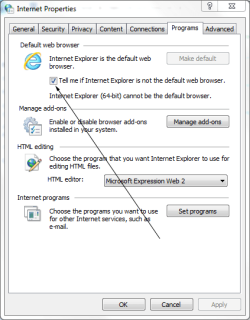
Is this what you were looking for?

IE9.PNG

You'll find it under Internet Options>Programs Tab.
 

My Computer My Computer

Computer Manufacturer/Model Number
HP Pavilion Elite 495UK
OS
Windows 7 Ultimate SP1 64-Bit
CPU
Intel Core i7 870 @ 2.93GHz
Motherboard
MSI 2A9C (CPU1)
Memory
8Gb Dual-Channel DDR3 @ 664MHz
Graphics Card(s)
nVidia GeForce GTX 460 1024MB dedicated RAM
Sound Card
Realtek HD Audio
Monitor(s) Displays
HP2310i
Screen Resolution
1920 x 1080
Hard Drives
1x1954GB Hitachi HDS22020ALA 330 (RAID), 1x1954GB Hitachi External for backup and storage
PSU
460W
Case
HP Elite
Cooling
Air cooled
Keyboard
Logitech K750 solar-powered keyboard
Mouse
Logitech Wireless M180 mouse
Internet Speed
2Mb
Other Info
Pure Avanti Flow Internet Radio with iPod Dock, 64Gb iPod, HP USB Speakers, Sony MDR-V500 Headphones, Sony Vaio F-Series Laptop
Hi - It's nothing so major that I would need to use systems restore. As to the comment on sending a page instead of a link - that is what I do (I just send links; not pages); often sending to myself if I see an article that I like or need for work (instead of saving in favorites). From what others are telling me it has something to do just checking off something in Explorer defaults - but can't seem to zero on what it is exactly. I had this issue a long time ago - and it was just a matter of checking off a box or two and the issue was solved
 
Last edited:

My Computer My Computer

OS
Windowx 7 Home Premium 64
Hello -

I have a Windows 7 computer with Explorer 8. In the top row, when I click on 'File' then 'Send' - the 'send link by e-mail' and 'send page by e-mail' tabs are both grayed out and I cannot do a thing with them. How do I solve this issue?

Thank you for your assistance.

Randy

Have a look at this tutorial :
Fix Send Page by E-Mail Option Grayed Out in Internet Explorer - The Winhelponline Blog

Edit : I use Windows Live Mail. So, I put a blue radio dot in front of Windows Live Mail.
 

My Computer My Computer

Computer Manufacturer/Model Number
Acer Aspire 7741Z
OS
Windows 7 Home Premium 64-bit, SP1
CPU
Intel Pentium P6200, Cores 2, 2.13 GHz
Memory
4 GB
Graphics Card(s)
Intel HD
Sound Card
unknown
Monitor(s) Displays
17.3 inches
Screen Resolution
1600 x 900
Hard Drives
640 GB, 5400 PRM
Back
Top