question regarding cpu HSF compatability and possible problem

midobatsu

New member
Local time
1:28 PM
Messages
37
ok so after 6 years of service my stock cpu heat-sink/ fan is starting to rattle once it heats up so a clear sign a bearing is starting to wear out since once it warms up good its loud and annoying. so instead of waiting for it to die im going to get it replaced.

i just want some advice, currently i have a g43t-am (v2.0) mobo or this more or less http://images.esellerpro.com/2131/I/713/66/g43t.JPG and a intel core 2 quad q8300


and im thinking of getting this since its universal
Amazon.com: Cooler Master Hyper TX3 - CPU Cooler with 3 Direct Contact Heat Pipes (RR-910-HTX3-G1): Electronics

my question is will it fit?, in the picture you see those 4 metal parts where the fan locks in and im afraid those will not be able to be removed if they are a problem, will it be ok?, need a good fix and need this computer to last longer since i cant afford to buy a new one at the moment and would like a "mark of approval" per say before i buy it

thanks in advance and i hope this is the right place to post this
 

My Computer

Computer type
PC/Desktop
Computer Manufacturer/Model Number
gateway
OS
windows 7 home premium x64
Antivirus
avast 2015
Browser
firefox
Since the specs say that the TX3 is compatible with LGA775, I would not worry any further.

If your case offers at least 140mm of clearance from motherboard to side-panel, you are golden. You may want to check your case documentation on this.

As to the fan fitments. Those are just plastic clips that you screw the fans onto and then clip onto the HSF. They are easily removable if you do not want a push-pull setup. Also you can orient the HSF in any direction to prevent RAM clearance issues.

If my Hyper 212 EVO was anything to go by, the TX3 should be completely worth the money, assuming you are not going to overclock the life out of your CPU.
 

My Computers

System One System Two

  • Computer type
    Laptop
    Computer Manufacturer/Model Number
    Custom
    OS
    Windows 10 Professional 64-Bit
    CPU
    Intel Core i7 8700K
    Motherboard
    Asus Maximus X Code
    Memory
    G.Skill TridentZ RGB DDR4 4000 F4-4000C18D-16GTZR
    Graphics Card(s)
    Zotac GeForce GTX-1660 Ti AMP 6GB
    Sound Card
    ROG SupremeFX S1220 (Onboard)
    Monitor(s) Displays
    Dell UP2716D
    Screen Resolution
    2560x1440
    Hard Drives
    Samsung 980 Pro PCIe NVMe 500GB
    Samsung 970 Evo PCIe NVMe 250GB
    Samsung 860 Evo SATA III 2TB
    WD Black WD2003FZEX 2TB x 3
    ODD - GH24NSC0
    PSU
    Coolermaster V1000
    Case
    Corsair Obsidian 450D
    Cooling
    Corsair H115i - Corsair SP140 Red x 2
    Keyboard
    Logitech G213
    Mouse
    Logitech G102
    Internet Speed
    100 Mbps (Supposedly) - Asianet India FTTH
    Antivirus
    Avast Free!
    Browser
    Maxthon Cloud Browser 5.xx
    Other Info
    Asus FX-553VD (960 Evo, 860 Evo, 16GB)
    Samsung Galaxy C9 Pro
    Canon EOS 70D
  • Computer type
    Laptop
    System Manufacturer/Model Number
    Asus FX503VD
    OS
    Windows 10 Pro x64
    CPU
    Intel Core i7 7700HQ
    Memory
    2 x 8GB Samsung DDR4 2400
    Graphics Card(s)
    GTX 1050
    Screen Resolution
    1920 x 1080
    Hard Drives
    Samsung 960 Evo PCIe NVMe 250GB Boot
    Samsung 840 Pro Series 256 GB SSD (MZ-7PD256BW);
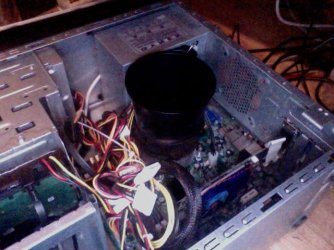
i would never overclock it, i want it to last as long as it can since im poor and cant yet afford to my my 1st 100% custom pc, i was so afraid that those plastic clips where something that where stuck there for good, so glad they can be removed...speaking of which how do i do that? do i need to remove the motherboard to?, and regarding space ill show you the current fan, based off the tube thing around the fan and how wide it is i think im good, and there is a point in the case in the back with tons of holes like the side pannel so i can have the fan facing that way instead of forwards, ill show in a pic bellow, and yes i know wire hell...i had warranty to cover a new power supply which is slightly higher than the one it had before (cant remember the watts of the last one but this one is 500w and has a lot of wires

as you can see there is this huge tunnel tube thing over the fan, i think it will fit fine. that does

edit: there is like 7 inches or at least 6"4-5 inches in there...yea the case is 7 inches in depth measured from the outside 14"5 inches long and 15 inches tall
 

Attachments

  • Photo on 2015-07-29 at 00.08.jpg
    Photo on 2015-07-29 at 00.08.jpg
    138.1 KB · Views: 13
Last edited:

My Computer

Computer type
PC/Desktop
Computer Manufacturer/Model Number
gateway
OS
windows 7 home premium x64
Antivirus
avast 2015
Browser
firefox
You can actually get the stock Intel HSF for the LGA775 socket here:

Amazon.com: Intel Original Socket 775 CPU Fan/Heatsink with Copper Core Center: Computers & Accessories

Based on the picture I think you should have no problems.

The clips fixing the fans to the TX3 can be removed by applying gentle pressure with your fingers or a flathead screwdriver.

Just remove the original cooler, mount the fans and retention clips on the TX3 and attach to the original Intel retention mechanism.

A good guide and review is shown here:
Cooler Master Hyper TX3 CPU Cooler Review | Hardware Secrets
 

My Computers

System One System Two

  • Computer type
    Laptop
    Computer Manufacturer/Model Number
    Custom
    OS
    Windows 10 Professional 64-Bit
    CPU
    Intel Core i7 8700K
    Motherboard
    Asus Maximus X Code
    Memory
    G.Skill TridentZ RGB DDR4 4000 F4-4000C18D-16GTZR
    Graphics Card(s)
    Zotac GeForce GTX-1660 Ti AMP 6GB
    Sound Card
    ROG SupremeFX S1220 (Onboard)
    Monitor(s) Displays
    Dell UP2716D
    Screen Resolution
    2560x1440
    Hard Drives
    Samsung 980 Pro PCIe NVMe 500GB
    Samsung 970 Evo PCIe NVMe 250GB
    Samsung 860 Evo SATA III 2TB
    WD Black WD2003FZEX 2TB x 3
    ODD - GH24NSC0
    PSU
    Coolermaster V1000
    Case
    Corsair Obsidian 450D
    Cooling
    Corsair H115i - Corsair SP140 Red x 2
    Keyboard
    Logitech G213
    Mouse
    Logitech G102
    Internet Speed
    100 Mbps (Supposedly) - Asianet India FTTH
    Antivirus
    Avast Free!
    Browser
    Maxthon Cloud Browser 5.xx
    Other Info
    Asus FX-553VD (960 Evo, 860 Evo, 16GB)
    Samsung Galaxy C9 Pro
    Canon EOS 70D
  • Computer type
    Laptop
    System Manufacturer/Model Number
    Asus FX503VD
    OS
    Windows 10 Pro x64
    CPU
    Intel Core i7 7700HQ
    Memory
    2 x 8GB Samsung DDR4 2400
    Graphics Card(s)
    GTX 1050
    Screen Resolution
    1920 x 1080
    Hard Drives
    Samsung 960 Evo PCIe NVMe 250GB Boot
    Samsung 840 Pro Series 256 GB SSD (MZ-7PD256BW);
ok, well i already bought the cooler master, ive never removed the mother board before... hope i remember where all the cords plugged in..and i hope i can remove the graphics card this time...since i failed to remove the side that shows on the outside where the monitor plugs in (yes i undid the screw...either there was a second one or im not doing it right)

only concern i have is it seems they put the fan on the side all the wires are on mine.. i hope i can have it the other way around but have the fan still push air out those holes in the back
 

My Computer

Computer type
PC/Desktop
Computer Manufacturer/Model Number
gateway
OS
windows 7 home premium x64
Antivirus
avast 2015
Browser
firefox
YOu do not need to remove the motherboard.

The TX3 will clip on to the original Intel socket retention mechanism.

You just need to remove the original HSF by turning the retention clips and then mount the TX3 as shown in the 2nd link above.

You can mount 1 or even 2 fans, they should not interfere with the cabling (which I guess you could try to clean up some :D)
 

My Computers

System One System Two

  • Computer type
    Laptop
    Computer Manufacturer/Model Number
    Custom
    OS
    Windows 10 Professional 64-Bit
    CPU
    Intel Core i7 8700K
    Motherboard
    Asus Maximus X Code
    Memory
    G.Skill TridentZ RGB DDR4 4000 F4-4000C18D-16GTZR
    Graphics Card(s)
    Zotac GeForce GTX-1660 Ti AMP 6GB
    Sound Card
    ROG SupremeFX S1220 (Onboard)
    Monitor(s) Displays
    Dell UP2716D
    Screen Resolution
    2560x1440
    Hard Drives
    Samsung 980 Pro PCIe NVMe 500GB
    Samsung 970 Evo PCIe NVMe 250GB
    Samsung 860 Evo SATA III 2TB
    WD Black WD2003FZEX 2TB x 3
    ODD - GH24NSC0
    PSU
    Coolermaster V1000
    Case
    Corsair Obsidian 450D
    Cooling
    Corsair H115i - Corsair SP140 Red x 2
    Keyboard
    Logitech G213
    Mouse
    Logitech G102
    Internet Speed
    100 Mbps (Supposedly) - Asianet India FTTH
    Antivirus
    Avast Free!
    Browser
    Maxthon Cloud Browser 5.xx
    Other Info
    Asus FX-553VD (960 Evo, 860 Evo, 16GB)
    Samsung Galaxy C9 Pro
    Canon EOS 70D
  • Computer type
    Laptop
    System Manufacturer/Model Number
    Asus FX503VD
    OS
    Windows 10 Pro x64
    CPU
    Intel Core i7 7700HQ
    Memory
    2 x 8GB Samsung DDR4 2400
    Graphics Card(s)
    GTX 1050
    Screen Resolution
    1920 x 1080
    Hard Drives
    Samsung 960 Evo PCIe NVMe 250GB Boot
    Samsung 840 Pro Series 256 GB SSD (MZ-7PD256BW);
so i do have to remove those plastic things the current cooler is screwed into, i also dont know where to put all that cabling, there is so much of it from that power supply alone, most of it is sitting on or just above my ram =/

but to get this straight i have to have the fan pointing towards the front or above the ram so the side without a fan points towards the back where those holes are?

also, my god the 3-4 pin plug bit on this stock fan is fighting hard and will not let go, so much effort to only get it a little up
 
Last edited:

My Computer

Computer type
PC/Desktop
Computer Manufacturer/Model Number
gateway
OS
windows 7 home premium x64
Antivirus
avast 2015
Browser
firefox
If I remember right all you have to do to remove the original HSF is turn the retention clips 90 degrees (I forget which direction) and it will unclip.

Then all you do is place the prepped TX3 with its fan on the CPU and turn/twist its own retention clips so it locks into the CPU socket's built-in retention mechanism.

Remember you need to clean off the old thermal paste from the CPU heat spreader and apply fresh thermal paste before you fit the TX3.

You can have the fan either pushing or pulling through the heatsink, so you can have it on the side facing the area with the ventilation holes and pulling air through the heatsink.

If space permits you can even have 2 fans in push-pull (you will have to buy an extra 92mm fan to do this). The TX3 comes with clips for 2 fans.
 

My Computers

System One System Two

  • Computer type
    Laptop
    Computer Manufacturer/Model Number
    Custom
    OS
    Windows 10 Professional 64-Bit
    CPU
    Intel Core i7 8700K
    Motherboard
    Asus Maximus X Code
    Memory
    G.Skill TridentZ RGB DDR4 4000 F4-4000C18D-16GTZR
    Graphics Card(s)
    Zotac GeForce GTX-1660 Ti AMP 6GB
    Sound Card
    ROG SupremeFX S1220 (Onboard)
    Monitor(s) Displays
    Dell UP2716D
    Screen Resolution
    2560x1440
    Hard Drives
    Samsung 980 Pro PCIe NVMe 500GB
    Samsung 970 Evo PCIe NVMe 250GB
    Samsung 860 Evo SATA III 2TB
    WD Black WD2003FZEX 2TB x 3
    ODD - GH24NSC0
    PSU
    Coolermaster V1000
    Case
    Corsair Obsidian 450D
    Cooling
    Corsair H115i - Corsair SP140 Red x 2
    Keyboard
    Logitech G213
    Mouse
    Logitech G102
    Internet Speed
    100 Mbps (Supposedly) - Asianet India FTTH
    Antivirus
    Avast Free!
    Browser
    Maxthon Cloud Browser 5.xx
    Other Info
    Asus FX-553VD (960 Evo, 860 Evo, 16GB)
    Samsung Galaxy C9 Pro
    Canon EOS 70D
  • Computer type
    Laptop
    System Manufacturer/Model Number
    Asus FX503VD
    OS
    Windows 10 Pro x64
    CPU
    Intel Core i7 7700HQ
    Memory
    2 x 8GB Samsung DDR4 2400
    Graphics Card(s)
    GTX 1050
    Screen Resolution
    1920 x 1080
    Hard Drives
    Samsung 960 Evo PCIe NVMe 250GB Boot
    Samsung 840 Pro Series 256 GB SSD (MZ-7PD256BW);
If I remember right all you have to do to remove the original HSF is turn the retention clips 90 degrees (I forget which direction) and it will unclip.

its in there by screws there is no clips like the new one will have =x, its screwed into the plastic things on the motherboard in that picture in the op (ill reply more tomorrow if i need to add anything or dont understand something or to just respond to you. time to sleep, been up way to long figuring/ researching this stuff out)
 

My Computer

Computer type
PC/Desktop
Computer Manufacturer/Model Number
gateway
OS
windows 7 home premium x64
Antivirus
avast 2015
Browser
firefox
The heatsink attaches to the retention mechanism via expanding plugs. When you turn the plastic head at the top of the post, the plug expands in the socket to hold the heatsink in place.

There should be a couple of videos on Youtube.
 

My Computers

System One System Two

  • Computer type
    Laptop
    Computer Manufacturer/Model Number
    Custom
    OS
    Windows 10 Professional 64-Bit
    CPU
    Intel Core i7 8700K
    Motherboard
    Asus Maximus X Code
    Memory
    G.Skill TridentZ RGB DDR4 4000 F4-4000C18D-16GTZR
    Graphics Card(s)
    Zotac GeForce GTX-1660 Ti AMP 6GB
    Sound Card
    ROG SupremeFX S1220 (Onboard)
    Monitor(s) Displays
    Dell UP2716D
    Screen Resolution
    2560x1440
    Hard Drives
    Samsung 980 Pro PCIe NVMe 500GB
    Samsung 970 Evo PCIe NVMe 250GB
    Samsung 860 Evo SATA III 2TB
    WD Black WD2003FZEX 2TB x 3
    ODD - GH24NSC0
    PSU
    Coolermaster V1000
    Case
    Corsair Obsidian 450D
    Cooling
    Corsair H115i - Corsair SP140 Red x 2
    Keyboard
    Logitech G213
    Mouse
    Logitech G102
    Internet Speed
    100 Mbps (Supposedly) - Asianet India FTTH
    Antivirus
    Avast Free!
    Browser
    Maxthon Cloud Browser 5.xx
    Other Info
    Asus FX-553VD (960 Evo, 860 Evo, 16GB)
    Samsung Galaxy C9 Pro
    Canon EOS 70D
  • Computer type
    Laptop
    System Manufacturer/Model Number
    Asus FX503VD
    OS
    Windows 10 Pro x64
    CPU
    Intel Core i7 7700HQ
    Memory
    2 x 8GB Samsung DDR4 2400
    Graphics Card(s)
    GTX 1050
    Screen Resolution
    1920 x 1080
    Hard Drives
    Samsung 960 Evo PCIe NVMe 250GB Boot
    Samsung 840 Pro Series 256 GB SSD (MZ-7PD256BW);
So on review (its been years since I saw LGA775), the original HSF just plugs into holes in the motherboard.

The posts you have may are for a custom heatsink (yours looks different from the standard Intel HSF) by your PC manufacturer, implying the presence of a special backplate.

You will have to remove it, which means getting the board out of the case, I am afraid:(.

You just place the TX3 mounting clips in the holes in the motherboard and push down to lock the clips in place.

If you are uncomfortable with rwmoving the notherboard you may have to approach your local PC repair guy.
 

My Computers

System One System Two

  • Computer type
    Laptop
    Computer Manufacturer/Model Number
    Custom
    OS
    Windows 10 Professional 64-Bit
    CPU
    Intel Core i7 8700K
    Motherboard
    Asus Maximus X Code
    Memory
    G.Skill TridentZ RGB DDR4 4000 F4-4000C18D-16GTZR
    Graphics Card(s)
    Zotac GeForce GTX-1660 Ti AMP 6GB
    Sound Card
    ROG SupremeFX S1220 (Onboard)
    Monitor(s) Displays
    Dell UP2716D
    Screen Resolution
    2560x1440
    Hard Drives
    Samsung 980 Pro PCIe NVMe 500GB
    Samsung 970 Evo PCIe NVMe 250GB
    Samsung 860 Evo SATA III 2TB
    WD Black WD2003FZEX 2TB x 3
    ODD - GH24NSC0
    PSU
    Coolermaster V1000
    Case
    Corsair Obsidian 450D
    Cooling
    Corsair H115i - Corsair SP140 Red x 2
    Keyboard
    Logitech G213
    Mouse
    Logitech G102
    Internet Speed
    100 Mbps (Supposedly) - Asianet India FTTH
    Antivirus
    Avast Free!
    Browser
    Maxthon Cloud Browser 5.xx
    Other Info
    Asus FX-553VD (960 Evo, 860 Evo, 16GB)
    Samsung Galaxy C9 Pro
    Canon EOS 70D
  • Computer type
    Laptop
    System Manufacturer/Model Number
    Asus FX503VD
    OS
    Windows 10 Pro x64
    CPU
    Intel Core i7 7700HQ
    Memory
    2 x 8GB Samsung DDR4 2400
    Graphics Card(s)
    GTX 1050
    Screen Resolution
    1920 x 1080
    Hard Drives
    Samsung 960 Evo PCIe NVMe 250GB Boot
    Samsung 840 Pro Series 256 GB SSD (MZ-7PD256BW);
i might have to do that..idk how i feel about removing the motherboard,computer is a gateway =x
the case at least looks like this but i dont think they have the same innards...no...no they dont..this is what i get for buying a computer from future shop 6 years ago after graduation high school as a reward =/... you sure cuzz those 4 plastic clip things are in this picture as well http://images.esellerpro.com/2131/I/713/66/g43t.JPG

update: i decided to twist one of the screws loose and after a while it made a popping sound, i think it all one part, those parts near the motherboard holes are metal as well..should i remove the HSF now? even though its no where near time to do this since the part is not in
 
Last edited:

My Computer

Computer type
PC/Desktop
Computer Manufacturer/Model Number
gateway
OS
windows 7 home premium x64
Antivirus
avast 2015
Browser
firefox
Hopefully that popping sound was just the screw releasing from the socket.

You might be best served going to your local PC guy/gal.
 

My Computers

System One System Two

  • Computer type
    Laptop
    Computer Manufacturer/Model Number
    Custom
    OS
    Windows 10 Professional 64-Bit
    CPU
    Intel Core i7 8700K
    Motherboard
    Asus Maximus X Code
    Memory
    G.Skill TridentZ RGB DDR4 4000 F4-4000C18D-16GTZR
    Graphics Card(s)
    Zotac GeForce GTX-1660 Ti AMP 6GB
    Sound Card
    ROG SupremeFX S1220 (Onboard)
    Monitor(s) Displays
    Dell UP2716D
    Screen Resolution
    2560x1440
    Hard Drives
    Samsung 980 Pro PCIe NVMe 500GB
    Samsung 970 Evo PCIe NVMe 250GB
    Samsung 860 Evo SATA III 2TB
    WD Black WD2003FZEX 2TB x 3
    ODD - GH24NSC0
    PSU
    Coolermaster V1000
    Case
    Corsair Obsidian 450D
    Cooling
    Corsair H115i - Corsair SP140 Red x 2
    Keyboard
    Logitech G213
    Mouse
    Logitech G102
    Internet Speed
    100 Mbps (Supposedly) - Asianet India FTTH
    Antivirus
    Avast Free!
    Browser
    Maxthon Cloud Browser 5.xx
    Other Info
    Asus FX-553VD (960 Evo, 860 Evo, 16GB)
    Samsung Galaxy C9 Pro
    Canon EOS 70D
  • Computer type
    Laptop
    System Manufacturer/Model Number
    Asus FX503VD
    OS
    Windows 10 Pro x64
    CPU
    Intel Core i7 7700HQ
    Memory
    2 x 8GB Samsung DDR4 2400
    Graphics Card(s)
    GTX 1050
    Screen Resolution
    1920 x 1080
    Hard Drives
    Samsung 960 Evo PCIe NVMe 250GB Boot
    Samsung 840 Pro Series 256 GB SSD (MZ-7PD256BW);
well what i decided to do was call my friend up to do it for me, he used to be in a I T course or w/e its called till he dropped out but hes made his own pc's and moved the innards of one into another bigger case,so this is nothing hard or new to him. he said the popping was just the lock releasing and that the heat sink is uneven due to it, which is normal when it does that.

he said his brother has a model like mine and that the lifts on my mother board should not get in the way and in fact make it easier, he is even going to bring over some of his oven thermal paste to use instead of the cheap low quality one its prob going to come with. even has the grounding clip thing you put on your wrist.. better than what i was doing..gonna pay him w/e he wants and again later down the road when i get all the parts for my custom comp... but thats all for when the part comes in aug 11th. ill update you if i figure out the name of those parts on the mother board and when its done, thank you for all the info you have shared thus far :)
 

My Computer

Computer type
PC/Desktop
Computer Manufacturer/Model Number
gateway
OS
windows 7 home premium x64
Antivirus
avast 2015
Browser
firefox
You're welcome.

Just hope I was able to help you some.

Have a wonderful day.
 

My Computers

System One System Two

  • Computer type
    Laptop
    Computer Manufacturer/Model Number
    Custom
    OS
    Windows 10 Professional 64-Bit
    CPU
    Intel Core i7 8700K
    Motherboard
    Asus Maximus X Code
    Memory
    G.Skill TridentZ RGB DDR4 4000 F4-4000C18D-16GTZR
    Graphics Card(s)
    Zotac GeForce GTX-1660 Ti AMP 6GB
    Sound Card
    ROG SupremeFX S1220 (Onboard)
    Monitor(s) Displays
    Dell UP2716D
    Screen Resolution
    2560x1440
    Hard Drives
    Samsung 980 Pro PCIe NVMe 500GB
    Samsung 970 Evo PCIe NVMe 250GB
    Samsung 860 Evo SATA III 2TB
    WD Black WD2003FZEX 2TB x 3
    ODD - GH24NSC0
    PSU
    Coolermaster V1000
    Case
    Corsair Obsidian 450D
    Cooling
    Corsair H115i - Corsair SP140 Red x 2
    Keyboard
    Logitech G213
    Mouse
    Logitech G102
    Internet Speed
    100 Mbps (Supposedly) - Asianet India FTTH
    Antivirus
    Avast Free!
    Browser
    Maxthon Cloud Browser 5.xx
    Other Info
    Asus FX-553VD (960 Evo, 860 Evo, 16GB)
    Samsung Galaxy C9 Pro
    Canon EOS 70D
  • Computer type
    Laptop
    System Manufacturer/Model Number
    Asus FX503VD
    OS
    Windows 10 Pro x64
    CPU
    Intel Core i7 7700HQ
    Memory
    2 x 8GB Samsung DDR4 2400
    Graphics Card(s)
    GTX 1050
    Screen Resolution
    1920 x 1080
    Hard Drives
    Samsung 960 Evo PCIe NVMe 250GB Boot
    Samsung 840 Pro Series 256 GB SSD (MZ-7PD256BW);
Back
Top