Question regarding libraries

trendy

David H.
Member
VIP
Local time
11:28 PM
Messages
379
Location
Swansea South Wales UK
Been scrolling through some of the questions and answers on here.And noticed that some of the replies are regarding libraries,Some of the posters have written that they don't use libraries.
Could someone please explain this to me as I thought that the libraries were to get you into documents etc.
Thanks.David Bit confused really.
 

My Computer

Computer type
PC/Desktop
Computer Manufacturer/Model Number
Home Build windows 7 Home premium.Built by a local computer shop.
OS
Summary Operating System Windows 7 Home Premium 64-bit SP1 CPU AMD Athlon II X2 250 23 °C
CPU
AMD Athlon II X2 250
Motherboard
Manufacturer BIOSTAR Group Model N61PB-M2S (Socket AM2 )
Memory
Total memory slots 4 Used memory slots 2 Free memory slots 2
Graphics Card(s)
Name Generic Non-PnP Monitor on NVIDIA GeForce 6150SE nForce
Sound Card
Realtek High Definition Audio Playback Devices Realtek Dig
Monitor(s) Displays
Acer
Hard Drives
Main C drive is now a 120GB SSD With only operating system and programs.
Second HDD 1TB with all documents etc.
Keyboard
HID Keyboard Device Device Kind Keyboard Device Name HID K
Antivirus
Karsersky
Browser
Google
Other Info
Summary
Operating System
Windows 7 Home Premium 64-bit SP1
CPU
AMD Athlon II X2 250 23 °C
Regor 45nm Technology
RAM
4.00GB Dual-Channel DDR2 @ 401MHz (6-6-6-18)
Motherboard
BIOSTAR Group N61PB-M2S (Socket AM2 ) 40 °C
Graphics
Generic Non-PnP Monitor (1024x768@60Hz)
128MB NVIDIA GeForce 6150SE nForce 430 (Biostar Microtech Int'l)
Storage
1863GB West

My Computer

Computer type
PC/Desktop
Computer Manufacturer/Model Number
Custom
OS
Dual Boot: Windows 8.1 & Server 2012r2 VMs: Kali Linux, Backbox, Matriux, Windows 8.1
CPU
A10 7700 Kavari SteamRoller
Motherboard
ASUS A88XM-PLUS (FM2+ )
Memory
8GB DDR3 SDRAM PC3-8500
Graphics Card(s)
1024MB ATI AMD Radeon R7 Graphics
Sound Card
Realtek High Definition Audio
Monitor(s) Displays
Samsung
Hard Drives
SSD Crucial 120gb
WD VelociRaptor 1tb
PSU
Rosewill Gaming 650w
Case
Rosewill Galaxy 2
Internet Speed
55/12
Antivirus
Malwarebytes, MSE, SAS
Browser
FireFox, Chrome
Try the built in windows help and support under your start menu for questions like these.

From help and support built into windows 7 start menu when searching for the word libraries:

Libraries: frequently asked questions-


Libraries are new in Windows 7. Here are answers to some common questions about libraries.

Show contentHide content What is a library?
Libraries are where you go to manage your documents, music, pictures, and other files. You can browse your files the same way you would in a folder, or you can view your files arranged by properties like date, type, and author.

In some ways, a library is similar to a folder. For example, when you open a library, you'll see one or more files. However, unlike a folder, a library gathers files that are stored in several locations. This is a subtle, but important, difference. Libraries don't actually store your items. They monitor folders that contain your items, and let you access and arrange the items in different ways. For instance, if you have music files in folders on your hard disk and on an external drive, you can access all of your music files at once using the Music library.

Show contentHide content How do I create or change a library?
Windows has four default libraries: Documents, Music, Pictures, and Videos. You can also create new libraries. For more information, see Create a new library.

Here are some ways you can modify an existing library:

Include or remove a folder. Libraries gather content from included folders, or library locations. You can include up to 50 folders in one library. For more information, see Include folders in a library.

Change the default save location. The default save location determines where an item is stored when it's copied, moved, or saved to the library. For more information, see Customize a library.

Change the type of file a library is optimized for. Each library can be optimized for a certain file type (such as music or pictures). Optimizing a library for a certain file type changes the available options for arranging your files. For more information, see Customize a library.

Show contentHide content What happens if I delete a library or the items in a library?
If you delete a library, the library itself is moved to the Recycle Bin. The files and folders that were accessible in the library are stored elsewhere and therefore aren't deleted. If you accidentally delete one of the four default libraries (Documents, Music, Pictures, or Videos), you can restore it to its original state in the navigation pane by right-clicking Libraries and then clicking Restore default libraries.

If you delete files or folders from within a library, they're also deleted from their original locations. If you want to remove an item from a library but not delete it from the location it's stored in, you should remove the folder containing the item. When you remove a folder from a library, all the items in the folder will be removed (but not deleted). For more information, see Include folders in a library.

Similarly, if you include a folder in a library and then delete the folder from its original location, the folder is no longer accessible in the library.

Show contentHide content Why can't I search or arrange files from a folder that I recently included in a library?
If a folder from a non-indexed location (such as an external hard drive or a network) was recently included in a library and it contains a large number of files, it might take some time for the library to add those files to the index. During the indexing process, searches and file arrangements might appear incomplete. For more information about indexing, see Improve Windows searches using the index: frequently asked questions.

Show contentHide content What types of locations are supported in libraries?
You can include folders in a library from many different locations, such as your computer's C drive, an external hard drive, or a network.

Where is the folder stored?
Can it be included in a library?

On your C drive
Yes.

On an external hard drive
Yes, but the content won't be available if the drive is disconnected.

On an additional hard disk inside your computer
Yes.

On a USB flash drive
Only if the device appears in the navigation pane, under Computer, in the Hard Disk Drives section. This is set by the device manufacturer, and in some cases, it can be changed. Contact your manufacturer for more information.

The content won't be available if the drive is disconnected.

On removable media (such as a CD or DVD)
No.

On a network
Yes, as long as the network location is indexed, or the folder has been made available offline. (See the question below.)

On a different computer in your homegroup
Yes. For more information, search Windows Help and Support for "Add computers to a homegroup."


Note
Only folders can be included in libraries. Other items on your computer (such as saved searches and search connectors) can't be included.

Show contentHide content Why did I get a message saying that a location can't be included because it's not indexed?
It means that the folder is stored on a network location that hasn't been indexed. A network folder can only be included in a library if the content of the folder has been added to the search index. If the folder is already indexed on the device where it's stored, you should be able to include it directly in the library.

If the network folder is not indexed, an easy way to index it is to make the folder available offline. This will create offline versions of the files in the folder and add these files to the search index on your computer. After you make a folder available offline, you can include it in a library.

When you make a network folder available offline, copies of all the files in that folder will be stored on your computer's hard disk. Take this into consideration if the network folder contains a large number of files.

To make a folder available offline
While connected to the network, locate the network folder that you want to make available offline.

Right-click the folder, and then click Always available offline.

Picture of the Always available offline commandThe Always available offline command

Notes
If you don't see the Always available offline command in the right-click menu for a network folder, you might be using an edition of Windows 7 that doesn't support offline files.

If the network folder you're trying to include is stored on a computer that's running an older version of Windows, you might be able to make it compatible with Windows 7 libraries by installing Windows Search 4.0 on the computer, and then indexing it. For more information about Windows Search 4.0, see the Windows Search website.

 

My Computer

Computer type
PC/Desktop
Computer Manufacturer/Model Number
Custom Built
OS
Windows 10 Pro
CPU
AMD Ryzen 5 2400G Processor with Radeon RX Vega 11 Graphics
Motherboard
ASRock X470 Master SLI/AC AM4 AMD Promontory X470 SATA 6Gb/s
Memory
G.SKILL Ripjaws V Series 16GB (2 x 8GB) 288-Pin DDR4 SDRAM D
Graphics Card(s)
2047MB NVIDIA GeForce GTX 1060 6GB (EVGA)
Sound Card
Motherboard Built in
Monitor(s) Displays
Acer R240HY bidx 23.8-Inch IPS HDMI DVI VGA (1920 x 1080) Wi
Screen Resolution
1920 x 1080
Hard Drives
1TB Sandisk SSD PLUS (Main drive)
500 GB Seagate 7200 RPM (Games)
500 GB Western Digital 7200 RPM (Virtual Machines)
PSU
CORSAIR TX Series TX650M 650W 80+ Gold Modular Power Supply
Case
CORSAIR CARBIDE SPEC-02 Mid-Tower Gaming Case, Red LED Fan
Cooling
220mm, two 120mm, and four 60mm fans
Keyboard
Wired Dell keyboard
Mouse
Wireless Logitech mouse
Internet Speed
250mb down, 30mb up
Antivirus
Panda Cloud Antivirus
Browser
Chrome-ish x64
Other Info
Your awesome for reading this.
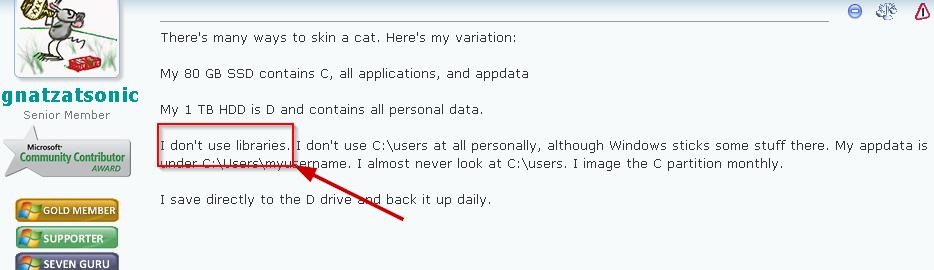
Don't think you understood my question,Here is an example ''I don't use libraries''That was my question does he mean that he don't have the libraries on the left ie:Documents etc,Or what method does one use?
Many thanks.
IKyr6Bw.jpg
 

My Computer

Computer type
PC/Desktop
Computer Manufacturer/Model Number
Home Build windows 7 Home premium.Built by a local computer shop.
OS
Summary Operating System Windows 7 Home Premium 64-bit SP1 CPU AMD Athlon II X2 250 23 °C
CPU
AMD Athlon II X2 250
Motherboard
Manufacturer BIOSTAR Group Model N61PB-M2S (Socket AM2 )
Memory
Total memory slots 4 Used memory slots 2 Free memory slots 2
Graphics Card(s)
Name Generic Non-PnP Monitor on NVIDIA GeForce 6150SE nForce
Sound Card
Realtek High Definition Audio Playback Devices Realtek Dig
Monitor(s) Displays
Acer
Hard Drives
Main C drive is now a 120GB SSD With only operating system and programs.
Second HDD 1TB with all documents etc.
Keyboard
HID Keyboard Device Device Kind Keyboard Device Name HID K
Antivirus
Karsersky
Browser
Google
Other Info
Summary
Operating System
Windows 7 Home Premium 64-bit SP1
CPU
AMD Athlon II X2 250 23 °C
Regor 45nm Technology
RAM
4.00GB Dual-Channel DDR2 @ 401MHz (6-6-6-18)
Motherboard
BIOSTAR Group N61PB-M2S (Socket AM2 ) 40 °C
Graphics
Generic Non-PnP Monitor (1024x768@60Hz)
128MB NVIDIA GeForce 6150SE nForce 430 (Biostar Microtech Int'l)
Storage
1863GB West
Trendy:

Not sure about your question when you say "on the left".

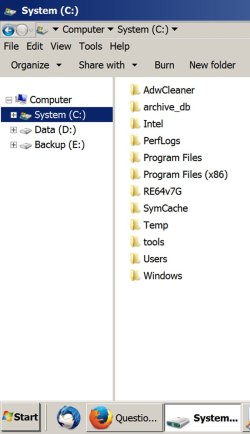
Here is a pic of my Explorer tree.

I save everything directly to the D drive.

You don't see "libraries" there. I think most people see "homegroup" and "network" also, but I got rid of them also. It's been 3 or 4 years since I set it up that way.
 

Attachments

  • Untitled-1.jpg
    Untitled-1.jpg
    76.5 KB · Views: 0

My Computer

Computer type
PC/Desktop
Computer Manufacturer/Model Number
Ignatz Special; 4 speed manual gearbox; factory air conditioning; one of one
OS
Windows 7 Home Premium SP1, 64-bit
CPU
Intel Skylake i5-6600K, not overclocked
Motherboard
AsRock Z170M Extreme 4, micro ATX
Memory
8 GB HyperX DDR4-2666 (2 x 4 GB)
Graphics Card(s)
none; graphics are integrated on CPU
Sound Card
onboard: Realtek ALC1150; external: USB Behringer UF0-202
Monitor(s) Displays
Dell S2340M 23 inch IPS
Screen Resolution
1600 x 900
Hard Drives
System: Crucial MX100 series SSD, 128 GB;
Data: Samsung Spinpoint 103SJ, 1 TB;
Backup: WD Caviar Green WD30EZRX-00D8PB0, 3 TB
PSU
Rosewill SilentNight 500 watt fanless, semi-modular
Case
Antec Solo II
Cooling
Noctua NH-U12S; Noctua F12 intake, Noctua S12A exhaust
Keyboard
Microsoft 200 6JH-00001 USB
Mouse
Dell or Microsoft optical wired; USB
Antivirus
Microsoft Security Essentials and Malwarebytes Premium
Browser
Pale Moon
Other Info
All fans PWM; speeds at idle: CPU circa 500 rpm; intake circa 600 rpm; exhaust circa 600 rpm; CPU temps 27 idle and 47 C load in a warm room (27 C/81 F) when running Intel Extreme Tuning Utility stress test.
Libraries are just shortcuts to other folders, so your Documents library is a shortcut pointing to C:\Users\<username>\Documents. You don't have to use libraries to access Documents as you can use the folder path instead. I use an SSD so have moved my Documents, Pictures etc folders to my hard disk so the path is now D:\Documents etc. I can use that path or I could add that folder to my Documents library. Either will work.
 

My Computer

Computer type
PC/Desktop
Computer Manufacturer/Model Number
PC Specialist Custom
OS
Windows 7 Pro 64 bit
CPU
Intel i5
Motherboard
ASUS® H81M-PLUS
Memory
8GB KINGSTON DUAL-DDR3 1600MHz
Graphics Card(s)
2GB AMD RADEON™ R7 250
Hard Drives
120GB KINGSTON V300 SSD
1TB WD CAVIAR BLACK WD1003FZEX
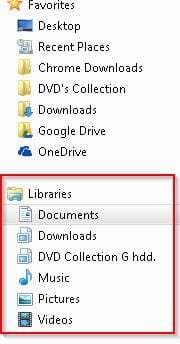
Okay here we go Thanks for the reply.
libraries 15-05-2014.jpg

Are you saying that you don't have as per image if so how do you access documents and so on?

Forgot to say,All my documents etc are on a second drive named G and the C drive only has the OS and program files.
 
Last edited:

My Computer

Computer type
PC/Desktop
Computer Manufacturer/Model Number
Home Build windows 7 Home premium.Built by a local computer shop.
OS
Summary Operating System Windows 7 Home Premium 64-bit SP1 CPU AMD Athlon II X2 250 23 °C
CPU
AMD Athlon II X2 250
Motherboard
Manufacturer BIOSTAR Group Model N61PB-M2S (Socket AM2 )
Memory
Total memory slots 4 Used memory slots 2 Free memory slots 2
Graphics Card(s)
Name Generic Non-PnP Monitor on NVIDIA GeForce 6150SE nForce
Sound Card
Realtek High Definition Audio Playback Devices Realtek Dig
Monitor(s) Displays
Acer
Hard Drives
Main C drive is now a 120GB SSD With only operating system and programs.
Second HDD 1TB with all documents etc.
Keyboard
HID Keyboard Device Device Kind Keyboard Device Name HID K
Antivirus
Karsersky
Browser
Google
Other Info
Summary
Operating System
Windows 7 Home Premium 64-bit SP1
CPU
AMD Athlon II X2 250 23 °C
Regor 45nm Technology
RAM
4.00GB Dual-Channel DDR2 @ 401MHz (6-6-6-18)
Motherboard
BIOSTAR Group N61PB-M2S (Socket AM2 ) 40 °C
Graphics
Generic Non-PnP Monitor (1024x768@60Hz)
128MB NVIDIA GeForce 6150SE nForce 430 (Biostar Microtech Int'l)
Storage
1863GB West
@Trendy
I think it's a matter of personal preference. Personally I keep the standard Windows libraries but mainly use the Documents (My Documents & Public Documents) for Word, Excel, Powerpoint type files. When it comes to my photos and any videos I do essentially what ignatzatsonic does. These tend to be large file collections and I store them (not as a library) on other (non OS) internal HDDs and external HDDs. A good reason for doing this is that I don't want enormous system images.
 

My Computer

Computer type
PC/Desktop
Computer Manufacturer/Model Number
Own build
OS
Windows 7x64 Home Premium SP1
CPU
Intel i7 2600k
Motherboard
ASUS P8Z68 Deluxe
Memory
G.Skill Ripjaws (DDR3-1600) 2x4GB
Graphics Card(s)
Nvidia GeForce GTS 450; Intel HD Graphics 3000(GT2+)
Monitor(s) Displays
Dell Ultrasharp IPS panel U2311H, Samsung SyncMaster P2350
Screen Resolution
1920x1080
Hard Drives
Samsung 850 Pro SSD 256GB, Samsung SSD 840 120GB, Seagates 1TB Barracuda ST31000528AS x2
PSU
Seasonic M12II 520W
Case
Lian Li Lancool PC-K60
Cooling
Case: 1x120mm, 3x140mm CPU: Hyper 212+
Keyboard
Logitech MK520 (wireless)
Mouse
Logitech MK520
Internet Speed
6-7 Mbps
Antivirus
Norton Security Premium, Malwarebytes on 2 (MSE on 3rd PC)
Browser
FireFox
Other Info
Audio: Logitech Z523 2.1
Are you saying that you don't have as per image if so how do you access documents and so on?

Forgot to say,All my documents etc are on a second drive named G and the C drive only has the OS and program files.

Not sure if you are talking to me, but I access documents by looking on the D drive. That's where they are. I open from there. I save to there.

You say all of your docs are on G.

You could save and open directly from the G drive if you desire.

I assume you can find your G drive in your folder tree?

PCs have been around for 30 years or so. "Libraries" were introduced just in the last few years (with Vista? Or was it Windows 7?).

They are optional. Use 'em if it helps you out. Don't if they don't.
 

My Computer

Computer type
PC/Desktop
Computer Manufacturer/Model Number
Ignatz Special; 4 speed manual gearbox; factory air conditioning; one of one
OS
Windows 7 Home Premium SP1, 64-bit
CPU
Intel Skylake i5-6600K, not overclocked
Motherboard
AsRock Z170M Extreme 4, micro ATX
Memory
8 GB HyperX DDR4-2666 (2 x 4 GB)
Graphics Card(s)
none; graphics are integrated on CPU
Sound Card
onboard: Realtek ALC1150; external: USB Behringer UF0-202
Monitor(s) Displays
Dell S2340M 23 inch IPS
Screen Resolution
1600 x 900
Hard Drives
System: Crucial MX100 series SSD, 128 GB;
Data: Samsung Spinpoint 103SJ, 1 TB;
Backup: WD Caviar Green WD30EZRX-00D8PB0, 3 TB
PSU
Rosewill SilentNight 500 watt fanless, semi-modular
Case
Antec Solo II
Cooling
Noctua NH-U12S; Noctua F12 intake, Noctua S12A exhaust
Keyboard
Microsoft 200 6JH-00001 USB
Mouse
Dell or Microsoft optical wired; USB
Antivirus
Microsoft Security Essentials and Malwarebytes Premium
Browser
Pale Moon
Other Info
All fans PWM; speeds at idle: CPU circa 500 rpm; intake circa 600 rpm; exhaust circa 600 rpm; CPU temps 27 idle and 47 C load in a warm room (27 C/81 F) when running Intel Extreme Tuning Utility stress test.
I stopped using Libraries shortly after Windows 7 was released, so it's been a while, but here's what I remember.

1. I hated the way various programs automatically look into Libraries for their data collections. A truly egregious one is WMP and by extension WMC. There was an endless Music Library rebuilding bug in the early days of Windows 7, and I have no use for those programs as music players anyway. They represented yet another of the many Microsoft processes that endlessly grind the hard drive, and WMP further has the propensity to dump crappy album art into music folders before you can disable that horrible behavior. Worst of all, Microsoft married these programs to Libraries, so there was no way to avoid the bad behavior except to nuke the libraries. I do use WMC for CableCard DVR purposes, and that's all I use it for. There are far better alternatives to Microsoft for everything else multimedia.

2. If you enter a subfolder of a Library via the Library and change its sort order, the sort order of every folder in that Library changes as well. That is so NOT what I want to happen. I want independent settings for my folders, and I get that when I don't use Libraries. I just verified it for the Documents Library vs. the Document folder, so it's a bizarre dumbening design choice that persists to this day. ISTR there were other view anomalies similar to this.

The upshot is, if a program seriously depends on Windows Libraries, it's a dealbreaker for me. Their only value IMO is providing a semi-coherent approach to private and public folders, but even that's something I don't use anymore. I just share specific folders that I want to share, which is plenty good enough for me, and it's simpler conceptually.
 

My Computer

Computer type
PC/Desktop
OS
Windows 7 Ultimate x64
Many thanks to all it was just a thought that I noticed in one of the postings by ignatzatsonic.That he posted
I don't use Libraries it just went through my mind what he did to access hie documents etc.

Many Thanks to all. :thumbsup:
 

My Computer

Computer type
PC/Desktop
Computer Manufacturer/Model Number
Home Build windows 7 Home premium.Built by a local computer shop.
OS
Summary Operating System Windows 7 Home Premium 64-bit SP1 CPU AMD Athlon II X2 250 23 °C
CPU
AMD Athlon II X2 250
Motherboard
Manufacturer BIOSTAR Group Model N61PB-M2S (Socket AM2 )
Memory
Total memory slots 4 Used memory slots 2 Free memory slots 2
Graphics Card(s)
Name Generic Non-PnP Monitor on NVIDIA GeForce 6150SE nForce
Sound Card
Realtek High Definition Audio Playback Devices Realtek Dig
Monitor(s) Displays
Acer
Hard Drives
Main C drive is now a 120GB SSD With only operating system and programs.
Second HDD 1TB with all documents etc.
Keyboard
HID Keyboard Device Device Kind Keyboard Device Name HID K
Antivirus
Karsersky
Browser
Google
Other Info
Summary
Operating System
Windows 7 Home Premium 64-bit SP1
CPU
AMD Athlon II X2 250 23 °C
Regor 45nm Technology
RAM
4.00GB Dual-Channel DDR2 @ 401MHz (6-6-6-18)
Motherboard
BIOSTAR Group N61PB-M2S (Socket AM2 ) 40 °C
Graphics
Generic Non-PnP Monitor (1024x768@60Hz)
128MB NVIDIA GeForce 6150SE nForce 430 (Biostar Microtech Int'l)
Storage
1863GB West
Back
Top