
Solved Question regarding moving sound card from 1 pcie slot to another

crankypenguin

qbasic gorillas champ
Local time
1:02 AM
Messages
590
Location
Eastern Europe
I would like to move my sound card above the GPU. Right now it's under it, because I thought it wouldn't fit up there with my new water cooler. But there seems to be more than enough room. So my question is, once I move the sound card from one slot to another, do I have to reinstall the drivers or change any of the settings? Thanks in advance :)
 

My Computer My Computer

At a glance

Windows 7 Ultimate x64FX 8350 @ 4.8ghz, turbo clocked to 5.4ghzMushkin Enhanced Blackline 16GB 1760mhz 10-10...Gigabyte-660 Windforce OC- GPU Clock 1212MHz ...
Computer type
PC/Desktop
Computer Manufacturer/Model Number
Custom Build
OS
Windows 7 Ultimate x64
CPU
FX 8350 @ 4.8ghz, turbo clocked to 5.4ghz
Motherboard
Asus Sabertooth FX990 Gen 3.0 R2.0
Memory
Mushkin Enhanced Blackline 16GB 1760mhz 10-10-9-24 T1
Graphics Card(s)
Gigabyte-660 Windforce OC- GPU Clock 1212MHz /3504MHz ram
Sound Card
Creative Sound Blaster Recon3D PCIe Sound Card
Monitor(s) Displays
Samsung SyncMaster S27B350H (HDMI)
Screen Resolution
1920x1080 60HZ
Hard Drives
1 x SSD Crucial M4 256GB (Primary OS)
3 x HDD WD 1TB
4 x HDD 2TB
1 x HDD 160GB (Secondary Backup OS)
Raid SATA III 6GB/s 4-port PCI-e Controller Card, Marvel 88SE9215 chipset
PSU
Chieftec-650-14CS (Modular) 80 Plus Gold-650 Watt
Case
Akasa Venom Toxic Gaming Big tower ( Custom Black ) Ver 2.0
Cooling
Water 2.0 PRO / GEIL Cyclone VRM / 6x120mm 2x220mm 2x140mm
Keyboard
Logitech G19
Mouse
Wireless Notebook Presenter Mouse 8000
Internet Speed
Fiber GBS
Antivirus
Don't Announce it to the world :)
Browser
Gotta have at least 1!
You do not need to change settings or re-install anything if you move the card.
 

My Computer My Computer

At a glance

W7 Pro SP1 64biti78GBIntel HD Graphics
Computer type
Laptop
Computer Manufacturer/Model Number
Employer provided Dell Latitude
OS
W7 Pro SP1 64bit
CPU
i7
Memory
8GB
Graphics Card(s)
Intel HD Graphics
Hard Drives
crappy SSD
Antivirus
Employer mandated Symantec Endpoint Protection
Browser
Pale Moon 64bit, IE11 64bit & Chrome 64bit
Every time i have moved my soundcard on any motherboard i have had Windows usually pick the card up again as a new device. Its kind of on the same basis as with USB devices also. If you have say a USB stick in one USB port and move it to another it will detect the device as a new one and reinstall drivers again.

In some cases it will pick the Soundcard up like i said as a new device but will find driver's from your system. But you need to check then that you 1: don't have two soundcards installed within sound properties. And 2: You don't have a multimedia device in "Device Manager" with a exclamation mark at the side of it.
 

My Computer My Computer

At a glance

Windows 10 Pro x64Intel i7 2600K @ 4.4GHz16GB Corsair Vengeance Pro DDR3 1600 MHzZOTAC GTX 1070 AMP Edition
Computer type
PC/Desktop
Computer Manufacturer/Model Number
Self Built
OS
Windows 10 Pro x64
CPU
Intel i7 2600K @ 4.4GHz
Motherboard
Asus P8Z77-V LX2
Memory
16GB Corsair Vengeance Pro DDR3 1600 MHz
Graphics Card(s)
ZOTAC GTX 1070 AMP Edition
Sound Card
Asus Xonar D2
Monitor(s) Displays
Viewsonic 24" VX2439WM LCD/LG 22" W2261VP LCD
Screen Resolution
1920x1080 DVI 1080p 16:9 on both screens
Hard Drives
1x SanDisk Extreme 120GB SSD SATA III (OS), 1x Samsung EVO 250GB SSD SATA III (Games), 1x Seagate Barracuda 1TB SATA III (Storage)
PSU
Corsair TX850W
Case
Corsair Carbide 200R
Cooling
3x 120mm Fans (Front, Bottom and Rear)
Keyboard
Roccat Isku
Mouse
Corsair M65 RGB
Internet Speed
Virgin Media 100Mb
Antivirus
Windows Defender
Browser
Firefox
Other Info
Logitech Z640 5.1 Speakers. Kingston HyperX Cloud Headset. M-Audio Oxygen 25/88 Keystation ES Midi Keyboard's
Every time i have moved my soundcard on any motherboard i have had Windows usually pick the card up again as a new device. Its kind of on the same basis as with USB devices also. If you have say a USB stick in one USB port and move it to another it will detect the device as a new one and reinstall drivers again.

In some cases it will pick the Soundcard up like i said as a new device but will find driver's from your system. But you need to check then that you 1: don't have two soundcards installed within sound properties. And 2: You don't have a multimedia device in "Device Manager" with a exclamation mark at the side of it.

1 -Just one
2 -No exclamation marks

Everything seemed to work ok with the transfer of the audio card.:o
 

My Computer My Computer

At a glance

Windows 7 Ultimate x64FX 8350 @ 4.8ghz, turbo clocked to 5.4ghzMushkin Enhanced Blackline 16GB 1760mhz 10-10...Gigabyte-660 Windforce OC- GPU Clock 1212MHz ...
Computer type
PC/Desktop
Computer Manufacturer/Model Number
Custom Build
OS
Windows 7 Ultimate x64
CPU
FX 8350 @ 4.8ghz, turbo clocked to 5.4ghz
Motherboard
Asus Sabertooth FX990 Gen 3.0 R2.0
Memory
Mushkin Enhanced Blackline 16GB 1760mhz 10-10-9-24 T1
Graphics Card(s)
Gigabyte-660 Windforce OC- GPU Clock 1212MHz /3504MHz ram
Sound Card
Creative Sound Blaster Recon3D PCIe Sound Card
Monitor(s) Displays
Samsung SyncMaster S27B350H (HDMI)
Screen Resolution
1920x1080 60HZ
Hard Drives
1 x SSD Crucial M4 256GB (Primary OS)
3 x HDD WD 1TB
4 x HDD 2TB
1 x HDD 160GB (Secondary Backup OS)
Raid SATA III 6GB/s 4-port PCI-e Controller Card, Marvel 88SE9215 chipset
PSU
Chieftec-650-14CS (Modular) 80 Plus Gold-650 Watt
Case
Akasa Venom Toxic Gaming Big tower ( Custom Black ) Ver 2.0
Cooling
Water 2.0 PRO / GEIL Cyclone VRM / 6x120mm 2x220mm 2x140mm
Keyboard
Logitech G19
Mouse
Wireless Notebook Presenter Mouse 8000
Internet Speed
Fiber GBS
Antivirus
Don't Announce it to the world :)
Browser
Gotta have at least 1!
Glad that it worked out for you and I'm glad that taylorig had some things for you to look out for. I guess that I've just been lucky. I've not seen those things with W7.
 

My Computer My Computer

At a glance

W7 Pro SP1 64biti78GBIntel HD Graphics
Computer type
Laptop
Computer Manufacturer/Model Number
Employer provided Dell Latitude
OS
W7 Pro SP1 64bit
CPU
i7
Memory
8GB
Graphics Card(s)
Intel HD Graphics
Hard Drives
crappy SSD
Antivirus
Employer mandated Symantec Endpoint Protection
Browser
Pale Moon 64bit, IE11 64bit & Chrome 64bit
Yeh, glad it worked out for you crankypenguin :)

Funny enough not long after i posted in this thread last night i went about moving my Sound card down to my bottom PCI slot in hopes of getting rid of some the static/low squeaks when moving my mouse around or browsing websites. It is kind of a well known issue on Creative cards...

Anyway i uninstalled all the drivers due to what i explained above about i've always had small issue's when moving this Sound card around. I now notice that my Sound card in Windows Playback Devices shows as "2 - Creative SB X-Fi". Before i moved it it didn't have the "2" infront of it :rolleyes:

This is the only reason i have hated Creative cards because they try to be cleaver and take over themselves. But in reality they're stupid lol
 

My Computer My Computer

At a glance

Windows 10 Pro x64Intel i7 2600K @ 4.4GHz16GB Corsair Vengeance Pro DDR3 1600 MHzZOTAC GTX 1070 AMP Edition
Computer type
PC/Desktop
Computer Manufacturer/Model Number
Self Built
OS
Windows 10 Pro x64
CPU
Intel i7 2600K @ 4.4GHz
Motherboard
Asus P8Z77-V LX2
Memory
16GB Corsair Vengeance Pro DDR3 1600 MHz
Graphics Card(s)
ZOTAC GTX 1070 AMP Edition
Sound Card
Asus Xonar D2
Monitor(s) Displays
Viewsonic 24" VX2439WM LCD/LG 22" W2261VP LCD
Screen Resolution
1920x1080 DVI 1080p 16:9 on both screens
Hard Drives
1x SanDisk Extreme 120GB SSD SATA III (OS), 1x Samsung EVO 250GB SSD SATA III (Games), 1x Seagate Barracuda 1TB SATA III (Storage)
PSU
Corsair TX850W
Case
Corsair Carbide 200R
Cooling
3x 120mm Fans (Front, Bottom and Rear)
Keyboard
Roccat Isku
Mouse
Corsair M65 RGB
Internet Speed
Virgin Media 100Mb
Antivirus
Windows Defender
Browser
Firefox
Other Info
Logitech Z640 5.1 Speakers. Kingston HyperX Cloud Headset. M-Audio Oxygen 25/88 Keystation ES Midi Keyboard's
Yeh, glad it worked out for you crankypenguin :)

Funny enough not long after i posted in this thread last night i went about moving my Sound card down to my bottom PCI slot in hopes of getting rid of some the static/low squeaks when moving my mouse around or browsing websites. It is kind of a well known issue on Creative cards...

Anyway i uninstalled all the drivers due to what i explained above about i've always had small issue's when moving this Sound card around. I now notice that my Sound card in Windows Playback Devices shows as "2 - Creative SB X-Fi". Before i moved it it didn't have the "2" infront of it :rolleyes:

This is the only reason i have hated Creative cards because they try to be cleaver and take over themselves. But in reality they're stupid lol

You know I just noticed this, but I also have a 2 in front of the name now:eek:, but I don't think this is a big issue as long as everything works ok.
 

My Computer My Computer

At a glance

Windows 7 Ultimate x64FX 8350 @ 4.8ghz, turbo clocked to 5.4ghzMushkin Enhanced Blackline 16GB 1760mhz 10-10...Gigabyte-660 Windforce OC- GPU Clock 1212MHz ...
Computer type
PC/Desktop
Computer Manufacturer/Model Number
Custom Build
OS
Windows 7 Ultimate x64
CPU
FX 8350 @ 4.8ghz, turbo clocked to 5.4ghz
Motherboard
Asus Sabertooth FX990 Gen 3.0 R2.0
Memory
Mushkin Enhanced Blackline 16GB 1760mhz 10-10-9-24 T1
Graphics Card(s)
Gigabyte-660 Windforce OC- GPU Clock 1212MHz /3504MHz ram
Sound Card
Creative Sound Blaster Recon3D PCIe Sound Card
Monitor(s) Displays
Samsung SyncMaster S27B350H (HDMI)
Screen Resolution
1920x1080 60HZ
Hard Drives
1 x SSD Crucial M4 256GB (Primary OS)
3 x HDD WD 1TB
4 x HDD 2TB
1 x HDD 160GB (Secondary Backup OS)
Raid SATA III 6GB/s 4-port PCI-e Controller Card, Marvel 88SE9215 chipset
PSU
Chieftec-650-14CS (Modular) 80 Plus Gold-650 Watt
Case
Akasa Venom Toxic Gaming Big tower ( Custom Black ) Ver 2.0
Cooling
Water 2.0 PRO / GEIL Cyclone VRM / 6x120mm 2x220mm 2x140mm
Keyboard
Logitech G19
Mouse
Wireless Notebook Presenter Mouse 8000
Internet Speed
Fiber GBS
Antivirus
Don't Announce it to the world :)
Browser
Gotta have at least 1!
Yea. It's stupid why it does this. I even went so far as to Uninstall all Creative Software/Drivers. And run Driver Sweeper before rebooting. Then again in Safe Mode. And once more after rebooting just to check everything had gone. I even checked through my Registry and everything had completely gone. Or so i thought...

Like you said it's not a problem. It just bugs the hell out of me to be honest. I like everything just right lol The only thing you have to watch is some programs will always look for the Default device and sometimes don't find it. It's just a matter of telling that program which device you want to use though. No biggy. But something to keep an eye out for :)
 

My Computer My Computer

At a glance

Windows 10 Pro x64Intel i7 2600K @ 4.4GHz16GB Corsair Vengeance Pro DDR3 1600 MHzZOTAC GTX 1070 AMP Edition
Computer type
PC/Desktop
Computer Manufacturer/Model Number
Self Built
OS
Windows 10 Pro x64
CPU
Intel i7 2600K @ 4.4GHz
Motherboard
Asus P8Z77-V LX2
Memory
16GB Corsair Vengeance Pro DDR3 1600 MHz
Graphics Card(s)
ZOTAC GTX 1070 AMP Edition
Sound Card
Asus Xonar D2
Monitor(s) Displays
Viewsonic 24" VX2439WM LCD/LG 22" W2261VP LCD
Screen Resolution
1920x1080 DVI 1080p 16:9 on both screens
Hard Drives
1x SanDisk Extreme 120GB SSD SATA III (OS), 1x Samsung EVO 250GB SSD SATA III (Games), 1x Seagate Barracuda 1TB SATA III (Storage)
PSU
Corsair TX850W
Case
Corsair Carbide 200R
Cooling
3x 120mm Fans (Front, Bottom and Rear)
Keyboard
Roccat Isku
Mouse
Corsair M65 RGB
Internet Speed
Virgin Media 100Mb
Antivirus
Windows Defender
Browser
Firefox
Other Info
Logitech Z640 5.1 Speakers. Kingston HyperX Cloud Headset. M-Audio Oxygen 25/88 Keystation ES Midi Keyboard's
Yea. It's stupid why it does this. I even went so far as to Uninstall all Creative Software/Drivers. And run Driver Sweeper before rebooting. Then again in Safe Mode. And once more after rebooting just to check everything had gone. I even checked through my Registry and everything had completely gone. Or so i thought...

Like you said it's not a problem. It just bugs the hell out of me to be honest. I like everything just right lol The only thing you have to watch is some programs will always look for the Default device and sometimes don't find it. It's just a matter of telling that program which device you want to use though. No biggy. But something to keep an eye out for :)

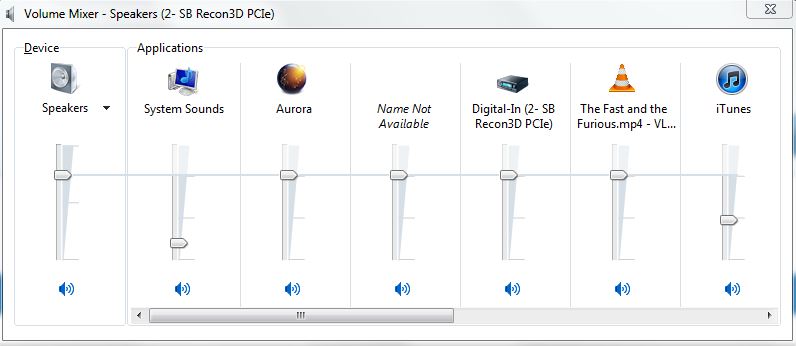
In that case, this mystery item that has shown up on my volume control would drive you nuts, here is a snippet of it.

V3yYjSM.jpg
 

My Computer My Computer

At a glance

Windows 7 Ultimate x64FX 8350 @ 4.8ghz, turbo clocked to 5.4ghzMushkin Enhanced Blackline 16GB 1760mhz 10-10...Gigabyte-660 Windforce OC- GPU Clock 1212MHz ...
Computer type
PC/Desktop
Computer Manufacturer/Model Number
Custom Build
OS
Windows 7 Ultimate x64
CPU
FX 8350 @ 4.8ghz, turbo clocked to 5.4ghz
Motherboard
Asus Sabertooth FX990 Gen 3.0 R2.0
Memory
Mushkin Enhanced Blackline 16GB 1760mhz 10-10-9-24 T1
Graphics Card(s)
Gigabyte-660 Windforce OC- GPU Clock 1212MHz /3504MHz ram
Sound Card
Creative Sound Blaster Recon3D PCIe Sound Card
Monitor(s) Displays
Samsung SyncMaster S27B350H (HDMI)
Screen Resolution
1920x1080 60HZ
Hard Drives
1 x SSD Crucial M4 256GB (Primary OS)
3 x HDD WD 1TB
4 x HDD 2TB
1 x HDD 160GB (Secondary Backup OS)
Raid SATA III 6GB/s 4-port PCI-e Controller Card, Marvel 88SE9215 chipset
PSU
Chieftec-650-14CS (Modular) 80 Plus Gold-650 Watt
Case
Akasa Venom Toxic Gaming Big tower ( Custom Black ) Ver 2.0
Cooling
Water 2.0 PRO / GEIL Cyclone VRM / 6x120mm 2x220mm 2x140mm
Keyboard
Logitech G19
Mouse
Wireless Notebook Presenter Mouse 8000
Internet Speed
Fiber GBS
Antivirus
Don't Announce it to the world :)
Browser
Gotta have at least 1!
Yep. That would indeed drive me nuts. I'm that bad for everything being just right i would do a full re-install. Actually considering it with this "2" thing in front of my Sound card. I know, Bad eh! LOL
 

My Computer My Computer

At a glance

Windows 10 Pro x64Intel i7 2600K @ 4.4GHz16GB Corsair Vengeance Pro DDR3 1600 MHzZOTAC GTX 1070 AMP Edition
Computer type
PC/Desktop
Computer Manufacturer/Model Number
Self Built
OS
Windows 10 Pro x64
CPU
Intel i7 2600K @ 4.4GHz
Motherboard
Asus P8Z77-V LX2
Memory
16GB Corsair Vengeance Pro DDR3 1600 MHz
Graphics Card(s)
ZOTAC GTX 1070 AMP Edition
Sound Card
Asus Xonar D2
Monitor(s) Displays
Viewsonic 24" VX2439WM LCD/LG 22" W2261VP LCD
Screen Resolution
1920x1080 DVI 1080p 16:9 on both screens
Hard Drives
1x SanDisk Extreme 120GB SSD SATA III (OS), 1x Samsung EVO 250GB SSD SATA III (Games), 1x Seagate Barracuda 1TB SATA III (Storage)
PSU
Corsair TX850W
Case
Corsair Carbide 200R
Cooling
3x 120mm Fans (Front, Bottom and Rear)
Keyboard
Roccat Isku
Mouse
Corsair M65 RGB
Internet Speed
Virgin Media 100Mb
Antivirus
Windows Defender
Browser
Firefox
Other Info
Logitech Z640 5.1 Speakers. Kingston HyperX Cloud Headset. M-Audio Oxygen 25/88 Keystation ES Midi Keyboard's
Back
Top