Question

aca85

New member
Local time
6:51 PM
Messages
24
Hi,does any1 know where i can get help in solving my BSOD problems? it's urgent.????
(obviously i am asking about off-forum sites) ?????
 

My Computer

OS
windows 7 ultimate x86
CPU
e5200 intel
Motherboard
gigabyte ep35-ds3
Memory
transcend ddr2 2gb
Graphics Card(s)
8800gs bliss
Monitor(s) Displays
benq 2200hda
Screen Resolution
1920x1080
Hard Drives
Wd 640gb caviar blue 32mb
Wd 500gb caviar blue 32mb
PSU
Chieftec 500w
We could help if you described your problem and uploaded your .dmp file ... its located in c:/windows/minidump...

Welcome to the forums.. :D
 

My Computer

Computer type
PC/Desktop
Computer Manufacturer/Model Number
LENOVO K450 @3.0GHZ
OS
64-bit Windows 8.1 Pro
CPU
Core(TM) i5 CPU 4330 Haswell @ 3.20GHz
Motherboard
LENOVO
Memory
12.00 GB
Graphics Card(s)
Intel(R) HD Graphics
Sound Card
Intel HD integtrated
Monitor(s) Displays
HP 25' ISP Monitor
Screen Resolution
1900/1020
Hard Drives
(1) ST1000DM003-1CH162 (2) Generic STORAGE DEVICE USB Device (3) Generic STORAGE DEVICE USB Device
Internet Speed
100mb down/10mb up
Can you read what the Blue screen says?

When does it happen, when you start a program?

Try downloding this free utility for better diagnosing blue screen errors

BlueScreenView v1.15

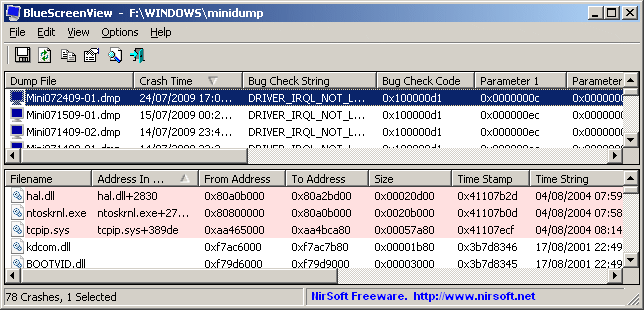
BlueScreenView scans all your minidump files created during 'blue screen of death' crashes, and displays the information about all crashes in one table. For each crash, BlueScreenView displays the minidump filename, the date/time of the crash, the basic crash information displayed in the blue screen (Bug Check Code and 4 parameters), and the details of the driver or module that possibly caused the crash (filename, product name, file description, and file version).

For each crash displayed in the upper pane, you can view the details of the device drivers loaded during the crash in the lower pane. BlueScreenView also mark the drivers that their addresses found in the crash stack, so you can easily locate the suspected drivers that possibly caused the crash.
bluescreenview.gif
 

My Computer

Computer Manufacturer/Model Number
Cheap $399.00 E-Machine
OS
Windows 7 Pro & Vista Home Premium
CPU
Athlon 64 3800+ (Orleans) 2.40GHz
Motherboard
Winfast
Memory
2GB DDR2 RAM DIMM
Graphics Card(s)
NVIDIA GeForce 8500 GT 512 MB memory HDMI out
Sound Card
creative X-Fi Exteme 7..1 channel
Monitor(s) Displays
Acer V223W 22" widescreen DVI
Screen Resolution
1680x1050
Hard Drives
WDC WD5 500GB
WDC WD25 250GB
PSU
OCZ 550 watt
Case
Gateway
Cooling
2 fans
Keyboard
Dell
Mouse
Sony Vaio
Internet Speed
18MB/s down - .72MB /s up
@tews : i did,i posted 2 different times...almost got no help at all.
@ref : tnx for the useful little tool ... (was looking for something like that,cuz i didn't really know how to read the *.dmp files)

Well i will try again,but i think it'll be the same...sigh...

I took a screenshot of the app (that Rehakr gave me for reading the DMP files),in all 6 cases it was the same (thats why i only took 1 SS). www.gfxuploader.com/images/k119ljpnmbyvnucqqo4.jpg
Hope u can figure it out.
Also here are the DMP (memory dump files) if any1 wants them
 

My Computer

OS
windows 7 ultimate x86
CPU
e5200 intel
Motherboard
gigabyte ep35-ds3
Memory
transcend ddr2 2gb
Graphics Card(s)
8800gs bliss
Monitor(s) Displays
benq 2200hda
Screen Resolution
1920x1080
Hard Drives
Wd 640gb caviar blue 32mb
Wd 500gb caviar blue 32mb
PSU
Chieftec 500w
Are you experiencing any problems connecting to the Internet, or connections dropping?

Do you have the latest drivers for your NIC card?

Could you give us the exact make and model of the Ethernet card or onboard NIC.

I would start here for upgraded BIOS downloads.
GIGABYTE - Support&Download - Motherboard - BIOS - GA-EP35-DS3L

I would also update your chipset here:
http://downloadcenter.intel.com/SearchResult.aspx?lang=eng&keyword=%22Intel%c2%ae+P35+%2b+ICH9+Chipset%22

Also upgrade your video card drivers here:
http://www.nvidia.com/object/win7_winvista_32bit_191.07_whql.html
 

My Computer

Computer Manufacturer/Model Number
Cheap $399.00 E-Machine
OS
Windows 7 Pro & Vista Home Premium
CPU
Athlon 64 3800+ (Orleans) 2.40GHz
Motherboard
Winfast
Memory
2GB DDR2 RAM DIMM
Graphics Card(s)
NVIDIA GeForce 8500 GT 512 MB memory HDMI out
Sound Card
creative X-Fi Exteme 7..1 channel
Monitor(s) Displays
Acer V223W 22" widescreen DVI
Screen Resolution
1680x1050
Hard Drives
WDC WD5 500GB
WDC WD25 250GB
PSU
OCZ 550 watt
Case
Gateway
Cooling
2 fans
Keyboard
Dell
Mouse
Sony Vaio
Internet Speed
18MB/s down - .72MB /s up
@reg : nope,net works fine,always has.(i am connected to the net via lan cable [to modem ofc] on my Mobo,and share my net with my other pc via 2nd lan card.)

Mobo : gigabyte ep35-ds3 > using a onboard Realtec GBE Lan card (with 8/20/2009 drivers - latest - was using older ones when i got Bsod's,i update it ,still have Bsod's)
2nd lan card : Realtec 8139 Lan Card (with 4/5/2002 - can't find any more up to date drivers)
 

My Computer

OS
windows 7 ultimate x86
CPU
e5200 intel
Motherboard
gigabyte ep35-ds3
Memory
transcend ddr2 2gb
Graphics Card(s)
8800gs bliss
Monitor(s) Displays
benq 2200hda
Screen Resolution
1920x1080
Hard Drives
Wd 640gb caviar blue 32mb
Wd 500gb caviar blue 32mb
PSU
Chieftec 500w
If yiour Reaktek card is a RTL8139C(L), you can try the Vista drivers here:

Realtek
 

My Computer

Computer Manufacturer/Model Number
Cheap $399.00 E-Machine
OS
Windows 7 Pro & Vista Home Premium
CPU
Athlon 64 3800+ (Orleans) 2.40GHz
Motherboard
Winfast
Memory
2GB DDR2 RAM DIMM
Graphics Card(s)
NVIDIA GeForce 8500 GT 512 MB memory HDMI out
Sound Card
creative X-Fi Exteme 7..1 channel
Monitor(s) Displays
Acer V223W 22" widescreen DVI
Screen Resolution
1680x1050
Hard Drives
WDC WD5 500GB
WDC WD25 250GB
PSU
OCZ 550 watt
Case
Gateway
Cooling
2 fans
Keyboard
Dell
Mouse
Sony Vaio
Internet Speed
18MB/s down - .72MB /s up
Well ill update the Lan card and Chipset if u think it'll help. (hope it does)
 

My Computer

OS
windows 7 ultimate x86
CPU
e5200 intel
Motherboard
gigabyte ep35-ds3
Memory
transcend ddr2 2gb
Graphics Card(s)
8800gs bliss
Monitor(s) Displays
benq 2200hda
Screen Resolution
1920x1080
Hard Drives
Wd 640gb caviar blue 32mb
Wd 500gb caviar blue 32mb
PSU
Chieftec 500w
If yiour Reaktek card is a RTL8139C(L), you can try the Vista drivers here:

Realtek

Well there are Win7 drivers there also ^^

Well for now i have no BSOD ... but somehow my net connection to my 2nd pc has died >_> gr8 ,from 1 prob to the other >_>
 

My Computer

OS
windows 7 ultimate x86
CPU
e5200 intel
Motherboard
gigabyte ep35-ds3
Memory
transcend ddr2 2gb
Graphics Card(s)
8800gs bliss
Monitor(s) Displays
benq 2200hda
Screen Resolution
1920x1080
Hard Drives
Wd 640gb caviar blue 32mb
Wd 500gb caviar blue 32mb
PSU
Chieftec 500w
Hi,does any1 know where i can get help in solving my BSOD problems? it's urgent.????
(obviously i am asking about off-forum sites) ?????

Why do you need to go off site?

If you post the dump I can debug it


Ken J++
 

My Computer

Computer Manufacturer/Model Number
HP Pavillion dv-7 1005 Tx
OS
Win 8 Release candidate 8400
CPU
[email protected]
Memory
4 gigs
Graphics Card(s)
Nvidia 9600M
Sound Card
HD built-in
Monitor(s) Displays
17" Wxga
Screen Resolution
1440x900
Cooling
none
Internet Speed
45Mb down 5Mb up

My Computer

OS
windows 7 ultimate x86
CPU
e5200 intel
Motherboard
gigabyte ep35-ds3
Memory
transcend ddr2 2gb
Graphics Card(s)
8800gs bliss
Monitor(s) Displays
benq 2200hda
Screen Resolution
1920x1080
Hard Drives
Wd 640gb caviar blue 32mb
Wd 500gb caviar blue 32mb
PSU
Chieftec 500w
RegHackr is of course correct

At least 3 of the crashes had the slnt.sys file in comman, I would update that and since its current date is 2005 and all the other critical drivers

I would also run a system file check to verofy and repair system files
to run type cmd in search>right click and run as admin> SFC /SCANNOW
let us know the results

Also note hte section below on the NDIS driver

AND AS AN ASIDE WOULD HAVE BEEN NICE TO KNOW YOU HAVE A RAID, AND IF YOU ARE OVERCLOCKING

Ken
\
slnt.sys slnt.sys+218d 0x9310b000 0x9310f640 0x00004640 0x43993b06 12/9/2005 3:06:30 AM
secdrv.SYS 0x9b8bd000 0x9b8c7000 0x0000a000 0x45080528 9/13/2006 8:18:32 AM
3xHybrid.sys 0x93110000 0x931ed480 0x000dd480 0x468ebf98 7/6/2007 5:18:00 PM
jraid.sys 0x835b4000 0x835c3e00 0x0000fe00 0x46fde30c 9/29/2007 12:30:52 AM


Microsoft (R) Windows Debugger Version 6.11.0001.404 X86
Copyright (c) Microsoft Corporation. All rights reserved.


Loading Dump File [C:\Users\K\Desktop\111809-17518-01.dmp]
Mini Kernel Dump File: Only registers and stack trace are available

Symbol search path is: SRV*d:\symbols*Symbol information
Executable search path is:
Windows 7 Kernel Version 7600 MP (2 procs) Free x86 compatible
Product: WinNt, suite: TerminalServer SingleUserTS
Built by: 7600.16385.x86fre.win7_rtm.090713-1255
Machine Name:
Kernel base = 0x82a08000 PsLoadedModuleList = 0x82b50810
Debug session time: Wed Nov 18 06:25:43.176 2009 (GMT-5)
System Uptime: 0 days 0:17:20.955
Loading Kernel Symbols
...............................................................
................................................................
........................
Loading User Symbols
Loading unloaded module list
.....
1: kd> !analyze -v
*******************************************************************************
* *
* Bugcheck Analysis *
* *
*******************************************************************************

BUGCODE_NDIS_DRIVER (7c)
This is the NDIS Driver Bugcheck for Windows Server 2003 and later.
For Windows 2000 and Windows XP, see 0xD2, BUGCODE_ID_DRIVER.
Arguments:
Arg1: 00000005, An Ethernet driver indicated receiving a packet using a
packet descriptor that is currently in use by protocol
stack. (Caught by checking stack packet location)
Arg2: 85e890e0, A pointer to Miniport block. !ndiskd.miniport on
this pointer for more info.
Arg3: 861f9304, The packet descriptor used by the driver. Use
!ndiskd.pkt on this pointer for more info.
Arg4: 861dc99c, A pointer to the packet array that contained this
packet descriptor. (not much of a use)


Debugging Details:
------------------

Unable to load image \SystemRoot\system32\DRIVERS\slnt.sys, Win32 error 0n2
*** WARNING: Unable to verify timestamp for slnt.sys
*** ERROR: Module load completed but symbols could not be loaded for slnt.sys

CUSTOMER_CRASH_COUNT: 1

DEFAULT_BUCKET_ID: VISTA_DRIVER_FAULT

BUGCHECK_STR: 0x7C

PROCESS_NAME: firefox.exe


CURRENT_IRQL: 2

LAST_CONTROL_TRANSFER: from 88cc44e8 to 82ae4d10

STACK_TEXT:
807e3e48 88cc44e8 0000007c 00000005 85e890e0 nt!KeBugCheckEx+0x1e
807e3eb0 9310d18d 003f0b28 861dc99c 00000002 ndis!ethFilterDprIndicateReceivePacket+0x8e7
WARNING: Stack unwind information not available. Following frames may be wrong.
807e3ee8 9310bc82 021dc648 7e7d2580 861dc650 slnt+0x218d
00000000 00000000 00000000 00000000 00000000 slnt+0xc82


STACK_COMMAND: kb

FOLLOWUP_IP:
slnt+218d
9310d18d ?? ???

SYMBOL_STACK_INDEX: 2

SYMBOL_NAME: slnt+218d

FOLLOWUP_NAME: MachineOwner

MODULE_NAME: slnt

IMAGE_NAME: slnt.sys


DEBUG_FLR_IMAGE_TIMESTAMP: 43993b06

FAILURE_BUCKET_ID: 0x7C_slnt+218d

BUCKET_ID: 0x7C_slnt+218d

Followup: MachineOwner
---------

 

My Computer

Computer Manufacturer/Model Number
HP Pavillion dv-7 1005 Tx
OS
Win 8 Release candidate 8400
CPU
[email protected]
Memory
4 gigs
Graphics Card(s)
Nvidia 9600M
Sound Card
HD built-in
Monitor(s) Displays
17" Wxga
Screen Resolution
1440x900
Cooling
none
Internet Speed
45Mb down 5Mb up
Not sure what all that "debugged" text means ^^ ...

Well like i said in my previous post,i reinstalled/updated those 3 drivers ... But now my internet connection to my 2nd pc doesn't work ... gah,from 1 prob to another.

And no im not using a Raid (i have 2 different hdd's) ,and nothing is OC-ed ...

~p.s. i run the Scan and everything works fine,or so i'm told :D
 

My Computer

OS
windows 7 ultimate x86
CPU
e5200 intel
Motherboard
gigabyte ep35-ds3
Memory
transcend ddr2 2gb
Graphics Card(s)
8800gs bliss
Monitor(s) Displays
benq 2200hda
Screen Resolution
1920x1080
Hard Drives
Wd 640gb caviar blue 32mb
Wd 500gb caviar blue 32mb
PSU
Chieftec 500w
Back
Top