

- Local time
- 7:35 AM
- Messages
- 223
I have a Samsung 840 Pro SSD (256 GB) and I installed windows seven on it, but not in AHCI Mode. I was going to change that now using this method: GUIDE - Enabling AHCI mode AFTER Windows 7 Installation - Guru3D.com Forums
It says that it works for all Intel SSDs, I assume this would work with mine as well, but I want to be sure before I accidentally mess something up. Also, is there any disadvantage to doing this as opposed to just installing Windows Seven in AHCI mode to begin with?
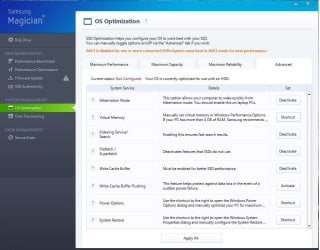
Lastly, I have all of my user folders on my HDD, and I'm wondering if it's safe to change these settings which Samsung's Software recommends without interfering or causing trouble with the HDD. Here's images of the recommended changes:
It says that it works for all Intel SSDs, I assume this would work with mine as well, but I want to be sure before I accidentally mess something up. Also, is there any disadvantage to doing this as opposed to just installing Windows Seven in AHCI mode to begin with?
Lastly, I have all of my user folders on my HDD, and I'm wondering if it's safe to change these settings which Samsung's Software recommends without interfering or causing trouble with the HDD. Here's images of the recommended changes:
Attachments


My Computer
At a glance
Windows 7 Home Premium x64Intel i7-2600KG.SKILL Ripjaws (16 GB Total)EVGA GeForce GTX 560 Ti
- OS
- Windows 7 Home Premium x64
- CPU
- Intel i7-2600K
- Motherboard
- ASUS Sabertooth Z77
- Memory
- G.SKILL Ripjaws (16 GB Total)
- Graphics Card(s)
- EVGA GeForce GTX 560 Ti
- Monitor(s) Displays
- ASUS
- Screen Resolution
- 1920x1080 (2 Monitors)
- Hard Drives
- Hitachi GST Deskstar 2 TB (HDD)
Samsung 840 Pro 256 GB (SSD)
- PSU
- SeaSonic X Series X650 Gold
- Case
- Antec DF 85
- Keyboard
- Microsoft SideWinder X4
- Mouse
- MadCatz M.M.O. 7 & Logitech G35
- Internet Speed
- 50 down
- Antivirus
- Avast Free, SuperAntiSpyware Free, Malwarebytes Free
- Browser
- Mozilla Firefox


