Questions about Hamachi

Keyes

New member
Member
VIP
Local time
10:48 AM
Messages
122
I've been thinking about using Hamachi to play a game online which would normally require someone to portfoward. I don't have much knowledge of how it works, so I'd like to be sure I can understand it and be safe using it.

My knowledge of Hamachi is that it creates a VPN (An emulated LAN?) which can be accessed on the internet which allows people to access LAN Functionality as if people were on the same physical network. This would allow me to join others in their games where it normally would require forwarding on the host's behalf.
This would be nice, but I have some concerns/questions.

First of all, how safe is Hamachi itself, and is it stable? I've heard alot about it causing network instability and such - even to the point where people have to reinstall their OS.

Can people view my shared folders? If it is emulating a LAN, would it be possible for people in the Hamachi network to see my folders and documents? Is there a way I can make it private or is this a non issue?

How safe is it in context with other users in the network? If a user who joins the Hamachi group/network has an unsafe/infected machine, can that affect my own machine? Also, are there any exploits in hamachi that can lead to security issues?
I just want to be sure that when I use Hamachi I am solely using it for accessing a multiplayer game, and that my system is secure and my documents and such are private.

I'd really appreciate if someone could answer this, thank you.
 

My Computer

Computer type
PC/Desktop
OS
Windows 7 Home Premium 64 bit
For this discussion, a game server might just be a personal computer in someone's home.

When you ask to make a VPN connection to the game server, the Hamachi software on your computer will connect to LogMeIn's server. That server will connect to the game server. If all goes well, there will be a direct connection between your computer and the game server. (Think of it like plugging a really long LAN cable between the two computers.) If a direct connection cannot be established, all VPN data traffic is relayed thru one of LogMeIn's servers.

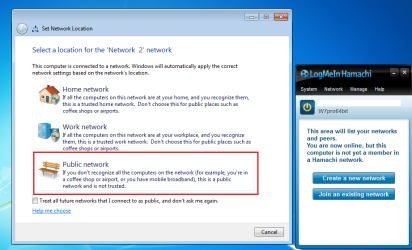
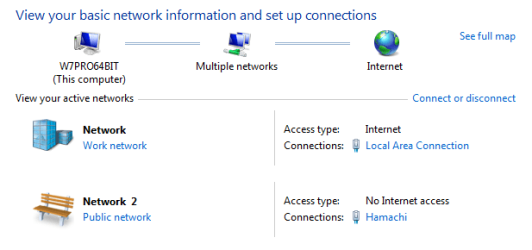
After installing Hamachi, when you first turn Hamachi on, Windows should ask you to pick a network type. If you select Public, then Windows should not share any of your files.

H1.PNG

H2.PNG

Any exploits that could take place between computers on the same network can also take place between computers in the same Hamachi group.
 

My Computer

Computer type
Laptop
Computer Manufacturer/Model Number
Employer provided Dell Latitude
OS
W7 Pro SP1 64bit
CPU
i7
Memory
8GB
Graphics Card(s)
Intel HD Graphics
Hard Drives
crappy SSD
Antivirus
Employer mandated Symantec Endpoint Protection
Browser
Pale Moon 64bit, IE11 64bit & Chrome 64bit
As far as stability, I have not had the problems that you cited. I've used Hamachi since 2005.
 

My Computer

Computer type
Laptop
Computer Manufacturer/Model Number
Employer provided Dell Latitude
OS
W7 Pro SP1 64bit
CPU
i7
Memory
8GB
Graphics Card(s)
Intel HD Graphics
Hard Drives
crappy SSD
Antivirus
Employer mandated Symantec Endpoint Protection
Browser
Pale Moon 64bit, IE11 64bit & Chrome 64bit
As far as stability, I have not had the problems that you cited. I've used Hamachi since 2005.

Thanks for the reply! When you say Windows "should not" share my files if I choose public, is that for certain? And how can I go about setting up Hamachi in a way that minimise the risk of any LAN exploits?
 

My Computer

Computer type
PC/Desktop
OS
Windows 7 Home Premium 64 bit
The Windows help file claims the following about networks that you mark as Public:

Choose Public network for networks in public places (such as coffee shops or airports). This location is designed to keep your computer from being visible to other computers around you and to help protect your computer from any malicious software from the Internet. HomeGroup is not available on public networks, and network discovery is turned off. You should also choose this option if you're connected directly to the Internet without using a router, or if you have a mobile broadband connection.

Maybe other forum members can add more info about shares. I disable the sharing (server) service.

Other than setting the Windows network type for the Hamachi network to Public, I don't know of any settings that are going to make Hamachi any safer. I don't do any gaming via Hamachi. I know/trust the owners of the computers that I connect to via Hamachi.
 

My Computer

Computer type
Laptop
Computer Manufacturer/Model Number
Employer provided Dell Latitude
OS
W7 Pro SP1 64bit
CPU
i7
Memory
8GB
Graphics Card(s)
Intel HD Graphics
Hard Drives
crappy SSD
Antivirus
Employer mandated Symantec Endpoint Protection
Browser
Pale Moon 64bit, IE11 64bit & Chrome 64bit
The Windows help file claims the following about networks that you mark as Public:

Choose Public network for networks in public places (such as coffee shops or airports). This location is designed to keep your computer from being visible to other computers around you and to help protect your computer from any malicious software from the Internet. HomeGroup is not available on public networks, and network discovery is turned off. You should also choose this option if you're connected directly to the Internet without using a router, or if you have a mobile broadband connection.

Maybe other forum members can add more info about shares. I disable the sharing (server) service.

Other than setting the Windows network type for the Hamachi network to Public, I don't know of any settings that are going to make Hamachi any safer. I don't do any gaming via Hamachi. I know/trust the owners of the computers that I connect to via Hamachi.
I could try experimenting with my home network by recognising it as public with another computer in the house. Should the results found in trying this translate to a Hamachi network?
 

My Computer

Computer type
PC/Desktop
OS
Windows 7 Home Premium 64 bit
I would think so. Let us know what you find.
 

My Computer

Computer type
Laptop
Computer Manufacturer/Model Number
Employer provided Dell Latitude
OS
W7 Pro SP1 64bit
CPU
i7
Memory
8GB
Graphics Card(s)
Intel HD Graphics
Hard Drives
crappy SSD
Antivirus
Employer mandated Symantec Endpoint Protection
Browser
Pale Moon 64bit, IE11 64bit & Chrome 64bit
Back
Top