

I did my first backup using Windows 7 built-in backup and restore last week. Chose to let windows decide what to backup and also do a system image (basically the default settings). It took quite a long time, almost 4 hours.
Tonight it did its weekly scheduled backup and another sytem image. Since it only copied any new files that part went fast but the system image took a long time, almost 1.5 hours.
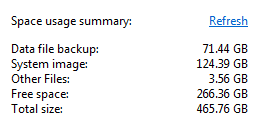
When I look at manage space the system image is using 124GB. This seems huge. I thought it should be maybe 20GB or so. Data files being backed up are 71GB. Other files are 4GB for a total of almost 200GB.
This is a relatively new computer so why is the system image so large? Is there a way to verify that it should be that large? Will it always take so long to do the system image?
Tonight it did its weekly scheduled backup and another sytem image. Since it only copied any new files that part went fast but the system image took a long time, almost 1.5 hours.
When I look at manage space the system image is using 124GB. This seems huge. I thought it should be maybe 20GB or so. Data files being backed up are 71GB. Other files are 4GB for a total of almost 200GB.
This is a relatively new computer so why is the system image so large? Is there a way to verify that it should be that large? Will it always take so long to do the system image?
Attachments
My Computer
- Computer Manufacturer/Model Number
- HP p6608f
- OS
- Win 7 Home Premium x64
- CPU
- Intel Core i3-540 3.07 GHz
- Motherboard
- MS-7613 (Iona-GL8E)
- Memory
- 4 GB (2 X 2) Dual-Channel PC-10600 DDR3 @ 665MHz (9-9-9-24)
- Graphics Card(s)
- Integrated Intel H57
- Sound Card
- Integrated Realtek ALC888S Audio
- Monitor(s) Displays
- 17" SDM-HS73 (a vestige from my old computer)
- Screen Resolution
- 1280 X 1024
- Hard Drives
- 750GB SATA 7200 RPM
- PSU
- 250W
- Keyboard
- HP USB keyboard
- Mouse
- HP USB optical mouse
- Internet Speed
- 15Mbps/1Mbps
