Quick Macrium Free question

Ageeb

New member
Pro User
VIP
Local time
1:48 PM
Messages
196
Location
Minnesota
I just did a full backup of c: using macrium free, and all went well.

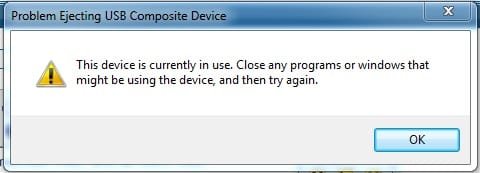
The image was stored to an external "My Book" drive and after closing macrium upon the image creation, I can't seem to safely eject the external. I get the following message:
macrium.jpg

I'm sure a reboot would allow me to eject it, but i'm curious what the proper way would be.

edit:
Macrium is fully closed
I don't see any processes running that are macrium related with "show processes from all users" used
 

My Computer

Computer Manufacturer/Model Number
Custom
OS
Windows 7 Ultimate x64
CPU
Intel i5-2500k
Motherboard
ASUS P8Z68-V Pro/GEN3
Memory
16GB
Graphics Card(s)
2x Radeon HD7970 Crossfire
Sound Card
On-Board / Logitech G930
Monitor(s) Displays
3x Dell u2412m
Screen Resolution
5760x1200
Hard Drives
Toshiba thns064gg2bbaa SSD
Seagate Barracuda 7200.12 ST31000528AS 1TB
Intel RST SSD caching enabled
PSU
Corsair AX850
Case
Corsair Obsidian 650D
Cooling
Corsair H100
Keyboard
Logitech Illuminated
Mouse
Logitech M510 Wireless
Internet Speed
1Mb/s
Neither Process Monitor or Process Explorer returned any results when filtering for the USB drive letter...

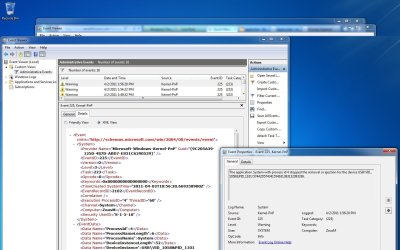
Event Viewer logged the following:
reflecterr.jpg


Nothing critical here, just more curious as to the why/how/learning parts of this scenario :)
 

My Computer

Computer Manufacturer/Model Number
Custom
OS
Windows 7 Ultimate x64
CPU
Intel i5-2500k
Motherboard
ASUS P8Z68-V Pro/GEN3
Memory
16GB
Graphics Card(s)
2x Radeon HD7970 Crossfire
Sound Card
On-Board / Logitech G930
Monitor(s) Displays
3x Dell u2412m
Screen Resolution
5760x1200
Hard Drives
Toshiba thns064gg2bbaa SSD
Seagate Barracuda 7200.12 ST31000528AS 1TB
Intel RST SSD caching enabled
PSU
Corsair AX850
Case
Corsair Obsidian 650D
Cooling
Corsair H100
Keyboard
Logitech Illuminated
Mouse
Logitech M510 Wireless
Internet Speed
1Mb/s
You're lucky I can't even get my (paid) Macrium to backup and verify (which is the critical step) any image. If the image doesn't pass verification then the image isn't any good.

The reason you are getting that message is because the external My Book is still using the computer. You can do one of 2 things, turn the My Book off using the tab on the back (right above the USB cable) or you can go to the right corner in the notifications bar (over where the clock and stuff is) and there should be a tab that says "safely remove hardware"; click on that and you can unplug it. It will reinstall the driver the next time you reconnect it. Personally I just shut mine off. You can also power down (turn off) the PC then turn the My Book off using the tab above the USB. That keeps the driver installed. With this method you just turn it back on before the next reboot.
 

My Computer

Computer type
PC/Desktop
Computer Manufacturer/Model Number
Acer Aspire E700 dsktop
OS
Windows 7 Pro
CPU
Intel 2 quad Q6600
Motherboard
Acer fg965M
Memory
4 GB
Graphics Card(s)
Nvidia GeForce GTS 450 1TB
Sound Card
RealTek
Monitor(s) Displays
Acer 22" X223w
Hard Drives
1TB WD Caviar Black (internal)
1TB WD My Book Essential
PSU
500W coolmaster Extreme Power Plus
Case
Acer
Cooling
case fan
Keyboard
acer
Mouse
acer
Internet Speed
56k
Antivirus
Microsoft Security Essentials
Browser
IE 8
Other Info
I hate IE 9 10 & 11
You're lucky I can't even get my (paid) Macrium to backup and verify (which is the critical step) any image. If the image doesn't pass verification then the image isn't any good.

The reason you are getting that message is because the external My Book is still using the computer. You can do one of 2 things, turn the My Book off using the tab on the back (right above the USB cable) or you can go to the right corner in the notifications bar (over where the clock and stuff is) and there should be a tab that says "safely remove hardware"; click on that and you can unplug it. It will reinstall the driver the next time you reconnect it. Personally I just shut mine off. You can also power down (turn off) the PC then turn the My Book off using the tab above the USB. That keeps the driver installed. With this method you just turn it back on before the next reboot.

sorry to go off topic per original op but regarding verify image I had a combination of 1gb and 2gb sticks of XMS2 ram and experienced no problems with any ram checking programs or within windows but it wasnt until i dropped back to just using the 4x1gb sticks that Macrium would successfully backup and verify :huh:

My conclusion is that this combination of sticks on my system possibly subtly changed the timings and produced a very small amount of allowable and tolerable errors but for the purposes of Macrium which appears to be very sensitive to errors this setup was not good enough ?

personally I wonder if we should be recommending Macrium as a ram checking procedure :p
 

My Computer

Computer Manufacturer/Model Number
built my own
OS
win7 ultimate / virtual box
CPU
Intel Core i7 3770K,1155, Ivy Bridge
Motherboard
MSI Z77A-G43
Memory
GSkill Ripjaws Z Series 1600 CL 9.0 16GB
Graphics Card(s)
KFA2 GeForce GTX 670 EX OC 2048MB GDDR5 PCI-E gfx card
Sound Card
onboard Nvidia HDMI audio
Monitor(s) Displays
ASUS VK222H 22" widescreen LCD monitor
Screen Resolution
1680x1050
Hard Drives
Kingston 128gb SSD
OCZ Vertex 90gb SSD
500GB WDCaviar 16mb 5000KS
320GB WDCaviar 16mb 3200AAKS sata 2
1TB Samsung 16mb HD103SJ sata 2
PSU
Corsair HX 750W ATX2.2 Modular
Cooling
Antec 25 Kuhler H2O 620
Keyboard
logitech
Mouse
logitech MX518
Internet Speed
7mb adsl
I just did a full backup of c: using macrium free, and all went well.

The image was stored to an external "My Book" drive and after closing macrium upon the image creation, I can't seem to safely eject the external. I get the following message:

View attachment 147042

I'm sure a reboot would allow me to eject it, but i'm curious what the proper way would be.

edit:
Macrium is fully closed
I don't see any processes running that are macrium related with "show processes from all users" used

have you tried running process explorer from sys internals and looking for PID 4 ?

the 4 denotes a group of process that have SYSTEM integrity. If you add the "Integrity" column, you would then see the integrity level of the processes in that group.
 

My Computer

Computer Manufacturer/Model Number
built my own
OS
win7 ultimate / virtual box
CPU
Intel Core i7 3770K,1155, Ivy Bridge
Motherboard
MSI Z77A-G43
Memory
GSkill Ripjaws Z Series 1600 CL 9.0 16GB
Graphics Card(s)
KFA2 GeForce GTX 670 EX OC 2048MB GDDR5 PCI-E gfx card
Sound Card
onboard Nvidia HDMI audio
Monitor(s) Displays
ASUS VK222H 22" widescreen LCD monitor
Screen Resolution
1680x1050
Hard Drives
Kingston 128gb SSD
OCZ Vertex 90gb SSD
500GB WDCaviar 16mb 5000KS
320GB WDCaviar 16mb 3200AAKS sata 2
1TB Samsung 16mb HD103SJ sata 2
PSU
Corsair HX 750W ATX2.2 Modular
Cooling
Antec 25 Kuhler H2O 620
Keyboard
logitech
Mouse
logitech MX518
Internet Speed
7mb adsl
I'm running 4 - 1GB sticks. I pulled 2 out and ran the original ones that came with the PC, didn't fix the problem. I also ran Memtest on them, no problems showed up. The ran a stress test on the system and nothing. I also used the Windows memory test, it passed. You are right Macrium is a very sensitive software, that's why I chose it. Like I said if you can't trust the image don't use it. One of my files has got to have a checksum issue. When I get time I'm going to run "Exact" on each file.
 

My Computer

Computer type
PC/Desktop
Computer Manufacturer/Model Number
Acer Aspire E700 dsktop
OS
Windows 7 Pro
CPU
Intel 2 quad Q6600
Motherboard
Acer fg965M
Memory
4 GB
Graphics Card(s)
Nvidia GeForce GTS 450 1TB
Sound Card
RealTek
Monitor(s) Displays
Acer 22" X223w
Hard Drives
1TB WD Caviar Black (internal)
1TB WD My Book Essential
PSU
500W coolmaster Extreme Power Plus
Case
Acer
Cooling
case fan
Keyboard
acer
Mouse
acer
Internet Speed
56k
Antivirus
Microsoft Security Essentials
Browser
IE 8
Other Info
I hate IE 9 10 & 11
Hey icky thanks for that link, they have some awesome stuff there. I'm going to see if I can find something to fix this checksum issue.
Thanks again
PS didn't mean to hijack Ageeb's post.
 

My Computer

Computer type
PC/Desktop
Computer Manufacturer/Model Number
Acer Aspire E700 dsktop
OS
Windows 7 Pro
CPU
Intel 2 quad Q6600
Motherboard
Acer fg965M
Memory
4 GB
Graphics Card(s)
Nvidia GeForce GTS 450 1TB
Sound Card
RealTek
Monitor(s) Displays
Acer 22" X223w
Hard Drives
1TB WD Caviar Black (internal)
1TB WD My Book Essential
PSU
500W coolmaster Extreme Power Plus
Case
Acer
Cooling
case fan
Keyboard
acer
Mouse
acer
Internet Speed
56k
Antivirus
Microsoft Security Essentials
Browser
IE 8
Other Info
I hate IE 9 10 & 11
I just did a full backup of c: using macrium free, and all went well.

The image was stored to an external "My Book" drive and after closing macrium upon the image creation, I can't seem to safely eject the external. I get the following message:

View attachment 147042

I'm sure a reboot would allow me to eject it, but i'm curious what the proper way would be.

edit:
Macrium is fully closed
I don't see any processes running that are macrium related with "show processes from all users" used
This is something I get from time to time and not related to Macrium. I haven't figured a way to release the drive and have no idea why the message says "in use".

If I absolutely must, I do a restart since logoff/logon often won't release the drive. After the restart "safely remove" is fine.
 

My Computer

Computer type
PC/Desktop
Computer Manufacturer/Model Number
Own build
OS
Windows 7x64 Home Premium SP1
CPU
Intel i7 2600k
Motherboard
ASUS P8Z68 Deluxe
Memory
G.Skill Ripjaws (DDR3-1600) 2x4GB
Graphics Card(s)
Nvidia GeForce GTS 450; Intel HD Graphics 3000(GT2+)
Monitor(s) Displays
Dell Ultrasharp IPS panel U2311H, Samsung SyncMaster P2350
Screen Resolution
1920x1080
Hard Drives
Samsung 850 Pro SSD 256GB, Samsung SSD 840 120GB, Seagates 1TB Barracuda ST31000528AS x2
PSU
Seasonic M12II 520W
Case
Lian Li Lancool PC-K60
Cooling
Case: 1x120mm, 3x140mm CPU: Hyper 212+
Keyboard
Logitech MK520 (wireless)
Mouse
Logitech MK520
Internet Speed
6-7 Mbps
Antivirus
Norton Security Premium, Malwarebytes on 2 (MSE on 3rd PC)
Browser
FireFox
Other Info
Audio: Logitech Z523 2.1
The problem is with your My Book, not the Macrium. Are you using the "Smartware"? If you are, it monitors everything going on with your PC, it does a continuous backup of your personal files. I don't use it, in fact I hate it. Smartware it's not!!

For what ever reason the My Book, just by being ON, makes it "in use". I would suggest going to the WD forum ( Western Digital Community - Western Digital Community )and ask there how to deal with it. I don't turn my external drive on unless I'm going to do a backup.
 

My Computer

Computer type
PC/Desktop
Computer Manufacturer/Model Number
Acer Aspire E700 dsktop
OS
Windows 7 Pro
CPU
Intel 2 quad Q6600
Motherboard
Acer fg965M
Memory
4 GB
Graphics Card(s)
Nvidia GeForce GTS 450 1TB
Sound Card
RealTek
Monitor(s) Displays
Acer 22" X223w
Hard Drives
1TB WD Caviar Black (internal)
1TB WD My Book Essential
PSU
500W coolmaster Extreme Power Plus
Case
Acer
Cooling
case fan
Keyboard
acer
Mouse
acer
Internet Speed
56k
Antivirus
Microsoft Security Essentials
Browser
IE 8
Other Info
I hate IE 9 10 & 11
I regularly use external drives connected via USB and this continues to be a problem.

And sometimes, the clean shutdown simply will not work. Something is using the drive and won't release it.

What I've found always works is gracefully shutting down the PC with the drive still running. That will clear any cache of writes to the drive. Then, turn off the drive.

While this sounds like it could be a problem, I've done this LOTS of times now, and never once encountered a problem with the drive when using it again. Yeah, sometimes I get the "needs to scan" popup when it sees the drive again, but even when I do run the scan (which I don't anymore), it never finds any errors.
 

My Computer

Computer type
PC/Desktop
Computer Manufacturer/Model Number
Custom
OS
Win7 Pro 32-bit, Win8 Pro 32-bit
CPU
AMD Phenom II X6 1090T
Motherboard
Gigabyte
Memory
4GB ddr3 1300
Graphics Card(s)
AMD HD 4290 onboard
Sound Card
Builtin Realtek HD Audio
Monitor(s) Displays
Samsung 24" widescreen, LG 23" widescreen
Screen Resolution
1920x1200/1920x1080
Hard Drives
Kingston 256GB SSD
Keyboard
Logitech Illuminated Keyboard
Mouse
Logitech M705 wireless mouse
Antivirus
Norton Av 2013
Browser
IE v10
Provided you have all user apps closed it's up to windows to close whatever it may be doing.
This can happen with all ext USB storage devices including USB flash drives.

Just do a restart.
 

My Computer

Computer type
PC/Desktop
Computer Manufacturer/Model Number
Own build
OS
Windows 7x64 Home Premium SP1
CPU
Intel i7 2600k
Motherboard
ASUS P8Z68 Deluxe
Memory
G.Skill Ripjaws (DDR3-1600) 2x4GB
Graphics Card(s)
Nvidia GeForce GTS 450; Intel HD Graphics 3000(GT2+)
Monitor(s) Displays
Dell Ultrasharp IPS panel U2311H, Samsung SyncMaster P2350
Screen Resolution
1920x1080
Hard Drives
Samsung 850 Pro SSD 256GB, Samsung SSD 840 120GB, Seagates 1TB Barracuda ST31000528AS x2
PSU
Seasonic M12II 520W
Case
Lian Li Lancool PC-K60
Cooling
Case: 1x120mm, 3x140mm CPU: Hyper 212+
Keyboard
Logitech MK520 (wireless)
Mouse
Logitech MK520
Internet Speed
6-7 Mbps
Antivirus
Norton Security Premium, Malwarebytes on 2 (MSE on 3rd PC)
Browser
FireFox
Other Info
Audio: Logitech Z523 2.1
Back
Top