Quick noob question

brian77

New member
Local time
8:05 PM
Messages
1
Sorry if this has been asked before, but I just need a quick answer before I go home.

For the life of me I can't find the place to change the security key for my network.

I have windows 7 and a linksys router (got someone from Geeksquad to install it, so don't know too much about it). I just wanted to change the security key on my main desktop computer, so all my passwords on my laptop (sign in/connect to internet,etc) are the same.

So how/where do i go to change my security key? I tried looking through the control panel, but no luck. (no patience is more like it :p)

Thanks for any help
 

My Computer

OS
Windows 7
Usually the security key is first setup in the router's control panel. You need to know the IP or default gateway of your router for this, usually in the US it's 192.168.0.1 or 192.168.1.1 typed into the URL of your browser.

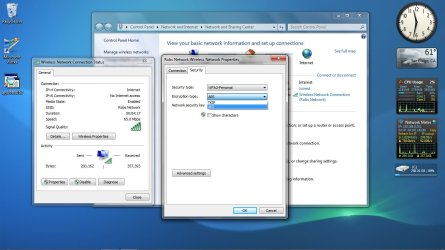
It can also be changed or adjusted in Windows 7 by going to the Network and Sharing Center, then look to the collum on the left and choose "Manage Wireless Networks" Once there you can choose a wireless network, click on it then you can use the Security tab and edit the security settings like in the picture below. :D Hope this helps.
 

Attachments

  • wireless security change.jpg
    wireless security change.jpg
    103.7 KB · Views: 2

My Computer

Computer type
PC/Desktop
Computer Manufacturer/Model Number
Home built
OS
Windows 7 Ult, Windows 8.1 Pro,
CPU
Q9650-4.275GHz, E8600 4.5GHz, E6750-3.8GHz
Motherboard
Evga 780i FTW
Memory
G.Skill PC2 9600 1200Mhz 5 5 5 15 2T
Graphics Card(s)
GTX480
Sound Card
Asus Xonar D2
Monitor(s) Displays
HannsG
Screen Resolution
1680X1050
Hard Drives
GSkill Phoenix Pro 120GB SSD
PSU
ThermalTake Toughpower 1000Watt modular
Case
ThermalTake XaserV
Cooling
Xigmatek S1283
Keyboard
Logitech G15
Mouse
Logitech G9
Internet Speed
T1
linksys is most likely, if not always, 192.168.1.1. Type that in your browser of your choice, preferably IE8.

Then Wireless ADVANCED Settings > pick between WPA, WEP > Then set the key.
 

My Computer

Computer Manufacturer/Model Number
HP
OS
Windows 7 Ultimate 64-bit
CPU
Intel(R) Core(TM) i5-540M @ 2.53GHz
Motherboard
Hewlett-Packard 1522
Memory
4GB DDR3 System Memory
Graphics Card(s)
1GB ATI Mobility Radeon HD 5830 Graphics
Monitor(s) Displays
15.6" diagonal Full High Definition LED
Screen Resolution
1920x1080
Hard Drives
500GB 7200RPM SATA Hard Drive
PSU
6 Cell Lithium Ion Polymer Battery
Cooling
NZXT Aluminum Notebook Cooler With 3 120mm Adjustable Fans
Other Info
Envy 15
Back
Top