MitchellEve New member Member VIP Local time 1:07 PM Messages 117 Jun 9, 2009 #1 Alright so I have a few question to ask you guys, one does anyone know how to turn this annoying thing off. It's really bothering me, second In XP you use to be able to change file type extension icons, now you cant Anyone know how you can, and don't point me to Vista tuts because they won't work. Last edited by a moderator: Jun 10, 2009 My Computer OSWindows 7 Ultimate x64
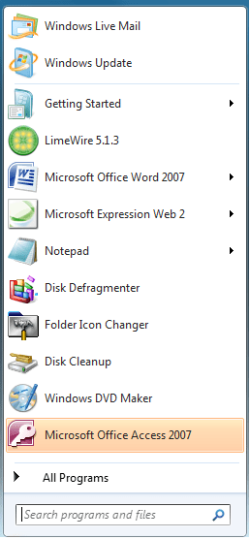
Alright so I have a few question to ask you guys, one does anyone know how to turn this annoying thing off. It's really bothering me, second In XP you use to be able to change file type extension icons, now you cant Anyone know how you can, and don't point me to Vista tuts because they won't work.
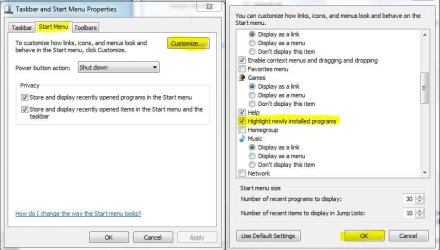
Airbot ---------------------- VIP SF Team Local time 12:07 PM Messages 18,396 Jun 9, 2009 #2 Turn what off exactly, the highlighting of newly installed programs? Uncheck this option here: My Computer Computer typePC/DesktopComputer Manufacturer/Model NumberAirbot 2.0OSWindows 7 Ultimate x64 SP1CPUCore i7 920 (D0) @ 4Ghz, *26c idle *65c full load on airMotherboardAsus P6X58D Premium - Sata 6Gb/s - USB 3.0Memory12GB DDR3 Corsair Dominator -CMD12GX3M6A1600C8 at 1600MHzGraphics Card(s)Zotac Geforce GTX 770Sound CardASUS Xonar D2XMonitor(s) Displays1 LG 24" Flatron W2453V-PF 1 Samsung 24" P2450H both 2ms RTScreen Resolution1920x1080@60hzHard Drives1 Samsung 250GB 840 Evo SSD 1 OCZ Vertex2 180GB SSD 1 TB Samsung Spinpoint F1 7200RPM 32MB cache 2 500GB WD Caviar Blacks 7200RPM 32MB cache (WD5001AALS) Pioneer DVD Burner DVR-S18MPSUCorsair HX1000WCaseCooler Master HAF 932CoolingCase Fans *3 230mm, *1 140mm/CPU - *Tuniq Tower 120 ExtremeKeyboardLogitech Wireless MK700MouseLogitech Wireless MK700Internet SpeedDL 15 Mbps UL 0.98 MbpsAntivirusNoneBrowserFirefox NightlyOther InfoProcessor-7.7 *RAM- 7.9 *Graphics-7.9 *Gaming Graphics- 7.9 *SSD- 7.8 W.E.I final score= 7.7 *Phone- LG Nexus 5
MitchellEve New member Member VIP Thread Starter Local time 1:07 PM Messages 117 Jun 9, 2009 #3 Worked great, thanks a ton. Now all I need to do is figure out how to change extension type icons and I'm good. My Computer OSWindows 7 Ultimate x64
Worked great, thanks a ton. Now all I need to do is figure out how to change extension type icons and I'm good.
Brink Administrator Staff member Local time 12:07 PM Messages 74,774 Location Oklahoma Jun 10, 2009 #4 Hello Mitchell, This can show you how to change the icons for file extension types. It is the same procedure in Windows 7. File Extension Type Icon - Change - Vista Forums Shawn My Computer Computer typePC/DesktopComputer Manufacturer/Model NumberSelf built customOS64-bit Windows 11 Pro for WorkstationsCPUIntel i7-8700K OC'd to 5 GHzMotherboardASUS ROG Maximus XI Formula Z390Memory64 GB (4x16GB) G.SKILL TridentZ RGB DDR4 3600 MHzGraphics Card(s)ASUS ROG-STRIX-GTX1080TI-O11G-GAMINGSound CardIntegratedMonitor(s) Displays2 x Samsung Odyssey G7 27"Screen Resolution2560x1440Hard Drives1TB Samsung 990 PRO M.2, 4TB Samsung 990 PRO PRO M.2, TerraMaster F8 SSD Plus NASPSUSeasonic Prime Titanium 850WCaseThermaltake Core P3CoolingCorsair Hydro H115iKeyboardLogitech wireless K800MouseLogitech MX Master 4Internet Speed2 Gb/s Download and 100 Mb/s UploadAntivirusMalwarebyte Anti-Malware PremiumBrowserGoogle ChromeOther InfoLogitech Z625 speaker system, Logitech BRIO 4K Pro webcam, HP Color LaserJet Pro MFP M477fdn, APC SMART-UPS RT 1000 XL - SURT1000XLI, Galaxy S23 Plus phone
Hello Mitchell, This can show you how to change the icons for file extension types. It is the same procedure in Windows 7. File Extension Type Icon - Change - Vista Forums Shawn