Solved Quick question about Adobe download pages on Firefox

ThisIsMadness91

New member
Member
VIP
Local time
12:10 PM
Messages
204
Sorry to bug you with this, but I just want to be safe.

Earlier today, I followed the instructions here...

Uninstall Flash Player | Windows

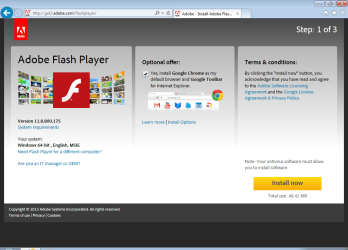
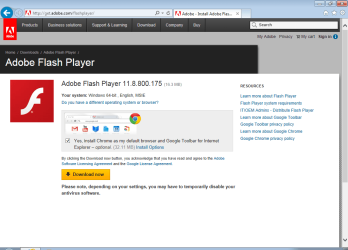
...to uninstall Adobe Flash Player, both the ActiveX version for Internet Explorer and the plugin version for Firefox, on my laptop while trying to solve a problem that was occurring on both it and my main PC. After reinstalling it for IE, I went to reinstall it in Firefox but found that the download page was different. It redirected me from get.adobe.com/flashplayer to get2.adobe.com/flashplayer, and did the same when I went to the Reader download page. The layout of the page is different but appears to have the same information on it as what I'm used to seeing.

I haven't uninstalled Flash on my PC, and when I try to use the get2 link on it, I get redirected to get.adobe.com/flashplayer/?no_ab=1. The get2 redirecting only happens on my laptop and only in Firefox.

I just wanted to ask quickly if the get2 download link was legit and safe, what I may have done to cause the redirecting, and what the ?no_ab=1 means. Again, sorry to bother you with something so trivial, but I just thought I'd ask for peace of mind:).
 

My Computer My Computer

At a glance

Windows 7 Home Premium 64bit (Service Pack 1)Intel Core i76.00 GBNVIDIA GeForce GTX 550 Ti
Computer type
PC/Desktop
Computer Manufacturer/Model Number
Packard Bell ipower G5800
OS
Windows 7 Home Premium 64bit (Service Pack 1)
CPU
Intel Core i7
Memory
6.00 GB
Graphics Card(s)
NVIDIA GeForce GTX 550 Ti
Antivirus
Avira Free Antivirus
Browser
Firefox

My Computer My Computer

At a glance

W7 Pro SP1 64biti78GBIntel HD Graphics
Computer type
Laptop
Computer Manufacturer/Model Number
Employer provided Dell Latitude
OS
W7 Pro SP1 64bit
CPU
i7
Memory
8GB
Graphics Card(s)
Intel HD Graphics
Hard Drives
crappy SSD
Antivirus
Employer mandated Symantec Endpoint Protection
Browser
Pale Moon 64bit, IE11 64bit & Chrome 64bit
Thanks. I'll give it a try tomorrow and let you know what happens. As long as it's safe, I can accept that.
 

My Computer My Computer

At a glance

Windows 7 Home Premium 64bit (Service Pack 1)Intel Core i76.00 GBNVIDIA GeForce GTX 550 Ti
Computer type
PC/Desktop
Computer Manufacturer/Model Number
Packard Bell ipower G5800
OS
Windows 7 Home Premium 64bit (Service Pack 1)
CPU
Intel Core i7
Memory
6.00 GB
Graphics Card(s)
NVIDIA GeForce GTX 550 Ti
Antivirus
Avira Free Antivirus
Browser
Firefox
On my laptop today, I got redirected to the get2 link for Flash Player in Internet Explorer, but not for Reader (which I don't have installed on either machine and am just using as a test). On my PC, I got redirected to the get2 link for Reader in Firefox, but not for Flash Player. Since the get2 link appears to be safe, should I go ahead and mark this as solved?
 

My Computer My Computer

At a glance

Windows 7 Home Premium 64bit (Service Pack 1)Intel Core i76.00 GBNVIDIA GeForce GTX 550 Ti
Computer type
PC/Desktop
Computer Manufacturer/Model Number
Packard Bell ipower G5800
OS
Windows 7 Home Premium 64bit (Service Pack 1)
CPU
Intel Core i7
Memory
6.00 GB
Graphics Card(s)
NVIDIA GeForce GTX 550 Ti
Antivirus
Avira Free Antivirus
Browser
Firefox
Sure, you can mark it as solved. I'm not sure why things are redirecting the way they are, but get2 does seem to be safe.

:-)
 

My Computer My Computer

At a glance

W7 Pro SP1 64biti78GBIntel HD Graphics
Computer type
Laptop
Computer Manufacturer/Model Number
Employer provided Dell Latitude
OS
W7 Pro SP1 64bit
CPU
i7
Memory
8GB
Graphics Card(s)
Intel HD Graphics
Hard Drives
crappy SSD
Antivirus
Employer mandated Symantec Endpoint Protection
Browser
Pale Moon 64bit, IE11 64bit & Chrome 64bit

My Computer My Computer

At a glance

Windows 7 Professional SP1 64-bitIntel Core 2 Duo Processor E8300 @ 2.83GHz4.00 GB Dual-Channel DDR2 @ 332MHz (5-5-5-15)Intel(R) G33/G31 Express Chipset Family
Computer type
PC/Desktop
Computer Manufacturer/Model Number
Dell Inspiron 530
OS
Windows 7 Professional SP1 64-bit
CPU
Intel Core 2 Duo Processor E8300 @ 2.83GHz
Motherboard
Dell Inc. 0RY007 (Socket 775)
Memory
4.00 GB Dual-Channel DDR2 @ 332MHz (5-5-5-15)
Graphics Card(s)
Intel(R) G33/G31 Express Chipset Family
Sound Card
Integrated 7.1 Channel Audio
Monitor(s) Displays
Acer G245HQL 23.6" LED(1920x1080@60Hz)
Screen Resolution
1920 x 1080
Hard Drives
Disk 0 HITACHI 1TB OS Installed - Disk 1 HITACHI 1TB For Backups
Keyboard
Dell USB Keyboard
Mouse
Dell Optical USB Mouse
Internet Speed
DSL 10 meg
Antivirus
Symantec(SEP)
Browser
Pale Moon
I finally happened upon get2 and I can see why you wondered about it.

It also took my a while to get to the "normal" get page.

GET2
get2.png


GET
get.png

But it is still safe :-)

http://get2.adobe.com/flashplayer/
 

My Computer My Computer

At a glance

W7 Pro SP1 64biti78GBIntel HD Graphics
Computer type
Laptop
Computer Manufacturer/Model Number
Employer provided Dell Latitude
OS
W7 Pro SP1 64bit
CPU
i7
Memory
8GB
Graphics Card(s)
Intel HD Graphics
Hard Drives
crappy SSD
Antivirus
Employer mandated Symantec Endpoint Protection
Browser
Pale Moon 64bit, IE11 64bit & Chrome 64bit
Thanks to both of you. I was thinking of preparing a comparison of the two pages myself, but it looks like that won't be necessary now. It's good to know that it's safe. I haven't been able to solve the problem with Flash itself that I briefly mentioned, but I'll make another topic for that tomorrow. Again, many thanks:).
 

My Computer My Computer

At a glance

Windows 7 Home Premium 64bit (Service Pack 1)Intel Core i76.00 GBNVIDIA GeForce GTX 550 Ti
Computer type
PC/Desktop
Computer Manufacturer/Model Number
Packard Bell ipower G5800
OS
Windows 7 Home Premium 64bit (Service Pack 1)
CPU
Intel Core i7
Memory
6.00 GB
Graphics Card(s)
NVIDIA GeForce GTX 550 Ti
Antivirus
Avira Free Antivirus
Browser
Firefox
Back
Top