
Quick Question about my installed Software

EchoX860

Super Senior Member
Pro User
VIP
Local time
7:57 PM
Messages
563
Are there any better alternatives to the ones I currently have installed? I reformatted my PC and used MSE2 instead of kaspersky, and installed all my old programs, I also plan to install Nero and Office10 and TuneUp2k10, but I've heard bad things about it.

Also, I've heard NOT to use the Registry Cleaner on CCleaner, may I ask why not and what would you reccommend as better alternatives to what I have?
 

Attachments
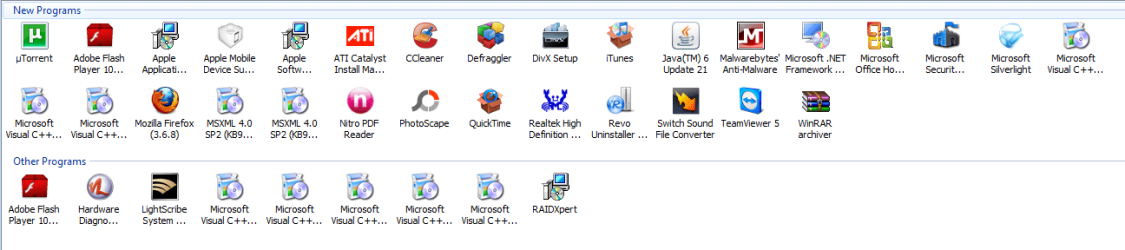
  • Capture.PNG
    Capture.PNG
    28.1 KB · Views: 15

My Computer

Computer Manufacturer/Model Number
HP p6270z
OS
Windows 7 Home Premium x64
CPU
AMD Athlon II X4 620
Motherboard
Foxconn ALOE (CPU 1)
Memory
4.00GB Dual Channel DDR3 @ 666Mhz (9-9-9-24)
Graphics Card(s)
HD Radeon 4200 (Integrated)
Sound Card
Realtek High Definition Audio
Monitor(s) Displays
HP 2311 (1920x1080) @ 60Hz
Screen Resolution
1920x1080
Hard Drives
488GB Seagate ST3500418AS SCSI Disk Device (RAID)
I strongly suggest you forget any tuneup utility. They are not needed with Win 7. There is no tuneup utility out there anywhere that can speed up Win 7, at least not at the present. At best a tuneup utility will do nothing but consume resources. At worst it can bog your system down and even crash it. Win 7 is not XP. Forget all the wisdom you learned about XP; it does not apply to Win 7.
 

My Computer

Computer Manufacturer/Model Number
Home built
OS
Windows 7 Ultimate 32 bit
CPU
Intel(R) Pentium(R) 4 CPU 3.00GHz
Motherboard
ASUS P4P800-VM Motherboard Chipset: Intel 865G + ICH5
Memory
2.50 GB RAM
Graphics Card(s)
NVIDIA GeForce 7600 GS
Sound Card
SoundMax Integrated Digital Audio (Chip)
Monitor(s) Displays
ViewSonic VX 1962 wm
Screen Resolution
1680 X 1050
Hard Drives
Seagate Barracuda 7200.10 80 GB
ST380215A ATA Device 18.6 GB
Western Digital "My Book" external hard drive 750 GB
Cooling
Fan based
Keyboard
Microsoft Comfort Curve Keyboard 2000 v10 USB
Mouse
Logitec optic USB
Internet Speed
3.01 Mb/s download 0.64 Mb/s upload
Okay, thanks! Does that count towards CCleaner? What about my Programs, anything I should get rid of and find a better replacement?
 

My Computer

Computer Manufacturer/Model Number
HP p6270z
OS
Windows 7 Home Premium x64
CPU
AMD Athlon II X4 620
Motherboard
Foxconn ALOE (CPU 1)
Memory
4.00GB Dual Channel DDR3 @ 666Mhz (9-9-9-24)
Graphics Card(s)
HD Radeon 4200 (Integrated)
Sound Card
Realtek High Definition Audio
Monitor(s) Displays
HP 2311 (1920x1080) @ 60Hz
Screen Resolution
1920x1080
Hard Drives
488GB Seagate ST3500418AS SCSI Disk Device (RAID)
Ccleaner is a favorate on this forum and works well. Not sure about Nero but i don't use it.The built in burner is fine. As Carl says stay away from 3 party add-in's they at best do nothing and at worst.....

Ken
 

My Computer

Computer Manufacturer/Model Number
Dell Optiplex 980
OS
Win7 x64 Ultimate SP1
CPU
Intel i7-2600
Memory
8 Gig
Graphics Card(s)
Geforce gt 520
Monitor(s) Displays
LG & Acer
Screen Resolution
1920x1080
Internet Speed
Fios 45/35
Other Info
Windows Home Server
Nero is ok if you are starting out and want to burn video in a hurry. But it is sort of "kitchen sink" software that tries to include everything you need to do it all. After you learn a bit about video conversion you may find you just need Imgburn, AviSynth and a few encoding programs.

VideoHelp.com - Forum, Guides, Tools and hardware lists
and
Digital Video Forums - Everybody's Talkin'

are good sites to learn video basics, encoding burning etc.. without resorting to Nero.
Nothing wrong with using Nero,, there are just simpler ways of doing it once you know your way around a bit.
 

My Computer

Computer Manufacturer/Model Number
HP Media Center
OS
Windows 7 32 bit
CPU
AMD 5200+ dual core
Memory
2 GB
Graphics Card(s)
NVidia GeForce 6150SE 128 MB
Monitor(s) Displays
CRT
Screen Resolution
1280x1024
Hard Drives
500 GB Sata internal :

SIIG USB 3.0 docking stations w/WD Caviar Black 6 Gb/s drives
Keyboard
PS/2
Mouse
PS/2 Wheel Mouse
Other Info
SIIG USB 3.0 PCIexpress card.
Echo,

Do not install TuneUp Utilities 2010 to avoid system corruption. If you want to trash your system then go ahead and install TrashDown Utilities 2010. :p You can install Nero but some applications included in the suite are considered to be junk since you won't be using the most of them. These so-called junk apps make Nero heavy to install. So make sure to uncheck every program you won't need to install during installation. :D
 

My Computer

Computer type
PC/Desktop
Computer Manufacturer/Model Number
Custom Built
OS
Windows 7 Ultimate x64
CPU
Intel(R) Core(TM) 2 Quad Q8200 @ 2.33 GHz
Motherboard
Asus P5KPL-AM SE Motherboard
Memory
2x2GB Kingston DDR2
Graphics Card(s)
1GB AMD Radeon HD 5450
Sound Card
VIA Technologies High Definition Audio Device
Monitor(s) Displays
Samsung SyncMaster 733NW
Screen Resolution
1440x900
Hard Drives
SEAGATE 320GB Barracuda® 7200.12, SATA 3 Gb/s, 7200 RPM, 16MB cache x 2
Case
Custom Casing
Cooling
Ice cubes from the freezer ;)
Keyboard
Generic Plug & Play Keyboard
Mouse
Optical Mouse
Internet Speed
Very slow
You don't need a defragger because Windows 7 defrag works great! Nero is full of bloatware, ImgBurn can do everything and works really well or even built in Windows Disc Image burner.
 

My Computers

System One System Two

  • Computer type
    PC/Desktop
    Computer Manufacturer/Model Number
    PowerSpec G164
    OS
    WIN10
    CPU
    AMD Ryzen 5 3600 6-Core Processor 3.59 GHz
    Memory
    16.0 GB
    Internet Speed
    VERY FAST>>>!!!
  • Antivirus
    ESET Security Premium
I thought about it and uninstalled all Nero programs except WaveEditor because it's good for editing songs and whatnot. I have yet to find one that's better, Audacity is confusing and well, looks ugly
 

My Computer

Computer Manufacturer/Model Number
HP p6270z
OS
Windows 7 Home Premium x64
CPU
AMD Athlon II X4 620
Motherboard
Foxconn ALOE (CPU 1)
Memory
4.00GB Dual Channel DDR3 @ 666Mhz (9-9-9-24)
Graphics Card(s)
HD Radeon 4200 (Integrated)
Sound Card
Realtek High Definition Audio
Monitor(s) Displays
HP 2311 (1920x1080) @ 60Hz
Screen Resolution
1920x1080
Hard Drives
488GB Seagate ST3500418AS SCSI Disk Device (RAID)
I've done a comphrensive search and noticed that IMO BurningRom is better than IMGBurn as far as I can tell.
 

My Computer

Computer Manufacturer/Model Number
HP p6270z
OS
Windows 7 Home Premium x64
CPU
AMD Athlon II X4 620
Motherboard
Foxconn ALOE (CPU 1)
Memory
4.00GB Dual Channel DDR3 @ 666Mhz (9-9-9-24)
Graphics Card(s)
HD Radeon 4200 (Integrated)
Sound Card
Realtek High Definition Audio
Monitor(s) Displays
HP 2311 (1920x1080) @ 60Hz
Screen Resolution
1920x1080
Hard Drives
488GB Seagate ST3500418AS SCSI Disk Device (RAID)
Back
Top