Quick question...

F1FAN

New member
Power User
VIP
Local time
5:55 AM
Messages
202
Location
UK
can you upgrade with the full retail edition of windows 7? Is the an option to format and upgrade?
 

My Computer

Computer type
PC/Desktop
Computer Manufacturer/Model Number
Custom Build
OS
Windows 8 Pro 64 bit
CPU
Intel Core i7 3770K @ 4.2 GHz
Motherboard
Gigabyte Z77X-D3H
Memory
8GB Corsair XMS3 1333mhz 2x4GB
Graphics Card(s)
Gigabyte Radeon HD 7970 OC WindForce
Sound Card
VIA High Definition Audio
Monitor(s) Displays
Dell S2740L
Screen Resolution
1920x1080
Hard Drives
Samsung 250GB 840 Pro (2.5) (OS+Aps)
Toshiba DT01ACA100 1TB 7200RPM (3.5) (Games)
PSU
Coolmaster Silent ProM 600W
Case
Coolermaster HAF 912 Plus
Cooling
Cooler Master Hyper 612S
Keyboard
Logitech Wireless Keyboard
Mouse
Thermaltake TteSPORTS Theron Gaming Mouse
Internet Speed
50-60Mbs (DL) 12-20Mbs (UL) BT Infinity FTTC
Antivirus
Bitdefender Anti Virus Plus 2015
Browser
Google Chrome
Other Info
Samsung SH-B083L 8x Blu-Ray Reader
I want to say yes...
But if you upgrade to Windows 7 you can't format the disk otherwise it is not an upgrade.. It would be a clean install.. But to my knowledge I believe you can upgrade with a Full retail edition of Windows 7..(I could be wrong)

Hope this Helps..and Happy Holidays..

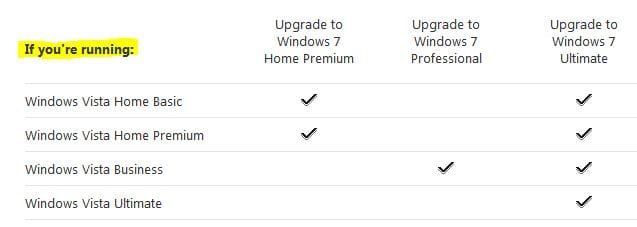
EDIT: Here are the upgrade paths from Windows Vista..Note you can only upgrade to Windows 7 if you have Windows Vista..If you have Windows XP or lower you will have to do a clean install..
Vista upgrades.JPG
 
Last edited:

My Computer

Computer Manufacturer/Model Number
HP Pavilion dv5 Notebook PC
OS
Windows Seven x64
CPU
2.2 GHz Dual Core
Motherboard
Quanta 3600
Memory
4GB
Graphics Card(s)
ATI Mobility RADEON HD 3470
Sound Card
ATI
Monitor(s) Displays
Laptop
Hard Drives
ATA Hitachi HTS543215 (5400RPM)
Case
Laptop
Cooling
Fan
Internet Speed
Basic DSL 1.5 up and Down
can you upgrade with the full retail edition of windows 7? Is the an option to format and upgrade?

Please, someone else correct me if I am wrong, but it was my impression that all the DVD's are the same. It is the Key that determines, what you are entitled to.

Since it was determined, back in Oct, that with an upgrade DVD, you could format, just like the full retail, I would say to the poster that the option to format and upgrade is present. In fact, if you did not give your key during the installation process, but waited until the install was complete, there would be no difference between an upgrade and the full retail DVD.
 

My Computer

Computer type
PC/Desktop
Computer Manufacturer/Model Number
Dell XPS 420
OS
Windows 10, Home Clean Install
CPU
Intel Core2 processsor Q8200(2.33Ghz 1333FSB) Quad Core Tech
Motherboard
Dell
Memory
6 gb
Graphics Card(s)
ATI Radeon 256MB HD3650
Sound Card
Intergrated 7.1 Channel Audio
Monitor(s) Displays
Dell SP2009W 20"
Hard Drives
640 GB Serial ATA Hard drive
Cooling
Fan
Keyboard
Dell USB Keyboard
Mouse
Dell Premium Optical USB
Internet Speed
DSL 2.85

My Computer

Computer Manufacturer/Model Number
Self Build 64bit
OS
Vista Ult64, Win7600
CPU
Intel Core 2 Quad Q6600 @ 2400 MHz 64bit OS
Motherboard
Asus P5E3 Deluxe WiFi @p 64 bit OS
Memory
4096 MB DDR3-SDRAM
Graphics Card(s)
ATI Radeon HD 3870 Series x2 Crossfired
Sound Card
Realtek on board
Monitor(s) Displays
Samsung SyncMaster - 23 inches
Screen Resolution
1680x1050 pixels at 60 Hz in True Colors
Hard Drives
Hitachi (250 GB)/Samsung 750 GB. /Barracuda 160 GB.
My Book 1 TB external..
PSU
Cooler Master 1000w
Case
Cooler Master Cosmos 1000.
Cooling
Fans and fresh air,
Keyboard
Wireless
Mouse
Wireless
Internet Speed
Never fast enough
Other Info
I use a Magnum.
can you upgrade with the full retail edition of windows 7? Is the an option to format and upgrade?

yes you can do an in-place Upgrade with full retail.

No you cannot format if doing an in-place upgrade, as it is only available when you boot the DVD to do a Custom clean install.
 
Back
Top