
QUICKBOOKS 2011/12 will not install after clean install Win 7 SP1 x64

sunlover

New member
Local time
6:40 PM
Messages
4
Location
LOCH SPORT
:confused:Have tried everything I can find online to re install above to no avail. Have program running on old PC with the same OS & have installed it on this PC on win 8.1 & win 10.(gone back to Win 7 because of lack of control of Win Update on Win 10 given my limited data on W/less B/band)
I did notice Quickbooks Install on win 8.1 & 10 installs MS NET Framework 1.1 & MS NET Framework 1.1 SP1 prior to the main install.
At the moment I get Error 1324 message (see image) when I try to install Quickbooks.
I have tried to install MS NET 1.1 & NET SP 1 as per post on MS support & get the same Error message?
There would seem to be something with Win 7 SP 1 that is blocking the installation?

Any feed back re the above would be greatly appreciated.
 

Attachments
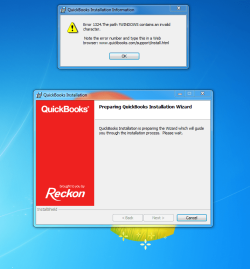
  • Error 1324.PNG
    Error 1324.PNG
    91.1 KB · Views: 0

My Computer My Computer

At a glance

Windows 7 Home Premium x64 SP1Intel Core i5 2.70GHzCorsair 8 GBon board
Computer type
PC/Desktop
Computer Manufacturer/Model Number
custom build
OS
Windows 7 Home Premium x64 SP1
CPU
Intel Core i5 2.70GHz
Motherboard
MSI B150M PRO- VDH
Memory
Corsair 8 GB
Graphics Card(s)
on board
Hard Drives
Samsung V- NND SSD 850 EVO (250 GB)
Antivirus
Norton Internet Security 2017
Browser
Firefox
Hi sunlover, welcome to the Forum.

The first thing to look at is your User Account. A corrupted User account frequently causes this problem.

Try setting up a new User Account & see if that helps.
 

My Computer My Computer

At a glance

Windows 7 Home Premium 64 bit sp1Intel i5 3570 3.4Ghz Ivy Bridge SKT 1155 quad...G-Skill Rip Jaws 16Gb (8x2) DDR3 -1600 PC3 12...Gigabyte NVIDIA GT610 1Gb DDR3 810/1200 PCI-E...
Computer type
PC/Desktop
Computer Manufacturer/Model Number
Self built using existing case
OS
Windows 7 Home Premium 64 bit sp1
CPU
Intel i5 3570 3.4Ghz Ivy Bridge SKT 1155 quad core
Motherboard
Gigabyte Z77-HD3 SKT 1155 2xSata 3, 4x USB 3.0
Memory
G-Skill Rip Jaws 16Gb (8x2) DDR3 -1600 PC3 12800 CL 10 red
Graphics Card(s)
Gigabyte NVIDIA GT610 1Gb DDR3 810/1200 PCI-E 2.0 Silent
Sound Card
NVIDIA High Definition & Realtech High Definition Audio
Monitor(s) Displays
2 x Philips 226V4L 16:9 aspect ratio
Screen Resolution
1920 x 1080 HD
Hard Drives
Samsung 840 Pro 256gb SSD, SATA 3.
Hitachi Touro Portable 1tb, USB 3.0 HDD used for image b/ups.
PSU
Corsair VS450
Case
Codeng
Cooling
PSU fan & CPU fan
Keyboard
Logitech
Mouse
Logitech Wireless trackball M570
Internet Speed
Wireless 3G. 3mg down & 550kb up.
Antivirus
Bitdefender Internet Security 2020
Browser
Opera (Current Version) & Firefox
Other Info
MS Office 2013 Pro. Davis weather station software. MGE Nova 600 avr UPS.
Thanks for that Ranger, that is one of many things I have tried without success.
 

My Computer My Computer

At a glance

Windows 7 Home Premium x64 SP1Intel Core i5 2.70GHzCorsair 8 GBon board
Computer type
PC/Desktop
Computer Manufacturer/Model Number
custom build
OS
Windows 7 Home Premium x64 SP1
CPU
Intel Core i5 2.70GHz
Motherboard
MSI B150M PRO- VDH
Memory
Corsair 8 GB
Graphics Card(s)
on board
Hard Drives
Samsung V- NND SSD 850 EVO (250 GB)
Antivirus
Norton Internet Security 2017
Browser
Firefox
You could try disabling Norton Internet Security 2017 to see if that will make a difference.

If your Windows 7 installation is up to date you should have Microsoft.NET Framework 4.6.1 installed.

My version of Reckon Personal 2013, does install Crystal Reports for .NET Framework 2.0 (x86), which gets installed from the Reckon installation DVD, but I think it's exclusively for Reckon use.

When you say you've gone back to Windows 7, does that mean you have reinstalled Windows 7 again recently. If that is the case it might worth formatting your hard drive & reinstalling Windows 7 again.
 
Last edited:

My Computer My Computer

At a glance

Windows 7 Home Premium 64 bit sp1Intel i5 3570 3.4Ghz Ivy Bridge SKT 1155 quad...G-Skill Rip Jaws 16Gb (8x2) DDR3 -1600 PC3 12...Gigabyte NVIDIA GT610 1Gb DDR3 810/1200 PCI-E...
Computer type
PC/Desktop
Computer Manufacturer/Model Number
Self built using existing case
OS
Windows 7 Home Premium 64 bit sp1
CPU
Intel i5 3570 3.4Ghz Ivy Bridge SKT 1155 quad core
Motherboard
Gigabyte Z77-HD3 SKT 1155 2xSata 3, 4x USB 3.0
Memory
G-Skill Rip Jaws 16Gb (8x2) DDR3 -1600 PC3 12800 CL 10 red
Graphics Card(s)
Gigabyte NVIDIA GT610 1Gb DDR3 810/1200 PCI-E 2.0 Silent
Sound Card
NVIDIA High Definition & Realtech High Definition Audio
Monitor(s) Displays
2 x Philips 226V4L 16:9 aspect ratio
Screen Resolution
1920 x 1080 HD
Hard Drives
Samsung 840 Pro 256gb SSD, SATA 3.
Hitachi Touro Portable 1tb, USB 3.0 HDD used for image b/ups.
PSU
Corsair VS450
Case
Codeng
Cooling
PSU fan & CPU fan
Keyboard
Logitech
Mouse
Logitech Wireless trackball M570
Internet Speed
Wireless 3G. 3mg down & 550kb up.
Antivirus
Bitdefender Internet Security 2020
Browser
Opera (Current Version) & Firefox
Other Info
MS Office 2013 Pro. Davis weather station software. MGE Nova 600 avr UPS.
I do have MS. NET Framework 4.6.1 installed. Program list include MS.NET Framework 1.1 as an empty folder.

Tried to install Q/bs with Norton Firewall turned off- got same error message.

I wiped SSD before doing clean install of Win 7 SP1 x64, this should not be a problem. Have had similar problems with another clean install in the past & other posts online would seem to point to problem with Win 7.
 

My Computer My Computer

At a glance

Windows 7 Home Premium x64 SP1Intel Core i5 2.70GHzCorsair 8 GBon board
Computer type
PC/Desktop
Computer Manufacturer/Model Number
custom build
OS
Windows 7 Home Premium x64 SP1
CPU
Intel Core i5 2.70GHz
Motherboard
MSI B150M PRO- VDH
Memory
Corsair 8 GB
Graphics Card(s)
on board
Hard Drives
Samsung V- NND SSD 850 EVO (250 GB)
Antivirus
Norton Internet Security 2017
Browser
Firefox
Open Control Panel & select Action Centre & run Troubleshooting to see if that comes up with what the problem might be.
 

My Computer My Computer

At a glance

Windows 7 Home Premium 64 bit sp1Intel i5 3570 3.4Ghz Ivy Bridge SKT 1155 quad...G-Skill Rip Jaws 16Gb (8x2) DDR3 -1600 PC3 12...Gigabyte NVIDIA GT610 1Gb DDR3 810/1200 PCI-E...
Computer type
PC/Desktop
Computer Manufacturer/Model Number
Self built using existing case
OS
Windows 7 Home Premium 64 bit sp1
CPU
Intel i5 3570 3.4Ghz Ivy Bridge SKT 1155 quad core
Motherboard
Gigabyte Z77-HD3 SKT 1155 2xSata 3, 4x USB 3.0
Memory
G-Skill Rip Jaws 16Gb (8x2) DDR3 -1600 PC3 12800 CL 10 red
Graphics Card(s)
Gigabyte NVIDIA GT610 1Gb DDR3 810/1200 PCI-E 2.0 Silent
Sound Card
NVIDIA High Definition & Realtech High Definition Audio
Monitor(s) Displays
2 x Philips 226V4L 16:9 aspect ratio
Screen Resolution
1920 x 1080 HD
Hard Drives
Samsung 840 Pro 256gb SSD, SATA 3.
Hitachi Touro Portable 1tb, USB 3.0 HDD used for image b/ups.
PSU
Corsair VS450
Case
Codeng
Cooling
PSU fan & CPU fan
Keyboard
Logitech
Mouse
Logitech Wireless trackball M570
Internet Speed
Wireless 3G. 3mg down & 550kb up.
Antivirus
Bitdefender Internet Security 2020
Browser
Opera (Current Version) & Firefox
Other Info
MS Office 2013 Pro. Davis weather station software. MGE Nova 600 avr UPS.
Checked Windows Update- 150 updates to download, many for M/S Net. Framework. Have gone over the data allowance for my W/less brooadband & will wait till the next biling period to download these & see if this fixes the problem. In the mean time will boot up my old PC on which Quickbooks is running & see what programs are installed.
 

My Computer My Computer

At a glance

Windows 7 Home Premium x64 SP1Intel Core i5 2.70GHzCorsair 8 GBon board
Computer type
PC/Desktop
Computer Manufacturer/Model Number
custom build
OS
Windows 7 Home Premium x64 SP1
CPU
Intel Core i5 2.70GHz
Motherboard
MSI B150M PRO- VDH
Memory
Corsair 8 GB
Graphics Card(s)
on board
Hard Drives
Samsung V- NND SSD 850 EVO (250 GB)
Antivirus
Norton Internet Security 2017
Browser
Firefox
Back
Top