<Quote> is currently unavailable

thattallguy

New member
Local time
11:20 PM
Messages
6
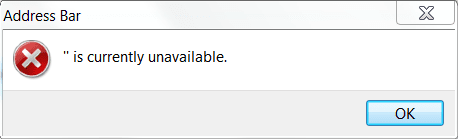
When opening the Desktop in Windows Explorer I get the following error along with my data:

" is currently unavailable.

Screenshot attached. Suggestions welcome.
 

Attachments

  • WindowsError.PNG
    WindowsError.PNG
    4.4 KB · Views: 13

My Computer

OS
Win 7 among others
Did you browse to the desktop entry and click on it?

Have you installed any theme programs that patch dll's?

What antivirus are you using?
 

My Computer

Computer Manufacturer/Model Number
Sony Vaio Z46GDU
OS
Windows 7 Ultimate x86-64
CPU
[email protected] 1066MHz FSB
Motherboard
Sony branded
Memory
6GB DDR3 1066MHz
Graphics Card(s)
9300M GS 256MB Dedicated (Speed) + Intel4500MHD (Stamina)
Sound Card
Realtek HD Audio
Monitor(s) Displays
13.1' WXGA
Screen Resolution
1600x900
Hard Drives
320GB 7200RPM w/ 16MB cache
Internet Speed
1MB/s
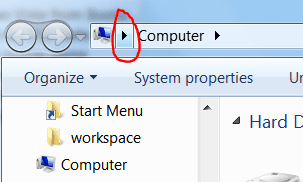
I typically choose the left-most right-arrow on the address bar (shown in the attachment) and then choose "Desktop" from the drop-down list. I just now tried typing 'Desktop' (no quotes) into the address bar and I get the same alert box, this time containing "'Desktop' is currently unavailable." but I also get a new Explorer window with the Desktop listing.

I am using the default theme (I have 64-bit Ultimate, using Aero) and have not installed any other themes.

Antivirus is AVG Free.
 

Attachments

  • WindowsError2.PNG
    WindowsError2.PNG
    8.7 KB · Views: 699

My Computer

OS
Win 7 among others
Another datum: choosing 'Desktop' on the navigation pane does not give the error -- however, I don't typically use this, because this pane is very large and it's easier to do two clicks then to scroll up the pane.
 

My Computer

OS
Win 7 among others
I typically choose the left-most right-arrow on the address bar (shown in the attachment) and then choose "Desktop" from the drop-down list. I just now tried typing 'Desktop' (no quotes) into the address bar and I get the same alert box, this time containing "'Desktop' is currently unavailable." but I also get a new Explorer window with the Desktop listing.

I am using the default theme (I have 64-bit Ultimate, using Aero) and have not installed any other themes.

Antivirus is AVG Free.

Uninstall AVG free with a removal tool and install Microsoft's Security Essentials. Then reboot and see if the problem disappears.
 

My Computer

Computer Manufacturer/Model Number
Sony Vaio Z46GDU
OS
Windows 7 Ultimate x86-64
CPU
[email protected] 1066MHz FSB
Motherboard
Sony branded
Memory
6GB DDR3 1066MHz
Graphics Card(s)
9300M GS 256MB Dedicated (Speed) + Intel4500MHD (Stamina)
Sound Card
Realtek HD Audio
Monitor(s) Displays
13.1' WXGA
Screen Resolution
1600x900
Hard Drives
320GB 7200RPM w/ 16MB cache
Internet Speed
1MB/s
Antivirus is AVG Free.

Uninstall AVG free with a removal tool and install Microsoft's Security Essentials. Then reboot and see if the problem disappears.

That does seem to have fixed it. I'm surprised. Is AVG known to cause this kind of problem a lot?

EDIT: It's back... not related to AVG.
 
Last edited:

My Computer

OS
Win 7 among others
Spoke too soon; the problem has returned. Any other ideas?
 

My Computer

OS
Win 7 among others
Spoke too soon; the problem has returned. Any other ideas?

Run sfc /scannow in an elevated command prompt. Type cmd into the start menu, then press Ctrl+Shift+Enter or right click and select run as administrator.
 

My Computer

Computer Manufacturer/Model Number
Sony Vaio Z46GDU
OS
Windows 7 Ultimate x86-64
CPU
[email protected] 1066MHz FSB
Motherboard
Sony branded
Memory
6GB DDR3 1066MHz
Graphics Card(s)
9300M GS 256MB Dedicated (Speed) + Intel4500MHD (Stamina)
Sound Card
Realtek HD Audio
Monitor(s) Displays
13.1' WXGA
Screen Resolution
1600x900
Hard Drives
320GB 7200RPM w/ 16MB cache
Internet Speed
1MB/s
Is AVG known to cause this kind of problem a lot?
'

Do what Frost suggested,,,

For lack of better term.......

AVG is the epitome of GARRrrBage Anti Virus software.
 

My Computer

Computer Manufacturer/Model Number
Self Built
OS
Win 7 Ultimate 32bit
CPU
C2D E6600 2.4Ghz
Motherboard
Intel D965WH
Memory
4G Kingston KHX5400D2
Graphics Card(s)
EVGA GTX 570 HD SC (012-P3-1573-KR)
Sound Card
On-Board
Monitor(s) Displays
Samsung 226BW
Screen Resolution
1680 x 1050
Hard Drives
2 x 250 Seagate Barracuda
2 x 500 Seagate Barracuda (Raid1)
PSU
Corsair TX750W
Case
In-Win C589
Cooling
Stock Intel Cooling
Run sfc /scannow in an elevated command prompt.

Holy Toledo!

Ran sfc /scannow. Output logfile was huge and command completion reported "Windows Resource Protection found corrupt files but was unable to fix some of them."

Problem was not resolved. On the theory that whatever sfc *had* managed to fix was now irrelevant, I reran sfc /scannow (it gave the same command line output about "unable to fix") and saved only the new log output. It's attached. And *still* huge: 1700+ lines of what seem to be instructions to restore files. Is this utility supposed to run cleanly? If so, I'm assuming I'm looking at a reinstall...
 

My Computer

OS
Win 7 among others
Yes, reinstall 7 and then install Microsoft Security Essentials and all drivers. Then, create a system image and keep it in case this happens again.
 

My Computer

Computer Manufacturer/Model Number
Sony Vaio Z46GDU
OS
Windows 7 Ultimate x86-64
CPU
[email protected] 1066MHz FSB
Motherboard
Sony branded
Memory
6GB DDR3 1066MHz
Graphics Card(s)
9300M GS 256MB Dedicated (Speed) + Intel4500MHD (Stamina)
Sound Card
Realtek HD Audio
Monitor(s) Displays
13.1' WXGA
Screen Resolution
1600x900
Hard Drives
320GB 7200RPM w/ 16MB cache
Internet Speed
1MB/s
Honestly,, it most cases like this,,, yes.
 

My Computer

Computer Manufacturer/Model Number
Self Built
OS
Win 7 Ultimate 32bit
CPU
C2D E6600 2.4Ghz
Motherboard
Intel D965WH
Memory
4G Kingston KHX5400D2
Graphics Card(s)
EVGA GTX 570 HD SC (012-P3-1573-KR)
Sound Card
On-Board
Monitor(s) Displays
Samsung 226BW
Screen Resolution
1680 x 1050
Hard Drives
2 x 250 Seagate Barracuda
2 x 500 Seagate Barracuda (Raid1)
PSU
Corsair TX750W
Case
In-Win C589
Cooling
Stock Intel Cooling
Back
Top