It seems after only 3 years of service, my MSI GT780R has given up on me ... I cannot even get into the BIOS... the hard drives are currently not recognized, either...
I have posted this on other places, too... but to no avail...
Please, any help is GREATLY appreciated! I am very close to scrap this computer, and save up for a new one...
Kind Regards
Skull Kid
My Computer
At a glance
Microsoft Windows 7 Ultimate x64Intel Core i7 3.07 GHz6 GBNVIDIA GeForce 470 GTX
Were there any symptoms popping up before the total failure?
Were you doing anything at the time of failure - unplugging a printer or external device for instance.
Were there any relevant events at the time - lightening strikes, power outages?
Below is a diagnostic to troubleshoot a new build that will not boot. This applies in your case too. Try it and see if you can isolate a problem device.
Note: newer motherboards do not beep. They have LEDs that show a code. You will want to have your manual out so you can interpret the codes.
New System Failure Diagnostic
Basic diagnostic procedure is to uninstall the entire build and start over. Some people do this out of the case by placing the motherboard on an anti-static surface. This eliminates the possibility that there is a short circuit between the motherboard and the case through the connection posts (stand-offs). A standoff in the wrong location or a sloppy job will cause a short.
The Test (power off, power cord unplugged):
Disconnect everything externally connected except the mouse and keyboard (printers, USB devices, etc). If you are not using a wired mouse and keyboard see if you can borrow one. The wireless device is just another component you have to deal with.
Disconnect the power and data cables from all the drives inside the computer (Hard drives, DVD/CD drives, etc).
Remove all the cards installed in the expansion slots (PCI/PCI-e) including the video card. (Be careful handling them and place them on a non conductive surface while testing).
Remove all the RAM sticks (same rules as above).
Now connect the power cord and turn the PC on.
The motherboard should start beeping. You should get a beep code that tells you there is no memory. This is good, it means the processor is functioning and the motherboard is good so far.
Now add one stick of memory in Slot A1 and power on. More beeping: "no video card" beep code. This is good.
Then add the video card and connect it to the monitor. You should get no beeping and you should see the BIOS start screens, ending with the message that there is no boot device.
If you get no video then switch the one memory stick installed for another one and test.
If you do get video then start adding components back, one at a time, until the system fails to boot. The last component you added is then the problem component.
Tell us where in the test the system fails to boot.
My Computer
At a glance
Windows 7 64 Bit Home Premium SP1i7-3820GSkill F3-14900CL9Q - 16GBEVGA GeForce GTX660 - Driver 352.86
Computer type
PC/Desktop
Computer Manufacturer/Model Number
Home Built - Jan 2013
OS
Windows 7 64 Bit Home Premium SP1
CPU
i7-3820
Motherboard
Asus P9X79-PRO - Bios 4608
Memory
GSkill F3-14900CL9Q - 16GB
Graphics Card(s)
EVGA GeForce GTX660 - Driver 352.86
Sound Card
On board Realtek ALC898
Monitor(s) Displays
Acer S271HL
Screen Resolution
1920 x 1080
Hard Drives
#1- Samsung 840 Pro Series
#2- Western Digital WD1002FAEX Sata3 Black
#3- Western Digital WD1002FAEX Sata3 Black
PSU
Corsair CMPSU-850TX-V2 - 850 watt (by Seasonic)
Case
Corsair Obsidian 550D
Cooling
Standard 3 120mm case fans, Cooler Master Hyper 212 EVO
You need a board speaker connected to the I/O header on the board for beep codes. Some boards have a set of 4 leds for the POST process and some even have a lcd display for Q codes.
Were there any symptoms popping up before the total failure?
Were you doing anything at the time of failure - unplugging a printer or external device for instance.
Were there any relevant events at the time - lightening strikes, power outages?
Well, sort of yes. I have been fiddling about with Windows XP, installing that (in IDE mode) and now, I can't really remember what exactly caused the computer not to boot into BIOS. Actually, right now, it won't boot at all. But I will take at look a it again.
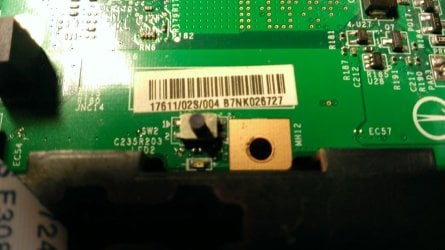
Reseting the CMOS... I am looking for that button on the motherboard... could it be this one right here? I have indeed pressed this button, also for 5 seconds, but nothing changes, of what I can see.
Attachments
WP_20140410_003.jpg
115 KB
· Views: 0
Last edited:
My Computer
At a glance
Microsoft Windows 7 Ultimate x64Intel Core i7 3.07 GHz6 GBNVIDIA GeForce 470 GTX

 ... I cannot even get into the BIOS... the hard drives are currently not recognized, either...