1--I had previously removed Bitwarden because it stopped working on Win 7. The people at Bitwarden said they can't guarantee it for 7. My vault is still at their site. I've downloaded a new copy, and tried installing it again, and I get an error that it can't install because there's something wrong with my internet connection. There's nothing wrong with my connection.
The Bitwarden stand-alone app is not supported on Windows 7. It says right on their download page that it is for Windows 10/11.
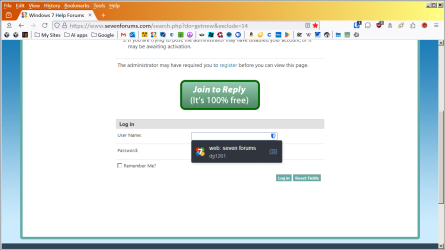
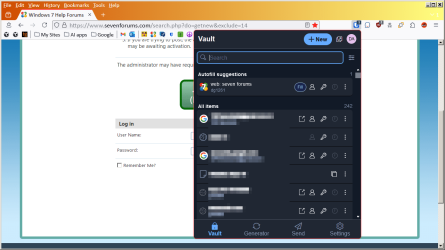
2--So I installed the extension just for Firefox, from firefox extensions site, but the passwords don't appear in the context menu.
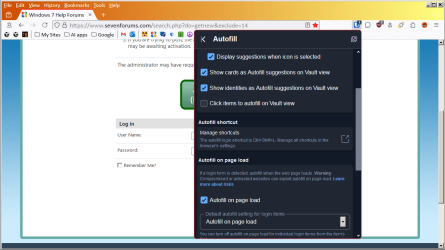
Have you adjusted your settings in the extension? Specifically, review your "Autofill" options.
3--I work online and sometimes have 8-9 tabs open, and I need to flip back and forth all day. On Waterfox Classic I had "Colorful Tabs," which colors each tab a different color. None of the color-tabs extensions for r3dFox work. I've tried all of them. The best I got was to color the current tab.
I'll assume you're referring to the "ColorfulTabs" extension v34.8 by Shivanand Sharma. In the extension's settings, it specifically warns, "Currently only colors the selected tab due to 1320585 - Allow styling individual tabs"
Checking that bugzilla thread, it appears this is a longstanding restriction that the Mozilla overlords have no intention of allowing. There's nothing r3dfox (or any other Firefox fork) can do about that.
4b--I had 2 rows of bookmarks across the top, but I can't find any extension that does that
I've never seen a configuration with a two-row Bookmarks Toolbar, so I don't know whether that might have been something unique to your version of Waterfox, or perhaps might have been some particular extension you had on Waterfox. I'll presume you've already done the following troubleshooting steps to assess those possibilities:
- Check Waterfox Settings to see if there might be a two-row "Bookmarks Toolbar" setting in there that's unique to Waterfox (since other FF forks don't have it);
- Check the settings in the Waterfox Bookmarks Manager to see if there's a two-row setting, unique to Waterfox (since other FF forks don't have it);
- Check your Waterfox Extensions page to see if there is any add-on you had that could be responsible for the two-row Bookmarks Toolbar.
In lieu of a two-row Toolbar option, as an alternative you might want to consider compacting your Bookmarks Toolbar so you can fit more bookmarks onto its single row -- such as the Bookmarks Toolbar illustrated in my screenshot upthread.
I've long used this technique on all my browsers, both Chromium-based and Firefox-based. I've never liked the verbose text and titles many webpages use these days because they get in the way of cramming lots of bookmarks into the Toolbar, so I edit each bookmark to delete the title and leave just the favicon. My rationale is that if I use a website often enough for it to have earned a prominent place at the top of my browser, then I'll instantly recognize it from the favicon alone and don't need a name next to it. A side benefit is this lets me make a lot more of my most frequently used bookmarks readily available in the Toolbar.
Note my screenshot shows you can also add a folder to your Bookmarks Toolbar, which will effectuate a sort of "drop-down menu" just for that subset of bookmarks. For instance, clicking "Google" in my Toolbar drops down a menu of a dozen Google sites, such as Mail, Maps, Calendar, et al. Clicking "My Sites" drops down a menu of my banking and home utility websites. You can do a whole lot without having to have two rows of bookmarks taking up screen space at the top of your browser window.
My Computer
At a glance
Windows 7/8.1/10 multibootIntel Core i7-770048GB (2x16GB Crucial DDR4-3200 + 2x8GB Hynix ...Intel HD630 + AMD Radeon R7 450 PCIe
- Computer type
- PC/Desktop
- Computer Manufacturer/Model Number
- Dell Optiplex 7050
- OS
- Windows 7/8.1/10 multiboot
- CPU
- Intel Core i7-7700
- Motherboard
- Dell, Intel Q270 chipset
- Memory
- 48GB (2x16GB Crucial DDR4-3200 + 2x8GB Hynix DDR4-2400)
- Graphics Card(s)
- Intel HD630 + AMD Radeon R7 450 PCIe
- Monitor(s) Displays
- Asus VC279 (27")
- Screen Resolution
- 1920x1080
- Hard Drives
- Toshiba M.2 NVMe (256GB),
Samsung 960 Evo (500GB),
WD Red Plus 80EFBX (8TB)

 I have 50 folders with about 1200 bookmarks. I found an extension to run them down the left side of the page..