Radeon 9800 pro issues

Willymann

New member
Local time
3:43 AM
Messages
4
I just recently installed Windows 7 Ultimate x32 and since then my graphics performance has been awful.

I have updated drivers (found here: ATI Catalystâ„¢ Legacy Display Driver )

DirectX 11 is also installed.

I have tried playing old games like day of defeat and counterstrike and the poor graphics/frame rates still persist. Am I doing something wrong? Please help

Also as a side note the games ran excellent on Windows XP (which is what i upgraded from)


Radeon 9800 pro 128mb
Asus A78XE- Deluxe
Amd Athlon 1044mHz
 

My Computer

OS
Windows 7 ultimate x32
CPU
AMD Athlon 1044mHz
Motherboard
Asus A7n8xe deluxe
Memory
1GB Kingston HyperX
Graphics Card(s)
Radeon 9800 pro
Willymann, welcome to the forums.

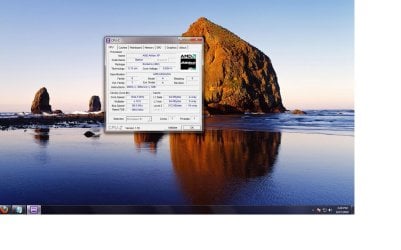
Is that motherboard model number a typo? Reason for asking is I cannot find a whole lot of anything about it. Also unless you have a real old Athlon XP processor, it isn't running at the correct speed. Let's start with seeing what is what and grab this,

CPUID - System & hardware benchmark, monitoring, reporting

and post a screen shot of both the CPU and mainboard tabs.
 

My Computer

Computer type
PC/Desktop
Computer Manufacturer/Model Number
Me
OS
Win 7 Ultimate x64
CPU
FX-8350 @ 4.6 GHz so far
Motherboard
Asus M5A97 EVO
Memory
ADATA XPG V1 Series Black 8GB DDR3 1600
Graphics Card(s)
Sapphire R9 270x Dual-X
Sound Card
Xonar DGX w/ Corsair Vengence 1300
Monitor(s) Displays
Acer S232HL Abid
Screen Resolution
1920x1080
Hard Drives
120 GB OCZ Vertex 3
500 GB Seagate 7200.12
PSU
Antec Earthwatts 650W Green
Case
Antec Three Hundred
Cooling
Cooler Master 212 EVO
Keyboard
Logitech G510
Mouse
Logitech G500s
Internet Speed
35000/3000
OK that helps a lot. Starting with the CPU it looks like it is the barton core XP 3000+ that should be running at 2100 MHz, not 1044 MHz,

AMD Athlon XP 3000+ - AXDA3000DKV4E

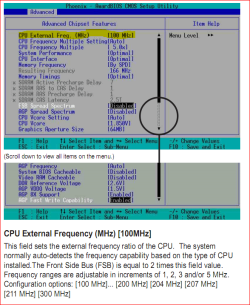
which means you need to go into the bios and raise the FSB to 200 from its current 100,

a7n8xe.PNG

Next is the chipset on the motherboard, the old Nforce 2 that hasn't seen any support since way back in 2004. There is not now and never will be any Windows 7 drivers for it. The reasons for your low video performance are twofold; first is the lower than it should be CPU speed, the second is the lack of a proper and function chipset driver, primarily the AGP/GART driver.

One thing you can try is to use the last XP driver for the NF2,

WinXP - UDP (5.10)

If you try it you can go about it two ways,

1. Run the installer using XP compatibility mode,

http://www.sevenforums.com/tutorials/98073-drivers-install-vista-drivers-windows-7-a.html

and do a custom install and only install the GART driver.

2. If you have something like Winrar or 7zip installed you can extract the installer and install the GART driver through Device Manager. You will need to locate the AGP/GART in Device Manager (should be under System Devices), then use method 2 from the above link and point it to the GART folder inside the extract folder.

If the driver installs (make sure to uninstall the driver for the 9800 first), then take a run through Windows Update just on the off chance that there might be an update available there for it. I did the above with an equally old SiS based motherboard (ESC L7S7A2 with a Barton XP-M 2800+, and a 9800 Pro) on Windows 7 32 bit, and it works just fine.
 

My Computer

Computer type
PC/Desktop
Computer Manufacturer/Model Number
Me
OS
Win 7 Ultimate x64
CPU
FX-8350 @ 4.6 GHz so far
Motherboard
Asus M5A97 EVO
Memory
ADATA XPG V1 Series Black 8GB DDR3 1600
Graphics Card(s)
Sapphire R9 270x Dual-X
Sound Card
Xonar DGX w/ Corsair Vengence 1300
Monitor(s) Displays
Acer S232HL Abid
Screen Resolution
1920x1080
Hard Drives
120 GB OCZ Vertex 3
500 GB Seagate 7200.12
PSU
Antec Earthwatts 650W Green
Case
Antec Three Hundred
Cooling
Cooler Master 212 EVO
Keyboard
Logitech G510
Mouse
Logitech G500s
Internet Speed
35000/3000
Thanks for all of your quick help.

FSB was already set to 200. I did disable the FSB spread spectrum however and performance has significantly increased, but it still isn't what it should be. I also adjusted the Graphics Aperture to 128mb but I doubt that contributed much to anything.

Still need to mess with chipset drivers, will let you know how it goes. Also would increasing the Frequency multiple help?

I Appreciate the assistance thus far.
 

My Computer

OS
Windows 7 ultimate x32
CPU
AMD Athlon 1044mHz
Motherboard
Asus A7n8xe deluxe
Memory
1GB Kingston HyperX
Graphics Card(s)
Radeon 9800 pro
Also be aware that just because Windows 7 has DX11 does not mean your games or card will run in DX11 mode, they will only run in DX9 mode. Reason: you ATI 9800Pro is only capable of DX9 support.

See my explanation here - Tips on Troubleshooting Game Issues, step#6

As to game performance, don't expect too much performance out of that card with today's games, that's a really old card. I know, I had one.

The other thing to keep in mind is that the games that worked well with that are old as well. Meaning... expect some older games to struggle under Windows 7 - http://www.sevenforums.com/gaming/25539-windows-7-rtm-game-compatibility.html

Sorry.
 

My Computer

Computer type
PC/Desktop
Computer Manufacturer/Model Number
Custom built by me.
OS
Windows 10 Pro
CPU
Intel Core i7-4770K (3.5Ghz)
Motherboard
Gigabyte G1 Sniper 5 (F10 Bios)
Memory
32 gig Corsair Dominator Platinum (4x8Gig)
Graphics Card(s)
Sapphire Tri-X R9 Fury
Sound Card
Soundblaster ZXR
Monitor(s) Displays
NEC PA242W 24" LCD Monitor
Screen Resolution
1920 x 1200
Hard Drives
Primary - Samsung 850 Pro (512gig), Samsung 840 Pro (256gig), 2TB WD Caviar Black.
PSU
EVGA Supernova 1000 G2
Case
Cooler Master HAF X
Cooling
Corsair H100i with Corsair Air Series SP120 Quiet Fans
Keyboard
Logitech Wireless Wave
Mouse
Logitech Performance MX
Internet Speed
High Speed Cable
Antivirus
Norton Security
Browser
IE11
Other Info
Memory Timings - 1866MHz @ 9-9-9-27-1T @ 1.5 volts
Ok, so in the middle of my GART driver update my screen turned off and never turned back on. I eventually just powered off the system and upon reboot my keyboard and mouse are not working (both USB connected). My computer is set to halt on all errors so I cant get past boot screen!

I am completely stuck as I dont own a PS2 keyboard. Any suggestions on how to improve my situation (other than chuck this damned thing out the window)

Also after browsing the forums i found this post so I now realize the update didnt install USB drivers...
 

My Computer

OS
Windows 7 ultimate x32
CPU
AMD Athlon 1044mHz
Motherboard
Asus A7n8xe deluxe
Memory
1GB Kingston HyperX
Graphics Card(s)
Radeon 9800 pro
Not that it helps much but this seems to be the week for that model of motherboard to die (or attempt too),

A7N8X-E mobo dead? - Guru3D.com Forums

As far as the USB keyboard, you have any computer shops nearby? If so see if they have one of these,

ps2usb.jpg

cheaper than a new keyboard, and will at least allow you to connect to the PS2 port and get in the bios.
 

My Computer

Computer type
PC/Desktop
Computer Manufacturer/Model Number
Me
OS
Win 7 Ultimate x64
CPU
FX-8350 @ 4.6 GHz so far
Motherboard
Asus M5A97 EVO
Memory
ADATA XPG V1 Series Black 8GB DDR3 1600
Graphics Card(s)
Sapphire R9 270x Dual-X
Sound Card
Xonar DGX w/ Corsair Vengence 1300
Monitor(s) Displays
Acer S232HL Abid
Screen Resolution
1920x1080
Hard Drives
120 GB OCZ Vertex 3
500 GB Seagate 7200.12
PSU
Antec Earthwatts 650W Green
Case
Antec Three Hundred
Cooling
Cooler Master 212 EVO
Keyboard
Logitech G510
Mouse
Logitech G500s
Internet Speed
35000/3000
Back
Top