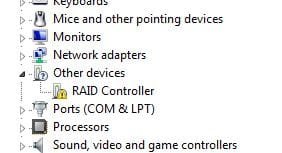
raid controller driver in window 7!!!

horizon3333

New member
Local time
7:51 PM
Messages
4
Hi, i am using Intel 945PL Express Chipset. I have installed window 7 32bits recently and i couldnt get any driver for my raid controller so far. Can someone tell me how to get this solved?

Thanks in advance.
 

Attachments

  • Raid.JPG
    Raid.JPG
    15.3 KB · Views: 1,601

My Computer

OS
Window 7 32bits
Hi, i am using Intel 945PL Express Chipset. I have installed window 7 32bits recently and i couldnt get any driver for my raid controller so far. Can someone tell me how to get this solved?

Thanks in advance.


hi and welcome

If you tell us about your computer we might be able to find you a driver. isnt 945 a graphics chipset not raid controller
 

My Computer

Computer Manufacturer/Model Number
HP Pavillion dv-7 1005 Tx
OS
Win 8 Release candidate 8400
CPU
[email protected]
Memory
4 gigs
Graphics Card(s)
Nvidia 9600M
Sound Card
HD built-in
Monitor(s) Displays
17" Wxga
Screen Resolution
1440x900
Cooling
none
Internet Speed
45Mb down 5Mb up
hi,

i was able to find the driver already. my mistake. my board model is actually 8i945PL instead of 945PL. anyhow i have problem with my 2nd HDD and my dvd rom. i have 2 hdd and a dvd rom. everytime when i on my pc, it just shows 1 hdd which is my master, 2nd hdd and dvd rom doesnt show up. what i do everytime is i have to go to "scan for hardware changes" then only my 2nd hdd and dvd rom can be seen.

1st hdd = WD 250GB
2nd hdd = maxtor 160GB
dvd rom = LG

all of them are sata.

thanks.
 

My Computer

OS
Window 7 32bits
Seems to me like you may have found an older driver for your sata controller. I hate to recommend this but it might be a bios issue if they are all on 1 sata controller you shouldn't be seeing some of the drives. I also think you found an older (vista) driver not a windows 7 driver because Gigabyte hasn't released an official W7 driver. Check out your bios revision, sometimes that helps. DO NOT ATTEMPT TO UPDATE YOUR BIOS HOWEVER unless you are fully aware of exact instructions how to do it.

Compare your bios revision with this:

GA-8I945PL-G - GIGABYTE - Support&Download - Motherboard - BIOS

Also try this for the driver installation:

http://america.giga-byte.com/FileList/Driver/motherboard_driver_chipset_intel.exe - Its windows Vista but it may work, I don't know which one you're attempting to install but this seems the most compatible.

If I understand correctly, when you first start your computer, your DVD and second HDD are NOT detected by W7 but after you refresh in Device manager, it shows up?
 

My Computer

Computer Manufacturer/Model Number
Custom Built By Me
OS
Windows 7 Ultimate
Motherboard
Only Asus
Monitor(s) Displays
Dual
Screen Resolution
Why do you care?
Yes, i have to refresh my device manager then only it shows up. i checked back the driver i had installed earlier, it was meant for XP instead of Win7. the chipset driver that u provided i tried it b4, it doesnt fix my problem. I guess by updating the bios also not really helpful. So meanwhile thr is nothing i can do but keep refreshing my device manager unless gigabyte release win7 driver. any other solution ???

thanks.
 

My Computer

OS
Window 7 32bits
Back
Top