RAID partition not showing

panF

New member
Local time
3:38 AM
Messages
17
Hello,

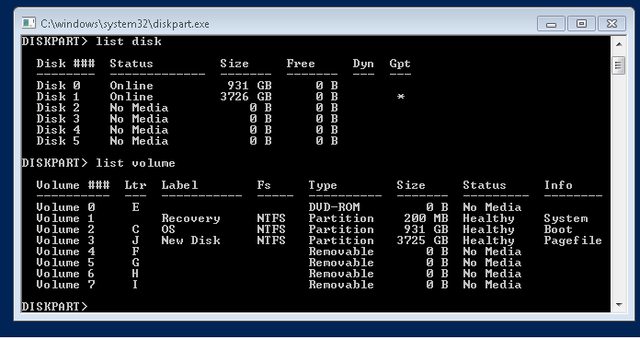
I'm working on a custom built Windows 7 PC (which is not mine and so don't know much about its internals).It was supposed to have a RAID array( I don't know which type RAID), the RAID drive is no longer visible. I assume that at least one of the RAID drives got corrupted. here's a screenshot from 'diskpart' output.

There are six HDD slots in the computer and one of them is a 1TB SSD for the OS, one could be the 4TB HDD and the rest are RAIDs?

UoQ3z7yl.png


I wish to know how to find out the corrupt hard disk ? Shall I've to replace the disk or can repair it, and if so how?

Thanks
 

My Computer

Computer type
PC/Desktop
Computer Manufacturer/Model Number
Dell, Custom buit, HP
OS
Windows 7 Professional x64
Meanwhile, I switched off the computer and individually taken out each HDD and put it on to USB HD enclosure
and ran "CrystalDiskInfo" to judge the health of the HD, without any formatting and repair.

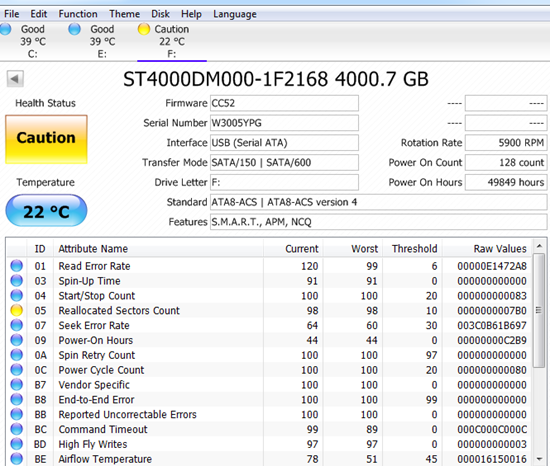
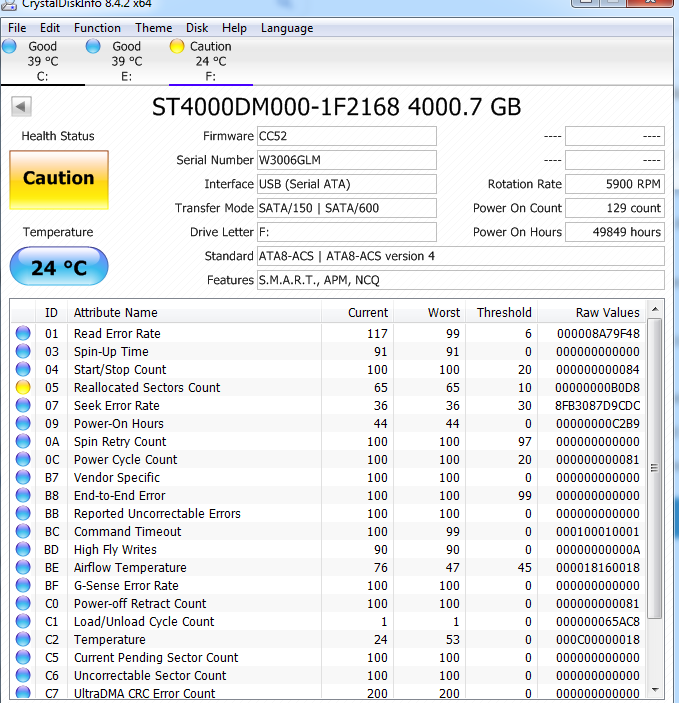
For two of the drives Drive 1 and Drive 4 I've got problems reported by CrystalDiskInfo:

peD7gVh.png


cMzFcRg.png


So how to proceed from here to revive and retrieve the data from RAID? Replace both the faulty HDs?
 

My Computer

Computer type
PC/Desktop
Computer Manufacturer/Model Number
Dell, Custom buit, HP
OS
Windows 7 Professional x64
Hello panF

If the computer is using Hardware RAID, then the RAID configuration will be transparent to Windows. You will need to enter the BIOS menu to see the configuration settings and actions available for the storage disks.

Where in BIOS these options reside depends on the motherboard and RAID technology. This is an example BIOS configuration for Gigabyte motherboard, using Intel Rapid Storage Technology (RST): RAID not visible in Windows Explorer | Microsoft Answers . The BIOS settings for the storage options will show what RAID is selected.
 

My Computer

Computer type
PC/Desktop
OS
Windows 7 x64, Vista x64, 8.1 smartphone
CPU
Intel E8400 65W 64-bit
Motherboard
Gigabyte EP45-UD3LR
Memory
DDR2 2 x 2GB, 1GB x 2
Graphics Card(s)
XFX Radeon HD5750
Sound Card
AMD High Definition Audio; Realtek High Definition Audio
Monitor(s) Displays
iiyama prolite X2377HDS
Screen Resolution
1920 x 1080
Hard Drives
500GB 7200 rpm Seagate ST3500413AS 16MB, 500GB 5400 rpm Toshiba MQ02ABF050H 32MB, 200GB 7200 rpm Seagate ST3200820AS 8MB, 2TB 7200 rpm Western Digital WD20EZRX 64MB
PSU
Enermax Liberty Modular
Case
Antec P193 Midi Tower
Keyboard
Mionix ZIBAL 60
Mouse
Razer USB 2.0 Diamondback Mouse or Huion Graphics Tablet
Browser
Internet Explorer, Lunascape, Firefox, Opera, Avast Safezone
As Iko mentioned, the computer probably has a Raid array set on BIOS.
You should test each disk with Seatools
 

My Computers

System One System Two

  • Computer type
    PC/Desktop
    Computer Manufacturer/Model Number
    custom build
    OS
    Windows 7 HP 64
    CPU
    i5 6600K - 800MHz to 4200MHz
    Motherboard
    GA-Z170-HD3P
    Memory
    4+4G GSkill DDR4 3000
    Graphics Card(s)
    IG - Intel 530
    Monitor(s) Displays
    Samsung 226BW
    Screen Resolution
    1680x1050
    Hard Drives
    (1) -1 SM951 – 128GB M.2 AHCI PCIe SSD drive for Windows 7 and Lubuntu
    (2) -1 WD SATA 3 - 1T for Data
    (3) -1 WD SATA 3 - 1T for backup
    PSU
    Thermaltake 450W TR2 gold
    Keyboard
    Old and good Chicony mechanical keyboard
    Mouse
    Logitech mX performance - 9 buttons (had to disable some)
    Internet Speed
    500Mb/s
    Browser
    Firefox 64
    Other Info
    TinyWall firewall
  • Computer type
    Laptop
    System Manufacturer/Model Number
    Asus Q550LF
    OS
    Windows 7 Pro
    CPU
    i7-4500U 800MHz to 3.0GHz
    Motherboard
    Asus Q550LF
    Memory
    (4+4)G DDR3 1600
    Graphics Card(s)
    IG intel 4400 + NVIDIA GeForce GT 745M
    Sound Card
    Realtek
    Monitor(s) Displays
    LG Display LP156WF4-SPH1
    Screen Resolution
    1920 x 1080
    Hard Drives
    BX500 120G SSD for Windows and programs +
    1T HDD for data
    Internet Speed
    500 Mb/s
    Browser
    Firefox
    Other Info
    TinyWall firewall
Boot Menu

Thank you both for your replies.

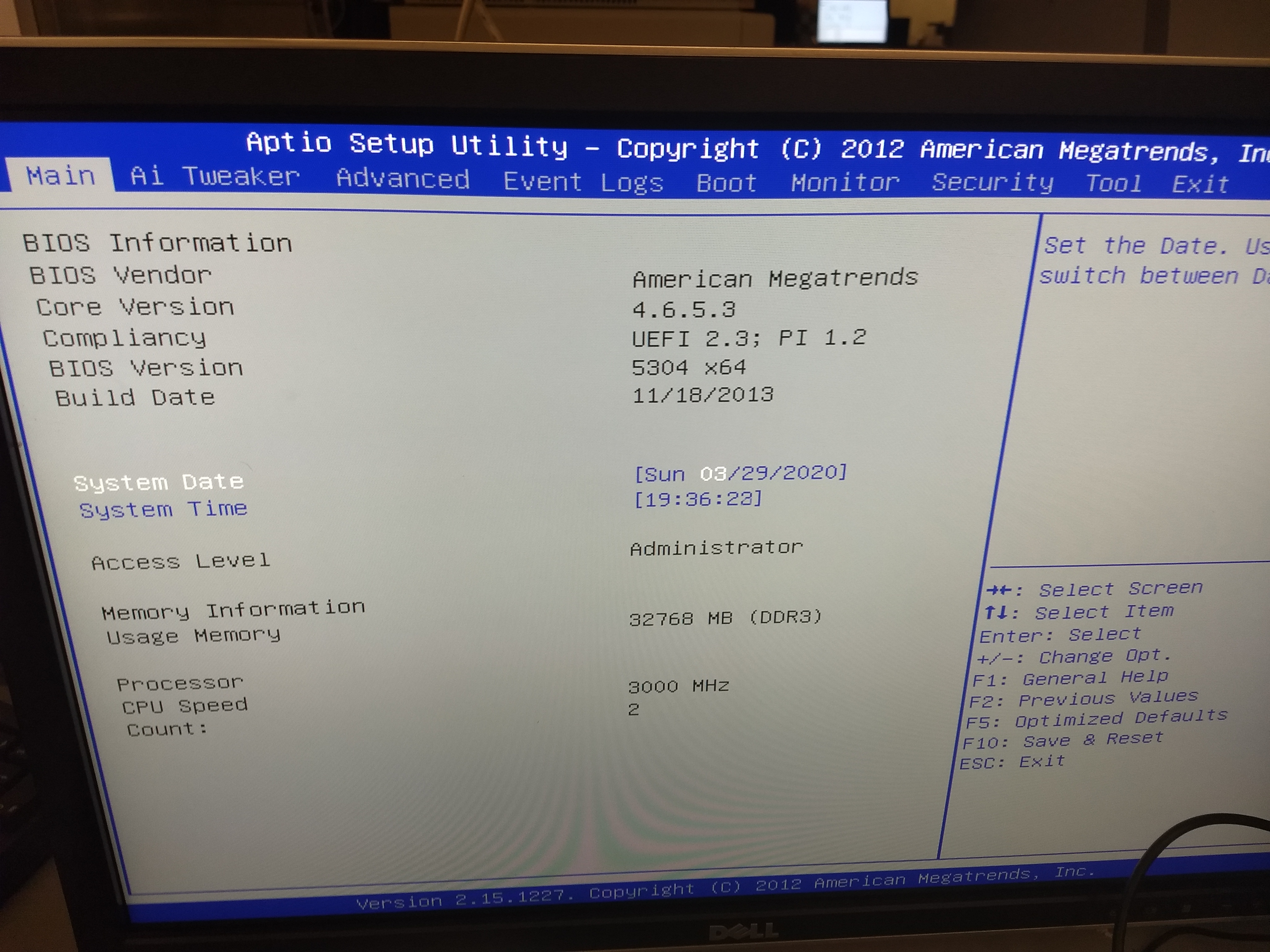
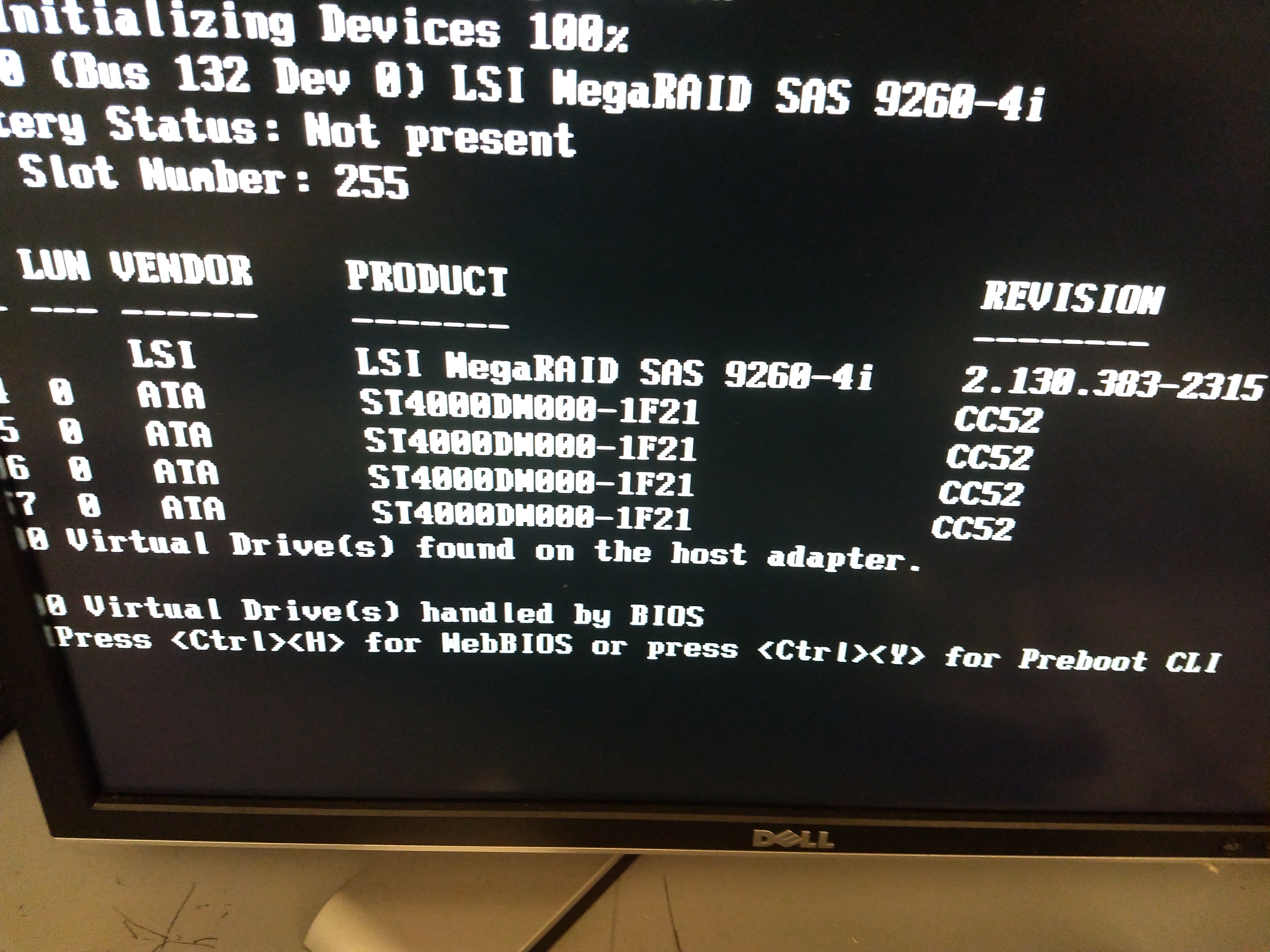
I'm a bit new to this and here are the main boot menu and the name of the raid drives(?) which come up while booting.

Are these information any helpful?

MDZE2tl.jpg


BnJ3UKR.jpg
 

My Computer

Computer type
PC/Desktop
Computer Manufacturer/Model Number
Dell, Custom buit, HP
OS
Windows 7 Professional x64
Thanks for the pictures.

Sorry, I cannot see any reference to disks, or storage controllers (or similar wording) in the first pic.

Second pic is badly cropped, and I cannot properly read the third line. It says the device has initialised 100%, so it seems to be working Okay.

What I can see, is that it is a MegaRAID SAS 9266-4i, which is a Broadcom device. Product details, and a download link for their documentation is at MegaRAID SAS 9266-4i | Broadcom .

I am not familiar with this device, but I can see from the documentation table of contents, that section 4 contains explanation of the device's own command line interface. Read that thoroughly to make sure you don't miss anything, and especially target sections on "locate drives" and "rebuild drives", when you are done.
 

My Computer

Computer type
PC/Desktop
OS
Windows 7 x64, Vista x64, 8.1 smartphone
CPU
Intel E8400 65W 64-bit
Motherboard
Gigabyte EP45-UD3LR
Memory
DDR2 2 x 2GB, 1GB x 2
Graphics Card(s)
XFX Radeon HD5750
Sound Card
AMD High Definition Audio; Realtek High Definition Audio
Monitor(s) Displays
iiyama prolite X2377HDS
Screen Resolution
1920 x 1080
Hard Drives
500GB 7200 rpm Seagate ST3500413AS 16MB, 500GB 5400 rpm Toshiba MQ02ABF050H 32MB, 200GB 7200 rpm Seagate ST3200820AS 8MB, 2TB 7200 rpm Western Digital WD20EZRX 64MB
PSU
Enermax Liberty Modular
Case
Antec P193 Midi Tower
Keyboard
Mionix ZIBAL 60
Mouse
Razer USB 2.0 Diamondback Mouse or Huion Graphics Tablet
Browser
Internet Explorer, Lunascape, Firefox, Opera, Avast Safezone
Thank you iko22 for the reference to the manuals.
One more question, I'm going to change the faulty disks. Do the new disks need to be exactly same as the old disks, namely, identical brand, identical model number, identical firmware number etc.? or just same sized disks will do?

for example my old damaged disks are of this type:
Robot Check

Can I replace with the same 4TB but newer generation disks like this one?

Robot Check


Thanks
 

My Computer

Computer type
PC/Desktop
Computer Manufacturer/Model Number
Dell, Custom buit, HP
OS
Windows 7 Professional x64
So long as the new disk is the same or better than the old one. Otherwise degraded performance may result.
 

My Computer

Computer type
PC/Desktop
OS
Windows 7 x64, Vista x64, 8.1 smartphone
CPU
Intel E8400 65W 64-bit
Motherboard
Gigabyte EP45-UD3LR
Memory
DDR2 2 x 2GB, 1GB x 2
Graphics Card(s)
XFX Radeon HD5750
Sound Card
AMD High Definition Audio; Realtek High Definition Audio
Monitor(s) Displays
iiyama prolite X2377HDS
Screen Resolution
1920 x 1080
Hard Drives
500GB 7200 rpm Seagate ST3500413AS 16MB, 500GB 5400 rpm Toshiba MQ02ABF050H 32MB, 200GB 7200 rpm Seagate ST3200820AS 8MB, 2TB 7200 rpm Western Digital WD20EZRX 64MB
PSU
Enermax Liberty Modular
Case
Antec P193 Midi Tower
Keyboard
Mionix ZIBAL 60
Mouse
Razer USB 2.0 Diamondback Mouse or Huion Graphics Tablet
Browser
Internet Explorer, Lunascape, Firefox, Opera, Avast Safezone
The link is for RAID 6. On RAID 6 you need 5 drives.
You need to find out what was the RAID configuration you had.
Standard RAID levels - Wikipedia

Basically you have two kinds of two disks RAID array
- RAID 0 - Data is split ed and goes to half to one drive and half to the other. Doubles the speed and available space. If one drive has problems, you loose all data. Disks has a position on the SATA port. You can't switch disks in the ports. If drive A was configured on port 0 and drive B on port 1, you can't change dreves / ports

- RAID 1 - Data is mirrored in both drives. If one drive has problems, you DON'T loose data.

Normally the RAID configuration is done on a low level, before the OS is loaded. Some computers it is done on BIOS level (Chipset RAID).

 

My Computers

System One System Two

  • Computer type
    PC/Desktop
    Computer Manufacturer/Model Number
    custom build
    OS
    Windows 7 HP 64
    CPU
    i5 6600K - 800MHz to 4200MHz
    Motherboard
    GA-Z170-HD3P
    Memory
    4+4G GSkill DDR4 3000
    Graphics Card(s)
    IG - Intel 530
    Monitor(s) Displays
    Samsung 226BW
    Screen Resolution
    1680x1050
    Hard Drives
    (1) -1 SM951 – 128GB M.2 AHCI PCIe SSD drive for Windows 7 and Lubuntu
    (2) -1 WD SATA 3 - 1T for Data
    (3) -1 WD SATA 3 - 1T for backup
    PSU
    Thermaltake 450W TR2 gold
    Keyboard
    Old and good Chicony mechanical keyboard
    Mouse
    Logitech mX performance - 9 buttons (had to disable some)
    Internet Speed
    500Mb/s
    Browser
    Firefox 64
    Other Info
    TinyWall firewall
  • Computer type
    Laptop
    System Manufacturer/Model Number
    Asus Q550LF
    OS
    Windows 7 Pro
    CPU
    i7-4500U 800MHz to 3.0GHz
    Motherboard
    Asus Q550LF
    Memory
    (4+4)G DDR3 1600
    Graphics Card(s)
    IG intel 4400 + NVIDIA GeForce GT 745M
    Sound Card
    Realtek
    Monitor(s) Displays
    LG Display LP156WF4-SPH1
    Screen Resolution
    1920 x 1080
    Hard Drives
    BX500 120G SSD for Windows and programs +
    1T HDD for data
    Internet Speed
    500 Mb/s
    Browser
    Firefox
    Other Info
    TinyWall firewall
Back
Top