Ralink RT61 crashes PC

summertime

New member
Local time
11:44 PM
Messages
7
Hello!
I have a Win7 Pro x64 PC and use it to host my home network via a Ralink RT61 wireless card.
For a year, the host PC has been crashing if I put the wireless card under any "strain" i.e. download anything larger than 5MB via the wireless network using my Vista Business laptop.

Today the wireless card's driver was updated automatically (from version 2.1.0.0 to 3.0.9.1) but now the wireless card does not work at all - I cannot connect to the wireless network from either machine and am asked to "(ICS) Select WAN Adapter". Neither of the 2 options selected enable the wireless card with it's new and "improved" driver..
If I roll back the driver, I can immediately access the WAN via the card but have the same freezing issues that have plagued me for months!
Pu-lease help me out here!! I have been looking for a solution to this problem for a year now...

1. Are there any new developments?
2. How do I stop my PC from crashing?
3. Why do I have such hassles trying to network a Vista and 7 machine?

I came across a blog claiming that 4 x 1GB DDR3 RAM chips may be causing the wireless card to crash the PC. Is this true?

Thanks in advance..
 

My Computer

OS
windows 7 and vista
Hello!
I have a Win7 Pro x64 PC and use it to host my home network via a Ralink RT61 wireless card.
For a year, the host PC has been crashing if I put the wireless card under any "strain" i.e. download anything larger than 5MB via the wireless network using my Vista Business laptop.

Today the wireless card's driver was updated automatically (from version 2.1.0.0 to 3.0.9.1) but now the wireless card does not work at all - I cannot connect to the wireless network from either machine and am asked to "(ICS) Select WAN Adapter". Neither of the 2 options selected enable the wireless card with it's new and "improved" driver..
If I roll back the driver, I can immediately access the WAN via the card but have the same freezing issues that have plagued me for months!
Pu-lease help me out here!! I have been looking for a solution to this problem for a year now...

1. Are there any new developments?
2. How do I stop my PC from crashing?
3. Why do I have such hassles trying to network a Vista and 7 machine?

I came across a blog claiming that 4 x 1GB DDR3 RAM chips may be causing the wireless card to crash the PC. Is this true?

Thanks in advance..

Any combination of RAM above 4GB can cause some Ralink cards to crash. Try this: give me the exact hardware ID from device manager and I'l fing the driver that works.
It's in the details tab of the device in device manager.
 

My Computer

Computer type
Laptop
Computer Manufacturer/Model Number
Apple
OS
El Capitan / Windows 10
CPU
i7-4980HQ
Memory
16GB
Graphics Card(s)
Iris 5200
"Any combination of RAM above 4GB can cause some Ralink cards to crash. Try this: give me the exact hardware ID from device manager and I'l fing the driver that works.
It's in the details tab of the device in device manager"

Thanks baarod

Just to reiterate and to be clear, I have 4 x 1GB of DDR3 1066 RAM.

The Hardware ID details for the "Ralink RT61 Turbo Wireless LAN Card" are as follows:
PCI\VEN_1814&DEV_0301&SUBSYS_25611814&REV_00
PCI\VEN_1814&DEV_0301&SUBSYS_25611814
PCI\VEN_1814&DEV_0301&CC_028000
PCI\VEN_1814&DEV_0301&CC_0280
Not sure if it's relevant but the PCI Bus details for the wireless card are: Intel 82801 PCI Bridge - 244E (Driver 6.1.7600.16385)

Hope that helps..


My Computer

OS
windows 7 and vista
"Any combination of RAM above 4GB can cause some Ralink cards to crash. Try this: give me the exact hardware ID from device manager and I'l fing the driver that works.
It's in the details tab of the device in device manager"

Thanks baarod

Just to reiterate and to be clear, I have 4 x 1GB of DDR3 1066 RAM.

The Hardware ID details for the "Ralink RT61 Turbo Wireless LAN Card" are as follows:
PCI\VEN_1814&DEV_0301&SUBSYS_25611814&REV_00
PCI\VEN_1814&DEV_0301&SUBSYS_25611814
PCI\VEN_1814&DEV_0301&CC_028000
PCI\VEN_1814&DEV_0301&CC_0280
Not sure if it's relevant but the PCI Bus details for the wireless card are: Intel 82801 PCI Bridge - 244E (Driver 6.1.7600.16385)

Hope that helps..


Expand this cab. In device manager select update driver software and point it at the expanded files. http://dl.dropbox.com/u/561353/Rali..._c5c760e3e5b727ec1674d2803d77563c7fe888b0.cab
 

My Computer

Computer type
Laptop
Computer Manufacturer/Model Number
Apple
OS
El Capitan / Windows 10
CPU
i7-4980HQ
Memory
16GB
Graphics Card(s)
Iris 5200
Please explain in a little more detail.
How do I expand the file? Have extracted and saved them all (although this made no difference to their appearance)
How do I "point" the device manager to a file? Am only able to point to a folder and not down to a file (after extracting each of the folders from your cab, it still doesn't appear as a driver option)

Thanks
 

My Computer

OS
windows 7 and vista
Please explain in a little more detail.
How do I expand the file? Have extracted and saved them all (although this made no difference to their appearance)
How do I "point" the device manager to a file? Am only able to point to a folder and not down to a file (after extracting each of the folders from your cab, it still doesn't appear as a driver option)

Thanks

Right next to the details tabs where you found the hardware IDs is the driver tab. Select that, click Update driver, then browse..., and select where you expanded the cab. You should expand the cab by just double clicking -- Windows knows how to handle cabs.
 

My Computer

Computer type
Laptop
Computer Manufacturer/Model Number
Apple
OS
El Capitan / Windows 10
CPU
i7-4980HQ
Memory
16GB
Graphics Card(s)
Iris 5200
Thanks baarod

I'm not getting this right and am feeling a little stupid here..

I had done as you suggested. The cab file expands and I can see 4 files:
netr6164 security catalogue; netr6164 detup information; netr6164 system file and RaCoInstx.dll (any further expansion efforts allow me to "extract" each of the files but this does nothing to their appearance).

All of the above files remain in my downloads folder and when I point the device manager to my downloads folder where all the cab files, I cannot see them. If I leave the device manager pointed at the downloads folder, it tells me that my driver is up to date and there is no rollback option i.e. this is v2.1.0.0 of the driver (the one it comes with and that crashes)...
 

My Computer

OS
windows 7 and vista
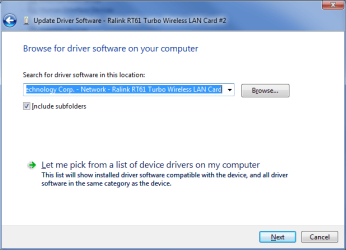
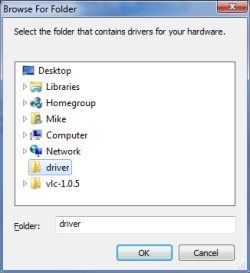
I'm doing screen shots from expanded files to finish.

1) Files expanded to D:\Mike\Desktop\driver....
Untitled.png

2) Getting ready to browse to D:\Mike\Desktop\driver...
Untitled1.png

3) It should go from here...
Untitled2.png
 

My Computer

Computer type
Laptop
Computer Manufacturer/Model Number
Apple
OS
El Capitan / Windows 10
CPU
i7-4980HQ
Memory
16GB
Graphics Card(s)
Iris 5200
moz-screenshot.png
moz-screenshot-1.png
Mike - I thank you for your time and for even going to the effort of screen shots to finish...but we're not there yet.
Please go back to the very beginning of my query. This driver version (3.0.9.1) does NOT work for all the reasons I painstakingly went through previously.

To reiterate, once this driver version is loaded, the network card is locked, I cannot connect to my WAN on either machine and I get "Windows was unable to connect to xx WAN" and am invited to trouble the problem when trying to manually connect and am then pointed to this forum for help when troubleshooting fails...

Please man - I have been at this for a year now. It is completely ridiculous that I cannot set up a network between these 2 versions of Windows' software. After I went through the agony and frustration of Vista, I expected a little more ease of use from 7.

I am trying to run a business and my video edits and renders are constantly interrupted and work lost because I have to force a reboot 3 or 4 times a day when the machine freezes. Please don't make me seriously think about crossing over to the dark side like all of the other editors whose only justification for paying premium for Apple for editing is that it is "stable". Not such a small thing to me any more...

This is a WIndows7 and Ralink driver issue and I cannot access any help with Ralink. Are you able to help me?

Thanks
Sean
 

My Computer

OS
windows 7 and vista
moz-screenshot.png
moz-screenshot-1.png
Mike - I thank you for your time and for even going to the effort of screen shots to finish...but we're not there yet.
Please go back to the very beginning of my query. This driver version (3.0.9.1) does NOT work for all the reasons I painstakingly went through previously.

To reiterate, once this driver version is loaded, the network card is locked, I cannot connect to my WAN on either machine and I get "Windows was unable to connect to xx WAN" and am invited to trouble the problem when trying to manually connect and am then pointed to this forum for help when troubleshooting fails...

Please man - I have been at this for a year now. It is completely ridiculous that I cannot set up a network between these 2 versions of Windows' software. After I went through the agony and frustration of Vista, I expected a little more ease of use from 7.

I am trying to run a business and my video edits and renders are constantly interrupted and work lost because I have to force a reboot 3 or 4 times a day when the machine freezes. Please don't make me seriously think about crossing over to the dark side like all of the other editors whose only justification for paying premium for Apple for editing is that it is "stable". Not such a small thing to me any more...

This is a WIndows7 and Ralink driver issue and I cannot access any help with Ralink. Are you able to help me?

Thanks
Sean

Lots of post being worked on -- lost track of the original problem. I think I can help as I have the same card and network it fine. I'll need to reconfigure it and work it out tomorrow morning....
 

My Computer

Computer type
Laptop
Computer Manufacturer/Model Number
Apple
OS
El Capitan / Windows 10
CPU
i7-4980HQ
Memory
16GB
Graphics Card(s)
Iris 5200
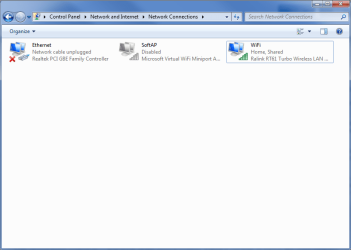
Here's what my Network Connections window looks like. Do you have more connections?
Untitled.png
 

My Computer

Computer type
Laptop
Computer Manufacturer/Model Number
Apple
OS
El Capitan / Windows 10
CPU
i7-4980HQ
Memory
16GB
Graphics Card(s)
Iris 5200
moz-screenshot-2.png
I do have more. I have four icons in total...
I'm not sure if my picture uploaded - apart from the LAN & WMC that you have I have a "Neoconnect" (my modem's default software name - which is not used = "disconnected") and "SummerTime" (the name of my internet connection)
 

Attachments

  • Network screenshot.png
    Network screenshot.png
    7.5 KB · Views: 64

My Computer

OS
windows 7 and vista
moz-screenshot-2.png
I do have more. I have four icons in total...
I'm not sure if my picture uploaded - apart from the LAN & WMC that you have I have a "Neoconnect" (my modem's default software name - which is not used = "disconnected") and "SummerTime" (the name of my internet connection)

So you share the RT61 and select SummerTime here as the WAN. You know that the RT61 gets a brand new STATIC IP address -- it has to since it's serving DHCP to the rest of the LAN. Please see this for more info: Using ICS (Internet Connection Sharing)

Notably: "Do not use ICS on a network with domain controllers, DNS servers, gateways, or DHCP servers. And don't use ICS on systems configured for static IP addresses."
 

My Computer

Computer type
Laptop
Computer Manufacturer/Model Number
Apple
OS
El Capitan / Windows 10
CPU
i7-4980HQ
Memory
16GB
Graphics Card(s)
Iris 5200
Thank you very much baarod, you driver works fine ! Since I found this topic, I don't have BSOD anymore !

Could you tell me where you got theese drivers ? There is no stable driver on Ralink's and Hercules's Website =/
 

My Computer

OS
Windows 7
Look up in the thread for the hardware IDs:

Code:
PCI\VEN_1814&DEV_0301&SUBSYS_25611814&REV_00
PCI\VEN_1814&DEV_0301&SUBSYS_25611814
PCI\VEN_1814&DEV_0301&CC_028000
PCI\VEN_1814&DEV_0301&CC_0280
Use Internet Explorer 6 or later (it has to be IE because the site your are going to uses ActiveX controls) and navigate to Microsoft Update Catalog

Copy each line into the search box one at a time until you get results. In this case this ID worked for me:

Code:
PCI\VEN_1814&DEV_0301&SUBSYS_25611814

Then choose the latest driver for your OS.
 

My Computer

Computer type
Laptop
Computer Manufacturer/Model Number
Apple
OS
El Capitan / Windows 10
CPU
i7-4980HQ
Memory
16GB
Graphics Card(s)
Iris 5200
I didn't expect a response so quickly :cool:
It doesn't work for my all hardware, but it's a very good thing to know !

(By the way, I send you a friend request because I searched how to send you this question, but I don't find, my apologizes for that, and for my english =D )
 

My Computer

OS
Windows 7
Back
Top