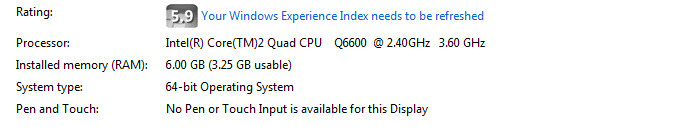
RAM 3.25GB usable of 6GB after overclocking Q6600 to 3.60GHz

kiwimalayalee

New member
Local time
1:54 AM
Messages
11
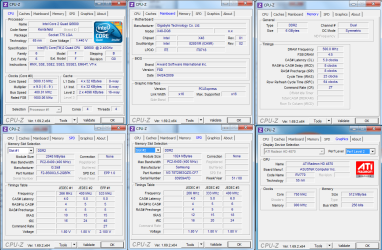
hi guys, i kinda only get to use 3.25GB out of the installed 6GB of ram after overclocking my CPU to 3.60(400x9) from 2.40GHZ(266x9). what causes this? i overclocked it on a gigabyte GA-X48-DQ6 using the bios.

i have G.Skill 2 x 2GB PC2-6400 (400 MHz) F2-8500CL5-2GBPK in ram slots 1 and 3
Samsung 2 x 1GB PC2-6400 (400 MHz) M3 78T2863QZS-CF7 in slots 2 and 4

but when i am on 3.00GHz (333x9) i get to use the whole of 6GB.
 

Attachments
  • CPUZ.png
    CPUZ.png
    75.9 KB · Views: 9

My Computer My Computer

At a glance

Windows 7 Professional x64Intel Core 2 Quad CPU [email protected] [email protected]...6Gb (3.25Gb usable)ATI Radeon HD 4870
Computer type
PC/Desktop
Computer Manufacturer/Model Number
Custom Build
OS
Windows 7 Professional x64
CPU
Intel Core 2 Quad CPU [email protected] [email protected] 9.0x400MHz
Motherboard
Gigabyte GA-X48-DQ6
Memory
6Gb (3.25Gb usable)
Graphics Card(s)
ATI Radeon HD 4870
Post a screen shot of the memory tab of Resource Monitor at 333 and again at 400.
 

My Computer My Computer

At a glance

Windows 7 Home Premium SP1, 64-bitIntel Skylake i5-6600K, not overclocked8 GB HyperX DDR4-2666 (2 x 4 GB)none; graphics are integrated on CPU
Computer type
PC/Desktop
Computer Manufacturer/Model Number
Ignatz Special; 4 speed manual gearbox; factory air conditioning; one of one
OS
Windows 7 Home Premium SP1, 64-bit
CPU
Intel Skylake i5-6600K, not overclocked
Motherboard
AsRock Z170M Extreme 4, micro ATX
Memory
8 GB HyperX DDR4-2666 (2 x 4 GB)
Graphics Card(s)
none; graphics are integrated on CPU
Sound Card
onboard: Realtek ALC1150; external: USB Behringer UF0-202
Monitor(s) Displays
Dell S2340M 23 inch IPS
Screen Resolution
1600 x 900
Hard Drives
System: Crucial MX100 series SSD, 128 GB;
Data: Samsung Spinpoint 103SJ, 1 TB;
Backup: WD Caviar Green WD30EZRX-00D8PB0, 3 TB
PSU
Rosewill SilentNight 500 watt fanless, semi-modular
Case
Antec Solo II
Cooling
Noctua NH-U12S; Noctua F12 intake, Noctua S12A exhaust
Keyboard
Microsoft 200 6JH-00001 USB
Mouse
Dell or Microsoft optical wired; USB
Antivirus
Microsoft Security Essentials and Malwarebytes Premium
Browser
Pale Moon
Other Info
All fans PWM; speeds at idle: CPU circa 500 rpm; intake circa 600 rpm; exhaust circa 600 rpm; CPU temps 27 idle and 47 C load in a warm room (27 C/81 F) when running Intel Extreme Tuning Utility stress test.
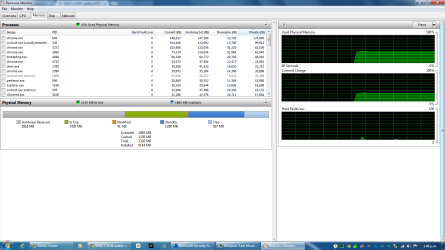
here u go, thanks for looking into this....
 

Attachments

  • Resource Monitor.png
    Resource Monitor.png
    54.6 KB · Views: 8

My Computer My Computer

At a glance

Windows 7 Professional x64Intel Core 2 Quad CPU [email protected] [email protected]...6Gb (3.25Gb usable)ATI Radeon HD 4870
Computer type
PC/Desktop
Computer Manufacturer/Model Number
Custom Build
OS
Windows 7 Professional x64
CPU
Intel Core 2 Quad CPU [email protected] [email protected] 9.0x400MHz
Motherboard
Gigabyte GA-X48-DQ6
Memory
6Gb (3.25Gb usable)
Graphics Card(s)
ATI Radeon HD 4870
You say "but when i am on 3.00GHz (333x9) i get to use the whole of 6GB".

As measured by what?

Is that pic of Resource Monitor when clocked at 9 x 333 or 9 x 400?
 

My Computer My Computer

At a glance

Windows 7 Home Premium SP1, 64-bitIntel Skylake i5-6600K, not overclocked8 GB HyperX DDR4-2666 (2 x 4 GB)none; graphics are integrated on CPU
Computer type
PC/Desktop
Computer Manufacturer/Model Number
Ignatz Special; 4 speed manual gearbox; factory air conditioning; one of one
OS
Windows 7 Home Premium SP1, 64-bit
CPU
Intel Skylake i5-6600K, not overclocked
Motherboard
AsRock Z170M Extreme 4, micro ATX
Memory
8 GB HyperX DDR4-2666 (2 x 4 GB)
Graphics Card(s)
none; graphics are integrated on CPU
Sound Card
onboard: Realtek ALC1150; external: USB Behringer UF0-202
Monitor(s) Displays
Dell S2340M 23 inch IPS
Screen Resolution
1600 x 900
Hard Drives
System: Crucial MX100 series SSD, 128 GB;
Data: Samsung Spinpoint 103SJ, 1 TB;
Backup: WD Caviar Green WD30EZRX-00D8PB0, 3 TB
PSU
Rosewill SilentNight 500 watt fanless, semi-modular
Case
Antec Solo II
Cooling
Noctua NH-U12S; Noctua F12 intake, Noctua S12A exhaust
Keyboard
Microsoft 200 6JH-00001 USB
Mouse
Dell or Microsoft optical wired; USB
Antivirus
Microsoft Security Essentials and Malwarebytes Premium
Browser
Pale Moon
Other Info
All fans PWM; speeds at idle: CPU circa 500 rpm; intake circa 600 rpm; exhaust circa 600 rpm; CPU temps 27 idle and 47 C load in a warm room (27 C/81 F) when running Intel Extreme Tuning Utility stress test.
the pic is of what i am currently running on i.e 3.60GHz @ 9 x 400 and only have 3.25 usable ram out of the 6GB installed....
i want to know why the rest has been disabled after being overclocked....
 

My Computer My Computer

At a glance

Windows 7 Professional x64Intel Core 2 Quad CPU [email protected] [email protected]...6Gb (3.25Gb usable)ATI Radeon HD 4870
Computer type
PC/Desktop
Computer Manufacturer/Model Number
Custom Build
OS
Windows 7 Professional x64
CPU
Intel Core 2 Quad CPU [email protected] [email protected] 9.0x400MHz
Motherboard
Gigabyte GA-X48-DQ6
Memory
6Gb (3.25Gb usable)
Graphics Card(s)
ATI Radeon HD 4870
the pic is of what i am currently running on i.e 3.60GHz @ 9 x 400 and only have 3.25 usable ram out of the 6GB installed....
i want to know why the rest has been disabled after being overclocked....

What makes you think you it's not disabled when clocked at 3.33?

To repeat: show us a pic of Resource Monitor memory tab when clocked at 3.33.
 

My Computer My Computer

At a glance

Windows 7 Home Premium SP1, 64-bitIntel Skylake i5-6600K, not overclocked8 GB HyperX DDR4-2666 (2 x 4 GB)none; graphics are integrated on CPU
Computer type
PC/Desktop
Computer Manufacturer/Model Number
Ignatz Special; 4 speed manual gearbox; factory air conditioning; one of one
OS
Windows 7 Home Premium SP1, 64-bit
CPU
Intel Skylake i5-6600K, not overclocked
Motherboard
AsRock Z170M Extreme 4, micro ATX
Memory
8 GB HyperX DDR4-2666 (2 x 4 GB)
Graphics Card(s)
none; graphics are integrated on CPU
Sound Card
onboard: Realtek ALC1150; external: USB Behringer UF0-202
Monitor(s) Displays
Dell S2340M 23 inch IPS
Screen Resolution
1600 x 900
Hard Drives
System: Crucial MX100 series SSD, 128 GB;
Data: Samsung Spinpoint 103SJ, 1 TB;
Backup: WD Caviar Green WD30EZRX-00D8PB0, 3 TB
PSU
Rosewill SilentNight 500 watt fanless, semi-modular
Case
Antec Solo II
Cooling
Noctua NH-U12S; Noctua F12 intake, Noctua S12A exhaust
Keyboard
Microsoft 200 6JH-00001 USB
Mouse
Dell or Microsoft optical wired; USB
Antivirus
Microsoft Security Essentials and Malwarebytes Premium
Browser
Pale Moon
Other Info
All fans PWM; speeds at idle: CPU circa 500 rpm; intake circa 600 rpm; exhaust circa 600 rpm; CPU temps 27 idle and 47 C load in a warm room (27 C/81 F) when running Intel Extreme Tuning Utility stress test.
i ll be back.... on 3.00GHZ.. gimme a min
 

My Computer My Computer

At a glance

Windows 7 Professional x64Intel Core 2 Quad CPU [email protected] [email protected]...6Gb (3.25Gb usable)ATI Radeon HD 4870
Computer type
PC/Desktop
Computer Manufacturer/Model Number
Custom Build
OS
Windows 7 Professional x64
CPU
Intel Core 2 Quad CPU [email protected] [email protected] 9.0x400MHz
Motherboard
Gigabyte GA-X48-DQ6
Memory
6Gb (3.25Gb usable)
Graphics Card(s)
ATI Radeon HD 4870
Ya, OCing a cpu should not change that at all.

Show us a shot of your computer properties page showing this.
 
Last edited:

My Computer My Computer

At a glance

Windows 10 Pro x64Intel Core i7 6700KGSkill TridentZ RGB 16GB 3600 16-16-16-36EVGA GTX 980 Ti SC x2
Computer type
PC/Desktop
Computer Manufacturer/Model Number
Skylake Special #666
OS
Windows 10 Pro x64
CPU
Intel Core i7 6700K
Motherboard
Asus Sabertooth Z170 Mark 1
Memory
GSkill TridentZ RGB 16GB 3600 16-16-16-36
Graphics Card(s)
EVGA GTX 980 Ti SC x2
Sound Card
Realtek High Definition
Monitor(s) Displays
AOC G2460PG
Screen Resolution
1920 x 1080 144Hz
Hard Drives
Samsung 860 Pro 256GB, Seagate Barracuda 4TB x2
PSU
EVGA 1000 P2, EVGA White Custom Braided Cables
Case
Corsair Vengeance C70 Gunmetal Black
Cooling
Corsair H100i v2, Corsair ML120 x2, Thermal Grizzly Kryonaut
Keyboard
Logitech G910 Orion Spectrum
Mouse
Logitech G700s
Internet Speed
Verizon Fios Quantum Gateway 75/75
Antivirus
Windows Defender, Malwarebytes Free 3.8.3
Browser
Chrome
Other Info
Corsair SP120 x4, LG Blu-ray Drive, Durabrand HT-395 100 Watt Dolby Digital Amp, Corsair H2100 Wireless 7.1 Headset
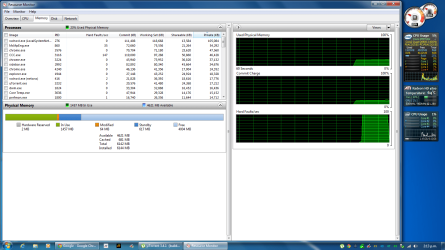
u can see the current settings on the right side gadgets...
 

Attachments

  • Resource Monitor.png
    Resource Monitor.png
    96.4 KB · Views: 9

My Computer My Computer

At a glance

Windows 7 Professional x64Intel Core 2 Quad CPU [email protected] [email protected]...6Gb (3.25Gb usable)ATI Radeon HD 4870
Computer type
PC/Desktop
Computer Manufacturer/Model Number
Custom Build
OS
Windows 7 Professional x64
CPU
Intel Core 2 Quad CPU [email protected] [email protected] 9.0x400MHz
Motherboard
Gigabyte GA-X48-DQ6
Memory
6Gb (3.25Gb usable)
Graphics Card(s)
ATI Radeon HD 4870
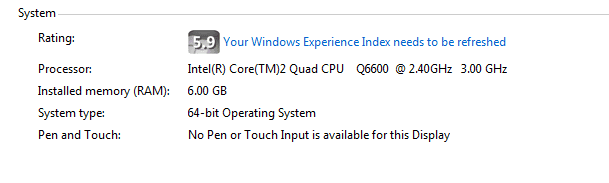
this is the system properties for 3.0GHz
 

Attachments

  • system.png
    system.png
    4.5 KB · Views: 24

My Computer My Computer

At a glance

Windows 7 Professional x64Intel Core 2 Quad CPU [email protected] [email protected]...6Gb (3.25Gb usable)ATI Radeon HD 4870
Computer type
PC/Desktop
Computer Manufacturer/Model Number
Custom Build
OS
Windows 7 Professional x64
CPU
Intel Core 2 Quad CPU [email protected] [email protected] 9.0x400MHz
Motherboard
Gigabyte GA-X48-DQ6
Memory
6Gb (3.25Gb usable)
Graphics Card(s)
ATI Radeon HD 4870
OK, so now show a shot of it saying only 3.25 of it is usable.

And refresh your WEI.

That`s interesting how it shows your OC there, don`t think I`ve ever seen mine change like that with an OC.

Does anyone else with an OC show a different GHz reading then their stock cpu GHz reading ?

I`ve noticed it be lower before, when there was a setting in the bios not right, but higher ? Experiment time :)
 
Last edited:

My Computer My Computer

At a glance

Windows 10 Pro x64Intel Core i7 6700KGSkill TridentZ RGB 16GB 3600 16-16-16-36EVGA GTX 980 Ti SC x2
Computer type
PC/Desktop
Computer Manufacturer/Model Number
Skylake Special #666
OS
Windows 10 Pro x64
CPU
Intel Core i7 6700K
Motherboard
Asus Sabertooth Z170 Mark 1
Memory
GSkill TridentZ RGB 16GB 3600 16-16-16-36
Graphics Card(s)
EVGA GTX 980 Ti SC x2
Sound Card
Realtek High Definition
Monitor(s) Displays
AOC G2460PG
Screen Resolution
1920 x 1080 144Hz
Hard Drives
Samsung 860 Pro 256GB, Seagate Barracuda 4TB x2
PSU
EVGA 1000 P2, EVGA White Custom Braided Cables
Case
Corsair Vengeance C70 Gunmetal Black
Cooling
Corsair H100i v2, Corsair ML120 x2, Thermal Grizzly Kryonaut
Keyboard
Logitech G910 Orion Spectrum
Mouse
Logitech G700s
Internet Speed
Verizon Fios Quantum Gateway 75/75
Antivirus
Windows Defender, Malwarebytes Free 3.8.3
Browser
Chrome
Other Info
Corsair SP120 x4, LG Blu-ray Drive, Durabrand HT-395 100 Watt Dolby Digital Amp, Corsair H2100 Wireless 7.1 Headset
The second pic shows 4621 available.

How much of that can you actually use and force into the "in use" category by loading up a bunch of apps or web pages?

See what you can force.

There was a similar case a few weeks ago, but I can't recall the exact explanation. I don't think it concerned over-clocking.
 

My Computer My Computer

At a glance

Windows 7 Home Premium SP1, 64-bitIntel Skylake i5-6600K, not overclocked8 GB HyperX DDR4-2666 (2 x 4 GB)none; graphics are integrated on CPU
Computer type
PC/Desktop
Computer Manufacturer/Model Number
Ignatz Special; 4 speed manual gearbox; factory air conditioning; one of one
OS
Windows 7 Home Premium SP1, 64-bit
CPU
Intel Skylake i5-6600K, not overclocked
Motherboard
AsRock Z170M Extreme 4, micro ATX
Memory
8 GB HyperX DDR4-2666 (2 x 4 GB)
Graphics Card(s)
none; graphics are integrated on CPU
Sound Card
onboard: Realtek ALC1150; external: USB Behringer UF0-202
Monitor(s) Displays
Dell S2340M 23 inch IPS
Screen Resolution
1600 x 900
Hard Drives
System: Crucial MX100 series SSD, 128 GB;
Data: Samsung Spinpoint 103SJ, 1 TB;
Backup: WD Caviar Green WD30EZRX-00D8PB0, 3 TB
PSU
Rosewill SilentNight 500 watt fanless, semi-modular
Case
Antec Solo II
Cooling
Noctua NH-U12S; Noctua F12 intake, Noctua S12A exhaust
Keyboard
Microsoft 200 6JH-00001 USB
Mouse
Dell or Microsoft optical wired; USB
Antivirus
Microsoft Security Essentials and Malwarebytes Premium
Browser
Pale Moon
Other Info
All fans PWM; speeds at idle: CPU circa 500 rpm; intake circa 600 rpm; exhaust circa 600 rpm; CPU temps 27 idle and 47 C load in a warm room (27 C/81 F) when running Intel Extreme Tuning Utility stress test.
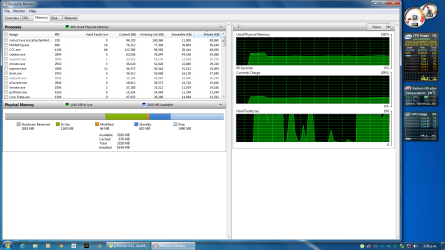
this is what i have on 3.60GHz now....
i have no idea whats causing this either.... :(
 

Attachments

  • Resource Monitor.png
    Resource Monitor.png
    95.8 KB · Views: 4
  • system.png
    system.png
    4.5 KB · Views: 19

My Computer My Computer

At a glance

Windows 7 Professional x64Intel Core 2 Quad CPU [email protected] [email protected]...6Gb (3.25Gb usable)ATI Radeon HD 4870
Computer type
PC/Desktop
Computer Manufacturer/Model Number
Custom Build
OS
Windows 7 Professional x64
CPU
Intel Core 2 Quad CPU [email protected] [email protected] 9.0x400MHz
Motherboard
Gigabyte GA-X48-DQ6
Memory
6Gb (3.25Gb usable)
Graphics Card(s)
ATI Radeon HD 4870
That is strange, but there has to be a reason. :huh:

There is a big difference in the hardware reserved reading, wow :shock:

And that`s what is causing it, whatever it is.

Maybe look for some option in the bios.
 

My Computer My Computer

At a glance

Windows 10 Pro x64Intel Core i7 6700KGSkill TridentZ RGB 16GB 3600 16-16-16-36EVGA GTX 980 Ti SC x2
Computer type
PC/Desktop
Computer Manufacturer/Model Number
Skylake Special #666
OS
Windows 10 Pro x64
CPU
Intel Core i7 6700K
Motherboard
Asus Sabertooth Z170 Mark 1
Memory
GSkill TridentZ RGB 16GB 3600 16-16-16-36
Graphics Card(s)
EVGA GTX 980 Ti SC x2
Sound Card
Realtek High Definition
Monitor(s) Displays
AOC G2460PG
Screen Resolution
1920 x 1080 144Hz
Hard Drives
Samsung 860 Pro 256GB, Seagate Barracuda 4TB x2
PSU
EVGA 1000 P2, EVGA White Custom Braided Cables
Case
Corsair Vengeance C70 Gunmetal Black
Cooling
Corsair H100i v2, Corsair ML120 x2, Thermal Grizzly Kryonaut
Keyboard
Logitech G910 Orion Spectrum
Mouse
Logitech G700s
Internet Speed
Verizon Fios Quantum Gateway 75/75
Antivirus
Windows Defender, Malwarebytes Free 3.8.3
Browser
Chrome
Other Info
Corsair SP120 x4, LG Blu-ray Drive, Durabrand HT-395 100 Watt Dolby Digital Amp, Corsair H2100 Wireless 7.1 Headset
cant find anything in the bios that i think has settings to get full ram usage after overclocking....
i just changed settings to 3.50GHz and still loss of ram....
 

My Computer My Computer

At a glance

Windows 7 Professional x64Intel Core 2 Quad CPU [email protected] [email protected]...6Gb (3.25Gb usable)ATI Radeon HD 4870
Computer type
PC/Desktop
Computer Manufacturer/Model Number
Custom Build
OS
Windows 7 Professional x64
CPU
Intel Core 2 Quad CPU [email protected] [email protected] 9.0x400MHz
Motherboard
Gigabyte GA-X48-DQ6
Memory
6Gb (3.25Gb usable)
Graphics Card(s)
ATI Radeon HD 4870
What matters is how much you can use of your 6 GB.

How much can you actually use and does that vary depending on your overclock?
 

My Computer My Computer

At a glance

Windows 7 Home Premium SP1, 64-bitIntel Skylake i5-6600K, not overclocked8 GB HyperX DDR4-2666 (2 x 4 GB)none; graphics are integrated on CPU
Computer type
PC/Desktop
Computer Manufacturer/Model Number
Ignatz Special; 4 speed manual gearbox; factory air conditioning; one of one
OS
Windows 7 Home Premium SP1, 64-bit
CPU
Intel Skylake i5-6600K, not overclocked
Motherboard
AsRock Z170M Extreme 4, micro ATX
Memory
8 GB HyperX DDR4-2666 (2 x 4 GB)
Graphics Card(s)
none; graphics are integrated on CPU
Sound Card
onboard: Realtek ALC1150; external: USB Behringer UF0-202
Monitor(s) Displays
Dell S2340M 23 inch IPS
Screen Resolution
1600 x 900
Hard Drives
System: Crucial MX100 series SSD, 128 GB;
Data: Samsung Spinpoint 103SJ, 1 TB;
Backup: WD Caviar Green WD30EZRX-00D8PB0, 3 TB
PSU
Rosewill SilentNight 500 watt fanless, semi-modular
Case
Antec Solo II
Cooling
Noctua NH-U12S; Noctua F12 intake, Noctua S12A exhaust
Keyboard
Microsoft 200 6JH-00001 USB
Mouse
Dell or Microsoft optical wired; USB
Antivirus
Microsoft Security Essentials and Malwarebytes Premium
Browser
Pale Moon
Other Info
All fans PWM; speeds at idle: CPU circa 500 rpm; intake circa 600 rpm; exhaust circa 600 rpm; CPU temps 27 idle and 47 C load in a warm room (27 C/81 F) when running Intel Extreme Tuning Utility stress test.
Well am still only able to use 3.25 GB...
 

My Computer My Computer

At a glance

Windows 7 Professional x64Intel Core 2 Quad CPU [email protected] [email protected]...6Gb (3.25Gb usable)ATI Radeon HD 4870
Computer type
PC/Desktop
Computer Manufacturer/Model Number
Custom Build
OS
Windows 7 Professional x64
CPU
Intel Core 2 Quad CPU [email protected] [email protected] 9.0x400MHz
Motherboard
Gigabyte GA-X48-DQ6
Memory
6Gb (3.25Gb usable)
Graphics Card(s)
ATI Radeon HD 4870
Well am still only able to use 3.25 GB...

3.25 regardless of clock.

For one clock you show a high hardware reserved and are limited to 3.25. For the other clock, you show a lower hardware reserved, but still can't use more than 3 plus GB even though Resource Monitor shows more than that available.

That's similar to that case from a couple of weeks back. Somebody had high hardware reserved that could not be explained, but I don't think overclocking was involved. Your case may have a different explanation--I don't know.

Does moving those RAM sticks around affect anything?
 

My Computer My Computer

At a glance

Windows 7 Home Premium SP1, 64-bitIntel Skylake i5-6600K, not overclocked8 GB HyperX DDR4-2666 (2 x 4 GB)none; graphics are integrated on CPU
Computer type
PC/Desktop
Computer Manufacturer/Model Number
Ignatz Special; 4 speed manual gearbox; factory air conditioning; one of one
OS
Windows 7 Home Premium SP1, 64-bit
CPU
Intel Skylake i5-6600K, not overclocked
Motherboard
AsRock Z170M Extreme 4, micro ATX
Memory
8 GB HyperX DDR4-2666 (2 x 4 GB)
Graphics Card(s)
none; graphics are integrated on CPU
Sound Card
onboard: Realtek ALC1150; external: USB Behringer UF0-202
Monitor(s) Displays
Dell S2340M 23 inch IPS
Screen Resolution
1600 x 900
Hard Drives
System: Crucial MX100 series SSD, 128 GB;
Data: Samsung Spinpoint 103SJ, 1 TB;
Backup: WD Caviar Green WD30EZRX-00D8PB0, 3 TB
PSU
Rosewill SilentNight 500 watt fanless, semi-modular
Case
Antec Solo II
Cooling
Noctua NH-U12S; Noctua F12 intake, Noctua S12A exhaust
Keyboard
Microsoft 200 6JH-00001 USB
Mouse
Dell or Microsoft optical wired; USB
Antivirus
Microsoft Security Essentials and Malwarebytes Premium
Browser
Pale Moon
Other Info
All fans PWM; speeds at idle: CPU circa 500 rpm; intake circa 600 rpm; exhaust circa 600 rpm; CPU temps 27 idle and 47 C load in a warm room (27 C/81 F) when running Intel Extreme Tuning Utility stress test.
am able to use 6GB ram at 3.25GHz and checking by varying at what CPU Hotst Frequency i start looking ram.....
 

My Computer My Computer

At a glance

Windows 7 Professional x64Intel Core 2 Quad CPU [email protected] [email protected]...6Gb (3.25Gb usable)ATI Radeon HD 4870
Computer type
PC/Desktop
Computer Manufacturer/Model Number
Custom Build
OS
Windows 7 Professional x64
CPU
Intel Core 2 Quad CPU [email protected] [email protected] 9.0x400MHz
Motherboard
Gigabyte GA-X48-DQ6
Memory
6Gb (3.25Gb usable)
Graphics Card(s)
ATI Radeon HD 4870
It just seems strange how running an OC changes the hardware reserved reading so much.
 

My Computer My Computer

At a glance

Windows 10 Pro x64Intel Core i7 6700KGSkill TridentZ RGB 16GB 3600 16-16-16-36EVGA GTX 980 Ti SC x2
Computer type
PC/Desktop
Computer Manufacturer/Model Number
Skylake Special #666
OS
Windows 10 Pro x64
CPU
Intel Core i7 6700K
Motherboard
Asus Sabertooth Z170 Mark 1
Memory
GSkill TridentZ RGB 16GB 3600 16-16-16-36
Graphics Card(s)
EVGA GTX 980 Ti SC x2
Sound Card
Realtek High Definition
Monitor(s) Displays
AOC G2460PG
Screen Resolution
1920 x 1080 144Hz
Hard Drives
Samsung 860 Pro 256GB, Seagate Barracuda 4TB x2
PSU
EVGA 1000 P2, EVGA White Custom Braided Cables
Case
Corsair Vengeance C70 Gunmetal Black
Cooling
Corsair H100i v2, Corsair ML120 x2, Thermal Grizzly Kryonaut
Keyboard
Logitech G910 Orion Spectrum
Mouse
Logitech G700s
Internet Speed
Verizon Fios Quantum Gateway 75/75
Antivirus
Windows Defender, Malwarebytes Free 3.8.3
Browser
Chrome
Other Info
Corsair SP120 x4, LG Blu-ray Drive, Durabrand HT-395 100 Watt Dolby Digital Amp, Corsair H2100 Wireless 7.1 Headset
Back
Top