Solved RAM 40% When nothing is running

Bravl

New member
Local time
1:09 PM
Messages
8
My Laptop has only 2GB of RAM
My Laptop's running wierd lately , RAM just kept going high
I've searched all ways to decrease memory usage
some of them are :
- Cleaning Registry and Temporary files using CCleaner
- Disabling some startup programs
- Uninstalling Unecessary softwares

Now there's nothing running on my taskbar except for Intel Graphics Driver
And Yet , when I gone to the task manager it puts me up with a 800 MB , thats 40% memory usage , turning into 75% opening Chrome
Is this the way it was supposed to be?
There are a suspicious Process running on the task manager , the ones in the name of csrss.exe with no description , and the Internet believes that this can potentially be a Trojan

Please Help , Any solutions would be awesome
 

My Computer

Computer type
Laptop
Computer Manufacturer/Model Number
Asus / Aspire 4750
OS
Windows 7 Ultimate 32bit
CPU
Intel Core i3-2310
Motherboard
-
Memory
2GB DDR3
Graphics Card(s)
Intel HD 3000
Hard Drives
500 GB
Antivirus
MalwareBytes
Browser
Google Chrome

My Computer

Computer type
PC/Desktop
Computer Manufacturer/Model Number
Dell Vostro 400/Dell XPS 8700(Slightly Customized for me by Dell)/Toshiba Satellite T135
OS
Windows 7 Professional 32-bit/Windows 8 64-bit/Win7 Pro64-bit
CPU
Intel Core 2 Quad Q6600/Intel Core i7 4790/Intel Pentium
Memory
2GB/16GB/4GB
Graphics Card(s)
Intel G33/G31 Express(Vostro)/NVIDIA GeForce GTX 745(XPS)
Monitor(s) Displays
HP 2009m(Vostro)/ViewSonic VX2250wm-LED(XPS)
Screen Resolution
1600x900(Vostro)/1920x1080(XPS)
Hard Drives
Seagate ST3160815AS(Vostro)/Western Digital Blue(Satellite)
External:
Western Digital My Passport 0748
Samsung HM121HC
Keyboard
Dell L100)(Vostro)/Dell KB2133p(XPS)
Mouse
Dell M-UAV-DEL8(XPS)
Internet Speed
100 Mbit/s(Only when IPTV is plugged out)
Antivirus
Avast, Malwarebytes PRO
Browser
Internet Explorer 11
Other Info
Note: Names with slashes between two different parts mean that the left is my old desktop and the right is my old laptop and the middle is my new desktop.(Unless specified)
Ping is horrible for servers overseas in US and Europe.
New laptop:LG Gram(Not available in US) Processor:Intel Core i3 4th Gen Ultra Low Power RAM:4GB Hard Drive:SK Hynix OEM MSATA or M.2 Graphics:Intel HD

My Computer

Computer type
Laptop
Computer Manufacturer/Model Number
HP Elitebook 8540p
OS
Windows 7 Pro 32
CPU
Intel(R) Core(TM) i5 CPU M 540 @ 2.53GHz
Motherboard
Hewlett-Packard 1521
Memory
4,00 GB (Usable 2,98)
Graphics Card(s)
NVIDIA NVS 5100M
Sound Card
NVIDIA High Definition Audio
Screen Resolution
1600x900
Hard Drives
INTEL SSDSA2CW120G3
Antivirus
F-Secure Internet Security
Browser
IE, Firefox, Opera
Other Info
Sandboxie,
SRP (Software Restriction Policy),
EMET (Enhanced Mitigation Experience Toolkit),
WFC (Windows Firewall Control by BiniSoft),
Malwarebytes Premium
Open Task manager --> Processes tab and check the list of processes running in the background.
Some process is eating up your RAM.

-Which Antivirus are you using?
 

My Computer

Computer type
PC/Desktop
Computer Manufacturer/Model Number
Custom Build
OS
Windows 8.1
CPU
Intel - Core i7 4.2GHz
Motherboard
Intel
Memory
8 GB
Graphics Card(s)
Nvidea GeForce 7800GT 2GB
Screen Resolution
1980 X 1280
Hard Drives
1 TB Toshiba
500 GB SATA
Internet Speed
Download - 30 Mbps, Upload - 10 Mbps
Antivirus
BitDefender Internet Security
Browser
Mozilla Firefox,Google Chrome,Internet Explorer
With only 2GB of RAM, 40% usage is normal.
 

My Computer

Computer Manufacturer/Model Number
HP, Dell, Gateway, Toshiba - 4 laptops and 2 desktops
OS
Vista, Windows7, Mint Mate, Zorin, Windows 8
CPU
from 1.6GHz Duo to i7
Monitor(s) Displays
2x HP w2207
Hard Drives
5x HDD, 7x SSD, 12x Externals
Keyboard
with trackball - no mices
Mouse
Trackball mice
Internet Speed
DSL 6000
This is the Protection Log :

Malwarebytes Anti-Malware
Malwarebytes | Free Anti-Malware & Internet Security Software


Detection, 10/4/2014 12:01:24 AM, SYSTEM, USER-PC, Protection, Malicious Website Protection, IP, 41.35.71.224, 37769, Inbound, C:\Users\user\AppData\Roaming\uTorrent\uTorrent.exe,
Detection, 10/4/2014 12:31:54 AM, SYSTEM, USER-PC, Protection, Malicious Website Protection, IP, 41.35.71.224, 37769, Inbound, C:\Users\user\AppData\Roaming\uTorrent\uTorrent.exe,
Detection, 10/4/2014 12:31:57 AM, SYSTEM, USER-PC, Protection, Malicious Website Protection, IP, 41.35.71.224, 37769, Inbound, C:\Users\user\AppData\Roaming\uTorrent\uTorrent.exe,
Detection, 10/4/2014 12:35:52 AM, SYSTEM, USER-PC, Protection, Malicious Website Protection, IP, 41.35.71.224, 37769, Inbound, C:\Users\user\AppData\Roaming\uTorrent\uTorrent.exe,
Detection, 10/4/2014 12:40:30 AM, SYSTEM, USER-PC, Protection, Malicious Website Protection, IP, 41.35.71.224, 37769, Inbound, C:\Users\user\AppData\Roaming\uTorrent\uTorrent.exe,
Detection, 10/4/2014 12:45:21 AM, SYSTEM, USER-PC, Protection, Malicious Website Protection, IP, 41.35.71.224, 37769, Inbound, C:\Users\user\AppData\Roaming\uTorrent\uTorrent.exe,
Detection, 10/4/2014 12:54:58 AM, SYSTEM, USER-PC, Protection, Malicious Website Protection, IP, 41.35.71.224, 37769, Inbound, C:\Users\user\AppData\Roaming\uTorrent\uTorrent.exe,
Detection, 10/4/2014 12:55:13 AM, SYSTEM, USER-PC, Protection, Malicious Website Protection, IP, 41.35.71.224, 37769, Inbound, C:\Users\user\AppData\Roaming\uTorrent\uTorrent.exe,
Detection, 10/4/2014 1:30:03 AM, SYSTEM, USER-PC, Protection, Malicious Website Protection, IP, 41.35.71.224, 37769, Inbound, C:\Users\user\AppData\Roaming\uTorrent\uTorrent.exe,
Detection, 10/4/2014 1:54:24 AM, SYSTEM, USER-PC, Protection, Malicious Website Protection, IP, 195.88.144.234, 37769, Inbound, C:\Users\user\AppData\Roaming\uTorrent\uTorrent.exe,
Detection, 10/4/2014 1:54:25 AM, SYSTEM, USER-PC, Protection, Malicious Website Protection, IP, 195.88.144.234, 37769, Inbound, C:\Users\user\AppData\Roaming\uTorrent\uTorrent.exe,
Detection, 10/4/2014 2:39:23 AM, SYSTEM, USER-PC, Protection, Malicious Website Protection, IP, 41.35.83.36, 37769, Inbound, C:\Users\user\AppData\Roaming\uTorrent\uTorrent.exe,
Detection, 10/4/2014 6:04:18 AM, SYSTEM, USER-PC, Protection, Malicious Website Protection, IP, 91.212.124.13, 37769, Outbound, C:\Users\user\AppData\Roaming\uTorrent\uTorrent.exe,
Detection, 10/4/2014 6:04:19 AM, SYSTEM, USER-PC, Protection, Malicious Website Protection, IP, 91.212.124.13, 37769, Outbound, C:\Users\user\AppData\Roaming\uTorrent\uTorrent.exe,
Detection, 10/4/2014 6:04:53 AM, SYSTEM, USER-PC, Protection, Malicious Website Protection, IP, 219.151.159.192, 37769, Outbound, C:\Users\user\AppData\Roaming\uTorrent\uTorrent.exe,
Detection, 10/4/2014 6:18:31 AM, SYSTEM, USER-PC, Protection, Malicious Website Protection, IP, 41.35.101.198, 37769, Outbound, C:\Users\user\AppData\Roaming\uTorrent\uTorrent.exe,
Detection, 10/4/2014 6:18:40 AM, SYSTEM, USER-PC, Protection, Malicious Website Protection, IP, 93.170.51.119, 37769, Outbound, C:\Users\user\AppData\Roaming\uTorrent\uTorrent.exe,
Detection, 10/4/2014 6:28:08 AM, SYSTEM, USER-PC, Protection, Malicious Website Protection, IP, 31.192.57.136, 37769, Outbound, C:\Users\user\AppData\Roaming\uTorrent\uTorrent.exe,
Detection, 10/4/2014 6:28:44 AM, SYSTEM, USER-PC, Protection, Malicious Website Protection, IP, 41.35.55.180, 37769, Outbound, C:\Users\user\AppData\Roaming\uTorrent\uTorrent.exe,
Detection, 10/4/2014 6:43:17 AM, SYSTEM, USER-PC, Protection, Malicious Website Protection, IP, 98.142.247.45, 37769, Outbound, C:\Users\user\AppData\Roaming\uTorrent\uTorrent.exe,
Detection, 10/4/2014 6:50:41 AM, SYSTEM, USER-PC, Protection, Malicious Website Protection, IP, 188.130.176.92, 37769, Outbound, C:\Users\user\AppData\Roaming\uTorrent\uTorrent.exe,
Detection, 10/4/2014 9:32:47 AM, SYSTEM, USER-PC, Protection, Malicious Website Protection, IP, 194.165.0.3, 37769, Inbound, C:\Users\user\AppData\Roaming\uTorrent\uTorrent.exe,
Detection, 10/4/2014 9:32:49 AM, SYSTEM, USER-PC, Protection, Malicious Website Protection, IP, 194.165.0.3, 37769, Inbound, C:\Users\user\AppData\Roaming\uTorrent\uTorrent.exe,
Detection, 10/4/2014 11:16:59 AM, SYSTEM, USER-PC, Protection, Malicious Website Protection, IP, 218.9.39.234, 37769, Outbound, C:\Users\user\AppData\Roaming\uTorrent\uTorrent.exe,
Detection, 10/4/2014 11:19:55 AM, SYSTEM, USER-PC, Protection, Malicious Website Protection, IP, 121.10.238.102, 37769, Outbound, C:\Users\user\AppData\Roaming\uTorrent\uTorrent.exe,
Detection, 10/4/2014 11:21:38 AM, SYSTEM, USER-PC, Protection, Malicious Website Protection, IP, 218.9.205.41, 37769, Outbound, C:\Users\user\AppData\Roaming\uTorrent\uTorrent.exe,
Update, 10/4/2014 12:05:41 PM, SYSTEM, USER-PC, Scheduler, Malware Database, 2014.10.2.2, 2014.10.4.4,
Protection, 10/4/2014 12:05:46 PM, SYSTEM, USER-PC, Protection, Refresh, Starting,
Protection, 10/4/2014 12:05:46 PM, SYSTEM, USER-PC, Protection, Malicious Website Protection, Stopping,
Protection, 10/4/2014 12:05:49 PM, SYSTEM, USER-PC, Protection, Malicious Website Protection, Stopped,
Protection, 10/4/2014 12:06:34 PM, SYSTEM, USER-PC, Protection, Refresh, Success,
Protection, 10/4/2014 12:06:34 PM, SYSTEM, USER-PC, Protection, Malicious Website Protection, Starting,
Protection, 10/4/2014 12:06:38 PM, SYSTEM, USER-PC, Protection, Malicious Website Protection, Started,
Update, 10/4/2014 12:51:47 PM, SYSTEM, USER-PC, Scheduler, Malware Database, 2014.10.4.4, 2014.10.4.6,
Protection, 10/4/2014 12:51:57 PM, SYSTEM, USER-PC, Protection, Refresh, Starting,
Protection, 10/4/2014 12:51:57 PM, SYSTEM, USER-PC, Protection, Malicious Website Protection, Stopping,
Protection, 10/4/2014 12:51:58 PM, SYSTEM, USER-PC, Protection, Malicious Website Protection, Stopped,
Protection, 10/4/2014 12:53:56 PM, SYSTEM, USER-PC, Protection, Refresh, Success,
Protection, 10/4/2014 12:54:00 PM, SYSTEM, USER-PC, Protection, Malicious Website Protection, Starting,
Protection, 10/4/2014 12:54:13 PM, SYSTEM, USER-PC, Protection, Malicious Website Protection, Started,
Protection, 10/4/2014 2:11:19 PM, SYSTEM, USER-PC, Protection, Malware Protection, Starting,
Protection, 10/4/2014 2:11:19 PM, SYSTEM, USER-PC, Protection, Malware Protection, Started,
Protection, 10/4/2014 2:11:19 PM, SYSTEM, USER-PC, Protection, Malicious Website Protection, Starting,
Protection, 10/4/2014 2:12:56 PM, SYSTEM, USER-PC, Protection, Malicious Website Protection, Started,
Update, 10/4/2014 2:40:21 PM, SYSTEM, USER-PC, Scheduler, Malware Database, 2014.10.4.6, 2014.10.4.7,
Protection, 10/4/2014 2:40:30 PM, SYSTEM, USER-PC, Protection, Refresh, Starting,
Protection, 10/4/2014 2:40:30 PM, SYSTEM, USER-PC, Protection, Malicious Website Protection, Stopping,
Protection, 10/4/2014 2:40:32 PM, SYSTEM, USER-PC, Protection, Malicious Website Protection, Stopped,
Protection, 10/4/2014 2:41:07 PM, SYSTEM, USER-PC, Protection, Refresh, Success,
Protection, 10/4/2014 2:41:07 PM, SYSTEM, USER-PC, Protection, Malicious Website Protection, Starting,
Protection, 10/4/2014 2:41:23 PM, SYSTEM, USER-PC, Protection, Malicious Website Protection, Started,
Update, 10/4/2014 6:26:13 PM, SYSTEM, USER-PC, Scheduler, Malware Database, 2014.10.4.7, 2014.10.4.8,
Protection, 10/4/2014 6:26:20 PM, SYSTEM, USER-PC, Protection, Refresh, Starting,
Protection, 10/4/2014 6:26:20 PM, SYSTEM, USER-PC, Protection, Malicious Website Protection, Stopping,
Protection, 10/4/2014 6:26:27 PM, SYSTEM, USER-PC, Protection, Malicious Website Protection, Stopped,
Protection, 10/4/2014 6:27:30 PM, SYSTEM, USER-PC, Protection, Refresh, Success,
Protection, 10/4/2014 6:27:31 PM, SYSTEM, USER-PC, Protection, Malicious Website Protection, Starting,
Protection, 10/4/2014 6:27:51 PM, SYSTEM, USER-PC, Protection, Malicious Website Protection, Started,
Protection, 10/4/2014 7:16:12 PM, SYSTEM, USER-PC, Protection, Malware Protection, Starting,
Protection, 10/4/2014 7:16:12 PM, SYSTEM, USER-PC, Protection, Malware Protection, Started,
Protection, 10/4/2014 7:16:12 PM, SYSTEM, USER-PC, Protection, Malicious Website Protection, Starting,
Protection, 10/4/2014 7:16:22 PM, SYSTEM, USER-PC, Protection, Malicious Website Protection, Started,
Protection, 10/4/2014 7:17:36 PM, SYSTEM, USER-PC, Protection, Malicious Website Protection, Stopping,
Protection, 10/4/2014 7:17:36 PM, SYSTEM, USER-PC, Protection, Malicious Website Protection, Stopped,
Protection, 10/4/2014 7:17:36 PM, SYSTEM, USER-PC, Protection, Malware Protection, Stopping,
Protection, 10/4/2014 7:17:37 PM, SYSTEM, USER-PC, Protection, Malware Protection, Stopped,
Protection, 10/4/2014 8:26:13 PM, SYSTEM, USER-PC, Protection, Malware Protection, Starting,
Protection, 10/4/2014 8:26:13 PM, SYSTEM, USER-PC, Protection, Malware Protection, Started,
Protection, 10/4/2014 8:26:13 PM, SYSTEM, USER-PC, Protection, Malicious Website Protection, Starting,
Protection, 10/4/2014 8:26:30 PM, SYSTEM, USER-PC, Protection, Malicious Website Protection, Started,
Protection, 10/4/2014 8:54:55 PM, SYSTEM, USER-PC, Protection, Malware Protection, Starting,
Protection, 10/4/2014 8:54:55 PM, SYSTEM, USER-PC, Protection, Malware Protection, Started,
Protection, 10/4/2014 8:54:55 PM, SYSTEM, USER-PC, Protection, Malicious Website Protection, Starting,
Protection, 10/4/2014 8:55:25 PM, SYSTEM, USER-PC, Protection, Malicious Website Protection, Started,

(end)

 

My Computer

Computer type
Laptop
Computer Manufacturer/Model Number
Asus / Aspire 4750
OS
Windows 7 Ultimate 32bit
CPU
Intel Core i3-2310
Motherboard
-
Memory
2GB DDR3
Graphics Card(s)
Intel HD 3000
Hard Drives
500 GB
Antivirus
MalwareBytes
Browser
Google Chrome
Open Task manager --> Processes tab and check the list of processes running in the background.
Some process is eating up your RAM.

-Which Antivirus are you using?

Currently , I'm Using MalwareBytes
 

My Computer

Computer type
Laptop
Computer Manufacturer/Model Number
Asus / Aspire 4750
OS
Windows 7 Ultimate 32bit
CPU
Intel Core i3-2310
Motherboard
-
Memory
2GB DDR3
Graphics Card(s)
Intel HD 3000
Hard Drives
500 GB
Antivirus
MalwareBytes
Browser
Google Chrome
With only 2GB of RAM, 40% usage is normal.

But it used to have that when I opened up multiple programs , now it's 40% when no programs are running on the background
 

My Computer

Computer type
Laptop
Computer Manufacturer/Model Number
Asus / Aspire 4750
OS
Windows 7 Ultimate 32bit
CPU
Intel Core i3-2310
Motherboard
-
Memory
2GB DDR3
Graphics Card(s)
Intel HD 3000
Hard Drives
500 GB
Antivirus
MalwareBytes
Browser
Google Chrome
Open Task manager --> Processes tab and check the list of processes running in the background.
Some process is eating up your RAM.

-Which Antivirus are you using?

Currently , I'm Using MalwareBytes

hmm........
How about disabling MalwareBytes and checking the memory usage.
That could possibly be the reason.
Turning off Aero might also help.
<--------------------------------------------------------------------------------------------->
Get Process explorer from this link:http://technet.microsoft.com/en-in/sysinternals/bb896653.aspx
Upload a snapshot of the processes list.
 

My Computer

Computer type
PC/Desktop
Computer Manufacturer/Model Number
Custom Build
OS
Windows 8.1
CPU
Intel - Core i7 4.2GHz
Motherboard
Intel
Memory
8 GB
Graphics Card(s)
Nvidea GeForce 7800GT 2GB
Screen Resolution
1980 X 1280
Hard Drives
1 TB Toshiba
500 GB SATA
Internet Speed
Download - 30 Mbps, Upload - 10 Mbps
Antivirus
BitDefender Internet Security
Browser
Mozilla Firefox,Google Chrome,Internet Explorer
With only 2GB of RAM, 40% usage is normal.

But it used to have that when I opened up multiple programs , now it's 40% when no programs are running on the background
So what - you cannot save the other 60% or more for a rainy day. The more RAM the system uses, the better it is,

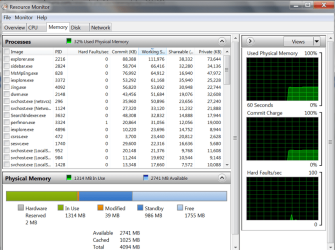
Open the Resource Monitor > Memory tab. That gives you a good picture. See picture below as an example.
 

Attachments

  • 2014-10-04_1842.png
    2014-10-04_1842.png
    85.5 KB · Views: 1

My Computer

Computer Manufacturer/Model Number
HP, Dell, Gateway, Toshiba - 4 laptops and 2 desktops
OS
Vista, Windows7, Mint Mate, Zorin, Windows 8
CPU
from 1.6GHz Duo to i7
Monitor(s) Displays
2x HP w2207
Hard Drives
5x HDD, 7x SSD, 12x Externals
Keyboard
with trackball - no mices
Mouse
Trackball mice
Internet Speed
DSL 6000
Open Task manager --> Processes tab and check the list of processes running in the background.
Some process is eating up your RAM.

-Which Antivirus are you using?

Currently , I'm Using MalwareBytes

hmm........
How about disabling MalwareBytes and checking the memory usage.
That could possibly be the reason.
Turning off Aero might also help.
<--------------------------------------------------------------------------------------------->
Get Process explorer from this link:Process Explorer
Upload a snapshot of the processes list.

I've made the screenshot


My Computer

Computer type
Laptop
Computer Manufacturer/Model Number
Asus / Aspire 4750
OS
Windows 7 Ultimate 32bit
CPU
Intel Core i3-2310
Motherboard
-
Memory
2GB DDR3
Graphics Card(s)
Intel HD 3000
Hard Drives
500 GB
Antivirus
MalwareBytes
Browser
Google Chrome
With only 2GB of RAM, 40% usage is normal.

But it used to have that when I opened up multiple programs , now it's 40% when no programs are running on the background
So what - you cannot save the other 60% or more for a rainy day. The more RAM the system uses, the better it is,

Open the Resource Monitor > Memory tab. That gives you a good picture. See picture below as an example.

So . How about this csrss.exe thingy?
should I be suspicious about it?
there's also no path in the csrss.exe properties
 

My Computer

Computer type
Laptop
Computer Manufacturer/Model Number
Asus / Aspire 4750
OS
Windows 7 Ultimate 32bit
CPU
Intel Core i3-2310
Motherboard
-
Memory
2GB DDR3
Graphics Card(s)
Intel HD 3000
Hard Drives
500 GB
Antivirus
MalwareBytes
Browser
Google Chrome
csrss.exe is a critical system process and it is normal to have 2 instances running. Unless you select "Show details for all processes" in the file menu of process explorer it will be running with a non elevated account. Such an account does not have permissions to access company and other information for some system files. You need to slect this option to see this information. If the path is to windows\system32 it is likely legitimate.

The real problem with malware isn't in what you can see in Task Manager other other such utilities. It is what you don't see. Modern malware is very good at hiding itself.

The Process Explorer screenshot shows many details but not the big picture and that is what is really needed. Post a scrfeenshot of Process Explorer - System Information in the View menu. Do this when the problem appears.
 

My Computer

Computer type
PC/Desktop
Computer Manufacturer/Model Number
HP
OS
Windows 7 Pro 64 bit
CPU
Xeon W3520
Memory
8 GB
Graphics Card(s)
Nvidia Geforce 210
I killed csrss.exe once ... once.
My PC suffered an instant BSOD. :D
 

My Computer

Computer type
PC/Desktop
Computer Manufacturer/Model Number
n/a
OS
W7 Ultimate SP1, LM19.2 MATE, W10 Home 1703, W10 Pro 1703 VM, #All 64 bit
CPU
AMD Phenom II x6 1100T, 3.3 GHz
Motherboard
ASUS M4A88T-M/USB3 (AM3)
Memory
12GB DDR3 1333 G-Skill (4GB x 2), G-Skill (2GB x 2)
Graphics Card(s)
NVIDIA GeForce GTX 660
Sound Card
Realtek?
Monitor(s) Displays
Samsung S23B350
Screen Resolution
1920x1080
Hard Drives
WD Green 2TB (SATA), WD Green 3TB (SATA), WD Blue 4TB (SATA), WD Blue 6TB (SATA)
PSU
Cooler Master
Case
Antec GX300 Tower
Cooling
3x Antec TRICOOL 120mm Fans
Mouse
Wired Optical
Internet Speed
DSL
Antivirus
Avast
Browser
Pale Moon (64 bit)
Other Info
2018-12-27 Upgraded HDDs
2015-12-10 Upgraded case, graphics card, storage
2015-08-15 Upgraded motherboard & RAM
2015-07-15 Upgraded LM17.1 to LM17.2
csrss.exe is a critical system process and it is normal to have 2 instances running. Unless you select "Show details for all processes" in the file menu of process explorer it will be running with a non elevated account. Such an account does not have permissions to access company and other information for some system files. You need to slect this option to see this information. If the path is to windows\system32 it is likely legitimate.

The real problem with malware isn't in what you can see in Task Manager other other such utilities. It is what you don't see. Modern malware is very good at hiding itself.

The Process Explorer screenshot shows many details but not the big picture and that is what is really needed. Post a scrfeenshot of Process Explorer - System Information in the View menu. Do this when the problem appears.


View image: Capture3

^
thats what i got
 

My Computer

Computer type
Laptop
Computer Manufacturer/Model Number
Asus / Aspire 4750
OS
Windows 7 Ultimate 32bit
CPU
Intel Core i3-2310
Motherboard
-
Memory
2GB DDR3
Graphics Card(s)
Intel HD 3000
Hard Drives
500 GB
Antivirus
MalwareBytes
Browser
Google Chrome
You worry too much. There is nothing wrong with your system. Why don't you enjoy it.
 

My Computer

Computer Manufacturer/Model Number
HP, Dell, Gateway, Toshiba - 4 laptops and 2 desktops
OS
Vista, Windows7, Mint Mate, Zorin, Windows 8
CPU
from 1.6GHz Duo to i7
Monitor(s) Displays
2x HP w2207
Hard Drives
5x HDD, 7x SSD, 12x Externals
Keyboard
with trackball - no mices
Mouse
Trackball mice
Internet Speed
DSL 6000
I agree with whs.
The system information screenshot shows nothing unusual. The process list shows nothing unusual either, except maybe for 17 chrome processes. That means quite a few tabs open. A 2 GB system seems to be running as well as can be expected under the circumstances.
 

My Computer

Computer type
PC/Desktop
Computer Manufacturer/Model Number
HP
OS
Windows 7 Pro 64 bit
CPU
Xeon W3520
Memory
8 GB
Graphics Card(s)
Nvidia Geforce 210
Currently , I'm Using MalwareBytes

hmm........
How about disabling MalwareBytes and checking the memory usage.
That could possibly be the reason.
Turning off Aero might also help.
<--------------------------------------------------------------------------------------------->
Get Process explorer from this link:Process Explorer
Upload a snapshot of the processes list.

I've made the screenshot


I too am in agreement with "whs &LMiller7" after taking a look at your processes list.Everything is as it should be on a 2GB RAM PC.
But I recommend you to use firefox which uses less memory than chrome when it has many tabs open.Moreover firefox is the No.1 browser now. Internet Browser Software Review 2014 | Best Internet Browsers - TopTenREVIEWS
Good Luck! :cool:
 

My Computer

Computer type
PC/Desktop
Computer Manufacturer/Model Number
Custom Build
OS
Windows 8.1
CPU
Intel - Core i7 4.2GHz
Motherboard
Intel
Memory
8 GB
Graphics Card(s)
Nvidea GeForce 7800GT 2GB
Screen Resolution
1980 X 1280
Hard Drives
1 TB Toshiba
500 GB SATA
Internet Speed
Download - 30 Mbps, Upload - 10 Mbps
Antivirus
BitDefender Internet Security
Browser
Mozilla Firefox,Google Chrome,Internet Explorer
Thanks for all the help , this is enough to fuel my curiosity
I just went on full psycho when I known csrss.exe might be a potential trojan

Off Topic here , but what's the difference between a CPU usage and a Physical Memory usage?
 

My Computer

Computer type
Laptop
Computer Manufacturer/Model Number
Asus / Aspire 4750
OS
Windows 7 Ultimate 32bit
CPU
Intel Core i3-2310
Motherboard
-
Memory
2GB DDR3
Graphics Card(s)
Intel HD 3000
Hard Drives
500 GB
Antivirus
MalwareBytes
Browser
Google Chrome
Thanks for all the help , this is enough to fuel my curiosity
I just went on full psycho when I known csrss.exe might be a potential trojan

Off Topic here , but what's the difference between a CPU usage and a Physical Memory usage?

Well,
Physical memory usage is the amount of RAM being consumed by any running program or process.
Simply,everything you see on your screen is temporarily stored in your RAM.
But, CPU usage describes how hard your processor is working to execute and run your programs.
Increasing both of them collectively gives a big boost to your PC.

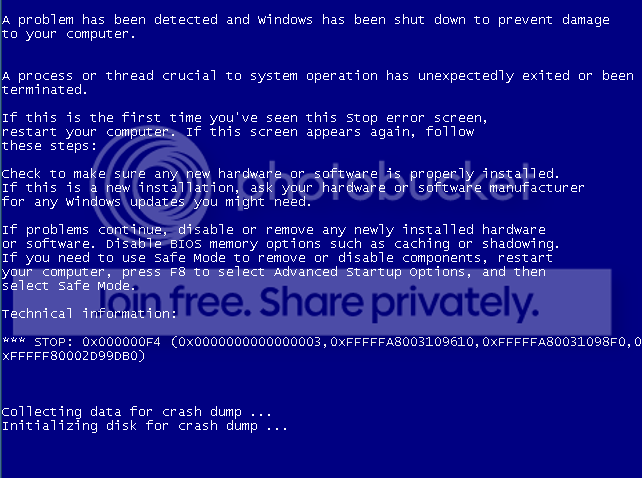
*******By the way,never ever try to end the csrss.exe process.It is a main windows process which must be running.If you end it you'll get a Blue screen of death.**********


See this image.That's what you'll get.

BSOD_Windows7.png
 

My Computer

Computer type
PC/Desktop
Computer Manufacturer/Model Number
Custom Build
OS
Windows 8.1
CPU
Intel - Core i7 4.2GHz
Motherboard
Intel
Memory
8 GB
Graphics Card(s)
Nvidea GeForce 7800GT 2GB
Screen Resolution
1980 X 1280
Hard Drives
1 TB Toshiba
500 GB SATA
Internet Speed
Download - 30 Mbps, Upload - 10 Mbps
Antivirus
BitDefender Internet Security
Browser
Mozilla Firefox,Google Chrome,Internet Explorer
Back
Top