RAM 4GB, only 2,94 usable

tokinhornr

New member
Local time
2:58 AM
Messages
7
Location
La Plata
Hi everyone, first of all sorry for my english, it's not my native language.
I have a HP Probook 4530s, Core i3, 4 GB RAM, using Windows Professional 64 bits. I've noticed that when I enter to (Panel Control) 'System' my RAM is only 2,94 GB usable from 4 GB. I enter into Virtual Memory Configuration and I found this:

7FDDE46D9.jpg

I think you can understand without reading Spanish

I searched in the forum, and of course, Google, but I'm not sure about the solution. I'm afraid to make a mistake changing the Maximum Size to 4521 MB that is the 'recommended'.

Hope you understand me.
Thank you.
 

My Computer

Computer Manufacturer/Model Number
Hewlett Packard Probook 4530s
OS
Windows 7 Professional 64bit
CPU
Intel Core i3 2310m
Memory
4 GB
Graphics Card(s)
Intel HD Graphics 3000
Monitor(s) Displays
15.6"
Screen Resolution
1366x768
Hard Drives
500 GB
Internet Speed
1 MB
Reason why it is 2.94 Gb usable some Hardware might be using it to help it work better when doing demanding task such as intergrated Gpu

The ram is placed to make sure the system won't hang you in those area's the 4 gb's are there but some of your hardware needs it to keep up with everything else
 

Attachments

  • mem.PNG
    mem.PNG
    155.6 KB · Views: 248

My Computer

Computer type
PC/Desktop
Computer Manufacturer/Model Number
CoreI7-6700K MrFingerIII Special Builds
OS
Windows 10 Home Premium 64bit sp1
CPU
Intel I7-6700K @ 4.6 Ghz 1.344 volts everyday OC
Motherboard
Asrock Fatality K6 Z170 Socket 1151
Memory
32GB G-Skill TridentZ 3200mhz 16-18-18-38 DDR4
Graphics Card(s)
Sli Gigabyte Windforce GTX 980 G1
Sound Card
AC97 Creative Rage Tactic 3D Headphones Bluetooth
Monitor(s) Displays
27" Asus ROG Swift PG278Q G-Sync 48" Vizio Smart HD TV
Screen Resolution
2560x1440p 27"- 48" Currently Gaming at 2560x1440p Res 2K
Hard Drives
250GB Samsung Evo840SSD Seagate baracuda 500 GB WD Mybook 500Gb 1TB Seagate Barracuda
PSU
HX1050w Corsair Silver 80plus certified crosfire/sli
Case
Enthod Pro Full Tower
Cooling
Corsair H110i GT 280 mm High Performance WaterBlock
Keyboard
Logitech wireless keyboard
Mouse
Logitech wireless mouse
Internet Speed
Cox Cable 100+ mb
Antivirus
WebRoot Spysweeper with Antivirus
Browser
IE-10, Chrome, Opera
Other Info
My Other Rig is a AMD FX8320E @4.6Ghz 16GB Ballistic Sport Ram
Mobo Asrock Fatality 990FX 120GB OCZ SSD 1TB Seagate Barracuda Corsair H75 Cooling PSU Corsair CX750
GPU GTX Gigabyte 970G1
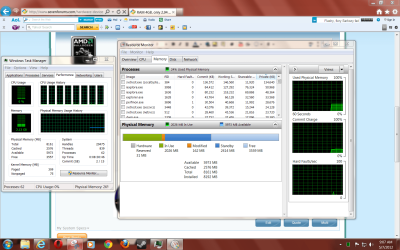
I see... I get into Resource Monitor, and in Hardware Reserved appears 1082 MB. That's not a lot of memory reserved?
So, I don't have to change anything :P
 

My Computer

Computer Manufacturer/Model Number
Hewlett Packard Probook 4530s
OS
Windows 7 Professional 64bit
CPU
Intel Core i3 2310m
Memory
4 GB
Graphics Card(s)
Intel HD Graphics 3000
Monitor(s) Displays
15.6"
Screen Resolution
1366x768
Hard Drives
500 GB
Internet Speed
1 MB
One of two things:

1. Your graphics card is ussing 1 GB of address space, but not physical RAM
2. Your graphics card is using 1GB of physical RAM instead of having its own

The first is more likely. I'd be pretty surprised if your computer BIOS didn't have a memory remap feature in the BIOS so you could actually use all 4GB. In that case, your computer needs address space, but not physical RAM, to communicate with your graphics card. If that address space is located below 4 GB, it is 1GB of RAM that gets wasted. Memory remapping allocates the 1 GB of address space the graphics card needs above 4GB, so the full 4GB of address space for your system and programs can be mapped to the 4GB of physical RAM.

So boot to your BIOS and see if there is memory remapping (or sometimes called a hole) option to enable.
 

My Computer

Computer type
PC/Desktop
Computer Manufacturer/Model Number
Home built (GeneO industries)/Model 4
OS
Windows 10 Pro. EFI boot partition, full EFI boot
CPU
i7 4770k 4.4GHz (44-44-43-43 turbo) @ 1.248V
Motherboard
ASUS Maximus VI Hero
Memory
16GB (8GBx2) @2200 MHz G.skill Sniper 10-11-10-30-1, 1.6V
Graphics Card(s)
MSI GTX 970 Gaming 4G
Sound Card
Onboard SupremeFX Audio
Monitor(s) Displays
NEC Spectraview 2490WUXi-SV
Screen Resolution
1920 x 1200
Hard Drives
Samsung 850 Pro 256GB (OS), Samsung 2x 128GB 840 Pro SSD in RAID0, 3x WD Blue 6Gb/s 1TB RAID0, WD 2TB Black external USB 3.0, 2TB WD20EARS Green external USB 3.0, 2x 500GB Seagate and 1 750 GB external USB, 1x 350GB external USB3
PSU
Seasonic X-850 (2012 KM3 model)
Case
Fractal Design Define R4
Cooling
NH-D14, NF-F12, NF-A15; NF-P14, NF-P12,NF-A14, S12A PWM
Keyboard
Cooler Master Storm Quickfire Rapid - Brown
Mouse
Logitech G602
Internet Speed
126.4 Mb/s down, 24.3 Mb/s up
Other Info
USB 3.0 x8 , SATA III x8, eSATA, USB 2.0 x6. Samsung DVD R/W drive.

WEI: CPU 7.8, Memory 7.9, Graphics 7.9, Disk 7.9
One of two things:

1. Your graphics card is ussing 1 GB of address space, but not physical RAM
2. Your graphics card is using 1GB of physical RAM instead of having its own

The first is more likely. I'd be pretty surprised if your computer BIOS didn't have a memory remap feature in the BIOS so you could actually use all 4GB. In that case, your computer needs address space, but not physical RAM, to communicate with your graphics card. If that address space is located below 4 GB, it is 1GB of RAM that gets wasted. Memory remapping allocates the 1 GB of address space the graphics card needs above 4GB, so the full 4GB of address space for your system and programs can be mapped to the 4GB of physical RAM.

So boot to your BIOS and see if there is memory remapping (or sometimes called a hole) option to enable.

Yes, I've looked into my Intel's options, and I found that is usin 1.3 GB. Well, I'm gonna see what can I do.
Thank you very much.
 

My Computer

Computer Manufacturer/Model Number
Hewlett Packard Probook 4530s
OS
Windows 7 Professional 64bit
CPU
Intel Core i3 2310m
Memory
4 GB
Graphics Card(s)
Intel HD Graphics 3000
Monitor(s) Displays
15.6"
Screen Resolution
1366x768
Hard Drives
500 GB
Internet Speed
1 MB
Back
Top