RAM Allocation

prospero

the ancient geek
Member
VIP
Local time
12:14 AM
Messages
114
Location
Primrose Hill, London, UK
I have 6GB RAM but the task manager only shows around 2GB being used even when doing heavy duty tasks such as video file conversion. Is there a tweak to ensure the RAM is fully utilized?

Dell Inspiron 580s
Intel Quad Core i5 2.66GHz, 8MB
6144MB DDR3 Dual Channel
1GB ATI Radeon HD 5450
1TB Serial ATA
 

My Computer

Computer type
PC/Desktop
Computer Manufacturer/Model Number
Dell Inspiron 580
OS
Windows 7 Professional 64-bit SP1
CPU
Intel Quad Core i5 750 2.67Ghz 8Mb
Motherboard
Dell 033FF6 A00
Memory
6Gb DDR3 Dual Channel
Graphics Card(s)
1Gb ATI Radeon HD 5450
Sound Card
Integrated 7.1
Monitor(s) Displays
Dell 23" ST 2310 HDMI; Samsung 21" HDMI
Screen Resolution
1920 x 1080; 1920 x 1080
Hard Drives
1TB WD Serial ATA 7200RPM
Iomega 500Gb Remote
PSU
300w
Case
Dell
Cooling
1 x Case; 1 x Processor; 1 x Video Card
Keyboard
Microsoft Comfort Curve 3000
Mouse
Microsoft Wireless Touch (Intellipoint)
Internet Speed
down 200Mb; up 12Mb (Virgin Media SuperHub 2)
Antivirus
MSE
Browser
IE11, Google Chrome
Other Info
HP Photosmart Premium 309g-m
Compaq Presario Laptop CQ70 with 7 Pro 32-bit.
Huawei MediaPad 32GB
Several Raspberry Pi's B2,B3 and Zero
Several varieties of Arduinos
I have 6GB RAM but the task manager only shows around 2GB being used even when doing heavy duty tasks such as video file conversion. Is there a tweak to ensure the RAM is fully utilized?

Dell Inspiron 580s
Intel Quad Core i5 2.66GHz, 8MB
6144MB DDR3 Dual Channel
1GB ATI Radeon HD 5450
1TB Serial ATA

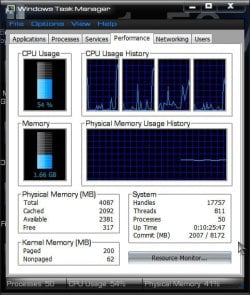
Pretty sure you are using more than 2. Can we get a screen shot of task manger showing the performance tab as shown in the picture.


Thanks


ken
 
Last edited:

My Computer

Computer Manufacturer/Model Number
HP Pavillion dv-7 1005 Tx
OS
Win 8 Release candidate 8400
CPU
[email protected]
Memory
4 gigs
Graphics Card(s)
Nvidia 9600M
Sound Card
HD built-in
Monitor(s) Displays
17" Wxga
Screen Resolution
1440x900
Cooling
none
Internet Speed
45Mb down 5Mb up
Ken, I like mine blue :)

BlueTM.jpg

A Guy
 

My Computer

Computer type
PC/Desktop
OS
Windows 10 Home x64
CPU
INTEL Core i5-750 Quad-Core 3.37GHz
Motherboard
ASUS P7P55D
Memory
HyperX Fury Black Series 8GB (2 x 4GB) 1866Mhz
Graphics Card(s)
EVGA GeForce GTX 750 Superclocked 1GB 128-Bit GDDR5
Monitor(s) Displays
LG 32MA68HY 32" IPS
Screen Resolution
1920 x 1080
Hard Drives
Samsung 840 Evo 120GB, SEAGATE 500GB Barracuda® 7200.12, SATA 3 Gb/s, 7200 RPM, 16MB cache
PSU
ANTEC TruePower New TP-550, 80 PLUS, 550W
Case
ANTEC Three Hundred Illusion
Cooling
COOLER MASTER Hyper 212 Plus, 4 x 120mm 1 x 140mm Noctua's
Internet Speed
85 + Mbps
Antivirus
Avast
Browser
Vivaldi
Why do you think video file conversion (aka video encoding) takes up alot of RAM? I've done alot of video conversion, even for video at FULL HD sizes and it certainly doesn't take up RAM. The OS and program has no reason to load more data into the RAM then the processor can process. Encoding is a processor heavy task, ie. it takes alot of processing power just to process a small amount of data. Therefore, even if the data were to be fed directly from the HDD to the CPU, it would still be fine since the processing rate doesn't exceed the HDD transfer limit.
[FONT=Arial ! important][/FONT]​
 

My Computer

Computer Manufacturer/Model Number
Dell E4300
OS
Windows 7 Ultimate
CPU
Intel C2D SP9400
Motherboard
Intel GS45
Memory
2GB DDR3
Graphics Card(s)
Integrated =(
Sound Card
Integrated =(
Monitor(s) Displays
Matte LCD
Screen Resolution
1280x800
Hard Drives
Intel X25-M Gen 2 SSD
WD Caviar Black
Mouse
MX 518, V470 - Logitech
hi :)
i have the same amount of ram and i never have seen it all used i dont think you will, i feel the more system resources you give the machine the better, it will run under stress of heavy loads on ram better because the resources are there if needed, i use readyboost as well (16 GB) and i have lots of feedback about how it does not work, but the tests i have done on my machine shows in the results that it does. saving the paging file on the hard drive doing all the work and using flash memory makes sense less strain again. :D

http://en.wikipedia.org/wiki/ReadyBoost

http://windows.microsoft.com/en-US/windows7/products/features/readyboost
 

My Computer

Computer Manufacturer/Model Number
packard bell IXTREME M5722
OS
Operating System : Windows 7 Home Premium Edition 6.01.7600 SP1 (x64)
CPU
Processor : Intel Core 2 Quad Q8300 @ 2500 MHz
Motherboard
Mainboard : Packard Bell (Acer EG43M )
Memory
Physical Memory :8GB Corsair4x 2GB 800MHz C5 DDR2
Graphics Card(s)
Video Card : XFX 6700 AMD
Monitor(s) Displays
Maestro 234DL - BenQ V2220 - BenQ VW2420H
Screen Resolution
Current Display :1920x1080p pixels at 60 Hz in HD LED
Hard Drives
Hard Disks : WDC (1000 GB)
Drive C: (Hard Disk) : 428 GB available on 491 GB
Drive D: (Hard Disk) : 426 GB available on 492 GB
SAMSUNG spinpoint HD103SJ 1000.2 GB
(X 2) KINGSTON SSD NOW V 30GB
PSU
XFX ProSeries 550W PSU
Case
PACKARD BELL IXTREME
Cooling
System Blower Current: 150mA Air Flow16CFM ;Akasa 90mm rear
Keyboard
Gigabyte Aivia K8100
Mouse
TRUST-Wireless Laser Mouse - Carbon edition MI-7770C
Internet Speed
TP-LINK > TL-WN951N / AV500 Gigabit Powerline Adapters
Browser
chrome dev
Other Info
EXTRA COOLING>(FAN CONTROLLER) PC Bay Cooler 3 x 40mm fans; Akasa AK-HD-BL Blue hard drive cooler 2 x 40 mm fan 4500 rpm 29.7 dBA
Bios> American Megatrends Inc.
Version : P01-A1
Date : 08/31/2009
Thanks to all for the interest. I was worried that my system had a problem. Screen shot attached.
Task-Manager.png
 

My Computer

Computer type
PC/Desktop
Computer Manufacturer/Model Number
Dell Inspiron 580
OS
Windows 7 Professional 64-bit SP1
CPU
Intel Quad Core i5 750 2.67Ghz 8Mb
Motherboard
Dell 033FF6 A00
Memory
6Gb DDR3 Dual Channel
Graphics Card(s)
1Gb ATI Radeon HD 5450
Sound Card
Integrated 7.1
Monitor(s) Displays
Dell 23" ST 2310 HDMI; Samsung 21" HDMI
Screen Resolution
1920 x 1080; 1920 x 1080
Hard Drives
1TB WD Serial ATA 7200RPM
Iomega 500Gb Remote
PSU
300w
Case
Dell
Cooling
1 x Case; 1 x Processor; 1 x Video Card
Keyboard
Microsoft Comfort Curve 3000
Mouse
Microsoft Wireless Touch (Intellipoint)
Internet Speed
down 200Mb; up 12Mb (Virgin Media SuperHub 2)
Antivirus
MSE
Browser
IE11, Google Chrome
Other Info
HP Photosmart Premium 309g-m
Compaq Presario Laptop CQ70 with 7 Pro 32-bit.
Huawei MediaPad 32GB
Several Raspberry Pi's B2,B3 and Zero
Several varieties of Arduinos
There's no problem here. 7 says it sees and is using all 6GB's of RAM.

You do however have a few more processes running than I do. You show 75 to my 46 processes; 24k to my 14k handles; 1000 to my 600 threads... but... you're probably doing stuff.

I do have to ask though... 6GB's on an LGA 1156 motherboard? How did you arrive at that configuration and why have you sacrificed running dual channel?
 

My Computer

OS
7 Ultimate x64
CPU
i5-2500k
Motherboard
Asus P8P67 Pro
Memory
8GB G.Skill Ripjaws X F3-12800CL7D-8GBXH 1866MHz 8-9-8-24
Graphics Card(s)
EVGA GTX 570 SC
Sound Card
X-Fi Titanium Fatality
Monitor(s) Displays
Samsung S27A550H 27" LED
Screen Resolution
1920x1080
Hard Drives
OCZ Vertex 3 120GB.
1TB Samsung F3.
2TB Samsung F4.
PSU
PC Power & Cooling Silencer 760
Case
Lian Li Lancool K62
Cooling
Thermalright Venomous X Black/Scythe S-Flex/Shin-Etsu X23
Keyboard
MS Natural Elite 4000 Ergonomic
Mouse
Logitech G500
Internet Speed
6MB/768
Other Info
Logitech Z-5500 505 watts.
D-Link DGL-4500.
Tripp-Lite Smart Pro 1500.
I don't understand what "dual channel" means but would appreciate some guidance. The rig is a Dell Inspiron 580s but I don't know the MOBO spec.
Another question - would it be appropriate to disable the page file? I've currently allocated 4096GB.
 

My Computer

Computer type
PC/Desktop
Computer Manufacturer/Model Number
Dell Inspiron 580
OS
Windows 7 Professional 64-bit SP1
CPU
Intel Quad Core i5 750 2.67Ghz 8Mb
Motherboard
Dell 033FF6 A00
Memory
6Gb DDR3 Dual Channel
Graphics Card(s)
1Gb ATI Radeon HD 5450
Sound Card
Integrated 7.1
Monitor(s) Displays
Dell 23" ST 2310 HDMI; Samsung 21" HDMI
Screen Resolution
1920 x 1080; 1920 x 1080
Hard Drives
1TB WD Serial ATA 7200RPM
Iomega 500Gb Remote
PSU
300w
Case
Dell
Cooling
1 x Case; 1 x Processor; 1 x Video Card
Keyboard
Microsoft Comfort Curve 3000
Mouse
Microsoft Wireless Touch (Intellipoint)
Internet Speed
down 200Mb; up 12Mb (Virgin Media SuperHub 2)
Antivirus
MSE
Browser
IE11, Google Chrome
Other Info
HP Photosmart Premium 309g-m
Compaq Presario Laptop CQ70 with 7 Pro 32-bit.
Huawei MediaPad 32GB
Several Raspberry Pi's B2,B3 and Zero
Several varieties of Arduinos
Integrated memory controller enables two channels of high-speed DDR3 1333 MHz memory. This memory controller's lower latency and higher memory bandwidth delivers amazing performance for data-intensive applications.
Intel® Core™ i5 Processor - Overview

The i5's have two memory "channels". You can set your board up to run in single channel mode (which is what you've done by having that odd third stick of RAM), but because the i5's have so much bandwidth, they benefit from using two channels at the same time.

However, in order to get dual channel to work, you have to place your RAM in the right slots. The dimm slots are colored differently for this very reason, so as to identify which channel is which. LGA 1156 motherboards (and that's what you have if you have an i5) use either 4GB's of RAM for dual channel, or 8GB's; they do not use 6GB's. 6GB's of RAM is typical of an LGA 1366 motherboard which has a triple channel memory controller.

Since you're using 6GB's of RAM, you have an extra stick populating the second channel, only because that second channel is not full (ie, not a fourth stick of RAM making 8GB's) your board defaults to single channel. In short, you're not getting the most out of your memory.

I thought that was odd, especially since this came from Dell. If you mistakenly have an i7 (an lga 1366 and not an lga 1156 i7) then your memory configuration would make perfect sense, but since you have an i5, it's a puzzler how Dell let you configure the machine this way?

You will get better performance if you remove the odd stick of RAM or add the fourth. Yes, generally speaking the more RAM you have the better your machine will perform, but not in your case... either remove the odd stick or get another bringing you to the full 8GB's.

If you're a gamer, then don't waste your money on a fourth stick as you will see no performance gains at all... no game uses more than 2GB's of RAM. If you can actually use all 8GB's of RAM, like with some CAD program, then get it, but if you can't, then don't bother.

As for disabling your page file, that is one huge internet myth that refuses to go away. It really won't bring you any sort of performance gains whatsoever... besides, no matter what you do trying to disable the page file, Windows will always create for itself a page file... so you can end up actually decreasing performance. Some guys have said that it's better to have the page file on another drive (not another partition on the same drive, but on a separate drive), yet, despite their insistence that performance increases, nobody, nowhere has actually ever demonstrated that with benchmarks that prove the point. If they had, everyone would be doing it who could benefit from it.

Windows does a very good job of managing the page file all on its own; let it. With the size of hard drives today, and the large amounts of RAM in most people's systems (4GB's or more) there is absolutely no need for this.

As for ReadyBoost: there is no performance gain to be had if you have 4GB's of RAM or more. RB is/was for systems that had less than 2GB's. http://blogs.technet.com/b/askperf/archive/2007/03/29/windows-vista-superfetch-readyboost.aspx

 
Last edited:

My Computer

OS
7 Ultimate x64
CPU
i5-2500k
Motherboard
Asus P8P67 Pro
Memory
8GB G.Skill Ripjaws X F3-12800CL7D-8GBXH 1866MHz 8-9-8-24
Graphics Card(s)
EVGA GTX 570 SC
Sound Card
X-Fi Titanium Fatality
Monitor(s) Displays
Samsung S27A550H 27" LED
Screen Resolution
1920x1080
Hard Drives
OCZ Vertex 3 120GB.
1TB Samsung F3.
2TB Samsung F4.
PSU
PC Power & Cooling Silencer 760
Case
Lian Li Lancool K62
Cooling
Thermalright Venomous X Black/Scythe S-Flex/Shin-Etsu X23
Keyboard
MS Natural Elite 4000 Ergonomic
Mouse
Logitech G500
Internet Speed
6MB/768
Other Info
Logitech Z-5500 505 watts.
D-Link DGL-4500.
Tripp-Lite Smart Pro 1500.
As for disabling your page file, that is one huge internet myth that refuses to go away. It really won't bring you any sort of performance gains whatsoever... besides, no matter what you do trying to disable the page file, Windows will always create for itself a page file... so you can end up actually decreasing performance. Some guys have said that it's better to have the page file on another drive (not another partition on the same drive, but on a separate drive), yet, despite their insistence that performance increases, nobody, nowhere has actually ever demonstrated that with benchmarks that prove the point. If they had, everyone would be doing it who could benefit from it.

Windows does a very good job of managing the page file all on its own; let it. With the size of hard drives today, and the large amounts of RAM in most people's systems (4GB's or more) there is absolutely no need for this.

You were doing well until you got into some dangerous territory. Disabling the page file will disable the system's ability to overcommit memory allocation and can cause processes that do not heed the return values from Windows memory allocation API calls to fail -- sometime spectacularly. That's not the fault of Windows. The same thing would happen if the system were using a system managed page file with a small initial size under very low disk space conditions where that file was not allowed to grow.

While setting a page file size of zero does not increase performance, it can prevent performance degradation by preventing writes to the page file during memory allocation calls under overcommited memory conditions. Without a page file and under those conditions Windows will trim the working set of all processes in an attempt to recover some free memory. If it cannot recover enough from processes then the allocation will fail and the calling process will be notified. If that process does not handle the failure, caveat emptor. In any event there will be no performance degradation due to committing pages to disk.

At least under Windows 7, Windows does NOT create a page file, temporary or permanent when told not to. I run with no page file at all and routinely use WinDirStat to manage storage on my boot/system SSD and profile HDD. Windows 7 does not create a page file for me and is not designed to. Maybe you're using Adobe apps that create their own?

It's ALWAYS better to have a page file on a drive other than the boot/system drive especially if that drive is an SSD. The reasons and are numerous and I'll gladly go into them in detail if anyone is interested.
 
Last edited:

My Computer

Computer type
Laptop
Computer Manufacturer/Model Number
Apple
OS
El Capitan / Windows 10
CPU
i7-4980HQ
Memory
16GB
Graphics Card(s)
Iris 5200
Strictly speaking Virtual Memory is always in operation and cannot be “turned off.” What is meant by such wording is “set the system to use no page file space at all.” Doing this would waste a lot of the RAM. The reason is that when programs ask for an allocation of Virtual memory space, they may ask for a great deal more than they ever actually bring into use — the total may easily run to hundreds of megabytes. These addresses have to be assigned to somewhere by the system. If there is a page file available, the system can assign them to it — if there is not, they have to be assigned to RAM, locking it out from any actual use.
Virtual Memory in Windows XP

It seems that you two are in disagreement? Granted, it's been a while since I've done any research on this topic, but have things changed since this was written?
 

My Computer

OS
7 Ultimate x64
CPU
i5-2500k
Motherboard
Asus P8P67 Pro
Memory
8GB G.Skill Ripjaws X F3-12800CL7D-8GBXH 1866MHz 8-9-8-24
Graphics Card(s)
EVGA GTX 570 SC
Sound Card
X-Fi Titanium Fatality
Monitor(s) Displays
Samsung S27A550H 27" LED
Screen Resolution
1920x1080
Hard Drives
OCZ Vertex 3 120GB.
1TB Samsung F3.
2TB Samsung F4.
PSU
PC Power & Cooling Silencer 760
Case
Lian Li Lancool K62
Cooling
Thermalright Venomous X Black/Scythe S-Flex/Shin-Etsu X23
Keyboard
MS Natural Elite 4000 Ergonomic
Mouse
Logitech G500
Internet Speed
6MB/768
Other Info
Logitech Z-5500 505 watts.
D-Link DGL-4500.
Tripp-Lite Smart Pro 1500.
Strictly speaking Virtual Memory is always in operation and cannot be “turned off.” What is meant by such wording is “set the system to use no page file space at all.” Doing this would waste a lot of the RAM. The reason is that when programs ask for an allocation of Virtual memory space, they may ask for a great deal more than they ever actually bring into use — the total may easily run to hundreds of megabytes. These addresses have to be assigned to somewhere by the system. If there is a page file available, the system can assign them to it — if there is not, they have to be assigned to RAM, locking it out from any actual use.
Virtual Memory in Windows XP

It seems that you two are in disagreement? Granted, it's been a while since I've done any research on this topic, but have things changed since this was written?

Yes. Since XP processes must explicitly force physical allocation even with VirtualAlloc() calls. I like having no page file in those circumstances because I am extremely interested in any process that wants to physically allocate gigabytes of memory on my computer. I such a process to fail first just so I can investigate whether the process is some kind of malware or just written by a complete bonehead.
 

My Computer

Computer type
Laptop
Computer Manufacturer/Model Number
Apple
OS
El Capitan / Windows 10
CPU
i7-4980HQ
Memory
16GB
Graphics Card(s)
Iris 5200
What apps have you found that make those kinds of outrageous calls?
 

My Computer

OS
7 Ultimate x64
CPU
i5-2500k
Motherboard
Asus P8P67 Pro
Memory
8GB G.Skill Ripjaws X F3-12800CL7D-8GBXH 1866MHz 8-9-8-24
Graphics Card(s)
EVGA GTX 570 SC
Sound Card
X-Fi Titanium Fatality
Monitor(s) Displays
Samsung S27A550H 27" LED
Screen Resolution
1920x1080
Hard Drives
OCZ Vertex 3 120GB.
1TB Samsung F3.
2TB Samsung F4.
PSU
PC Power & Cooling Silencer 760
Case
Lian Li Lancool K62
Cooling
Thermalright Venomous X Black/Scythe S-Flex/Shin-Etsu X23
Keyboard
MS Natural Elite 4000 Ergonomic
Mouse
Logitech G500
Internet Speed
6MB/768
Other Info
Logitech Z-5500 505 watts.
D-Link DGL-4500.
Tripp-Lite Smart Pro 1500.
What apps have you found that make those kinds of outrageous calls?

There were a few "memory cleaner" type applications that did it. All were of dubious benefit with out without a page file. With the page file they slowed the system down by forcing the system to write process pages to disk only to later have to read them back. Without the page file they just forced a working set trim of running processes like what occurs when you minimize most apps or failed with an error message or crash.

Oh and some old versions of Photoshop...
 

My Computer

Computer type
Laptop
Computer Manufacturer/Model Number
Apple
OS
El Capitan / Windows 10
CPU
i7-4980HQ
Memory
16GB
Graphics Card(s)
Iris 5200
Memory cleaners... tsk tsk... :p
 

My Computer

OS
7 Ultimate x64
CPU
i5-2500k
Motherboard
Asus P8P67 Pro
Memory
8GB G.Skill Ripjaws X F3-12800CL7D-8GBXH 1866MHz 8-9-8-24
Graphics Card(s)
EVGA GTX 570 SC
Sound Card
X-Fi Titanium Fatality
Monitor(s) Displays
Samsung S27A550H 27" LED
Screen Resolution
1920x1080
Hard Drives
OCZ Vertex 3 120GB.
1TB Samsung F3.
2TB Samsung F4.
PSU
PC Power & Cooling Silencer 760
Case
Lian Li Lancool K62
Cooling
Thermalright Venomous X Black/Scythe S-Flex/Shin-Etsu X23
Keyboard
MS Natural Elite 4000 Ergonomic
Mouse
Logitech G500
Internet Speed
6MB/768
Other Info
Logitech Z-5500 505 watts.
D-Link DGL-4500.
Tripp-Lite Smart Pro 1500.
Those last two posts were extremely informative, you learn something new every day (if you've a mind to). Thanks for your help.
 

My Computer

Computer type
PC/Desktop
Computer Manufacturer/Model Number
Dell Inspiron 580
OS
Windows 7 Professional 64-bit SP1
CPU
Intel Quad Core i5 750 2.67Ghz 8Mb
Motherboard
Dell 033FF6 A00
Memory
6Gb DDR3 Dual Channel
Graphics Card(s)
1Gb ATI Radeon HD 5450
Sound Card
Integrated 7.1
Monitor(s) Displays
Dell 23" ST 2310 HDMI; Samsung 21" HDMI
Screen Resolution
1920 x 1080; 1920 x 1080
Hard Drives
1TB WD Serial ATA 7200RPM
Iomega 500Gb Remote
PSU
300w
Case
Dell
Cooling
1 x Case; 1 x Processor; 1 x Video Card
Keyboard
Microsoft Comfort Curve 3000
Mouse
Microsoft Wireless Touch (Intellipoint)
Internet Speed
down 200Mb; up 12Mb (Virgin Media SuperHub 2)
Antivirus
MSE
Browser
IE11, Google Chrome
Other Info
HP Photosmart Premium 309g-m
Compaq Presario Laptop CQ70 with 7 Pro 32-bit.
Huawei MediaPad 32GB
Several Raspberry Pi's B2,B3 and Zero
Several varieties of Arduinos
Those last two posts were extremely informative, you learn something new every day (if you've a mind to). Thanks for your help.

What about the posts helped you? It was mostly just two experts talking shop. Was your original question answered to your satisfaction or should we still continue to work on it? Thanks for the compliment!
 

My Computer

Computer type
Laptop
Computer Manufacturer/Model Number
Apple
OS
El Capitan / Windows 10
CPU
i7-4980HQ
Memory
16GB
Graphics Card(s)
Iris 5200
I enjoyed the chat! Yes, I'm now better informed and thanks to all for the advice.
 

My Computer

Computer type
PC/Desktop
Computer Manufacturer/Model Number
Dell Inspiron 580
OS
Windows 7 Professional 64-bit SP1
CPU
Intel Quad Core i5 750 2.67Ghz 8Mb
Motherboard
Dell 033FF6 A00
Memory
6Gb DDR3 Dual Channel
Graphics Card(s)
1Gb ATI Radeon HD 5450
Sound Card
Integrated 7.1
Monitor(s) Displays
Dell 23" ST 2310 HDMI; Samsung 21" HDMI
Screen Resolution
1920 x 1080; 1920 x 1080
Hard Drives
1TB WD Serial ATA 7200RPM
Iomega 500Gb Remote
PSU
300w
Case
Dell
Cooling
1 x Case; 1 x Processor; 1 x Video Card
Keyboard
Microsoft Comfort Curve 3000
Mouse
Microsoft Wireless Touch (Intellipoint)
Internet Speed
down 200Mb; up 12Mb (Virgin Media SuperHub 2)
Antivirus
MSE
Browser
IE11, Google Chrome
Other Info
HP Photosmart Premium 309g-m
Compaq Presario Laptop CQ70 with 7 Pro 32-bit.
Huawei MediaPad 32GB
Several Raspberry Pi's B2,B3 and Zero
Several varieties of Arduinos
There's no problem here. 7 says it sees and is using all 6GB's of RAM.

You do however have a few more processes running than I do. You show 75 to my 46 processes; 24k to my 14k handles; 1000 to my 600 threads... but... you're probably doing stuff.

I do have to ask though... 6GB's on an LGA 1156 motherboard? How did you arrive at that configuration and why have you sacrificed running dual channel?

Hi Fumz. I've just used Belarc Advisor to check that my updates are OK and discovered that the MOBO is a Dell 033FF6 A00. Does that make a difference? I'm happy with the system's performance and don't plan to spend another £50-60 to add more RAM at the moment.
 

My Computer

Computer type
PC/Desktop
Computer Manufacturer/Model Number
Dell Inspiron 580
OS
Windows 7 Professional 64-bit SP1
CPU
Intel Quad Core i5 750 2.67Ghz 8Mb
Motherboard
Dell 033FF6 A00
Memory
6Gb DDR3 Dual Channel
Graphics Card(s)
1Gb ATI Radeon HD 5450
Sound Card
Integrated 7.1
Monitor(s) Displays
Dell 23" ST 2310 HDMI; Samsung 21" HDMI
Screen Resolution
1920 x 1080; 1920 x 1080
Hard Drives
1TB WD Serial ATA 7200RPM
Iomega 500Gb Remote
PSU
300w
Case
Dell
Cooling
1 x Case; 1 x Processor; 1 x Video Card
Keyboard
Microsoft Comfort Curve 3000
Mouse
Microsoft Wireless Touch (Intellipoint)
Internet Speed
down 200Mb; up 12Mb (Virgin Media SuperHub 2)
Antivirus
MSE
Browser
IE11, Google Chrome
Other Info
HP Photosmart Premium 309g-m
Compaq Presario Laptop CQ70 with 7 Pro 32-bit.
Huawei MediaPad 32GB
Several Raspberry Pi's B2,B3 and Zero
Several varieties of Arduinos

My Computer

Computer type
PC/Desktop
Computer Manufacturer/Model Number
Dell Inspiron 580
OS
Windows 7 Professional 64-bit SP1
CPU
Intel Quad Core i5 750 2.67Ghz 8Mb
Motherboard
Dell 033FF6 A00
Memory
6Gb DDR3 Dual Channel
Graphics Card(s)
1Gb ATI Radeon HD 5450
Sound Card
Integrated 7.1
Monitor(s) Displays
Dell 23" ST 2310 HDMI; Samsung 21" HDMI
Screen Resolution
1920 x 1080; 1920 x 1080
Hard Drives
1TB WD Serial ATA 7200RPM
Iomega 500Gb Remote
PSU
300w
Case
Dell
Cooling
1 x Case; 1 x Processor; 1 x Video Card
Keyboard
Microsoft Comfort Curve 3000
Mouse
Microsoft Wireless Touch (Intellipoint)
Internet Speed
down 200Mb; up 12Mb (Virgin Media SuperHub 2)
Antivirus
MSE
Browser
IE11, Google Chrome
Other Info
HP Photosmart Premium 309g-m
Compaq Presario Laptop CQ70 with 7 Pro 32-bit.
Huawei MediaPad 32GB
Several Raspberry Pi's B2,B3 and Zero
Several varieties of Arduinos
Back
Top