Solved RAM Configuration: KHX1600C9D3K2/8GX

FallibleCanine

New member
Local time
12:30 PM
Messages
18
I think this should be an easy one, but I thought I'd check.

I got this memory:
http://www.kingston.com/datasheets/KHX1600C9D3K2_8GX.pdf
(spec sheet)

And I want to make sure I have it set up properly in the BIOS.

The BIOS gives me a huge list of options, like:

CPU Core
CPC Core
IGPU Voltage
DRAM Voltage
RCH Voltage
CPU PLC Voltage
VTT Voltage
VCCSA Voltage

...

How do I figure out what to set everything to?

The spec sheet says it runs at "DDR-1600", but then it mentions 1333 mhZ...
 

My Computer My Computer

At a glance

Windows 7 - 64-bitIntel Core i3-2100 3.1GHz Dual-Core 65W LGA1155Kingston Technology HyperX 8 GB (2x4 GB Modul...Sapphire Radeon HD 5850
Computer Manufacturer/Model Number
Specs: https://docs.google.com/spreadsheet/ccc?key=0ApEvyoOwrfzBdFlZR19iZXJFSGR5ak5falh4d0l2eVE&auth
OS
Windows 7 - 64-bit
CPU
Intel Core i3-2100 3.1GHz Dual-Core 65W LGA1155
Motherboard
ASRock H61M/U3S3 LGA 1155 Intel H61 HDMI SATA 6Gb/s USB 3.0
Memory
Kingston Technology HyperX 8 GB (2x4 GB Modules) 1600 MHz DD
Graphics Card(s)
Sapphire Radeon HD 5850
Monitor(s) Displays
ASUS VH238H
Screen Resolution
1920x1080
Hard Drives
Samsung 1 TB Spinpoint 7200 RPM 32MB Cache SATA 3.5 inch Bulk/OEM Desktop Hard Drive HD103SJ
PSU
Antec BP550 Plus 550W Continuous Power ATX12V V2.2 80 PLUS C
Case
Cooler Master RC-692-KKN2 Advanced
Keyboard
Macally iKeySlim
Mouse
Razer Deathadder
Internet Speed
wi-fi (Netgear WN300 usb adapter)
On the side of the ram sticks there is a sticker that will tell you the voltage and the first 3 timings. Your board may have a Ram (or Dram) configuration section. If you set it to XMP and set the correct voltage, it should run at specs. You may have to set the timings manually, but not usually. Download CPUz and post a screenshot of the memory and SPD tabs. When you set bios at optimizwd defaults, everything else should be set correctly. You will just have to set your sata controller to what you want, set the ram and set the boot order. In your list above is dram voltage. That is your ram voltage, it is on the sticker on your ram sticks and probably the package they came in. it will usually say 1.5V or 1.6V something like that. But, your board will usually read it right, but make sure.
 

My Computers My Computers

  • At a glance

    Windows 11 ProRyzen 9 5900X32GB G Skill DDR4-3600EVGA RTX 3080 FTW 3 Ultra
    Computer type
    PC/Desktop
    Computer Manufacturer/Model Number
    ALWAYS UNDER CONSTRUCTION
    OS
    Windows 11 Pro
    CPU
    Ryzen 9 5900X
    Motherboard
    Asus X570 Crosshair Viii Hero
    Memory
    32GB G Skill DDR4-3600
    Graphics Card(s)
    EVGA RTX 3080 FTW 3 Ultra
    Sound Card
    On Board/Sennheiser PC37X Headset
    Monitor(s) Displays
    3 X Asus 27"
    Screen Resolution
    2560x1440
    Hard Drives
    2 X 1 TB NVME drives
    PSU
    EVGA 850
    Case
    Phanteks Eclipse P400A
    Cooling
    EVGA 280 AIO
    Keyboard
    Logitech G510s/ Logitech G13
    Mouse
    Logitech G502
    Internet Speed
    24/1
    Antivirus
    ESET/MBAM Pro/SAS Pro
    Browser
    Chrome/ Firefox/ Edge
  • At a glance

    Windows 11 ProIntel Ultra 9 288V32 GB LPDDR5X 8533
    Computer type
    Laptop
    System Manufacturer/Model Number
    Dell 16 Plus
    OS
    Windows 11 Pro
    CPU
    Intel Ultra 9 288V
    Memory
    32 GB LPDDR5X 8533
    Monitor(s) Displays
    16" Mini-LED HDR600 Touch 90 Hz
    Screen Resolution
    2560X1600
    Hard Drives
    1 TB NVME
I think this should be an easy one, but I thought I'd check.

I got this memory:
http://www.kingston.com/datasheets/KHX1600C9D3K2_8GX.pdf
(spec sheet)

And I want to make sure I have it set up properly in the BIOS.

The BIOS gives me a huge list of options, like:

CPU Core
CPC Core
IGPU Voltage
DRAM Voltage
RCH Voltage
CPU PLC Voltage
VTT Voltage
VCCSA Voltage

...

How do I figure out what to set everything to?

The spec sheet says it runs at "DDR-1600", but then it mentions 1333 mhZ...

The RAM will default to 1333 unless you change the BIOS settings. The easiest way to do that is to enable the XMP profile. (I feel too lazy to check your MB manual to see where that's done.) ALternately, you can probably set the memory frequency, voltage, and timings manually. (That's what I usually do.)
 

My Computer My Computer

At a glance

Windows 7 Pro X64 SP1Intel Core I7-3930k16 GB Gskill DDR3-2133eVGA GTX680
Computer Manufacturer/Model Number
homegrown
OS
Windows 7 Pro X64 SP1
CPU
Intel Core I7-3930k
Motherboard
Asus P9X79 Pro
Memory
16 GB Gskill DDR3-2133
Graphics Card(s)
eVGA GTX680
Sound Card
Creative X-Fi Titanium
Monitor(s) Displays
As PA246Q
Screen Resolution
1920 X 1200
Hard Drives
Corsair Force GT, 120 GB
WDC 1.5TB Caviar Black
PSU
PCP&C Silencer 750 Crossfire
Case
Silverstone FT02
Cooling
Noctua NH-D14
Keyboard
cheap Logitech USB
Mouse
Microsoft Intellimouse Explorer (old optical) USB
Internet Speed
6Mb cable
Other Info
Pioneer BDR-205
Samsung SH-203B
Monsoon 5.1 speakers
Thanks!

On the side of the ram sticks there is a sticker that will tell you the voltage and the first 3 timings. Your board may have a Ram (or Dram) configuration section. If you set it to XMP and set the correct voltage, it should run at specs. You may have to set the timings manually, but not usually. Download CPUz and post a screenshot of the memory and SPD tabs. When you set bios at optimizwd defaults, everything else should be set correctly. You will just have to set your sata controller to what you want, set the ram and set the boot order. In your list above is dram voltage. That is your ram voltage, it is on the sticker on your ram sticks and probably the package they came in. it will usually say 1.5V or 1.6V something like that. But, your board will usually read it right, but make sure.

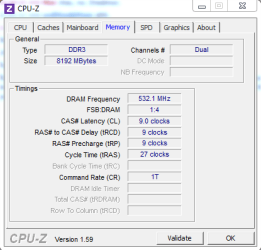
The voltage is 1.65V, although I've read that it's best to set it to 1.5V.

The timings are 9-9-27.

The only two things I changed in the BIOS were that I changed the 24 to 27 and I changed the voltage to 1.65V.

The RAM will default to 1333 unless you change the BIOS settings. The easiest way to do that is to enable the XMP profile. (I feel too lazy to check your MB manual to see where that's done.) ALternately, you can probably set the memory frequency, voltage, and timings manually. (That's what I usually do.)

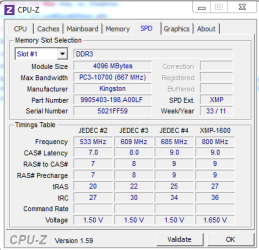
I have an Asrock motherboard, and I don't think it supports XMP yet. But cpu-z does show an XMP column; is that giving me the XMP numbers?

If "auto" isn't totally reliable, I'd rather set everything manually, but I'm not sure how to do so. There are an awful lot of numbers on that sheet. I also can't tell when the specs are indicating the most extreme possible setting (for overclocking) and when they're giving the recommended number.
 

Attachments

  • FallibleCanineMemoryTab.PNG
    FallibleCanineMemoryTab.PNG
    10 KB · Views: 24
  • FallibleCanineSPDTab.PNG
    FallibleCanineSPDTab.PNG
    11.9 KB · Views: 31
Last edited:

My Computer My Computer

At a glance

Windows 7 - 64-bitIntel Core i3-2100 3.1GHz Dual-Core 65W LGA1155Kingston Technology HyperX 8 GB (2x4 GB Modul...Sapphire Radeon HD 5850
Computer Manufacturer/Model Number
Specs: https://docs.google.com/spreadsheet/ccc?key=0ApEvyoOwrfzBdFlZR19iZXJFSGR5ak5falh4d0l2eVE&auth
OS
Windows 7 - 64-bit
CPU
Intel Core i3-2100 3.1GHz Dual-Core 65W LGA1155
Motherboard
ASRock H61M/U3S3 LGA 1155 Intel H61 HDMI SATA 6Gb/s USB 3.0
Memory
Kingston Technology HyperX 8 GB (2x4 GB Modules) 1600 MHz DD
Graphics Card(s)
Sapphire Radeon HD 5850
Monitor(s) Displays
ASUS VH238H
Screen Resolution
1920x1080
Hard Drives
Samsung 1 TB Spinpoint 7200 RPM 32MB Cache SATA 3.5 inch Bulk/OEM Desktop Hard Drive HD103SJ
PSU
Antec BP550 Plus 550W Continuous Power ATX12V V2.2 80 PLUS C
Case
Cooler Master RC-692-KKN2 Advanced
Keyboard
Macally iKeySlim
Mouse
Razer Deathadder
Internet Speed
wi-fi (Netgear WN300 usb adapter)
I have an Asrock motherboard too, only mine is a P67 version. Mine does support XML. It is in the overclocking section. If you have it, open it, go to the dram configuration, and enable XMP, set the profile to auto and it should set the ram to specs. But, I always check. On the SPD tab you showed, the XMP is what you will want it set to.
 

My Computers My Computers

  • At a glance

    Windows 11 ProRyzen 9 5900X32GB G Skill DDR4-3600EVGA RTX 3080 FTW 3 Ultra
    Computer type
    PC/Desktop
    Computer Manufacturer/Model Number
    ALWAYS UNDER CONSTRUCTION
    OS
    Windows 11 Pro
    CPU
    Ryzen 9 5900X
    Motherboard
    Asus X570 Crosshair Viii Hero
    Memory
    32GB G Skill DDR4-3600
    Graphics Card(s)
    EVGA RTX 3080 FTW 3 Ultra
    Sound Card
    On Board/Sennheiser PC37X Headset
    Monitor(s) Displays
    3 X Asus 27"
    Screen Resolution
    2560x1440
    Hard Drives
    2 X 1 TB NVME drives
    PSU
    EVGA 850
    Case
    Phanteks Eclipse P400A
    Cooling
    EVGA 280 AIO
    Keyboard
    Logitech G510s/ Logitech G13
    Mouse
    Logitech G502
    Internet Speed
    24/1
    Antivirus
    ESET/MBAM Pro/SAS Pro
    Browser
    Chrome/ Firefox/ Edge
  • At a glance

    Windows 11 ProIntel Ultra 9 288V32 GB LPDDR5X 8533
    Computer type
    Laptop
    System Manufacturer/Model Number
    Dell 16 Plus
    OS
    Windows 11 Pro
    CPU
    Intel Ultra 9 288V
    Memory
    32 GB LPDDR5X 8533
    Monitor(s) Displays
    16" Mini-LED HDR600 Touch 90 Hz
    Screen Resolution
    2560X1600
    Hard Drives
    1 TB NVME
Thanks! I'll look for it. If it's not there, maybe I'll update.

So I'm guessing I should manually change the TRC to 36.

What about Command Rate?

Also, it gives 800 mHz as the frequency ... um ... I think I have the frequency set to 1333, because that was the highest it would go. Is it something like "set command rate to 2 and then set frequency to 800"? It's 1600 mhz memory.
 

My Computer My Computer

At a glance

Windows 7 - 64-bitIntel Core i3-2100 3.1GHz Dual-Core 65W LGA1155Kingston Technology HyperX 8 GB (2x4 GB Modul...Sapphire Radeon HD 5850
Computer Manufacturer/Model Number
Specs: https://docs.google.com/spreadsheet/ccc?key=0ApEvyoOwrfzBdFlZR19iZXJFSGR5ak5falh4d0l2eVE&auth
OS
Windows 7 - 64-bit
CPU
Intel Core i3-2100 3.1GHz Dual-Core 65W LGA1155
Motherboard
ASRock H61M/U3S3 LGA 1155 Intel H61 HDMI SATA 6Gb/s USB 3.0
Memory
Kingston Technology HyperX 8 GB (2x4 GB Modules) 1600 MHz DD
Graphics Card(s)
Sapphire Radeon HD 5850
Monitor(s) Displays
ASUS VH238H
Screen Resolution
1920x1080
Hard Drives
Samsung 1 TB Spinpoint 7200 RPM 32MB Cache SATA 3.5 inch Bulk/OEM Desktop Hard Drive HD103SJ
PSU
Antec BP550 Plus 550W Continuous Power ATX12V V2.2 80 PLUS C
Case
Cooler Master RC-692-KKN2 Advanced
Keyboard
Macally iKeySlim
Mouse
Razer Deathadder
Internet Speed
wi-fi (Netgear WN300 usb adapter)

My Computer My Computer

At a glance

Windows 7 - 64-bitIntel Core i3-2100 3.1GHz Dual-Core 65W LGA1155Kingston Technology HyperX 8 GB (2x4 GB Modul...Sapphire Radeon HD 5850
Computer Manufacturer/Model Number
Specs: https://docs.google.com/spreadsheet/ccc?key=0ApEvyoOwrfzBdFlZR19iZXJFSGR5ak5falh4d0l2eVE&auth
OS
Windows 7 - 64-bit
CPU
Intel Core i3-2100 3.1GHz Dual-Core 65W LGA1155
Motherboard
ASRock H61M/U3S3 LGA 1155 Intel H61 HDMI SATA 6Gb/s USB 3.0
Memory
Kingston Technology HyperX 8 GB (2x4 GB Modules) 1600 MHz DD
Graphics Card(s)
Sapphire Radeon HD 5850
Monitor(s) Displays
ASUS VH238H
Screen Resolution
1920x1080
Hard Drives
Samsung 1 TB Spinpoint 7200 RPM 32MB Cache SATA 3.5 inch Bulk/OEM Desktop Hard Drive HD103SJ
PSU
Antec BP550 Plus 550W Continuous Power ATX12V V2.2 80 PLUS C
Case
Cooler Master RC-692-KKN2 Advanced
Keyboard
Macally iKeySlim
Mouse
Razer Deathadder
Internet Speed
wi-fi (Netgear WN300 usb adapter)
If it shows 800 on the memory tab of cpuz, that is correct. Ram id double data rate (DDR) so it should be at 600 (which is 1600). If you enable XMP it will ruually set everything correctly. It reads it off of the ram.
 

My Computers My Computers

  • At a glance

    Windows 11 ProRyzen 9 5900X32GB G Skill DDR4-3600EVGA RTX 3080 FTW 3 Ultra
    Computer type
    PC/Desktop
    Computer Manufacturer/Model Number
    ALWAYS UNDER CONSTRUCTION
    OS
    Windows 11 Pro
    CPU
    Ryzen 9 5900X
    Motherboard
    Asus X570 Crosshair Viii Hero
    Memory
    32GB G Skill DDR4-3600
    Graphics Card(s)
    EVGA RTX 3080 FTW 3 Ultra
    Sound Card
    On Board/Sennheiser PC37X Headset
    Monitor(s) Displays
    3 X Asus 27"
    Screen Resolution
    2560x1440
    Hard Drives
    2 X 1 TB NVME drives
    PSU
    EVGA 850
    Case
    Phanteks Eclipse P400A
    Cooling
    EVGA 280 AIO
    Keyboard
    Logitech G510s/ Logitech G13
    Mouse
    Logitech G502
    Internet Speed
    24/1
    Antivirus
    ESET/MBAM Pro/SAS Pro
    Browser
    Chrome/ Firefox/ Edge
  • At a glance

    Windows 11 ProIntel Ultra 9 288V32 GB LPDDR5X 8533
    Computer type
    Laptop
    System Manufacturer/Model Number
    Dell 16 Plus
    OS
    Windows 11 Pro
    CPU
    Intel Ultra 9 288V
    Memory
    32 GB LPDDR5X 8533
    Monitor(s) Displays
    16" Mini-LED HDR600 Touch 90 Hz
    Screen Resolution
    2560X1600
    Hard Drives
    1 TB NVME
I didn't see it either, but in the OC tweeker section, try setting the frequency and the timings on the ram just like the XMP profile in cpuz SPD tab and see if that works.

EDIT: Page 37 of the manual.
 

My Computers My Computers

  • At a glance

    Windows 11 ProRyzen 9 5900X32GB G Skill DDR4-3600EVGA RTX 3080 FTW 3 Ultra
    Computer type
    PC/Desktop
    Computer Manufacturer/Model Number
    ALWAYS UNDER CONSTRUCTION
    OS
    Windows 11 Pro
    CPU
    Ryzen 9 5900X
    Motherboard
    Asus X570 Crosshair Viii Hero
    Memory
    32GB G Skill DDR4-3600
    Graphics Card(s)
    EVGA RTX 3080 FTW 3 Ultra
    Sound Card
    On Board/Sennheiser PC37X Headset
    Monitor(s) Displays
    3 X Asus 27"
    Screen Resolution
    2560x1440
    Hard Drives
    2 X 1 TB NVME drives
    PSU
    EVGA 850
    Case
    Phanteks Eclipse P400A
    Cooling
    EVGA 280 AIO
    Keyboard
    Logitech G510s/ Logitech G13
    Mouse
    Logitech G502
    Internet Speed
    24/1
    Antivirus
    ESET/MBAM Pro/SAS Pro
    Browser
    Chrome/ Firefox/ Edge
  • At a glance

    Windows 11 ProIntel Ultra 9 288V32 GB LPDDR5X 8533
    Computer type
    Laptop
    System Manufacturer/Model Number
    Dell 16 Plus
    OS
    Windows 11 Pro
    CPU
    Intel Ultra 9 288V
    Memory
    32 GB LPDDR5X 8533
    Monitor(s) Displays
    16" Mini-LED HDR600 Touch 90 Hz
    Screen Resolution
    2560X1600
    Hard Drives
    1 TB NVME
Thanks! I'll look for it. If it's not there, maybe I'll update.

So I'm guessing I should manually change the TRC to 36.

What about Command Rate?

Also, it gives 800 mHz as the frequency ... um ... I think I have the frequency set to 1333, because that was the highest it would go. Is it something like "set command rate to 2 and then set frequency to 800"? It's 1600 mhz memory.

Your RAM is listed on your motherboard RAM compatibility site:
ASRock > Products > H61M/U3S3 > Memory Support List

As suggested the best way to set your RAM to 1600 MHz (in UEFI it is 800MHZ: DDR = Double Data Rate, 800 x 2 =1600) is to select XMP in your UEFI.

OC Tweaker screen > DRAM Timing Control > DRAM Frequency
Default is 'Auto', check there for the XMP options.
The H61 is limited as far as OC'ing and may be limited on RAM settings, as the documentation is vague at best.

If there is no XMP setting then check the DRAM Frequency 'Manual' setting, see if it has a 800MHz selection (that is what you use to get 1600MHz).
Set the first four RAM timings as per the CPUZ SPD XMP tab, 9-9-9-27 and leave the rest on auto.
DRAM voltage to 1.65v
VTT voltage to 1.15v
If it's not stable change the CR (Command Rate) to 2N.

If that is not stable you will need to bump the VTT voltage, CPU integrated memory controller.
You have to be careful with this voltage, let us know before you do any adjustments.

Let us know how it's going.
 
Last edited:

My Computer My Computer

At a glance

Windows 7 Ult x64 - SP1/ Windows 8 Pro x64Intel Core i5-3570K 4.6GHz8GB (2X4GB) DDR3 1600 Corsair Vengeance CL8 1.5vSapphire HD 7770 Vapor-X OC 1GB DDR5
Computer type
PC/Desktop
Computer Manufacturer/Model Number
76~2.0
OS
Windows 7 Ult x64 - SP1/ Windows 8 Pro x64
CPU
Intel Core i5-3570K 4.6GHz
Motherboard
Gigabyte GA-Z77X UD3H, f18
Memory
8GB (2X4GB) DDR3 1600 Corsair Vengeance CL8 1.5v
Graphics Card(s)
Sapphire HD 7770 Vapor-X OC 1GB DDR5
Sound Card
Onboard VIA VT2021
Monitor(s) Displays
22" LCD Dell
Screen Resolution
1680x1050
Hard Drives
Samsung 840Pro 128GB SSD,
Seagate Barracuda 500GB SATA2 7200rpm 32MB cache, Seagate Barracuda 1TB SATA2 7200rpm 32MB cache,
PSU
Corsair HX650W
Case
Cooler Master Storm Scout
Cooling
Corsair H80 2x12cm Noctua NF P12 , 2x14cm case fans
Keyboard
Logitech Wave
Mouse
CM Sentinel
Internet Speed
Dismal
Antivirus
Avast
Browser
Opera Next
Other Info
Haswell laptop: HP Envy 17t-j, i7-4700MQ, GeForce 740M 2GB DDR3, 17.3" Full HD 1920x1080, 16GB RAM, Samsung 840 Pro 128GB, 1TB Hitachi 7200 HDD,
Desktop: eSATA ports,
External eSATA Seagate 500GB SATA2 7200rpm,
External WD USB 500GB
Your RAM is listed on your motherboard RAM compatibility site:
ASRock > Products > H61M/U3S3 > Memory Support List

As suggested the best way to set your RAM to 1600 MHz (in UEFI it is 800MHZ: DDR = Double Data Rate, 800 x 2 =1600) is to select XMP in your UEFI.

OC Tweaker screen > DRAM Timing Control > DRAM Frequency
Default is 'Auto', check there for the XMP options.
The H61 is limited as far as OC'ing and may be limited on RAM settings, as the documentation is vague at best.

If there is no XMP setting then check the DRAM Frequency 'Manual' setting, see if it has a 800MHz selection (that is what you use to get 1600MHz).
Set the first four RAM timings as per the CPUZ SPD XMP tab, 9-9-9-27 and leave the rest on auto.
DRAM voltage to 1.65v
VTT voltage to 1.15v
If it's not stable change the CR (Command Rate) to 2N.

If that is not stable you will need to bump the VTT voltage, CPU integrated memory controller.
You have to be careful with this voltage, let us know before you do any adjustments.

Let us know how it's going.

Thanks!

I changed the VTT voltage, and the CR.

I tried all the different settings for DRAM frequency:
Auto
DDR3-800
DDR3-1066
DDR3-1333

and CPU-Z reports half of whatever number I select under the "Memory" tab. e.g., 800 --> 400mhz or so. Maybe it just doesn't support 1600.

I searched for but did not find an XMP option. Here are the setting choices (current selections in CAPS):

CPU Control

Load CPU EZ OC Setting
--> DISABLED
--> 1300mhz
--> 1400mhz
--> 1500mhz

CPU Ratio Setting
--> AUTO
--> manual

Intel Speedstep Technology
--> ENABLED
--> disabled

Turbo Boost Power Limit
--> AUTO
--> manual

Core Current Limit
--> (field) 150
 

My Computer My Computer

At a glance

Windows 7 - 64-bitIntel Core i3-2100 3.1GHz Dual-Core 65W LGA1155Kingston Technology HyperX 8 GB (2x4 GB Modul...Sapphire Radeon HD 5850
Computer Manufacturer/Model Number
Specs: https://docs.google.com/spreadsheet/ccc?key=0ApEvyoOwrfzBdFlZR19iZXJFSGR5ak5falh4d0l2eVE&auth
OS
Windows 7 - 64-bit
CPU
Intel Core i3-2100 3.1GHz Dual-Core 65W LGA1155
Motherboard
ASRock H61M/U3S3 LGA 1155 Intel H61 HDMI SATA 6Gb/s USB 3.0
Memory
Kingston Technology HyperX 8 GB (2x4 GB Modules) 1600 MHz DD
Graphics Card(s)
Sapphire Radeon HD 5850
Monitor(s) Displays
ASUS VH238H
Screen Resolution
1920x1080
Hard Drives
Samsung 1 TB Spinpoint 7200 RPM 32MB Cache SATA 3.5 inch Bulk/OEM Desktop Hard Drive HD103SJ
PSU
Antec BP550 Plus 550W Continuous Power ATX12V V2.2 80 PLUS C
Case
Cooler Master RC-692-KKN2 Advanced
Keyboard
Macally iKeySlim
Mouse
Razer Deathadder
Internet Speed
wi-fi (Netgear WN300 usb adapter)
The next section is DRAM Timing Control.

DRAM frequency
--> AUTO
--> DDR3-800
--> DDR3-1066
--> DDR3-1333

(I tried 800 and 1333; the highest I could get the mhz in the "Memory" tab of CPU-Z was 665.2 with AUTO or 1333. 800 gives 400 or so.)

Then the 9-9-27 stuff.

tWR
tRFC
tRRD
tWTR
tRTP
tFAW
ODT WR (CHA)
ODT NOM (CHA)
ODT WR (CHB)
ODT NOM (CHB)


Voltage Control

Power Saving Mode
--> OFF

CPU Voltage offset
...

and a bunch of voltages, all at auto.
 

My Computer My Computer

At a glance

Windows 7 - 64-bitIntel Core i3-2100 3.1GHz Dual-Core 65W LGA1155Kingston Technology HyperX 8 GB (2x4 GB Modul...Sapphire Radeon HD 5850
Computer Manufacturer/Model Number
Specs: https://docs.google.com/spreadsheet/ccc?key=0ApEvyoOwrfzBdFlZR19iZXJFSGR5ak5falh4d0l2eVE&auth
OS
Windows 7 - 64-bit
CPU
Intel Core i3-2100 3.1GHz Dual-Core 65W LGA1155
Motherboard
ASRock H61M/U3S3 LGA 1155 Intel H61 HDMI SATA 6Gb/s USB 3.0
Memory
Kingston Technology HyperX 8 GB (2x4 GB Modules) 1600 MHz DD
Graphics Card(s)
Sapphire Radeon HD 5850
Monitor(s) Displays
ASUS VH238H
Screen Resolution
1920x1080
Hard Drives
Samsung 1 TB Spinpoint 7200 RPM 32MB Cache SATA 3.5 inch Bulk/OEM Desktop Hard Drive HD103SJ
PSU
Antec BP550 Plus 550W Continuous Power ATX12V V2.2 80 PLUS C
Case
Cooler Master RC-692-KKN2 Advanced
Keyboard
Macally iKeySlim
Mouse
Razer Deathadder
Internet Speed
wi-fi (Netgear WN300 usb adapter)
The next section is DRAM Timing Control.

DRAM frequency
--> AUTO
--> DDR3-800
--> DDR3-1066
--> DDR3-1333
BIOS usually is the actual speed 400MHz for 800MHz, 533MHz for 1066MHz, 667MHz for 1333MHz, and 800MHz for 1600MHz.
The UEFI is showing you the DDR speed, they are the same thing.
DDR is Double Data Rate, this is why you see half the amount in CPUZ. It is actually running at the higher speed.

(I tried 800 and 1333; the highest I could get the mhz in the "Memory" tab of CPU-Z was 665.2 with AUTO or 1333. 800 gives 400 or so.)
Then the 9-9-27 stuff.

tWR
tRFC
tRRD
tWTR
tRTP
tFAW
ODT WR (CHA)
ODT NOM (CHA)
ODT WR (CHB)
ODT NOM (CHB)
Only change the first four, leave the rest on 'Auto'.
Voltage Control

Power Saving Mode
--> OFF

CPU Voltage offset
...

and a bunch of voltages, all at auto.

Looks like your UEFI only allows RAM frequency at a max of 1333MHz.
The difference between 1333MHz and 1600MHz can only be noticed in a benchmark.

Just set it to 1333MHz.
Use the Auto setting for DDR3-1333.
Check that the DRAM voltage is 1.50v.
Set the VTT to auto, it should be around 1.00v to 1.10v, either are good if it's running stable.
The RAM timings should be 9-9-9-25.
Command rate 1N.

The 'Auto' setting should do all of this for you.

Let us know how it's going.
 

My Computer My Computer

At a glance

Windows 7 Ult x64 - SP1/ Windows 8 Pro x64Intel Core i5-3570K 4.6GHz8GB (2X4GB) DDR3 1600 Corsair Vengeance CL8 1.5vSapphire HD 7770 Vapor-X OC 1GB DDR5
Computer type
PC/Desktop
Computer Manufacturer/Model Number
76~2.0
OS
Windows 7 Ult x64 - SP1/ Windows 8 Pro x64
CPU
Intel Core i5-3570K 4.6GHz
Motherboard
Gigabyte GA-Z77X UD3H, f18
Memory
8GB (2X4GB) DDR3 1600 Corsair Vengeance CL8 1.5v
Graphics Card(s)
Sapphire HD 7770 Vapor-X OC 1GB DDR5
Sound Card
Onboard VIA VT2021
Monitor(s) Displays
22" LCD Dell
Screen Resolution
1680x1050
Hard Drives
Samsung 840Pro 128GB SSD,
Seagate Barracuda 500GB SATA2 7200rpm 32MB cache, Seagate Barracuda 1TB SATA2 7200rpm 32MB cache,
PSU
Corsair HX650W
Case
Cooler Master Storm Scout
Cooling
Corsair H80 2x12cm Noctua NF P12 , 2x14cm case fans
Keyboard
Logitech Wave
Mouse
CM Sentinel
Internet Speed
Dismal
Antivirus
Avast
Browser
Opera Next
Other Info
Haswell laptop: HP Envy 17t-j, i7-4700MQ, GeForce 740M 2GB DDR3, 17.3" Full HD 1920x1080, 16GB RAM, Samsung 840 Pro 128GB, 1TB Hitachi 7200 HDD,
Desktop: eSATA ports,
External eSATA Seagate 500GB SATA2 7200rpm,
External WD USB 500GB
The next section is DRAM Timing Control.

DRAM frequency
--> AUTO
--> DDR3-800
--> DDR3-1066
--> DDR3-1333
BIOS usually is the actual speed 400MHz for 800MHz, 533MHz for 1066MHz, 667MHz for 1333MHz, and 800MHz for 1600MHz.
The UEFI is showing you the DDR speed, they are the same thing.
DDR is Double Data Rate, this is why you see half the amount in CPUZ. It is actually running at the higher speed.

(I tried 800 and 1333; the highest I could get the mhz in the "Memory" tab of CPU-Z was 665.2 with AUTO or 1333. 800 gives 400 or so.)
Then the 9-9-27 stuff.

tWR
tRFC
tRRD
tWTR
tRTP
tFAW
ODT WR (CHA)
ODT NOM (CHA)
ODT WR (CHB)
ODT NOM (CHB)
Only change the first four, leave the rest on 'Auto'.
Voltage Control

Power Saving Mode
--> OFF

CPU Voltage offset
...

and a bunch of voltages, all at auto.

Looks like your UEFI only allows RAM frequency at a max of 1333MHz.
The difference between 1333MHz and 1600MHz can only be noticed in a benchmark.

Just set it to 1333MHz.
Use the Auto setting for DDR3-1333.
Check that the DRAM voltage is 1.50v.
Set the VTT to auto, it should be around 1.00v to 1.10v, either are good if it's running stable.
The RAM timings should be 9-9-9-25.
Command rate 1N.

The 'Auto' setting should do all of this for you.

Let us know how it's going.

Thanks! Merry Christmas. ^^ It's running wonderfully.

So earlier you said 1.65V DRAM voltage and 1.15 VTT voltage...and I think 9-9-9-27 for timings.

Just want to confirm that I should change VTT to auto voltage and DRAM to 1.50V, and the timings to 9-9-9-25.
 

My Computer My Computer

At a glance

Windows 7 - 64-bitIntel Core i3-2100 3.1GHz Dual-Core 65W LGA1155Kingston Technology HyperX 8 GB (2x4 GB Modul...Sapphire Radeon HD 5850
Computer Manufacturer/Model Number
Specs: https://docs.google.com/spreadsheet/ccc?key=0ApEvyoOwrfzBdFlZR19iZXJFSGR5ak5falh4d0l2eVE&auth
OS
Windows 7 - 64-bit
CPU
Intel Core i3-2100 3.1GHz Dual-Core 65W LGA1155
Motherboard
ASRock H61M/U3S3 LGA 1155 Intel H61 HDMI SATA 6Gb/s USB 3.0
Memory
Kingston Technology HyperX 8 GB (2x4 GB Modules) 1600 MHz DD
Graphics Card(s)
Sapphire Radeon HD 5850
Monitor(s) Displays
ASUS VH238H
Screen Resolution
1920x1080
Hard Drives
Samsung 1 TB Spinpoint 7200 RPM 32MB Cache SATA 3.5 inch Bulk/OEM Desktop Hard Drive HD103SJ
PSU
Antec BP550 Plus 550W Continuous Power ATX12V V2.2 80 PLUS C
Case
Cooler Master RC-692-KKN2 Advanced
Keyboard
Macally iKeySlim
Mouse
Razer Deathadder
Internet Speed
wi-fi (Netgear WN300 usb adapter)
FallibleCanine, I do not presume to speak for Dave76, he is our ram Guru. But I believe the adjustments he mentioned first were for if you could run the ram at 1600. But, because you can't, I think he said set everything to auto and see if it runs stable. Just be sure and check the voltage and make sure it is set to what your ram package says is correct. If it does not run stable that way, come back and we will help you adjust it and make it stable. Perhaps after you set everything to auto and check the voltage you could post a screenshot of the Memory tab and SPD tab of cpuz, and tell us the voltage in bios.
 

My Computers My Computers

  • At a glance

    Windows 11 ProRyzen 9 5900X32GB G Skill DDR4-3600EVGA RTX 3080 FTW 3 Ultra
    Computer type
    PC/Desktop
    Computer Manufacturer/Model Number
    ALWAYS UNDER CONSTRUCTION
    OS
    Windows 11 Pro
    CPU
    Ryzen 9 5900X
    Motherboard
    Asus X570 Crosshair Viii Hero
    Memory
    32GB G Skill DDR4-3600
    Graphics Card(s)
    EVGA RTX 3080 FTW 3 Ultra
    Sound Card
    On Board/Sennheiser PC37X Headset
    Monitor(s) Displays
    3 X Asus 27"
    Screen Resolution
    2560x1440
    Hard Drives
    2 X 1 TB NVME drives
    PSU
    EVGA 850
    Case
    Phanteks Eclipse P400A
    Cooling
    EVGA 280 AIO
    Keyboard
    Logitech G510s/ Logitech G13
    Mouse
    Logitech G502
    Internet Speed
    24/1
    Antivirus
    ESET/MBAM Pro/SAS Pro
    Browser
    Chrome/ Firefox/ Edge
  • At a glance

    Windows 11 ProIntel Ultra 9 288V32 GB LPDDR5X 8533
    Computer type
    Laptop
    System Manufacturer/Model Number
    Dell 16 Plus
    OS
    Windows 11 Pro
    CPU
    Intel Ultra 9 288V
    Memory
    32 GB LPDDR5X 8533
    Monitor(s) Displays
    16" Mini-LED HDR600 Touch 90 Hz
    Screen Resolution
    2560X1600
    Hard Drives
    1 TB NVME
Thanks essenbe, you're correct.

The first timing and voltage settings were for if your UEFI has a setting for 1600MHz.
The second timing and voltage settings are for running it at 1333MHz.

Due to your motherboard/UEFI limitations you need to run your RAM at 1333MHz.
Just set it to 1333MHz.
Use the Auto setting for DDR3-1333.
Check that the DRAM voltage is 1.50v.
Set the VTT to auto, it should be around 1.00v to 1.10v, either are good if it's running stable.
The RAM timings should be 9-9-9-25.
Command rate 1N.

To confirm all the settings are correct can you post the information requested.
Perhaps after you set everything to auto and check the voltage you could post a screenshot of the Memory tab and SPD tab of cpuz, and tell us the voltage in bios.

Let us know how it's running.
 

My Computer My Computer

At a glance

Windows 7 Ult x64 - SP1/ Windows 8 Pro x64Intel Core i5-3570K 4.6GHz8GB (2X4GB) DDR3 1600 Corsair Vengeance CL8 1.5vSapphire HD 7770 Vapor-X OC 1GB DDR5
Computer type
PC/Desktop
Computer Manufacturer/Model Number
76~2.0
OS
Windows 7 Ult x64 - SP1/ Windows 8 Pro x64
CPU
Intel Core i5-3570K 4.6GHz
Motherboard
Gigabyte GA-Z77X UD3H, f18
Memory
8GB (2X4GB) DDR3 1600 Corsair Vengeance CL8 1.5v
Graphics Card(s)
Sapphire HD 7770 Vapor-X OC 1GB DDR5
Sound Card
Onboard VIA VT2021
Monitor(s) Displays
22" LCD Dell
Screen Resolution
1680x1050
Hard Drives
Samsung 840Pro 128GB SSD,
Seagate Barracuda 500GB SATA2 7200rpm 32MB cache, Seagate Barracuda 1TB SATA2 7200rpm 32MB cache,
PSU
Corsair HX650W
Case
Cooler Master Storm Scout
Cooling
Corsair H80 2x12cm Noctua NF P12 , 2x14cm case fans
Keyboard
Logitech Wave
Mouse
CM Sentinel
Internet Speed
Dismal
Antivirus
Avast
Browser
Opera Next
Other Info
Haswell laptop: HP Envy 17t-j, i7-4700MQ, GeForce 740M 2GB DDR3, 17.3" Full HD 1920x1080, 16GB RAM, Samsung 840 Pro 128GB, 1TB Hitachi 7200 HDD,
Desktop: eSATA ports,
External eSATA Seagate 500GB SATA2 7200rpm,
External WD USB 500GB
Thanks essenbe, you're correct.

The first timing and voltage settings were for if your UEFI has a setting for 1600MHz.
The second timing and voltage settings are for running it at 1333MHz.

Due to your motherboard/UEFI limitations you need to run your RAM at 1333MHz.
Just set it to 1333MHz.
Use the Auto setting for DDR3-1333.
Check that the DRAM voltage is 1.50v.
Set the VTT to auto, it should be around 1.00v to 1.10v, either are good if it's running stable.
The RAM timings should be 9-9-9-25.
Command rate 1N.

To confirm all the settings are correct can you post the information requested.
Perhaps after you set everything to auto and check the voltage you could post a screenshot of the Memory tab and SPD tab of cpuz, and tell us the voltage in bios.

Let us know how it's running.

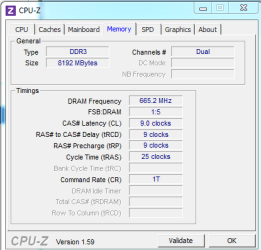
I set the frequency to DDR3-1333,
DRAM voltage to 1.495 (closest to 1.5),
timings to 9-9-9-25,
and VTT to auto.

In BIOS, now, it shows these voltages:
DRAM: 1.495V
PCH: 1.059V
CPU PLL: 1.794V
VTT: 1.057
VCCSA: .925V

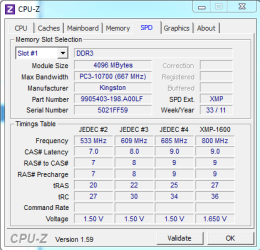
I've attached CPU-Z screenshots, too.

It seems to be running okay!


As an aside, I'm actually sort of curious. Why would it have been working with 9-9-9-27? If it's about timing...shouldn't any variance make the whole thing explode, like a plane shooting off its own propeller?
 

Attachments

  • 2011-12-26-FC-Memory.PNG
    2011-12-26-FC-Memory.PNG
    9.8 KB · Views: 16
  • 2011-12-26-FC-SPD.PNG
    2011-12-26-FC-SPD.PNG
    11.8 KB · Views: 16

My Computer My Computer

At a glance

Windows 7 - 64-bitIntel Core i3-2100 3.1GHz Dual-Core 65W LGA1155Kingston Technology HyperX 8 GB (2x4 GB Modul...Sapphire Radeon HD 5850
Computer Manufacturer/Model Number
Specs: https://docs.google.com/spreadsheet/ccc?key=0ApEvyoOwrfzBdFlZR19iZXJFSGR5ak5falh4d0l2eVE&auth
OS
Windows 7 - 64-bit
CPU
Intel Core i3-2100 3.1GHz Dual-Core 65W LGA1155
Motherboard
ASRock H61M/U3S3 LGA 1155 Intel H61 HDMI SATA 6Gb/s USB 3.0
Memory
Kingston Technology HyperX 8 GB (2x4 GB Modules) 1600 MHz DD
Graphics Card(s)
Sapphire Radeon HD 5850
Monitor(s) Displays
ASUS VH238H
Screen Resolution
1920x1080
Hard Drives
Samsung 1 TB Spinpoint 7200 RPM 32MB Cache SATA 3.5 inch Bulk/OEM Desktop Hard Drive HD103SJ
PSU
Antec BP550 Plus 550W Continuous Power ATX12V V2.2 80 PLUS C
Case
Cooler Master RC-692-KKN2 Advanced
Keyboard
Macally iKeySlim
Mouse
Razer Deathadder
Internet Speed
wi-fi (Netgear WN300 usb adapter)
Glad to hear it's running well.

Electronics are fickle, when you put several electronic components together, they will run differently even with the exact same components.

Each type of electronic component is similar but not exactly the same, two kits of 2x4GB RAM from the same manufacturer may not run the same with identical timings and voltages.

You can adjust the RAM timings and voltages to find the limits of the RAM, this is called overclocking. When you push it too far your system will BSoD, then you have to back it off a little to get it to run stable.

Usually they won't explode ;)


If you're happy with the system and RAM, you can mark the thread 'Solved'.
 
Last edited:

My Computer My Computer

At a glance

Windows 7 Ult x64 - SP1/ Windows 8 Pro x64Intel Core i5-3570K 4.6GHz8GB (2X4GB) DDR3 1600 Corsair Vengeance CL8 1.5vSapphire HD 7770 Vapor-X OC 1GB DDR5
Computer type
PC/Desktop
Computer Manufacturer/Model Number
76~2.0
OS
Windows 7 Ult x64 - SP1/ Windows 8 Pro x64
CPU
Intel Core i5-3570K 4.6GHz
Motherboard
Gigabyte GA-Z77X UD3H, f18
Memory
8GB (2X4GB) DDR3 1600 Corsair Vengeance CL8 1.5v
Graphics Card(s)
Sapphire HD 7770 Vapor-X OC 1GB DDR5
Sound Card
Onboard VIA VT2021
Monitor(s) Displays
22" LCD Dell
Screen Resolution
1680x1050
Hard Drives
Samsung 840Pro 128GB SSD,
Seagate Barracuda 500GB SATA2 7200rpm 32MB cache, Seagate Barracuda 1TB SATA2 7200rpm 32MB cache,
PSU
Corsair HX650W
Case
Cooler Master Storm Scout
Cooling
Corsair H80 2x12cm Noctua NF P12 , 2x14cm case fans
Keyboard
Logitech Wave
Mouse
CM Sentinel
Internet Speed
Dismal
Antivirus
Avast
Browser
Opera Next
Other Info
Haswell laptop: HP Envy 17t-j, i7-4700MQ, GeForce 740M 2GB DDR3, 17.3" Full HD 1920x1080, 16GB RAM, Samsung 840 Pro 128GB, 1TB Hitachi 7200 HDD,
Desktop: eSATA ports,
External eSATA Seagate 500GB SATA2 7200rpm,
External WD USB 500GB
Back
Top