RAM displaying different CAS in each slot?

teapo

New member
Member
Local time
11:55 AM
Messages
25
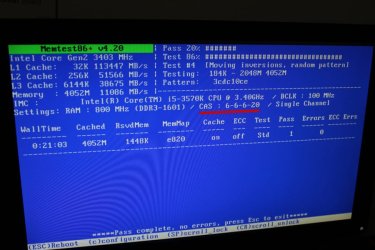
Hello I am currently running my RAM sticks through a Memtest86 . Right now I am testing them individually in each slot. One thing I noticed was that in Slot 1 the first test CAS read 6-6-6-20 and on Slot 3 the current test I'm running, the CAS reads 9-9-9-24 which is what Memtest86 will read if I have both sticks in at the same time.

Is this normal? I have yet to test Slots 2 and 4.

Here is the model of my RAM sticks for reference PV38G160C9K Viper (patriot memory)
 

My Computer My Computer

OS
Windows 7 Home Premium SP1 64bit
CPU
Intel Core i5-3570K @ 3.40GHz 3.80GHz
Motherboard
GIGABYTE GA-Z77X-UP4 TH
Memory
8.00 GB (2x4) Patriot Memory - Viper DDR3 @ 1600MHz
Graphics Card(s)
NVIDIA GeForce GTX 660
Hard Drives
Samsung SSD 840 PRO Seri and ST31000524AS HDD
PSU
Corsair CX600 600W ATX12V v2.3
Case
NZXT Phantom 410 (white)
Cooling
Cooler Master Hyper 212 EVO / 3x 120mm Phantom 410 stock

My Computer My Computer

Computer type
PC/Desktop
Computer Manufacturer/Model Number
HP Pavilion g7-1350dx
OS
Windows 7 Ultimate SP1 x64
CPU
AMD A6-3420M APU
Memory
4.0 Gb DDR3 838 MHz
Graphics Card(s)
AMD Radeon HD 6520G
Sound Card
IDT HD Audio
Screen Resolution
1600x 900
Hard Drives
500GB Hitachi HTS547550A9E384
Sorry ionbasa, I meant Slot 1 as DDR3_1 and Slot 3 as DDR3_2. Testing Stick A in DDR3_3 at the moment and that one reads 6-6-6-20. Also, what difference does it make using XMP? Should I be running XMP profile when I use both modules?

I will see again if both modules are detected in the BIOS after testing Stick B. From what I can remember though is that they are both detected as the memory reads for a total of 8GB.
 

My Computer My Computer

OS
Windows 7 Home Premium SP1 64bit
CPU
Intel Core i5-3570K @ 3.40GHz 3.80GHz
Motherboard
GIGABYTE GA-Z77X-UP4 TH
Memory
8.00 GB (2x4) Patriot Memory - Viper DDR3 @ 1600MHz
Graphics Card(s)
NVIDIA GeForce GTX 660
Hard Drives
Samsung SSD 840 PRO Seri and ST31000524AS HDD
PSU
Corsair CX600 600W ATX12V v2.3
Case
NZXT Phantom 410 (white)
Cooling
Cooler Master Hyper 212 EVO / 3x 120mm Phantom 410 stock
Yes when running both use the XMP profile. XMP basically loads all timings and frequencies for the RAM.
One thing to point out though is tat Memtest may incorrectly read ram timings, if we know that the XMP profile is being used, then we know that this is the case.
 

My Computer My Computer

Computer type
PC/Desktop
Computer Manufacturer/Model Number
HP Pavilion g7-1350dx
OS
Windows 7 Ultimate SP1 x64
CPU
AMD A6-3420M APU
Memory
4.0 Gb DDR3 838 MHz
Graphics Card(s)
AMD Radeon HD 6520G
Sound Card
IDT HD Audio
Screen Resolution
1600x 900
Hard Drives
500GB Hitachi HTS547550A9E384
If you have two different modules installed, the BIOS will set the timing of ALL modules to the slowest (higher number) for timing. What you are seeing is normal for mis-matched memory modules.
 

My Computer My Computer

Computer type
PC/Desktop
Computer Manufacturer/Model Number
Built 2/11/2011
OS
Windows 7 Pro-x64
CPU
i7-2600 3.4GHz - 3.8GHz Turbo
Motherboard
Intel DH67BL-B3
Memory
8Gb - 2x4GB, Muskin 991770 PC3-1333
Graphics Card(s)
Integrated Intel HD 2000
Sound Card
Integrated Intel 10.1 HD, RealTek ALC892
Monitor(s) Displays
Asus LCD VH222H, Haier HL24XSL2a
Screen Resolution
1920x1080, 1920x1080
Hard Drives
Crucial SSD C300-128Gb,
Western Digital WD5002AALX - 500Gb,
Western Digital WD7501AALS - 750Gb
PSU
Seasonic 650W 80+ Gold Modular
Case
Rosewill Defender
Cooling
Stock CPU, Four 120mm case fans, PCH fan added
Keyboard
Logitech EX100 Y-RBH94 Wireless
Mouse
Logitech EX100 M-RCE95 Wireless
Internet Speed
3.0/1.5 Mbs
Antivirus
Microsoft Security Essentials
Browser
Microsoft Internet Explorer 11
Other Info
Antec Veris Premier-Multimedia IR Station,
Cyber Accoustics-3602 Speakers,
AFT XM-5U Card Reader,
Hauppauge TV-HVR-2250,
Sony LX300 USB Turntable
If you have two different modules installed, the BIOS will set the timing of ALL modules to the slowest (higher number) for timing. What you are seeing is normal for mis-matched memory modules.
He is using matched memory modules in both slots.
 

My Computer My Computer

Computer type
PC/Desktop
Computer Manufacturer/Model Number
HP Pavilion g7-1350dx
OS
Windows 7 Ultimate SP1 x64
CPU
AMD A6-3420M APU
Memory
4.0 Gb DDR3 838 MHz
Graphics Card(s)
AMD Radeon HD 6520G
Sound Card
IDT HD Audio
Screen Resolution
1600x 900
Hard Drives
500GB Hitachi HTS547550A9E384
Correct, I am using matched modules from same package. Testing Stick A in DDR3_4 and that reads 9-9-9-24.
 

My Computer My Computer

OS
Windows 7 Home Premium SP1 64bit
CPU
Intel Core i5-3570K @ 3.40GHz 3.80GHz
Motherboard
GIGABYTE GA-Z77X-UP4 TH
Memory
8.00 GB (2x4) Patriot Memory - Viper DDR3 @ 1600MHz
Graphics Card(s)
NVIDIA GeForce GTX 660
Hard Drives
Samsung SSD 840 PRO Seri and ST31000524AS HDD
PSU
Corsair CX600 600W ATX12V v2.3
Case
NZXT Phantom 410 (white)
Cooling
Cooler Master Hyper 212 EVO / 3x 120mm Phantom 410 stock
Alright, so Stick B so far is getting the same results...

DDR3_1 at 6-6-6-20
DDR3_2 at 9-9-9-24
DDR3_3 at 6-6-6-20

Testing DDR3_4 next but I'm going to guess it will be 9-9-9-24. I did some research on XMP and a lot of it seems to involve overclocking-- which I do not want to do. So I guess my question with that is, It's still safe to enable XMP profile 1 without having to OC?

Also the main reason I'm doing all this RAM testing is to try and diagnose my BSOD issues which can be found on this thread here http://www.sevenforums.com/crashes-debugging/275401-bsod-memory_management-1a.html

I still have yet to receive help on that :/
 

My Computer My Computer

OS
Windows 7 Home Premium SP1 64bit
CPU
Intel Core i5-3570K @ 3.40GHz 3.80GHz
Motherboard
GIGABYTE GA-Z77X-UP4 TH
Memory
8.00 GB (2x4) Patriot Memory - Viper DDR3 @ 1600MHz
Graphics Card(s)
NVIDIA GeForce GTX 660
Hard Drives
Samsung SSD 840 PRO Seri and ST31000524AS HDD
PSU
Corsair CX600 600W ATX12V v2.3
Case
NZXT Phantom 410 (white)
Cooling
Cooler Master Hyper 212 EVO / 3x 120mm Phantom 410 stock
you could try the xmp profile if you like, and see if it sets the RAM timings corectly, although the RAM will be 'Overclocked" not your CPU.

Another option is to mnually set the ram timings and frequency in your BIOS.

I would start with all ram sticks installed properly and then test it with XMP, if that still doesn't work then move on to changing the settings in the BIOS manually.
 

My Computer My Computer

Computer type
PC/Desktop
Computer Manufacturer/Model Number
HP Pavilion g7-1350dx
OS
Windows 7 Ultimate SP1 x64
CPU
AMD A6-3420M APU
Memory
4.0 Gb DDR3 838 MHz
Graphics Card(s)
AMD Radeon HD 6520G
Sound Card
IDT HD Audio
Screen Resolution
1600x 900
Hard Drives
500GB Hitachi HTS547550A9E384
Something is definitely not right here.

Reset your BIOS to its defaults by removing the battery and using the appropriate motherboard jumper (see manual for details). Wait a few minutes. Don't forget to replace the battery and place the jumper in its original position (if used). This will clear any settings but, more importantly, will reset any memory timing settings to their defaults (which is usually Auto and/or By SPD, meaning that the timings are taken from the Serial Presence Detect chip on the RAM modules).

Now try each stick in turn in each of the slots. Are you still getting the same results? Don't worry if the frequency shown is 1333MHz instead of 1600MHz. This is normal, as the higher frequency has to be explicitly enabled by selecting the XMP profile in the BIOS.

If you get the same results, then I have a feeling that it is the board not reading the SPD data correctly. Do you have the latest BIOS firmware installed?
 

My Computer My Computer

Computer type
PC/Desktop
Computer Manufacturer/Model Number
Dwarf Dwf/11/2012 r09/2013
OS
Windows 8.1 Pro RTM x64
CPU
Intel Core-i5-3570K 4-core @ 3.4GHz (Ivy Bridge) (OC 4.4GHz)
Motherboard
ASRock Z77 Extreme4-M
Memory
4 x 4GB DDR3-1600 Corsair Vengeance CMZ8GX3M2A1600C9B (16GB)
Graphics Card(s)
MSI GeForce GTX770 Gaming OC 2GB
Sound Card
Realtek High Definition on board solution (ALC 898)
Monitor(s) Displays
ViewSonic VA1912w Widescreen (VGA)
Screen Resolution
1440x900
Hard Drives
OCZ Agility 3 SSD 120GB SATA III x2 (RAID 0)
Samsung HD501LJ 500GB SATA II x2
Hitachi HDS721010CLA332 1TB SATA II
Iomega 1.5TB Ext USB 2.0
WD 2.0TB Ext USB 3.0
PSU
XFX Pro Series 850W Semi-Modular
Case
Gigabyte IF233
Cooling
1 x 120mm Front Inlet 1 x 120mm Rear Exhaust
Keyboard
Microsoft Comfort Curve Keyboard 3000 (USB)
Mouse
Microsoft Comfort Mouse 3000 for Business (USB)
Internet Speed
NetGear DG834Gv3 ADSL Modem/Router (Ethernet) ~4.0 Mb/s (O2)
Antivirus
Avast! 8.0.1497
Browser
IE 11
Other Info
Optical Drive: HL-DT-ST BD-RE BH10LS30 SATA Bluray
Lexmark S305 Printer/Scanner/Copier (USB)
WEI Score: 8.1/8.1/8.5/8.5/8.25
Asus Eee PC 1011PX Netbook (Windows 7 x86 Starter)
Very interesting. I like Dwarft's method. I have never had that happened with matched ram.
 

My Computer My Computer

Computer type
PC/Desktop
Computer Manufacturer/Model Number
Home made Desktop
OS
Windows 10 Pro. 64/ version 1709 Windows 7 Pro/64
CPU
Intel i7-6800K @ 4.3
Motherboard
ASUS X-99 Deluxe II
Memory
Corsair Platinum 16 gig @2400
Graphics Card(s)
EVGA GTX 1070 OC
Monitor(s) Displays
Asus 27" LED LCD/VE278Q
Screen Resolution
1920-1080 or 1280-720 HDMI
Hard Drives
INTEL SSD 730-240 Gb Sata 3.0/
PSU
EVGA Platium 1200W
Case
Phanteks Luxe Tempered Glass 8 fans/ one radiator
Cooling
XSPC/ Water Cooled CPU
Keyboard
Das 4 Professional
Mouse
Logitech M705/MX Anywhere 2-S
Internet Speed
100 mbits
Antivirus
Microsoft Security Essentials/ Malwarebytes Premium 3.0/ SAS
Browser
I.E. 11 default/Firefox/ ISP Time Warner Cable/Spectrum
Other Info
LG BluRay Burner/
Sound system-KLipsch-THX/
Icy Dock ssd Hot Swap bays.
Thanks for the feedback guys.

Dwarf, I reset the BIOS / CMOS via your steps so everything went back to default settings. I tried Memtest with the individual sticks and I get the same results as mentioned before. Then I tried ionbasa's suggestions with both XMP profile and manually changing the CAS latencies but they still appear as 6-6-6-20 on the test. Perhaps this is normal for those two slots to read my memory that way? When I Dual Channel, Memtest and the BIOS will read it as 9-9-9-24.

And yes, my BIOS firmware is up to date.
 

My Computer My Computer

OS
Windows 7 Home Premium SP1 64bit
CPU
Intel Core i5-3570K @ 3.40GHz 3.80GHz
Motherboard
GIGABYTE GA-Z77X-UP4 TH
Memory
8.00 GB (2x4) Patriot Memory - Viper DDR3 @ 1600MHz
Graphics Card(s)
NVIDIA GeForce GTX 660
Hard Drives
Samsung SSD 840 PRO Seri and ST31000524AS HDD
PSU
Corsair CX600 600W ATX12V v2.3
Case
NZXT Phantom 410 (white)
Cooling
Cooler Master Hyper 212 EVO / 3x 120mm Phantom 410 stock
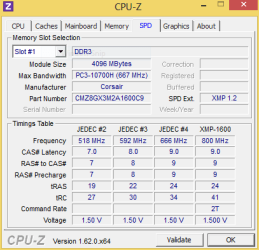
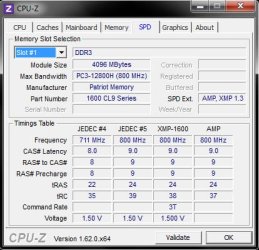
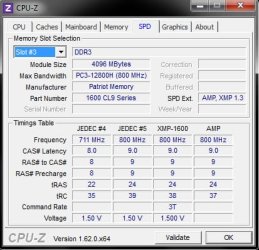
That is certainly not normal. What timings are displayed by the SPD tab of CPU-Z? Are the timings you are reporting mentioned on this tab?

Capture.PNG
 

My Computer My Computer

Computer type
PC/Desktop
Computer Manufacturer/Model Number
Dwarf Dwf/11/2012 r09/2013
OS
Windows 8.1 Pro RTM x64
CPU
Intel Core-i5-3570K 4-core @ 3.4GHz (Ivy Bridge) (OC 4.4GHz)
Motherboard
ASRock Z77 Extreme4-M
Memory
4 x 4GB DDR3-1600 Corsair Vengeance CMZ8GX3M2A1600C9B (16GB)
Graphics Card(s)
MSI GeForce GTX770 Gaming OC 2GB
Sound Card
Realtek High Definition on board solution (ALC 898)
Monitor(s) Displays
ViewSonic VA1912w Widescreen (VGA)
Screen Resolution
1440x900
Hard Drives
OCZ Agility 3 SSD 120GB SATA III x2 (RAID 0)
Samsung HD501LJ 500GB SATA II x2
Hitachi HDS721010CLA332 1TB SATA II
Iomega 1.5TB Ext USB 2.0
WD 2.0TB Ext USB 3.0
PSU
XFX Pro Series 850W Semi-Modular
Case
Gigabyte IF233
Cooling
1 x 120mm Front Inlet 1 x 120mm Rear Exhaust
Keyboard
Microsoft Comfort Curve Keyboard 3000 (USB)
Mouse
Microsoft Comfort Mouse 3000 for Business (USB)
Internet Speed
NetGear DG834Gv3 ADSL Modem/Router (Ethernet) ~4.0 Mb/s (O2)
Antivirus
Avast! 8.0.1497
Browser
IE 11
Other Info
Optical Drive: HL-DT-ST BD-RE BH10LS30 SATA Bluray
Lexmark S305 Printer/Scanner/Copier (USB)
WEI Score: 8.1/8.1/8.5/8.5/8.25
Asus Eee PC 1011PX Netbook (Windows 7 x86 Starter)
Dwarf, here is what CPU-Z is reporting for both slots (Dual Channelling right now).

Unless you wanted me to see what CPU-Z reports if I'm running with 1 module in Slot 1 or Slot 3?
 

Attachments

  • slot1.jpg
    slot1.jpg
    33.8 KB · Views: 2
  • slot2.jpg
    slot2.jpg
    34.2 KB · Views: 2

My Computer My Computer

OS
Windows 7 Home Premium SP1 64bit
CPU
Intel Core i5-3570K @ 3.40GHz 3.80GHz
Motherboard
GIGABYTE GA-Z77X-UP4 TH
Memory
8.00 GB (2x4) Patriot Memory - Viper DDR3 @ 1600MHz
Graphics Card(s)
NVIDIA GeForce GTX 660
Hard Drives
Samsung SSD 840 PRO Seri and ST31000524AS HDD
PSU
Corsair CX600 600W ATX12V v2.3
Case
NZXT Phantom 410 (white)
Cooling
Cooler Master Hyper 212 EVO / 3x 120mm Phantom 410 stock
Yes please, since those are the slots that are giving you those timing figures. I see no mention of those figures on your SPD snips though, which leads me to believe that your board could be faulty.
 

My Computer My Computer

Computer type
PC/Desktop
Computer Manufacturer/Model Number
Dwarf Dwf/11/2012 r09/2013
OS
Windows 8.1 Pro RTM x64
CPU
Intel Core-i5-3570K 4-core @ 3.4GHz (Ivy Bridge) (OC 4.4GHz)
Motherboard
ASRock Z77 Extreme4-M
Memory
4 x 4GB DDR3-1600 Corsair Vengeance CMZ8GX3M2A1600C9B (16GB)
Graphics Card(s)
MSI GeForce GTX770 Gaming OC 2GB
Sound Card
Realtek High Definition on board solution (ALC 898)
Monitor(s) Displays
ViewSonic VA1912w Widescreen (VGA)
Screen Resolution
1440x900
Hard Drives
OCZ Agility 3 SSD 120GB SATA III x2 (RAID 0)
Samsung HD501LJ 500GB SATA II x2
Hitachi HDS721010CLA332 1TB SATA II
Iomega 1.5TB Ext USB 2.0
WD 2.0TB Ext USB 3.0
PSU
XFX Pro Series 850W Semi-Modular
Case
Gigabyte IF233
Cooling
1 x 120mm Front Inlet 1 x 120mm Rear Exhaust
Keyboard
Microsoft Comfort Curve Keyboard 3000 (USB)
Mouse
Microsoft Comfort Mouse 3000 for Business (USB)
Internet Speed
NetGear DG834Gv3 ADSL Modem/Router (Ethernet) ~4.0 Mb/s (O2)
Antivirus
Avast! 8.0.1497
Browser
IE 11
Other Info
Optical Drive: HL-DT-ST BD-RE BH10LS30 SATA Bluray
Lexmark S305 Printer/Scanner/Copier (USB)
WEI Score: 8.1/8.1/8.5/8.5/8.25
Asus Eee PC 1011PX Netbook (Windows 7 x86 Starter)
Alright here's the results and a pic I got from doing Memtest single channel earlier.

slot1-single.jpgslot3-single.jpg

slot1-memtest-single.jpg
 

My Computer My Computer

OS
Windows 7 Home Premium SP1 64bit
CPU
Intel Core i5-3570K @ 3.40GHz 3.80GHz
Motherboard
GIGABYTE GA-Z77X-UP4 TH
Memory
8.00 GB (2x4) Patriot Memory - Viper DDR3 @ 1600MHz
Graphics Card(s)
NVIDIA GeForce GTX 660
Hard Drives
Samsung SSD 840 PRO Seri and ST31000524AS HDD
PSU
Corsair CX600 600W ATX12V v2.3
Case
NZXT Phantom 410 (white)
Cooling
Cooler Master Hyper 212 EVO / 3x 120mm Phantom 410 stock
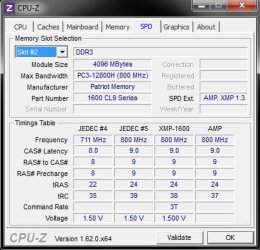
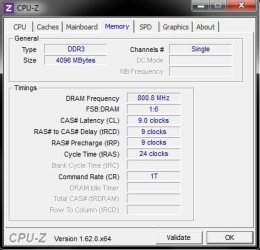
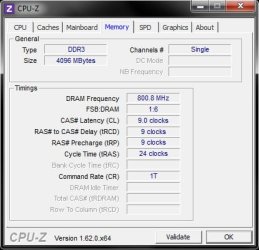
What timings are shown on the Memory tab of CPU-Z? It would be helpful to use just a single stick of RAM (the same one) and show what you get on this tab for each slot. The SPD tab shows you the available timings as stored in the module's SPD chip, whereas the Memory tab shows you the actual timings currently in use.
 

My Computer My Computer

Computer type
PC/Desktop
Computer Manufacturer/Model Number
Dwarf Dwf/11/2012 r09/2013
OS
Windows 8.1 Pro RTM x64
CPU
Intel Core-i5-3570K 4-core @ 3.4GHz (Ivy Bridge) (OC 4.4GHz)
Motherboard
ASRock Z77 Extreme4-M
Memory
4 x 4GB DDR3-1600 Corsair Vengeance CMZ8GX3M2A1600C9B (16GB)
Graphics Card(s)
MSI GeForce GTX770 Gaming OC 2GB
Sound Card
Realtek High Definition on board solution (ALC 898)
Monitor(s) Displays
ViewSonic VA1912w Widescreen (VGA)
Screen Resolution
1440x900
Hard Drives
OCZ Agility 3 SSD 120GB SATA III x2 (RAID 0)
Samsung HD501LJ 500GB SATA II x2
Hitachi HDS721010CLA332 1TB SATA II
Iomega 1.5TB Ext USB 2.0
WD 2.0TB Ext USB 3.0
PSU
XFX Pro Series 850W Semi-Modular
Case
Gigabyte IF233
Cooling
1 x 120mm Front Inlet 1 x 120mm Rear Exhaust
Keyboard
Microsoft Comfort Curve Keyboard 3000 (USB)
Mouse
Microsoft Comfort Mouse 3000 for Business (USB)
Internet Speed
NetGear DG834Gv3 ADSL Modem/Router (Ethernet) ~4.0 Mb/s (O2)
Antivirus
Avast! 8.0.1497
Browser
IE 11
Other Info
Optical Drive: HL-DT-ST BD-RE BH10LS30 SATA Bluray
Lexmark S305 Printer/Scanner/Copier (USB)
WEI Score: 8.1/8.1/8.5/8.5/8.25
Asus Eee PC 1011PX Netbook (Windows 7 x86 Starter)
The CPU-Z reports in post #16 are from using single sticks. I used the same stick in Slot 1, took the screenshot, and then turned off computer to insert it in Slot 3 and took that screenshot. Running on 4GB (1 stick) right now in Slot 3 as we speak.

EDIT: Sorry, just re-read your post... let me grab the Memory tab.
 

My Computer My Computer

OS
Windows 7 Home Premium SP1 64bit
CPU
Intel Core i5-3570K @ 3.40GHz 3.80GHz
Motherboard
GIGABYTE GA-Z77X-UP4 TH
Memory
8.00 GB (2x4) Patriot Memory - Viper DDR3 @ 1600MHz
Graphics Card(s)
NVIDIA GeForce GTX 660
Hard Drives
Samsung SSD 840 PRO Seri and ST31000524AS HDD
PSU
Corsair CX600 600W ATX12V v2.3
Case
NZXT Phantom 410 (white)
Cooling
Cooler Master Hyper 212 EVO / 3x 120mm Phantom 410 stock
I'm just about to hit the sack as I'm at work early in the morning. I'll be back later. :)
 

My Computer My Computer

Computer type
PC/Desktop
Computer Manufacturer/Model Number
Dwarf Dwf/11/2012 r09/2013
OS
Windows 8.1 Pro RTM x64
CPU
Intel Core-i5-3570K 4-core @ 3.4GHz (Ivy Bridge) (OC 4.4GHz)
Motherboard
ASRock Z77 Extreme4-M
Memory
4 x 4GB DDR3-1600 Corsair Vengeance CMZ8GX3M2A1600C9B (16GB)
Graphics Card(s)
MSI GeForce GTX770 Gaming OC 2GB
Sound Card
Realtek High Definition on board solution (ALC 898)
Monitor(s) Displays
ViewSonic VA1912w Widescreen (VGA)
Screen Resolution
1440x900
Hard Drives
OCZ Agility 3 SSD 120GB SATA III x2 (RAID 0)
Samsung HD501LJ 500GB SATA II x2
Hitachi HDS721010CLA332 1TB SATA II
Iomega 1.5TB Ext USB 2.0
WD 2.0TB Ext USB 3.0
PSU
XFX Pro Series 850W Semi-Modular
Case
Gigabyte IF233
Cooling
1 x 120mm Front Inlet 1 x 120mm Rear Exhaust
Keyboard
Microsoft Comfort Curve Keyboard 3000 (USB)
Mouse
Microsoft Comfort Mouse 3000 for Business (USB)
Internet Speed
NetGear DG834Gv3 ADSL Modem/Router (Ethernet) ~4.0 Mb/s (O2)
Antivirus
Avast! 8.0.1497
Browser
IE 11
Other Info
Optical Drive: HL-DT-ST BD-RE BH10LS30 SATA Bluray
Lexmark S305 Printer/Scanner/Copier (USB)
WEI Score: 8.1/8.1/8.5/8.5/8.25
Asus Eee PC 1011PX Netbook (Windows 7 x86 Starter)
Okay, here is the Memory tabs for the same stick in Slot 1 (top) and Slot 3 (bottom).

slot-1-single-memory.jpg

slot-3-single-memory.jpg

EDIT: alright mate, I appreciate your help. Will continue to do research on the BSOD thread XD.
 

My Computer My Computer

OS
Windows 7 Home Premium SP1 64bit
CPU
Intel Core i5-3570K @ 3.40GHz 3.80GHz
Motherboard
GIGABYTE GA-Z77X-UP4 TH
Memory
8.00 GB (2x4) Patriot Memory - Viper DDR3 @ 1600MHz
Graphics Card(s)
NVIDIA GeForce GTX 660
Hard Drives
Samsung SSD 840 PRO Seri and ST31000524AS HDD
PSU
Corsair CX600 600W ATX12V v2.3
Case
NZXT Phantom 410 (white)
Cooling
Cooler Master Hyper 212 EVO / 3x 120mm Phantom 410 stock
Back
Top